
LTCCDSS 902VR
LTCCDSS Ultra-Low EMF Red Cedar 2-Person Far Infrared Sauna
Model 902VR Instruction Manual
1. Introduction
This manual provides essential information for the safe and efficient operation of your LTCCDSS Ultra-Low EMF Red Cedar 2-Person Far Infrared Sauna, Model 902VR. Please read all instructions carefully before assembly and use. This sauna features ultra-low electromagnetic fields (EMF), 6 carbon crystal heaters, Bluetooth connectivity, and chromotherapy lighting, designed for home use.
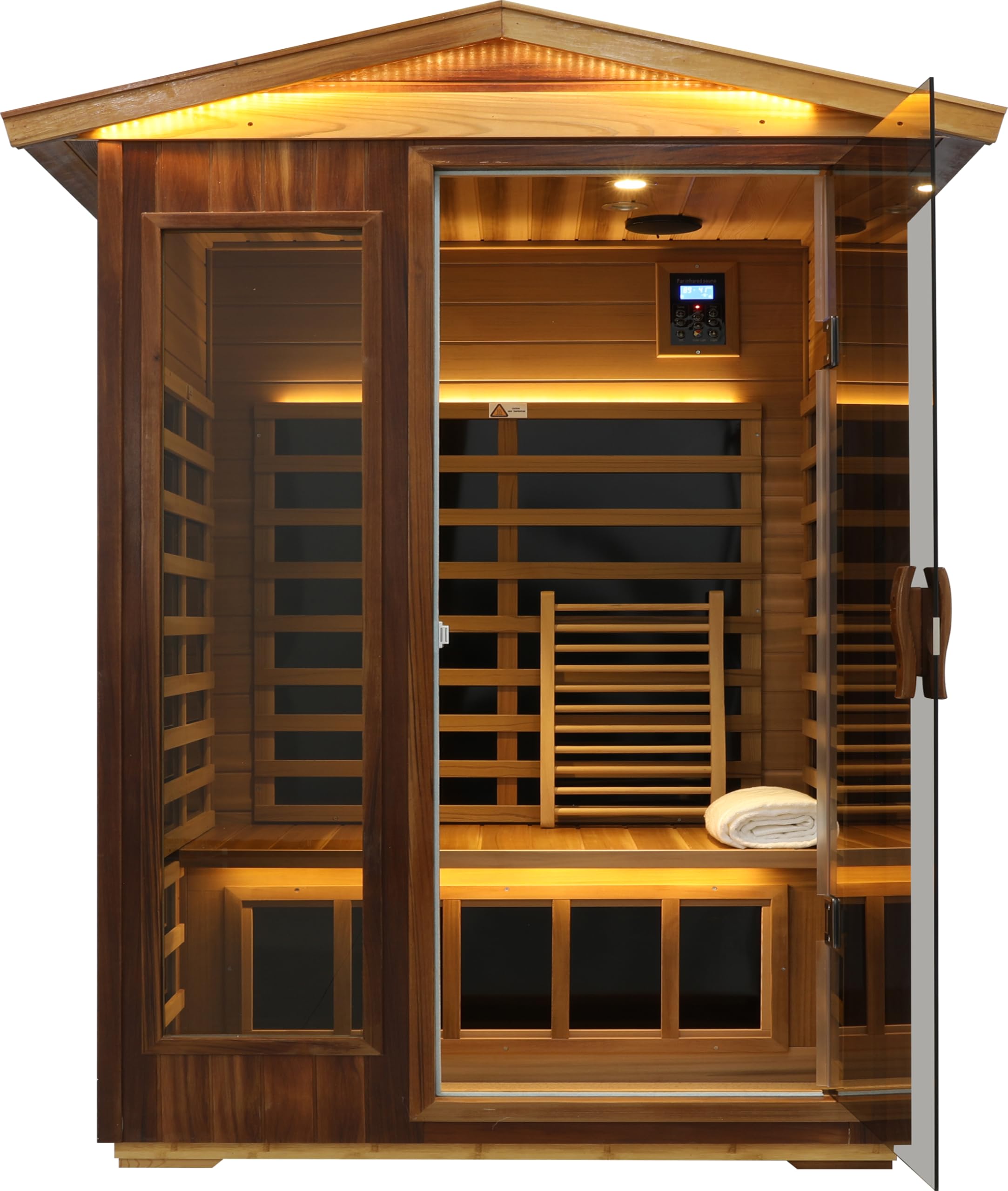
Figure 1: Front view of the LTCCDSS Red Cedar 2-Person Far Infrared Sauna.
2. Safety Information
Observe the following safety precautions to prevent injury or damage to the sauna:
- Consult a physician before using the sauna if you have any medical conditions, are pregnant, or are taking medication.
- Do not use the sauna if you are under the influence of alcohol or drugs.
- Limit sauna sessions to 30-45 minutes to avoid overheating.
- Stay hydrated by drinking water before, during, and after sauna use.
- Ensure the sauna is placed on a level, stable surface.
- Do not block ventilation openings.
- Keep children and pets away from the sauna during operation.
- Unplug the sauna from the power outlet when not in use or during cleaning.
3. Setup and Assembly
The LTCCDSS Far Infrared Sauna is designed for straightforward assembly. It is recommended that two people perform the assembly. Refer to the installation video for visual guidance.
3.1 Assembly Steps
- Prepare the Base: Place the sauna base on a flat, stable surface. Ensure adequate space around the sauna for assembly and ventilation.
- Install Rear Panel: Carefully position the rear panel onto the base, ensuring it is securely seated.
- Attach Side Panels: Connect the left and right side panels to the rear panel and base. Ensure all connections are firm.
- Connect Wiring: Locate the pre-labeled wiring harnesses on the top edges of the panels. Connect them according to their labels. This typically involves connecting wires for heaters, lights, and the control panel.
- Install Bench and Floor Grates: Place the wooden bench inside the sauna. Secure any removable floor grates.
- Attach Front Panel/Door: Carefully attach the front panel, which includes the glass door. Ensure the door opens and closes smoothly.
- Place Roof Panel: Position the roof panel onto the assembled walls. Connect any remaining electrical connections for roof-mounted components (e.g., exterior lights, speakers).
- Secure Roof: Fasten the roof panel using the provided screws or clips.
- Install Exterior Roof Shingles (if applicable): If your model includes exterior roof shingles, carefully attach them as per the instructions to ensure weather resistance.
- Connect Power: Plug the sauna into a standard 110V outlet.

Figure 2: Interior view of the sauna with dimensions indicated, showing ample space for two persons.
Video 1: Installation guide for a 2-person outdoor infrared sauna. This video demonstrates the step-by-step assembly process, including panel placement, wiring connections, and roof installation.
4. Operating Instructions
Your LTCCDSS sauna is equipped with an intuitive control panel for easy operation. Familiarize yourself with the functions below:
4.1 Control Panel Functions

Figure 3: Liquid Crystal Display Control Panel with temperature, time, power, and light controls.
- Power Button: Press to turn the sauna ON/OFF. The power indicator light will illuminate when active.
- Temperature Control (Temp +/-): Adjust the desired temperature between 68-140 degrees Fahrenheit (20-60 degrees Celsius). The sauna typically takes 20-30 minutes to reach the set temperature.
- Time Control (Time +/-): Set the duration of your sauna session. The timer will count down and automatically shut off the heaters when complete.
- C/F Change: Toggle between Celsius and Fahrenheit temperature display.
- Color Light: Activate and cycle through various chromotherapy light colors.
- Light: Turn the interior reading lights ON/OFF.
- Bluetooth: Pair your mobile device with the sauna's built-in Bluetooth speakers to enjoy music or podcasts during your session.
4.2 Starting a Session
- Ensure the sauna is plugged in and the door is closed.
- Press the Power button to turn on the sauna.
- Adjust the desired temperature and time using the respective buttons.
- Allow the sauna to pre-heat to your desired temperature.
- Enter the sauna and select your preferred chromotherapy light setting or turn on the reading lights.
- Optionally, connect your device via Bluetooth to the sauna speakers.
- Enjoy your session. The sauna will automatically power off after the set time.
5. Maintenance
Regular maintenance ensures the longevity and optimal performance of your sauna.
- Cleaning: Wipe down the interior and exterior wood surfaces with a damp cloth. Avoid using harsh chemicals or abrasive cleaners.
- Wood Care: The red cedar wood is naturally resistant to rot and mold. For outdoor models, apply outdoor wood wax oil every 6 months for up to 10 years of protection.
- Heater Inspection: Periodically check the carbon crystal heaters for any visible damage. Do not attempt to repair them yourself.
- Ventilation: Ensure the sauna's ventilation system is clear of obstructions.
6. Troubleshooting
If you encounter issues with your sauna, refer to the following common problems and solutions:
- Sauna Not Heating:
- Check if the power cord is securely plugged into a working outlet.
- Ensure the power button on the control panel is activated.
- Verify that the temperature and time settings are correctly configured.
- Control Panel Not Responding/No Display:
- Check all internal wiring connections, especially those leading to the control panel, to ensure they are firmly connected.
- Ensure the main power supply to the sauna is active.
- Lights Not Working:
- Check the light button on the control panel.
- Inspect light bulb connections if accessible.
- Bluetooth Connectivity Issues:
- Ensure your device's Bluetooth is enabled and discoverable.
- Restart the sauna and your device, then attempt to pair again.
For persistent issues not resolved by these steps, please contact LTCCDSS customer support.
7. Specifications
| Feature | Detail |
|---|---|
| Model Number | 902VR |
| Product Dimensions | 46.5 x 36.2 x 81.1 inches (External: 82.7 x 57.2 x 41.4 inches) |
| Capacity | 2 Person |
| Material | West Coast Red Cedar (British Columbia, Canada) |
| Heater Type | 6 Carbon Crystal Far-Infrared Heaters |
| EMF Level | Ultra-Low (0.1-1mG average) |
| Temperature Range | 68-140 degrees Fahrenheit (20-60 degrees Celsius) |
| Warm-up Time | Approximately 20 minutes |
| Features | 2 Colorful Lights, 2 Reading Lights, 2 Bluetooth Speakers |
| Power Requirement | 110V (Standard Household Outlet) |
| Manufacturer | LTCCDSS |

Figure 4: EMF meter demonstrating the ultra-low electromagnetic field levels within the sauna.
8. Warranty and Support
For specific warranty details, please refer to the documentation provided with your purchase or contact LTCCDSS customer service directly. In case of any issues or for technical assistance, please reach out to the manufacturer's support team.
LTCCDSS Customer Service: Refer to your product packaging or the official LTCCDSS website for contact information.
Ask a question about this manual
Ask about setup, troubleshooting, compatibility, parts, safety, or missing instructions. Manuals+ will review the question and use this page’s manual context to help answer it.