
Introduction
This manual provides detailed instructions for the assembly, operation, maintenance, and troubleshooting of your YITAHOME U Shaped Desk. Please read all instructions carefully before assembly and use to ensure proper function and safety.
Safety Information
Always assemble the desk according to the provided instructions. Ensure the desk is fully assembled and stable before use. Do not exceed the weight limit of 104.71 pounds. Always anchor the desk to the wall or floor to prevent tipping, especially in homes with children or pets.
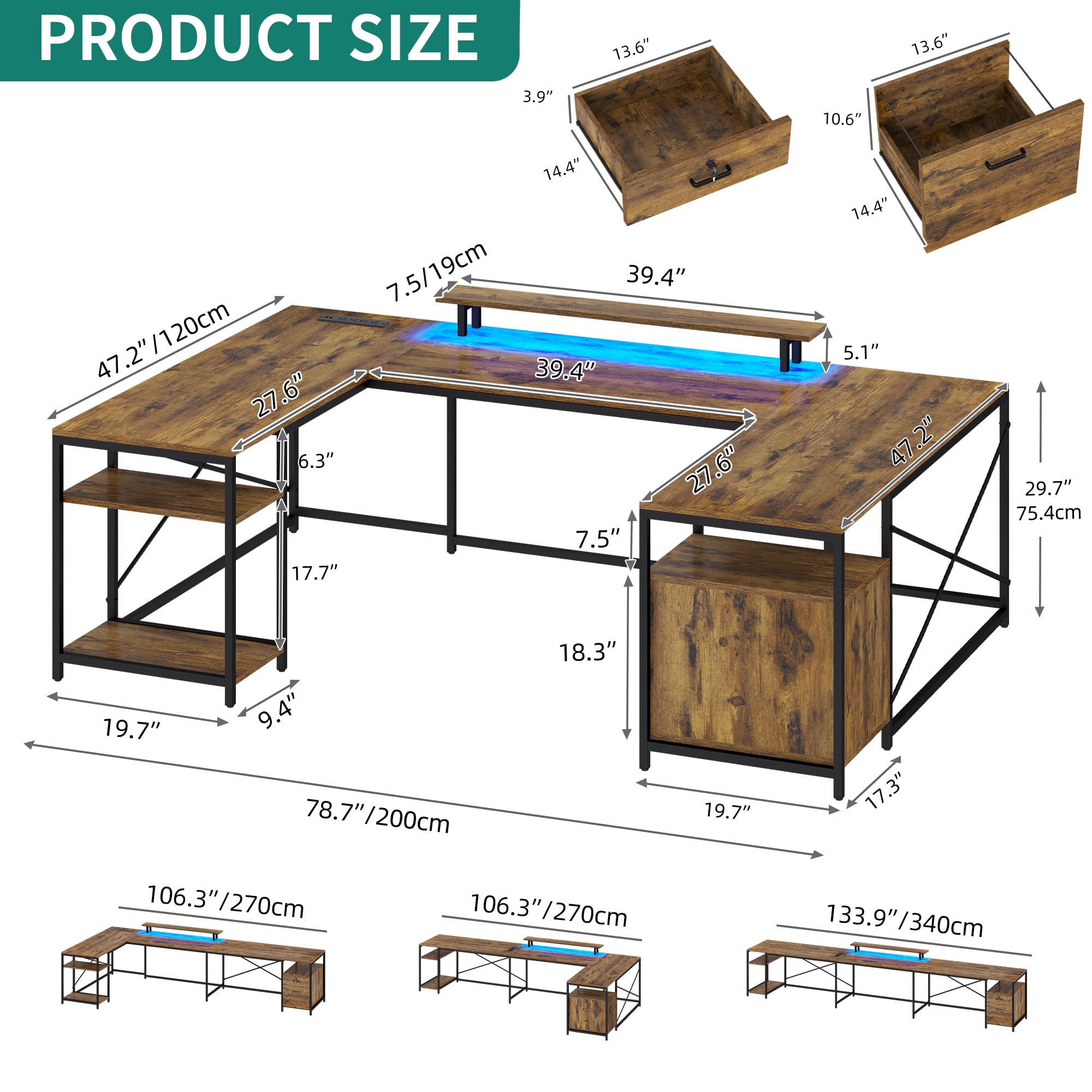
Image: The YITAHOME U Shaped Desk configured for a multi-monitor setup in an office environment.
Product Features
- Convenient Charging Station: Equipped with 4 standard plug outlets, 2 USB ports, and a 6.56ft power cord for charging various devices.
- LED Light Strips: Multi-color RGB LED light strip, controllable via phone app or remote control, with customizable colors, music sync, built-in Mic, and timer functions.
- Personalized Workspace: Reversible design allows configuration as a 78.7" U-shaped desk, 106.3" left/right L-shape desk, or 133.9" straight desk.
- Ample Workspace & Storage: Features three wide desktops, a monitor stand, one file drawer, one standard drawer, and three open storage shelves.
- Sturdy & Stylish Construction: Crafted with a steel frame and scratch-resistant P2 MDF boards, featuring 12 adjustable foot pads for stability.

Image: Detail of the built-in power strip with four outlets and two USB ports.

Image: The monitor stand with a glowing LED light strip underneath, showing a 5.7 inch height clearance.

Image: An illustration demonstrating the flexible configurations of the desk, including U-shape, L-shape, and straight desk options.

Image: Close-up of the desk's storage drawers, including a file drawer for hanging files.

Image: The open storage shelves of the desk, designed to accommodate items like a computer tower.
Setup and Assembly
Assembly of the YITAHOME U Shaped Desk is required. It is recommended that two people assemble the desk to ensure ease and safety. All necessary assembly tools are included in the package. Please refer to the separate 'Instructions Manual' included with your product for step-by-step assembly guidance. Ensure all parts are present before beginning assembly.

Image: A wide view of the desk showcasing its extensive surface area and storage capabilities for monitors, laptops, books, printers, documents, and plants.
Operating Instructions
Using the Power Outlets and USB Ports
The integrated charging station provides convenient access to power. Simply plug your devices into the standard AC outlets or USB ports located on the desk surface. Ensure the desk's main power cord is securely plugged into a wall outlet.
Controlling the LED Lights
The RGB LED light strip can be controlled using either the provided remote control or a dedicated smartphone application. Follow the instructions in the separate LED light manual for pairing the remote or app. You can customize colors, select various modes (including music sync), and set timers for the lights.
Maintenance
To maintain the appearance and longevity of your desk, wipe surfaces with a dry cloth regularly. Avoid using harsh chemicals or abrasive cleaners, as these may damage the finish. Ensure all electrical connections are dry and free from debris.
Troubleshooting
- Missing Parts or Damaged Components: If you find any parts missing or damaged upon unboxing, please contact YITAHOME customer support immediately with your purchase details.
- Assembly Difficulties (e.g., misaligned holes): Carefully review the assembly manual. If holes do not align, double-check that you are using the correct parts and orientations as indicated in the instructions. Do not force components together. If issues persist, contact customer support.
- LED Lights Not Functioning: Ensure the LED light strip is properly connected to its power source and that the power outlet is active. Check the remote control battery or app connection.
- Power Outlets Not Working: Verify that the desk's main power cord is securely plugged into a functional wall outlet. Check for any tripped circuit breakers.
Specifications
| Feature | Detail |
|---|---|
| Brand | YITAHOME |
| Model Number | MAYIHPdZmM |
| Desk Design | Computer Desk (U-shaped, L-shaped, Straight) |
| Product Dimensions (U-shape) | 47.2"D x 78.7"W x 34.8"H |
| Item Weight | 104.71 Pounds |
| Top Material Type | Engineered Wood (P2 MDF) |
| Base Material | Metal (Steel Frame) |
| Special Features | Power Outlets, USB Outlets, LED Lights, File Drawer, Reversible Configuration |
| Number of Drawers | 2 (1 file drawer, 1 standard drawer) |
| Number of Shelves | 3 (open storage) |
| Required Assembly | Yes |
| Recommended People for Assembly | 2 |
| Included Components | 1 x Instructions Manual, 1 x Packet of Fittings, 1 x U Shaped Desk |
Warranty and Support
This YITAHOME U Shaped Desk comes with a Limited Warranty. For specific details regarding warranty coverage, terms, and conditions, please refer to the warranty information provided in your product packaging or contact YITAHOME customer support directly. For any questions, assistance with assembly, or troubleshooting not covered in this manual, please reach out to YITAHOME customer service.
