
1. Introduction
This manual provides detailed instructions for the assembly, operation, and maintenance of your DWVO Makeup Vanity Desk with Mirror and Lights. Please read this guide thoroughly before assembly and use to ensure proper function and longevity of your product. Keep this manual for future reference.

Image 1.1: The DWVO Makeup Vanity Desk, featuring a large mirror with lights, multiple drawers, and open storage shelves.
2. Safety Information
WARNING: Assembly may require safety precautions. Use electrical components with caution. Always ensure the vanity is placed on a stable, level surface to prevent tipping. Do not overload drawers or shelves. Keep all electrical cords away from water and heat sources. Disconnect power before cleaning or performing any maintenance.
3. Package Contents
Before beginning assembly, please verify that all parts and hardware are present and undamaged. Refer to the included parts list in your packaging. If any components are missing or damaged, contact customer support immediately.
4. Assembly Instructions
Assembly of the DWVO Makeup Vanity Desk is designed to be straightforward. Follow the step-by-step instructions provided in the accessory kit. It is recommended to have a second person assist with assembly, especially when handling larger components like the mirror.
- Step 1: Unpack and Identify Parts. Lay out all components on a clean, soft surface to prevent scratches.
- Step 2: Assemble the Main Frame. Connect the base panels and side supports according to the diagrams.
- Step 3: Install Drawers. Carefully align drawer slides with pre-drilled holes. Ensure slides are installed correctly for smooth operation. If drawers do not close flush, re-check the alignment of the rails.
- Step 4: Attach the Mirror Unit. Secure the mirror frame to the main desk structure.
- Step 5: Install Shelves and Accessories. Place the open storage shelves and attach the hairdryer holder. The side shelves are height-adjustable to accommodate various item sizes.
- Step 6: Connect Electrical Components. Plug in the mirror lights and the power hub.
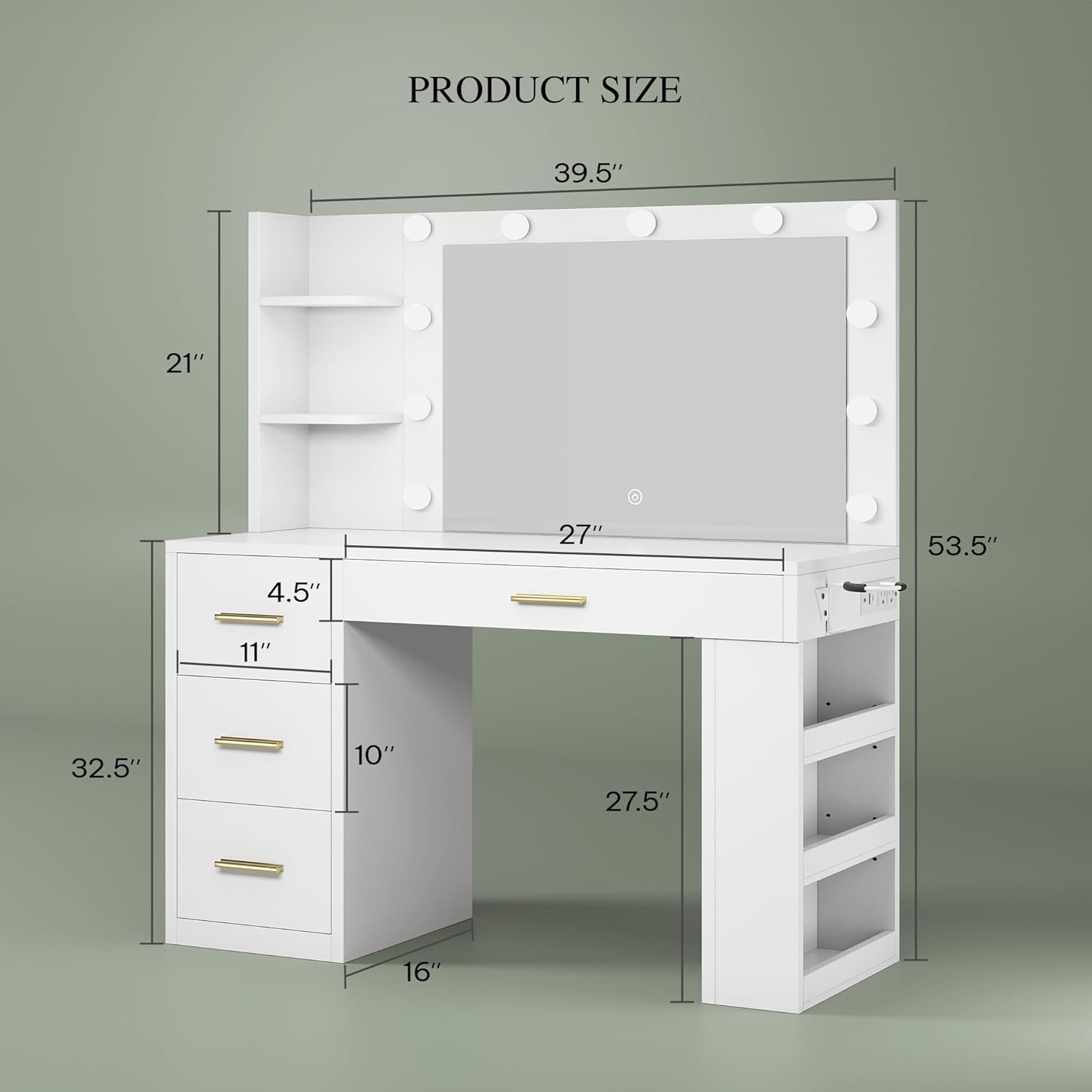
Image 4.1: Product dimensions for reference during assembly.

Image 4.2: Overview of the vanity's storage, including four large drawers and open shelves.
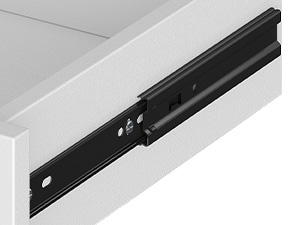
Image 4.3: Detail of the drawer slide for proper installation.

Image 4.4: The height-adjustable shelves provide flexible storage options.
5. Operating Instructions
5.1 Mirror Lights
The integrated mirror lights offer three color modes and adjustable brightness. To operate:
- Power On/Off: Lightly touch the power button icon on the mirror surface to turn the lights on or off.
- Change Color Mode: Briefly touch the power button icon to cycle through the three color modes: Cold White (6000K), Warm White (4500K), and Warm Yellow (3000K).
- Adjust Brightness: Press and hold the power button icon to continuously adjust the brightness level from 0% to 100%. Release when the desired brightness is reached.

Image 5.1: The mirror lights feature three distinct color temperatures and adjustable brightness.

Image 5.2: The vanity mirror lights provide ample illumination for various tasks.
5.2 Built-In Power Hub
The vanity desk includes a built-in power hub for convenient charging and powering of your devices.
- AC Outlets: Two 125V/12A AC outlets are provided for standard electrical devices.
- USB Ports: One 5V/2A USB-A port and one 2.5V/2.1A USB-C port are available for charging mobile devices.
Ensure devices are compatible with the provided power specifications before plugging them in.

Image 5.3: The integrated power hub provides convenient access to electrical outlets and USB charging ports.
6. Maintenance
To maintain the appearance and functionality of your vanity desk:
- Cleaning: Wipe surfaces with a soft, damp cloth. Avoid abrasive cleaners or harsh chemicals that may damage the finish.
- Mirror Care: Clean the mirror with a glass cleaner and a lint-free cloth. Do not spray cleaner directly onto the mirror lights or electrical components.
- Tighten Fasteners: Periodically check and tighten all screws and fasteners to ensure stability.
- Electrical Safety: Regularly inspect power cords and plugs for any signs of damage. Discontinue use if damage is found and contact customer support.
7. Troubleshooting
If you encounter issues with your DWVO Makeup Vanity Desk, refer to the following common problems and solutions:
- Problem: Drawers do not close completely or are misaligned.
Solution: This often indicates incorrect installation of the drawer slides. Review the assembly instructions for drawer slide alignment. Ensure the slides are correctly positioned and secured to the pre-drilled holes. Adjusting the rail position may be necessary if the initial alignment was incorrect. - Problem: Mirror lights do not turn on or respond to touch.
Solution: First, ensure the vanity is properly plugged into a working power outlet. Check all electrical connections. If the touch button on the mirror is unresponsive, verify that the control box behind the mirror is securely connected and accessible. In some cases, the touch function may require a firm, direct touch. - Problem: Power outlets or USB ports are not working.
Solution: Confirm the vanity is plugged into a live power source. Check if the power hub's internal wiring is securely connected (refer to assembly steps). Test with a different device to rule out device-specific issues. - Problem: Vanity feels unstable or wobbly.
Solution: Ensure all assembly screws and fasteners are fully tightened. Verify that the vanity is placed on a flat, even surface.
If these solutions do not resolve the issue, please contact DWVO customer support for further assistance.
8. Specifications
| Feature | Specification |
|---|---|
| Brand | DWVO |
| Model Number | MADWVPJ68z |
| UPC | 199449408208 |
| Product Dimensions (L x W x H) | 39.5"W x 16"D x 53.5"H |
| Item Weight | 81.2 pounds |
| Frame Material | Engineered Wood |
| Color | White |
| Mirror Lights | 3 Color Modes (6000K, 4500K, 3000K), Adjustable Brightness |
| Power Outlets | 2 AC Outlets (125V/12A) |
| USB Ports | 1 USB-A (5V/2A), 1 USB-C (2.5V/2.1A) |
| Storage | 4 Drawers, 6 Open Storage Shelves (adjustable) |
9. Warranty and Support
For warranty information and customer support, please refer to the documentation included with your purchase or contact the retailer/manufacturer directly. Keep your proof of purchase for any warranty claims.
Contact Information: Please visit the official DWVO website or your point of purchase for the most current customer service contact details.