
SLEKVERSA SE33A-4-White-YY-USQVDeHc2
SLEKVERSA 4-Drawer Dresser with USB Charging Station and LED Lights
Model: SE33A-4-White-YY-USQVDeHc2
Introduction
Thank you for choosing the SLEKVERSA 4-Drawer Dresser. This modern storage cabinet is designed to enhance your living space with its functional features, including a built-in USB charging station and adjustable LED lights. This manual provides essential information for safe assembly, operation, and maintenance of your new dresser.
Important Safety Information
Please read and understand all instructions before assembly and use. Failure to follow these instructions may result in injury or damage to the product.
- Keep all small parts and packaging materials away from children.
- Assemble the unit on a soft, clean surface to prevent scratches.
- Ensure all connections are secure before use.
- Do not overload drawers. Distribute weight evenly.
- Always use the anti-tipping device provided to secure the dresser to a wall. This is crucial to prevent serious injury from tipping furniture.
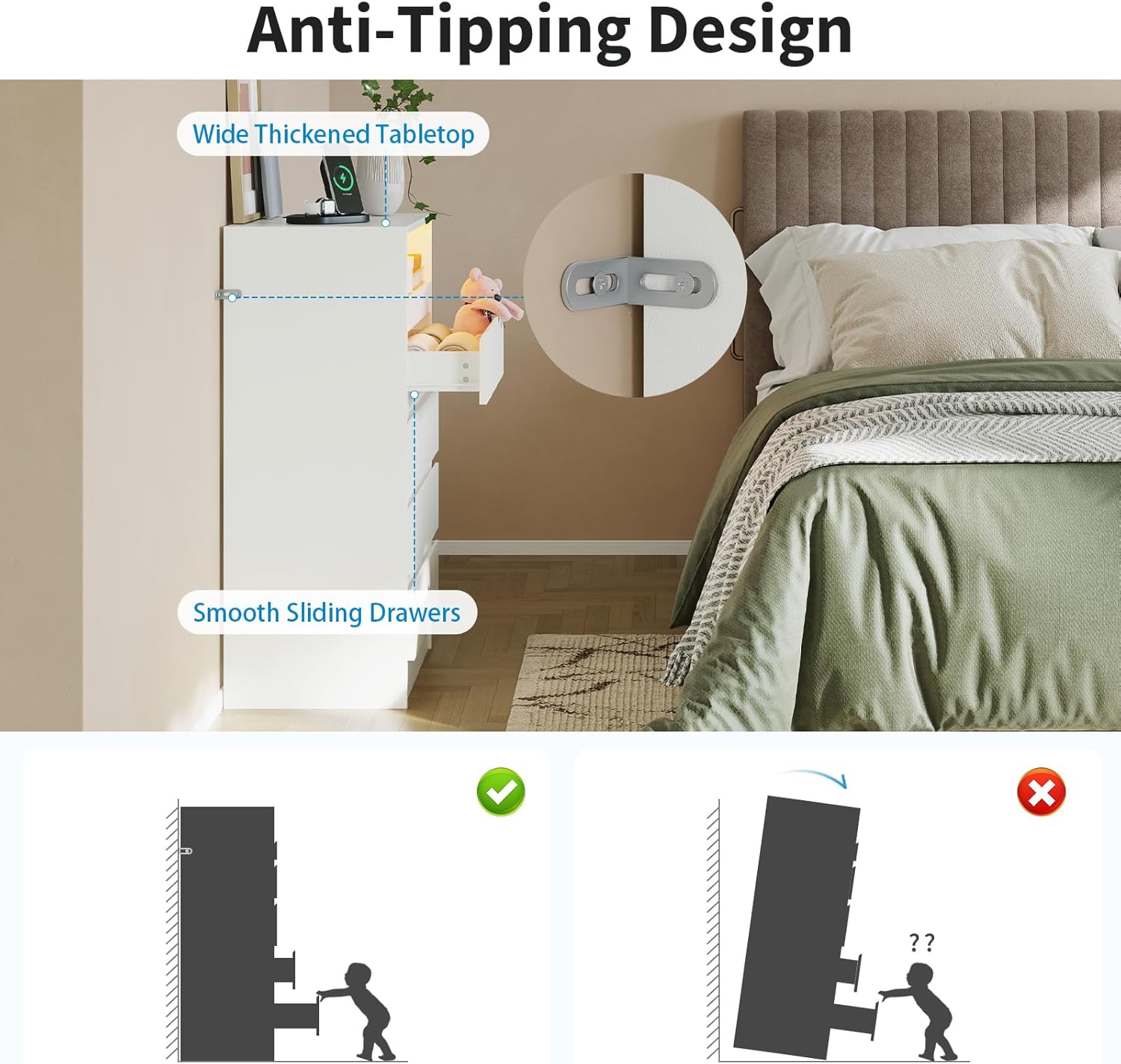
Image: Anti-Tipping Device Installation. This image illustrates the importance of securing the dresser to the wall using the included anti-tipping device to prevent accidental tipping, which can cause injury.
Package Contents
Verify that all components are present before beginning assembly. If any parts are missing or damaged, please contact customer support.
(Note: Specific part list not provided in source data. Refer to the included assembly guide for a detailed list of parts and hardware.)
Setup and Assembly
Assembly is required for this dresser. All parts are labeled, and step-by-step instructions are included with the product. Follow the provided assembly guide carefully.
- Unpack all components and lay them out on a clean, soft surface.
- Identify each part using the labels and the assembly diagram.
- Follow the numerical sequence in the assembly guide to construct the dresser frame.
- Install the drawer slides, ensuring they are correctly oriented for smooth operation.
- Assemble the drawers and insert them into the dresser frame.
- Attach the anti-tipping device to the back of the dresser and secure it to a wall stud using appropriate hardware.
- Connect the power cord for the charging station and LED lights to a suitable power outlet.
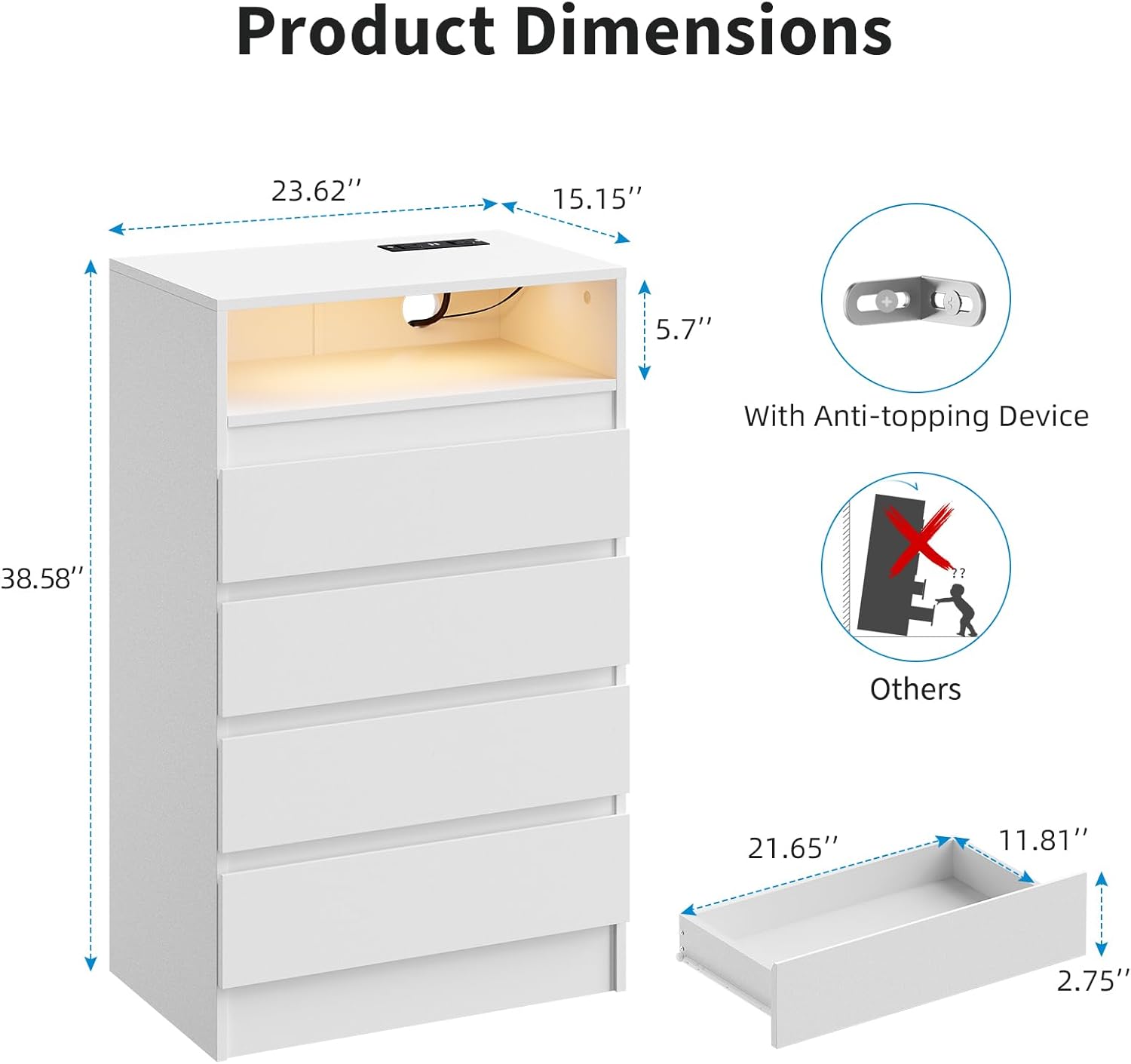
Image: Product Dimensions and Anti-Tipping Device. This diagram provides key measurements of the dresser and highlights the anti-tipping device, emphasizing its importance for stability.

Image: Construction Details. This image showcases the smooth sliding mechanism of the drawers, the thickened tabletop for durability, and the stable base design, all contributing to the dresser's overall quality and ease of use.
Operating Instructions
LED Lights Operation
The dresser features multi-color RGB LED lights to enhance ambiance. The LED strip is controlled by a button located near the light strip.
- Turn On/Off: Press the control button once to turn the lights on or off.
- Change Color/Mode: Press the control button repeatedly to cycle through various colors and lighting modes.
- Adjust Brightness: Some models may allow brightness adjustment by holding the button or through specific button presses. Refer to the LED controller's specific instructions if provided.

Image: Adjustable RGB Light Strips. This image demonstrates the dresser's LED lighting feature, showing different color options and highlighting the key control button used to manage the lights.
USB Charging Station and Power Outlets
The built-in charging station provides convenient access to power for your electronic devices.
- AC Outlets: Two standard AC outlets (125V/12A) are available for plugging in lamps, laptops, or other small appliances.
- USB Ports: Two USB ports (5V/2A) are provided for charging smartphones, tablets, and other USB-powered devices.
- Ensure the dresser's power cord is securely plugged into a wall outlet for the charging station to function.

Image: Built-in Charging Station. This close-up view shows the integrated charging station on the dresser's top surface, featuring two AC power outlets and two USB ports for convenient device charging.
Drawer Usage
The dresser features four spacious drawers designed for organized storage.
- Pull drawers gently to open and push firmly to close. The ball-bearing slides ensure smooth and quiet operation.
- Avoid forcing drawers open or closed if they encounter resistance. Check for obstructions.
- Distribute items evenly within drawers to maintain balance and prevent strain on the slides.

Image: Storage Capacity. This image illustrates the dresser's storage capabilities, featuring four deep drawers for private storage and an open display shelf with LED lighting for decorative items or frequently accessed essentials.
Maintenance
Proper care will extend the life and appearance of your SLEKVERSA dresser.
- Cleaning: Wipe surfaces with a soft, damp cloth. Avoid harsh chemicals or abrasive cleaners, which can damage the finish.
- Spills: Clean spills immediately with a dry cloth to prevent staining or water damage.
- Drawer Slides: Periodically check drawer slides for smooth operation. If needed, a small amount of silicone lubricant can be applied.
- Hardware: Periodically check and tighten all assembly hardware to ensure stability.
- LED Lights: The LED lights are designed for long-term use. If they malfunction, contact customer support; do not attempt to repair them yourself.
Troubleshooting
| Problem | Possible Cause | Solution |
|---|---|---|
| Dresser is wobbly or unstable. | Loose hardware; uneven floor; anti-tipping device not installed. | Tighten all screws and bolts. Place shims under legs if floor is uneven. Ensure anti-tipping device is securely installed to a wall stud. |
| Drawers do not slide smoothly. | Misaligned slides; obstructions; worn slides. | Check that drawer slides are correctly installed and aligned. Remove any obstructions. Apply silicone lubricant to slides if necessary. |
| LED lights are not working. | Power cord unplugged; LED controller malfunction; faulty LED strip. | Ensure the dresser's power cord is fully plugged into a working outlet. Check the connection to the LED controller. If issues persist, contact customer support. |
| Charging station (USB/AC outlets) is not working. | Power cord unplugged; circuit breaker tripped; faulty charging unit. | Verify the dresser's power cord is securely plugged in. Check your home's circuit breaker. Test with another device. If still not working, contact customer support. |
Specifications
- Brand: SLEKVERSA
- Model Name: SE33A-4-White-YY-USQVDeHc2
- Product Dimensions: 23.62"D x 15.75"W x 38.58"H
- Color: White
- Room Type: Bedroom, Living Room, Entryway
- Assembly Required: Yes
- Item Weight: 68.7 pounds
- UPC: 199641672926
- Charging Station: 2 AC Outlets (125V/12A), 2 USB Ports (5V/2A)
- LED Lights: RGB Multi-color, controllable by button
- Material: Premium MDF
Warranty and Support
For warranty information, missing parts, or technical assistance, please contact SLEKVERSA customer support. Refer to your purchase documentation for specific warranty terms and contact details.
You can often find support information on the official SLEKVERSA website or through the retailer where the product was purchased.
Online Support: Visit the SLEKVERSA Store on Amazon
Ask a question about this manual
Ask about setup, troubleshooting, compatibility, parts, safety, or missing instructions. Manuals+ will review the question and use this page’s manual context to help answer it.