
1. Product Overview
The Grehitk Mobile AV Cart with Cabinet, Model 00103 (Style4 24x18Wx42H), is a versatile and height-adjustable utility cart designed for various environments such as offices, classrooms, and workshops. It features a robust alloy steel construction, integrated power outlets, a pullout keyboard tray, and a secure locking cabinet for organized storage and mobility.
Key Features:
- Adjustable Height: Easily adjust the cart's height from 29.13 inches to 42.52 inches for comfortable seated or standing use.
- Integrated Power Strip: Includes a three-outlet power socket with two USB 2.0 ports and a 47.2-inch power cord for convenient device charging and power access.
- Retractable Keyboard Tray: A pullout tray provides a dedicated space for a keyboard and mouse, optimizing workspace.
- Secure Storage Cabinet: A lockable cabinet offers secure storage for equipment and supplies.
- Mobile Design: Equipped with four full-swivel casters, two of which have locking brakes, for smooth movement and stable positioning.
- Durable Construction: Made from alloy steel with a rust-resistant finish, ensuring longevity and stability.

This image displays the Grehitk Mobile AV Cart with its key dimensions labeled. The top shelf is 23.86 inches wide and 17.72 inches deep. The cart's height is adjustable from a lowest point of 29.13 inches to a highest point of 42.52 inches. The pullout keyboard tray measures 19.69 inches in width.
2. Setup Instructions
The Grehitk Mobile AV Cart is designed for minimal assembly. Please follow these steps to prepare your cart for use.
Unboxing and Initial Inspection:
- Carefully remove all components from the packaging.
- Verify that all parts are present and undamaged. Refer to the packing list for a complete inventory.
- Place the main cart frame on a stable, flat surface.
Attaching Casters (if not pre-attached):
- Locate the four casters. Two casters will have locking brakes.
- Insert the stem of each caster into the designated holes at the bottom corners of the cart frame.
- Ensure casters are securely seated. The locking casters should be placed on the same side for easier access.
Adjusting Shelves:
- The cart features adjustable shelves. To adjust a shelf, locate the adjustment pins on the side supports.
- Remove the pins, position the shelf at the desired height, and reinsert the pins to secure the shelf. Ensure both sides are at the same height.

This diagram highlights the main features of the AV cart, including the anti-slip mat, retractable keyboard, three-outlet power socket, locking cabinet with key, and wheels with brake, which are relevant for initial setup and understanding components.
3. Operating Instructions
Adjusting Cart Height:
The cart's height can be adjusted to suit various user preferences and tasks, allowing for both seated and standing operation.
- To adjust the height, locate the quick-release levers or knobs on the vertical support columns.
- Loosen the mechanisms, carefully raise or lower the top section of the cart to the desired height.
- Securely tighten the levers or knobs to lock the cart at the chosen height. Ensure both sides are locked evenly for stability.
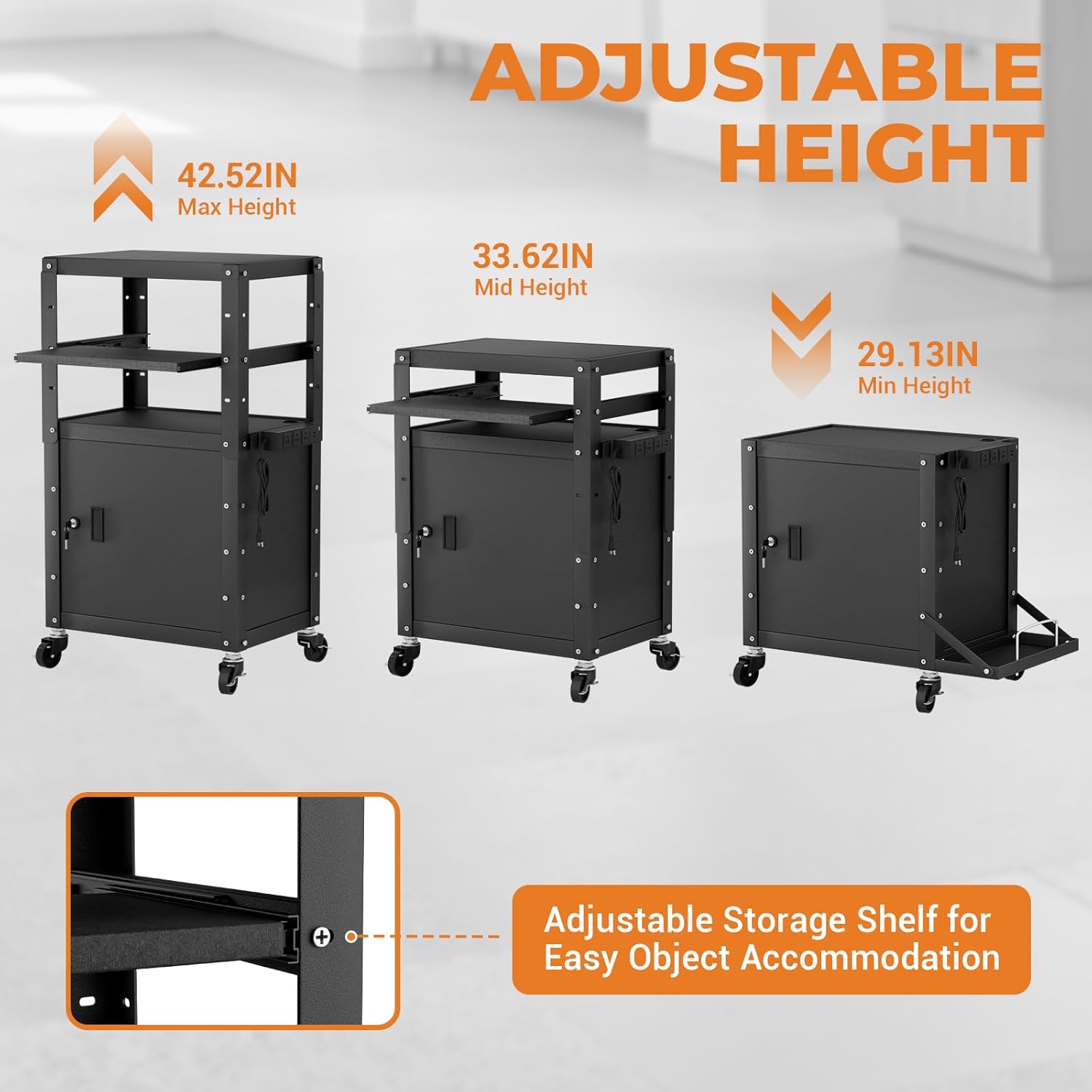
This image illustrates the height adjustment capability of the AV cart, presenting it at its maximum height of 42.52 inches, a mid-range height of 33.62 inches, and its minimum height of 29.13 inches. It also shows an adjustable storage shelf for easy object accommodation.
Using the Retractable Keyboard Tray:
The keyboard tray slides out for use and retracts for compact storage.
- Gently pull the keyboard tray forward from beneath the top shelf until it is fully extended.
- Place your keyboard and mouse on the tray.
- When not in use, push the tray back into the cart until it is fully retracted.
Utilizing the Integrated Power Strip:
The cart includes a power strip with three AC outlets and two USB ports for powering electronic devices.
- Plug the cart's main power cord into a standard wall outlet.
- Connect your devices (e.g., laptop, monitor, phone charger) to the available AC outlets or USB ports on the power strip.
- Ensure devices are properly plugged in and receiving power.

This detailed view focuses on the retractable keyboard tray, designed for convenient storage and space-saving. Below it, an integrated power strip is shown, featuring three standard outlets and two USB 2.0 ports, with a 47.2-inch power cord.
Securing the Cabinet:
The lower cabinet provides secure storage for valuable items.
- Place items inside the cabinet.
- Close the cabinet door and insert the key into the lock.
- Turn the key to lock the cabinet. Remove the key and store it in a safe place.
Moving the Cart:
The cart's swivel casters allow for easy repositioning.
- Ensure the locking brakes on the casters are disengaged before moving the cart.
- Use the push handles to guide the cart to its desired location.
- Once in position, engage the locking brakes on the casters to prevent unintended movement.

This image demonstrates the versatile applications of the mobile AV cart, showing it in use within a conference room setting, a school classroom, and a typical office environment, highlighting its adaptability for different professional and educational needs.
4. Maintenance
Regular maintenance ensures the longevity and optimal performance of your Grehitk Mobile AV Cart.
Cleaning:
- Wipe down all surfaces with a soft, damp cloth.
- For stubborn dirt, use a mild, non-abrasive cleaner. Avoid harsh chemicals that may damage the finish.
- Ensure the cart is dry after cleaning to prevent water spots.
Inspections:
- Periodically check all screws and fasteners to ensure they are tight. Tighten any loose connections.
- Inspect casters for any debris or hair that might impede smooth rolling. Clean as necessary.
- Verify that the height adjustment mechanism operates smoothly and locks securely.
- Check the power strip for any signs of damage or wear. Discontinue use if damage is observed.
Rust Resistance:
The cart is constructed from alloy steel with a rust-resistant coating. To maintain this protection, avoid prolonged exposure to moisture or corrosive substances.
5. Troubleshooting
This section addresses common issues you might encounter with your AV cart.
| Problem | Possible Cause | Solution |
|---|---|---|
| Cart does not roll smoothly. | Caster brakes engaged; debris in casters; loose casters. | Disengage caster brakes. Clean any debris from caster wheels. Ensure casters are securely attached. |
| Height adjustment is difficult or unstable. | Adjustment levers/knobs not fully loosened or tightened; uneven adjustment. | Ensure levers/knobs are fully loosened before adjusting and fully tightened afterward. Adjust both sides evenly. |
| Cabinet door does not lock. | Door not fully closed; lock mechanism obstructed; incorrect key. | Ensure the cabinet door is completely closed. Check for any obstructions. Use the correct key provided with the cart. |
| Power outlets are not working. | Cart's main power cord unplugged; power strip overloaded; circuit breaker tripped. | Verify the cart's main power cord is securely plugged into a functional wall outlet. Reduce the number of devices plugged in. Check your building's circuit breaker. |
6. Product Specifications
| Feature | Detail |
|---|---|
| Brand | Grehitk |
| Model Number | 00103 |
| Material | Alloy Steel |
| Color | Black |
| Product Dimensions (W x D x H) | 23.86 in x 17.72 in x 29.13-42.52 in (Adjustable Height) |
| Item Weight | 40 Pounds |
| Weight Capacity Maximum | 300 Pounds |
| Number of Shelves | 3 (including top surface and cabinet interior) |
| Number of Wheels | 4 (Full-swivel, 2 with locking brakes) |
| Special Feature | Rust Resistant, Height Adjustable, Locking Cabinet, Pullout Keyboard Tray, Integrated Power Outlets (3 AC, 2 USB) |
| Recommended Uses | Indoor (Office, School, Home, Workshop) |
| UPC | 722891921355 |
7. Warranty and Support
For warranty information, technical support, or any inquiries regarding your Grehitk Mobile AV Cart, please contact the manufacturer directly.
You can visit the official Grehitk store for more information and contact options: Grehitk Store on Amazon