
1. Introduction
The Allen & Heath Qu-7D is a 38-input, 24-output digital mixer designed for professional live sound, studio recording, and broadcast applications. It integrates advanced XCVI processing, a 7-inch capacitive touchscreen, 33 motorized faders, and Dante connectivity to deliver exceptional audio performance and intuitive control. This manual provides essential information for the safe and effective operation of your Qu-7D mixer.
2. Safety Information
Please read and understand all safety instructions before operating the Qu-7D mixer. Retain this manual for future reference.
- Power Supply: Use only the specified power supply unit. Ensure the voltage matches your local power supply.
- Grounding: Always connect the mixer to a grounded power outlet.
- Moisture: Do not expose the unit to rain, moisture, or excessive humidity. Avoid placing liquids near the mixer.
- Ventilation: Ensure adequate ventilation around the unit. Do not block ventilation openings.
- Servicing: Refer all servicing to qualified service personnel. Do not attempt to open or modify the unit.
- Placement: Place the mixer on a stable, level surface. Avoid extreme temperatures or direct sunlight.
3. Package Contents
Verify that all items are present in the package:
- Allen & Heath Qu-7D Digital Mixer
- Power Cable
- USB Cable
- Quick Start Guide (if included)
- Safety Instructions
If any items are missing or damaged, please contact your dealer immediately.
4. Product Overview
The Qu-7D features a comprehensive control surface and extensive connectivity options. Familiarize yourself with the layout before operation.
4.1 Front Panel and Control Surface

Image Description: A top-down view of the Allen & Heath Qu-7D digital mixer. It shows the main control surface with numerous faders, rotary encoders, buttons, and a central touchscreen display. The Allen & Heath logo is visible on the left side.
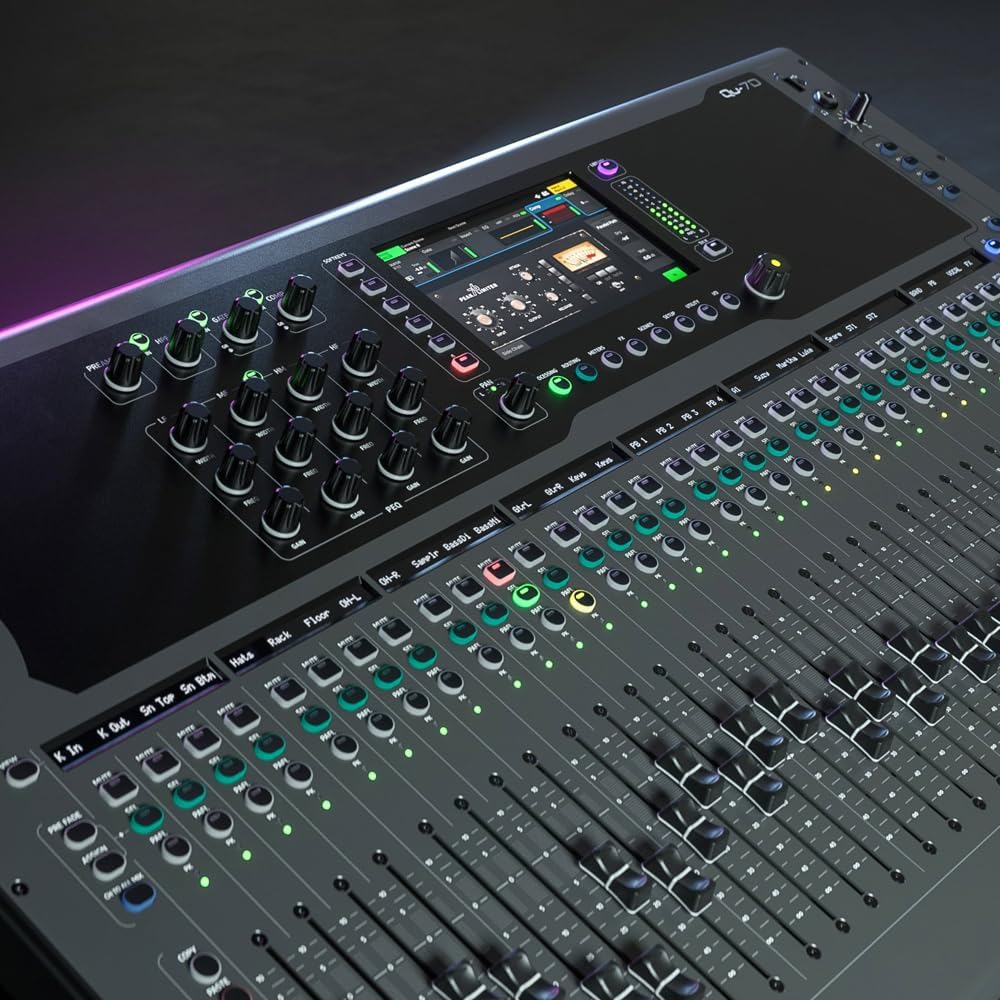
Image Description: A close-up, angled view of the Allen & Heath Qu-7D digital mixer's control surface. This image highlights the 7-inch capacitive touchscreen displaying a graphical interface, along with several rotary controls, illuminated buttons, and a section of motorized faders.
- 7-inch Capacitive Touchscreen: Provides intuitive access to settings, routing, effects, and metering.
- Motorized Faders: 33 100mm motorized faders for precise level control and scene recall.
- Rotary Encoders and Buttons: Dedicated controls for channel processing, effects, and navigation.
- SoftKeys: Eight programmable SoftKeys for custom functions.
- Channel Strip Displays: Vivid displays for each channel strip providing visual feedback.
4.2 Rear Panel Connectivity

Image Description: A rear view of the Allen & Heath Qu-7D digital mixer, showcasing its extensive array of input and output connectors. These include numerous XLR inputs, XLR outputs, USB ports, network ports, and the power input.
- XLR Inputs: 32 digitally controlled mic preamps for high-quality audio input.
- XLR Outputs: Multiple XLR outputs for main mix, groups, and auxiliary sends.
- USB-C Audio Interface: 32-in/32-out for multi-track recording and playback with a computer.
- SD Card Slot: For direct multi-track recording and playback without a computer.
- Dante Interface: 16-in/16-out for network audio integration.
- Network Port: For remote control and firmware updates.
- Power Input: Standard IEC power connector.
5. Setup
5.1 Initial Power-Up
- Connect the power cable to the IEC input on the rear panel and then to a grounded power outlet.
- Ensure all faders are at their lowest position and gain controls are turned down.
- Press the power button located on the rear panel. The mixer will initiate its boot sequence.
- Wait for the touchscreen to display the main mixing interface.
5.2 Audio Connections
- Inputs: Connect microphones, instruments, or line-level sources to the XLR input jacks on the rear panel.
- Outputs: Connect your main PA system, monitors, or recording devices to the XLR output jacks.
5.3 USB-C and Dante Connectivity
- USB-C: Connect a USB-C cable from the mixer's USB-C port to your computer for multi-track audio interface functionality. Install necessary drivers if prompted by your operating system.
- Dante: Connect to a Dante network via the dedicated Dante ports for integration with other Dante-enabled devices. Refer to the Dante Controller software for network configuration.
6. Operating the Qu-7D
6.1 Basic Mixing
- Select a Channel: Press the 'Select' button above the desired input channel fader. The touchscreen will display the channel's processing view.
- Adjust Gain: Use the 'Gain' rotary encoder to set the input level. Monitor the channel meter to avoid clipping.
- EQ and Dynamics: Use the touchscreen and dedicated rotary controls to adjust equalization, compression, and gating for the selected channel.
- Fader Control: Use the motorized faders to control channel levels.
- Main Mix: Adjust the main stereo output fader to control the overall volume.
6.2 Multi-FX Engines
The Qu-7D features six stereo Multi-FX engines. Access these via the 'FX' section on the touchscreen. You can assign various effects (reverbs, delays, modulations) to channels via sends and returns.
6.3 Recording and Playback
- USB-C Recording: When connected to a computer, the Qu-7D acts as a 32-in/32-out audio interface. Configure your Digital Audio Workstation (DAW) to recognize the mixer as an audio device.
- SD Card Recording: Insert an SD card into the dedicated slot. Use the 'Qu-Drive' section on the touchscreen to arm tracks and initiate multi-track recording or stereo playback.
7. Maintenance
- Cleaning: Use a soft, dry cloth to clean the surface of the mixer. For the touchscreen, use a microfiber cloth specifically designed for electronics. Avoid abrasive cleaners or solvents.
- Firmware Updates: Periodically check the Allen & Heath website for firmware updates. Follow the instructions provided with the update carefully to ensure proper installation.
- Storage: When not in use, store the mixer in a clean, dry environment, preferably covered to protect from dust.
8. Troubleshooting
| Problem | Possible Cause | Solution |
|---|---|---|
| No power | Power cable disconnected; power outlet fault; unit fault | Check power cable connections; try a different outlet; contact support if issue persists. |
| No audio output | Incorrect routing; faders down; mute engaged; gain too low | Verify channel and main mix routing; check fader positions; ensure no channels are muted; adjust gain levels. |
| USB-C/Dante not recognized | Driver issue; incorrect cable; network configuration | Install/update drivers; try a different USB/Ethernet cable; check Dante Controller settings. |
| Touchscreen unresponsive | Temporary software glitch; hardware issue | Restart the mixer; ensure screen is clean; contact support if issue persists. |
9. Specifications
| Feature | Detail |
|---|---|
| Brand | Allen & Heath |
| Model | Qu-7D |
| Number of Channels | 38 |
| Item Weight | 46.2 Pounds |
| Connectivity Technology | USB, Dante |
| Power Source | Corded Electric |
| Frequency | 96 KHz |
| Output Connector Type | XLR |
| Audio Input | XLR |
10. Warranty and Support
The Allen & Heath Qu-7D Digital Mixer is covered by a 1-year manufacturer's warranty from the date of purchase. This warranty covers defects in materials and workmanship under normal use.
For technical support, service, or warranty claims, please contact your authorized Allen & Heath dealer or visit the official Allen & Heath website for contact information and support resources. Please have your product model and serial number available when contacting support.