
1. Product Overview
The DewinLVD LSXDB03 is a 3-phase intelligent energy meter designed for accurate bidirectional measurement of electrical energy. It integrates Tuya WiFi connectivity for remote monitoring and control via a smartphone application. This device also features comprehensive protection functions including over-voltage, under-voltage, and over-current protection, enhancing the reliability and stability of your electrical circuit.

Image: Angled view of the DewinLVD LSXDB03 3-Phase Smart Energy Meter, showcasing its compact design and clear display.
2. Safety Information
WARNING: Installation and maintenance of this device should only be performed by qualified electricians to prevent electric shock or damage to the device. Always disconnect power before installation or servicing.
- Ensure the main power supply is disconnected before any wiring.
- Verify all connections are secure and correct according to the wiring diagram.
- Do not operate the device if it appears damaged.
- Keep the device away from water and high humidity environments.
- This device is designed for indoor use only.
3. Package Contents
Verify that all items are present in the package:
- 1 x DewinLVD LSXDB03 3-Phase Tuya WiFi Smart Energy Meter
- 1 x User Manual (this document)
4. Specifications
| Parameter | Value |
|---|---|
| Material | Flame-retardant PC material |
| Maximum Current | 100 A |
| Supply Voltage | 380 V AC |
| Operating Voltage Range | 80 V–400 V AC |
| Rated Frequency | 50 Hz |
| Display | LCD screen |
| WiFi Control | Smartphone app "Smart Graffiti" (Tuya Smart) |
| WiFi Frequency | 2.4 GHz |
| Mounting | 35 mm DIN rail |
| Under-voltage Protection | 60 V–300 V (adjustable, default: 175 V) |
| Over-voltage Protection | 60 V–300 V (adjustable, default: 275 V) |
| Over-current Protection | 1 A–100 A (adjustable, default: 80 A) |
| Under-current Protection | 1 A–100 A (adjustable, default: off) |
| Voltage Safety | 10–100 % (adjustable, default: off) |
| Power Outage Protection | 10–100 % (adjustable, default: off) |
| Product Dimensions | 7.5 x 7.5 x 9 cm |
| Product Weight | 480 g |

Image: Front and side view of the DewinLVD LSXDB03 showing its dimensions (89mm height, 75mm width, 75mm depth, 35mm DIN rail depth).
5. Installation
5.1 DIN Rail Mounting
The DewinLVD LSXDB03 is designed for easy installation on a standard 35mm DIN rail. Ensure the rail is securely mounted within your electrical distribution box.

Image: The smart energy meter installed on a DIN rail inside an electrical panel, demonstrating its compact fit.
5.2 Wiring Diagram
Follow the wiring diagram carefully. This device is a 3-phase, 4-wire meter. Connect the input and output lines as indicated.
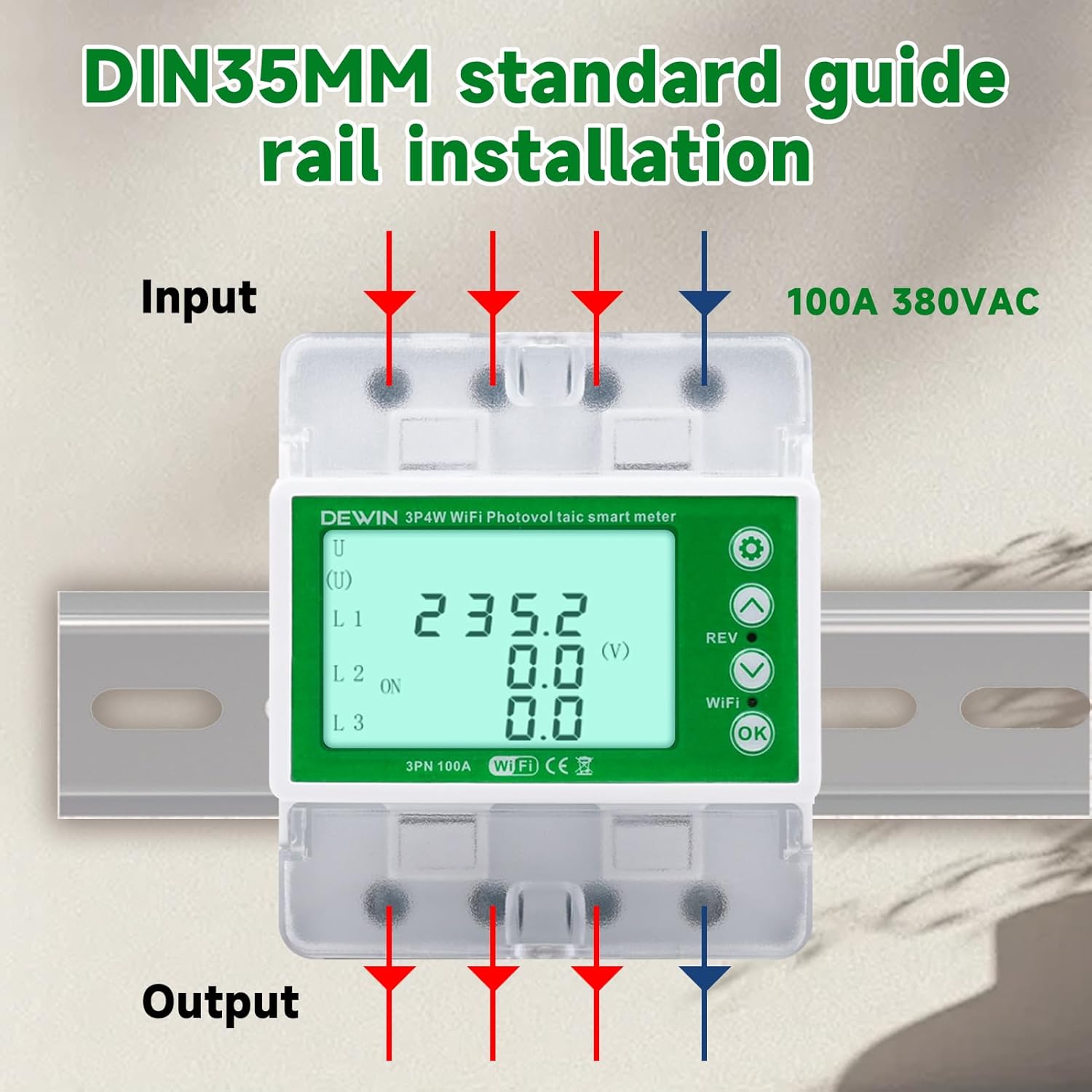
Image: Wiring diagram for the DewinLVD LSXDB03, showing input and output connections for a 3-phase, 4-wire system (100A 380VAC).
- Connect the 3-phase input lines (L1, L2, L3) and Neutral (N) to the designated input terminals.
- Connect the corresponding output lines (L1, L2, L3) and Neutral (N) to the output terminals.
- Ensure all connections are tight and secure.
5.3 Tuya WiFi App Connection
To enable remote control and monitoring, connect the device to the "Smart Graffiti" (Tuya Smart) app.

Image: The smart energy meter alongside a smartphone displaying the Tuya Smart app interface, indicating remote control capabilities.
- Download the "Smart Graffiti" or "Tuya Smart" app from your smartphone's app store.
- Register or log in to your account.
- Ensure your smartphone is connected to a 2.4 GHz WiFi network.
- Power on the energy meter.
- Follow the in-app instructions to add a new device. The meter should enter pairing mode (often indicated by a blinking WiFi LED).
- Once connected, you can monitor and control the meter remotely.
6. Operating Instructions
6.1 LCD Display and Buttons
The device features an LCD screen for real-time data display and physical buttons for local control and settings adjustment.

Image: Close-up of the DewinLVD LSXDB03's LCD display showing voltage readings and the physical control buttons (up, down, REV, WiFi, OK).
- LCD Screen: Displays real-time voltage (V), current (A), power (W), energy consumption (kWh), and other parameters for each phase.
- Buttons: Use the navigation buttons (Up/Down arrows) to scroll through different display parameters or adjust settings. The "OK" button confirms selections, and "REV" might indicate reverse direction or reset. The "WiFi" button is typically used for pairing mode.
6.2 Bidirectional Measurement
This meter supports bidirectional energy measurement, which is crucial for systems like solar power installations. It accurately measures both energy consumed from the grid and energy fed back into the grid.
6.3 Protection Functions
The device offers multiple adjustable protection settings:

Image: The smart energy meter with a list of its protection features, including overcurrent, over-pressure (overvoltage), and three-phase imbalance protection.
- Over-voltage Protection: Adjustable range 60 V–300 V AC (default: 275 V).
- Under-voltage Protection: Adjustable range 60 V–300 V AC (default: 175 V).
- Over-current Protection: Adjustable range 1 A–100 A (default: 80 A).
- Under-current Protection: Adjustable range 1 A–100 A (default: off).
- Voltage Safety: Adjustable range 10–100 % (default: off).
- Power Outage Protection: Adjustable range 10–100 % (default: off).
- Three-phase Current Imbalance Protection: Automatically detects and protects against imbalances.
- Phase Failure Protection: Protects against loss of a phase.
These settings can typically be adjusted via the Tuya Smart app or directly on the device using the physical buttons. Refer to the app's interface for detailed instructions on setting protection thresholds.
7. Maintenance
- Keep the device clean and free from dust. Use a dry, soft cloth for cleaning.
- Do not use abrasive cleaners or solvents.
- Periodically check wiring connections for tightness and signs of wear.
- Ensure the operating environment remains within specified temperature and humidity ranges.
- Firmware updates for the device may be available through the Tuya Smart app. Follow app instructions for updates.
8. Troubleshooting
| Problem | Possible Cause | Solution |
|---|---|---|
| Device not powering on. | No power supply; incorrect wiring. | Check main power supply. Verify wiring connections according to the diagram. |
| WiFi connection fails. | Incorrect WiFi password; 5GHz network; device too far from router. | Ensure correct 2.4 GHz WiFi network and password. Move device closer to router. Re-enter pairing mode. |
| Inaccurate readings. | Incorrect wiring; faulty sensor. | Double-check wiring. If problem persists, contact support. |
| Protection trips frequently. | Protection thresholds set too low; actual electrical issue. | Review and adjust protection settings in the app. Consult an electrician to check for underlying electrical problems. |
9. Support Information
For technical assistance, warranty claims, or any questions regarding your DewinLVD LSXDB03 Smart Energy Meter, please contact our customer support team.
We aim to respond to all inquiries within 24 hours.
Contact Information: Please refer to your purchase documentation or the seller's contact details on the platform where you purchased the product.