
1. Introduction
Thank you for choosing the SKIWEC Cordless Vacuum Cleaner, Model B0FLY82LZZ. This manual provides essential information for the safe and efficient operation, maintenance, and troubleshooting of your new vacuum cleaner. Please read this manual thoroughly before first use and retain it for future reference.

Figure 1: SKIWEC Cordless Vacuum Cleaner and Included Accessories
This image displays the main unit of the SKIWEC Cordless Vacuum Cleaner along with its various attachments, including the main brush head, crevice tool, and 2-in-1 brush, showcasing its versatility.
2. Important Safety Instructions
To reduce the risk of fire, electric shock, or injury, please observe the following safety precautions:
- Read all instructions before using the appliance.
- Do not use outdoors or on wet surfaces.
- Do not allow to be used as a toy. Close attention is necessary when used by or near children.
- Use only as described in this manual. Use only manufacturer's recommended attachments.
- Do not use with a damaged cord or plug. If appliance is not working as it should, has been dropped, damaged, left outdoors, or dropped into water, return it to a service center.
- Do not pull or carry by cord, use cord as a handle, close a door on cord, or pull cord around sharp edges or corners. Do not run appliance over cord. Keep cord away from heated surfaces.
- Do not unplug by pulling on cord. To unplug, grasp the plug, not the cord.
- Do not handle plug or appliance with wet hands.
- Do not put any object into openings. Do not use with any opening blocked; keep free of dust, lint, hair, and anything that may reduce air flow.
- Keep hair, loose clothing, fingers, and all parts of body away from openings and moving parts.
- Do not pick up anything that is burning or smoking, such as cigarettes, matches, or hot ashes.
- Do not use to pick up flammable or combustible liquids, such as gasoline, or use in areas where they may be present.
- Do not pick up toxic material, such as chlorine bleach, ammonia, or drain cleaner.
- Do not use without dust cup and/or filters in place.
- Turn off all controls before unplugging.
- Use extra care when cleaning on stairs.
- Do not charge the unit outdoors.
- Prevent unintentional starting. Ensure the switch is in the off-position before connecting to battery pack, picking up or carrying the appliance.
3. Package Contents
Please check the package contents upon unboxing to ensure all items are present and undamaged. If any items are missing or damaged, please contact customer support.

Figure 2: Exploded View of Package Contents
This diagram illustrates all components included in the SKIWEC Cordless Vacuum Cleaner package, such as the main host, battery, telescopic rod, various brushes, and charging accessories.
| Item | Quantity |
|---|---|
| Host (Main Unit) | 1 |
| Battery Pack | 1 |
| Telescopic Rod | 1 |
| Power Brush (Main Floor Head) | 1 |
| Power Adapter (Charger) | 1 |
| Wall Mount Plate and Hardware Bag | 1 |
| Long Crevice Nozzle | 1 |
| 2-in-1 Brush | 1 |
| HEPA Filter (Extra) | 1 |
| Dust Cup | 1 (pre-installed) |
| Cleaning Brush | 1 |
| User Manual | 1 |
4. Product Overview
The SKIWEC Cordless Vacuum Cleaner is designed for efficient and versatile cleaning across various surfaces. Key features include:
- Powerful Suction: Equipped with a 600W brushless motor, providing up to 50,000Pa suction for effective cleaning.
- Extended Runtime: Features an 8*2800mAh rechargeable battery pack, offering up to 70 minutes of continuous operation.
- Anti-Tangle Brush: V-shaped spiral brush with a built-in guide comb to prevent hair entanglement.
- Self-Standing Design: Allows the vacuum to stand upright independently for convenient storage and pauses during cleaning.
- Smart LED Touchscreen: Provides real-time information on battery life, suction mode, and filter status, with easy touch controls.
- Large Dust Cup: A 1.8L capacity dust cup with a one-touch emptying mechanism.
- High-Efficiency Filtration: An 8-layer filtration system, including a HEPA filter, captures fine dust and allergens.
- Low Noise Level: Operates at a noise level of ≤ 62dB.

Figure 3: Powerful Suction Capability
This image illustrates the vacuum cleaner in action, highlighting its 50KPA suction power generated by the 600W brushless motor, effectively cleaning debris from a hard floor.
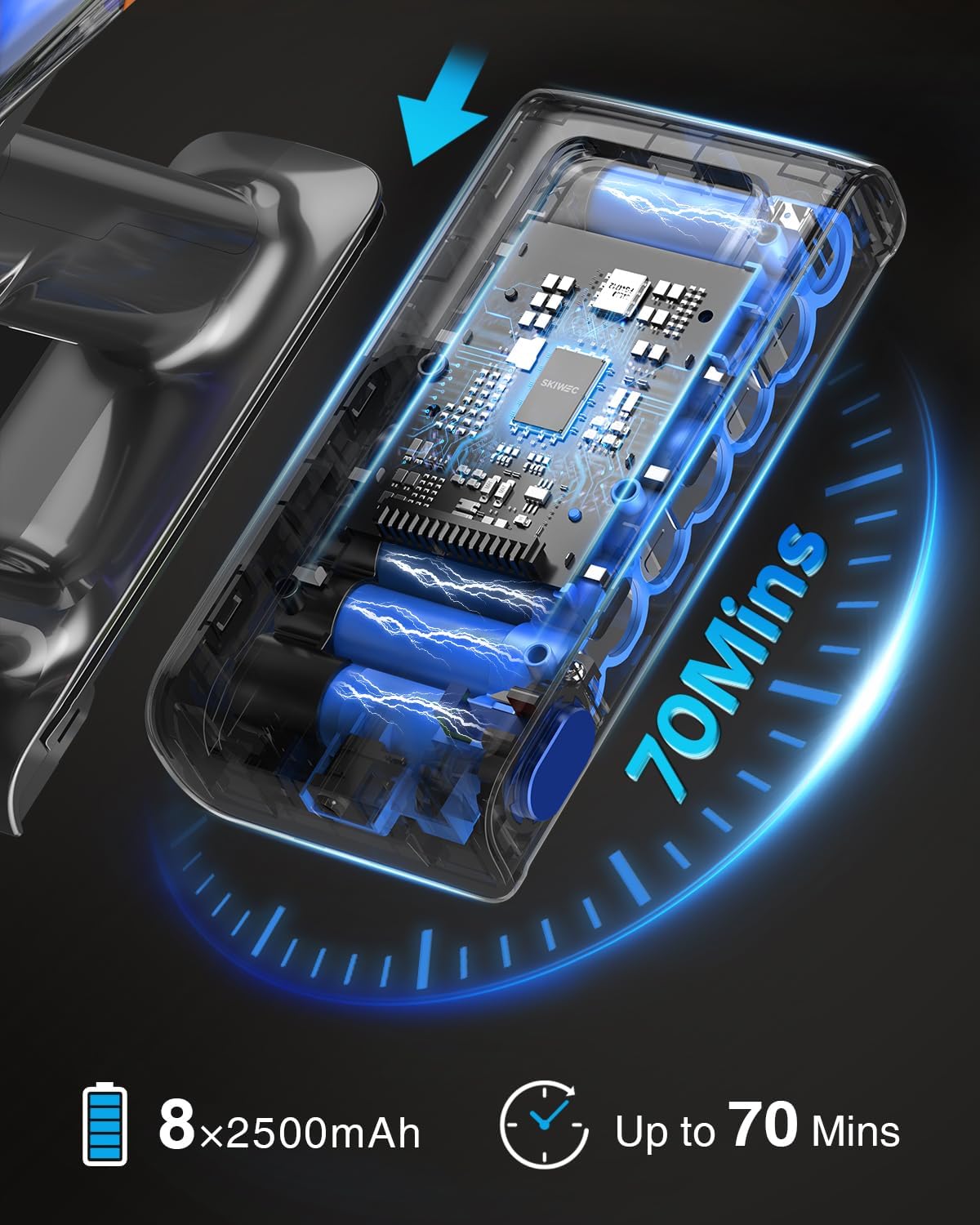
Figure 4: Extended Battery Runtime
An internal diagram of the vacuum's battery pack, emphasizing its 8x2800mAh cells and up to 70 minutes of operating time on a single charge.
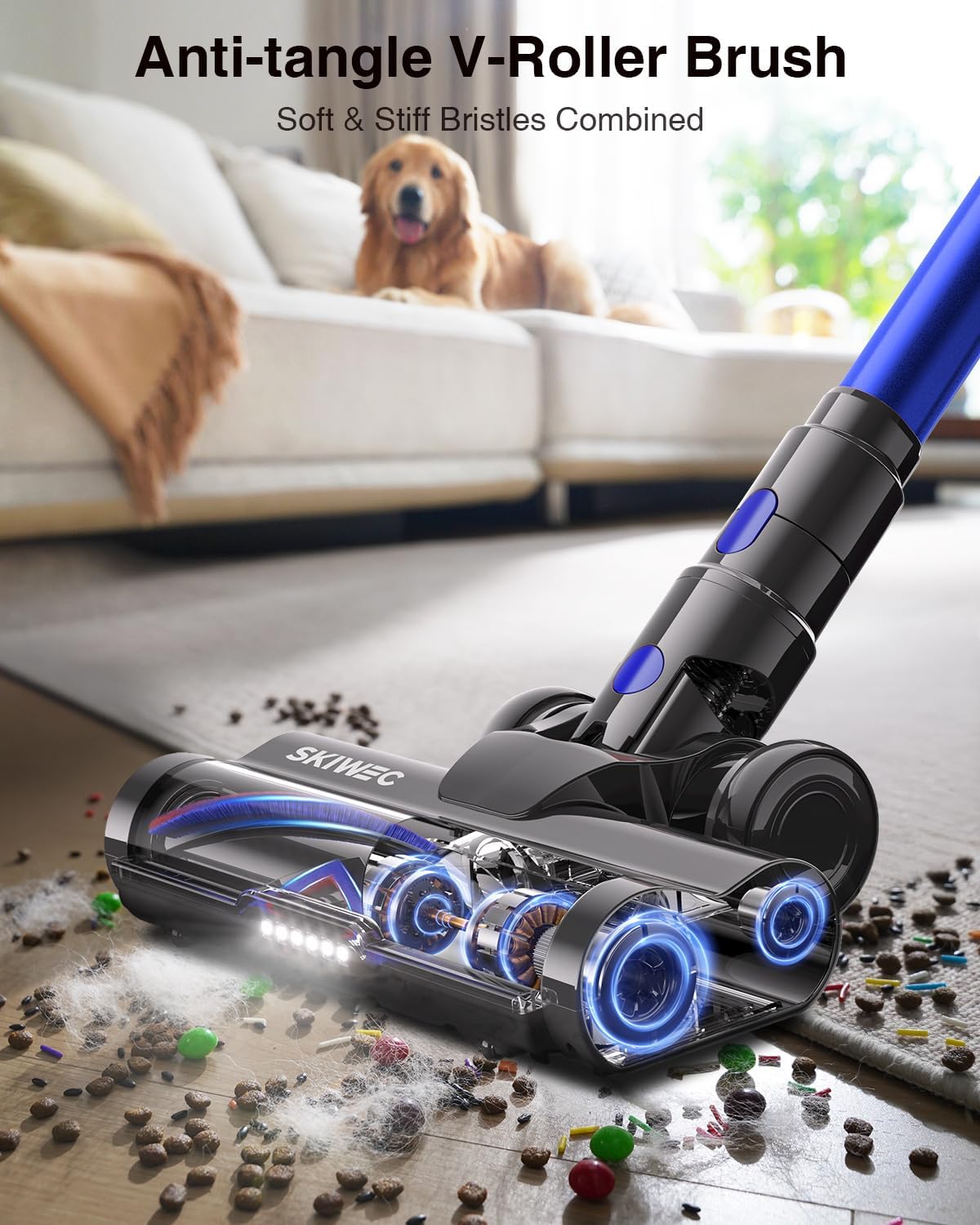
Figure 5: Anti-Tangle V-Roller Brush
A detailed view of the V-shaped brush head, designed with soft and stiff bristles and a guide comb to prevent hair from tangling around the roller, shown with pet hair and debris.

Figure 6: Self-Standing Design
The vacuum cleaner is shown standing upright on its own, demonstrating the self-standing feature for convenient storage and temporary pauses during cleaning tasks.

Figure 7: All-in-One LED Display
A close-up of the vacuum's LED touchscreen, displaying battery level, suction mode indicators, and filter maintenance alerts for easy monitoring and control.

Figure 8: 1.8L Dust Cup with One-Touch Emptying
This image shows a hand pressing a button to release debris from the 1.8-liter dust cup, illustrating the convenient one-touch emptying feature.

Figure 9: High-Efficiency Filtration System
An internal diagram showcasing the multi-layer filtration system, including the HEPA filter, designed to capture fine dust particles and ensure clean air exhaust.
5. Setup and Assembly
Follow these steps to assemble your SKIWEC Cordless Vacuum Cleaner:
- Unpack Components: Carefully remove all components from the packaging and verify against the "Package Contents" list.
- Attach Telescopic Rod: Insert the telescopic rod into the main host unit until it clicks securely into place.
- Connect Power Brush: Attach the power brush (main floor head) to the other end of the telescopic rod, ensuring it locks firmly.
- Install Battery Pack: Slide the battery pack into the designated slot on the main host unit until it clicks. Ensure it is fully seated.
- Initial Charge: Before first use, fully charge the vacuum cleaner. Connect the power adapter to the charging port on the main unit or the wall mount, then plug it into a power outlet. The LED display will indicate charging status. Charging time is approximately 4.5 hours.
- Optional Wall Mount Installation: If desired, install the wall mount plate in a convenient location using the provided hardware. Ensure it is mounted securely to a stud or with appropriate anchors. The vacuum can be stored and charged on the wall mount.

Figure 10: Wall Mount Charging
This image shows the vacuum cleaner securely mounted on its wall bracket, with the charging cable connected, illustrating how to store and charge the unit.
6. Operation
6.1 Power On/Off and Suction Adjustment
- To turn on the vacuum, press the power button located on the handle. The LED touchscreen will illuminate.
- To adjust the suction power, tap the corresponding icon on the LED touchscreen. You can cycle through different suction modes (e.g., Eco, Standard, Max) as indicated by the display.
- To turn off the vacuum, press the power button again.
6.2 Using Attachments
The SKIWEC Cordless Vacuum Cleaner comes with various attachments for different cleaning needs:
- Long Crevice Nozzle: Ideal for reaching tight spaces, corners, and gaps in furniture or car interiors.
- 2-in-1 Brush: Can be used as a brush for delicate surfaces or as an upholstery tool for fabrics.
- To attach an accessory, remove the telescopic rod (if attached) and directly connect the desired tool to the main host unit until it clicks.

Figure 11: Versatile Cleaning with Attachments
This composite image demonstrates the vacuum's adaptability, showing it used as a handheld unit for stairs and car interiors, and with the telescopic rod for high-reach cleaning.
7. Maintenance
Regular maintenance ensures optimal performance and extends the lifespan of your vacuum cleaner.
7.1 Emptying and Cleaning the Dust Cup
- Ensure the vacuum is turned off and disconnected from any charging source.
- Locate the dust cup release button (refer to Figure 8). Press the button to open the bottom flap of the dust cup and empty contents into a trash bin.
- For thorough cleaning, the dust cup can be detached from the main unit. Twist and pull to remove.
- Wash the dust cup with mild detergent and water. Ensure it is completely dry before reattaching.
7.2 Cleaning Filters
The vacuum features an 8-layer filtration system, including a HEPA filter. Regular cleaning is crucial.
- Turn off the vacuum and remove the dust cup.
- Locate and remove the filter components from inside the dust cup (refer to Figure 9 for filter assembly).
- Tap the filters gently to remove loose dust. For deeper cleaning, rinse the filters under running water.
- Important: Allow all filter components to air dry completely for at least 24 hours before reassembling. Do not use the vacuum with wet filters.
- Reassemble the filters and dust cup, ensuring all parts are securely in place.
7.3 Cleaning the V-Shaped Anti-Tangle Brush
- Turn off the vacuum and detach the power brush head.
- Locate the brush roll release mechanism (usually a latch or screw on the side of the brush head). Open it to remove the V-shaped brush roll.
- Use the provided cleaning brush or scissors to remove any tangled hair, threads, or debris from the brush roll.
- Reinsert the brush roll and secure the release mechanism.
8. Troubleshooting
If you encounter issues with your vacuum cleaner, refer to the following table for common problems and solutions.
| Problem | Possible Cause | Solution |
|---|---|---|
| Vacuum does not turn on. | Battery is not charged or not properly installed. | Ensure battery is fully charged and securely inserted. Check power adapter connection. |
| Low suction power. | Dust cup is full; filters are clogged; blockage in nozzle/tube/brush head. | Empty dust cup. Clean or replace filters. Check for and remove any blockages. |
| Brush roll not spinning. | Hair or debris tangled in brush roll; brush roll is jammed. | Turn off vacuum, remove brush head, and clear any obstructions from the brush roll. |
| Vacuum stops suddenly during use. | Battery is depleted; vacuum is overheating due to blockage. | Recharge the battery. Check for and clear any blockages, then allow the vacuum to cool down. |
| Unusual noise. | Blockage in air path or brush roll; damaged component. | Check for and remove any blockages. If noise persists, contact customer support. |
9. Specifications
| Feature | Specification |
|---|---|
| Brand | SKIWEC |
| Model | B0FLY82LZZ |
| Motor Power | 600W Brushless Motor |
| Suction Power | Up to 50,000Pa (50KPA) |
| Battery Capacity | 8*2800mAh (29.6 Volts) |
| Max Runtime | Up to 70 minutes |
| Charging Time | Approximately 4.5 hours |
| Dust Cup Capacity | 1.8 Liters |
| Filtration System | 8-layer, including HEPA filter |
| Noise Level | ≤ 62 Decibels |
| Item Weight | 4.27 kg |
| Surface Recommendation | All floors |
| Special Features | Self-standing design, LED touch screen, Anti-tangle brush, Rechargeable wall mount |
10. Warranty and Customer Support
Your SKIWEC Cordless Vacuum Cleaner is covered by a 24-month protection plan from the date of purchase. This warranty covers manufacturing defects and workmanship under normal use.
For any questions, technical assistance, or warranty claims, please contact our customer support team. We offer 24-hour online customer service and 2-year support to ensure your satisfaction.
Please have your model number (B0FLY82LZZ) and purchase information ready when contacting support.

Figure 12: Customer Support Information
This image features a customer service representative alongside icons indicating 24-hour online support and a 2-year support period for the product.


