
1. Introduction
Thank you for choosing the Homeiju 52-Inch Floating TV Stand. This wall-mounted console is designed to provide a space-saving solution for your entertainment needs, featuring two drawers, two open shelves, and a built-in power outlet with AC and USB ports. This manual provides essential information for safe assembly, installation, operation, and maintenance of your new TV stand. Please read these instructions carefully before beginning assembly and retain them for future reference.
2. Safety Information
WARNING: Failure to follow these safety instructions could result in injury or damage to the product.
- Weight Capacity: Do not exceed the maximum weight limit of 110 pounds (50 kg) for the entire unit. Distribute weight evenly across the shelves and top surface.
- Wall Mounting: This product is designed for wall mounting only. Ensure the wall structure is capable of supporting the weight of the TV stand and its contents. Suitable wall types include brick, wooden, and concrete walls. Do not mount on plasterboard (drywall) without locating and securing to wall studs.
- Electrical Safety: The integrated power outlet includes 2 AC outlets (120V/12A) and 2 USB ports (5V/2A) with a 4.9-foot power cord. Do not overload the outlets. Ensure the power cord is not pinched or damaged during installation.
- Assembly: Assemble the unit on a soft, clean surface to prevent scratches. Keep all small parts away from children during assembly.
- Stability: Regularly check all connections and mounting hardware to ensure they remain secure. Loose connections can lead to instability and potential hazards.
- Tools: Use appropriate tools for assembly and installation. Improper tools can cause damage or injury.
3. Package Contents
Please verify that all components are present before beginning assembly. If any parts are missing or damaged, contact customer support.
- TV Stand Panels (various sizes)
- Drawer Components (fronts, sides, backs, bottoms)
- Drawer Slides and Handles
- Integrated Power Outlet Unit with Power Cord
- Assembly Hardware (screws, dowels, cam locks, expansion screws, self-tapping screws, wall anchors)
- Instruction Manual
4. Tools Required
The following tools are recommended for assembly and installation:
- Phillips Head Screwdriver
- Hammer (for dowels)
- Electric Drill with appropriate drill bits (for wall mounting)
- Level
- Measuring Tape
- Pencil
- Stud Finder (essential for drywall installation)
5. Setup and Assembly Instructions
Follow these steps carefully for proper assembly and secure wall mounting.
5.1. Pre-Assembly
- Unpack all components and lay them out on a clean, soft surface to prevent damage.
- Identify each part using the included parts list (if provided).
- Familiarize yourself with the hardware.
5.2. Assembling the TV Stand Frame
Follow the step-by-step diagrams in the included manual to connect the main panels using dowels, screws, and cam locks. Ensure all connections are tight and secure.
5.3. Installing Drawers
- Assemble the drawer boxes according to the diagrams.
- Attach the drawer slides to the drawer boxes and the corresponding locations within the TV stand frame.
- Insert the assembled drawers into the frame. Ensure they slide smoothly.
5.4. Installing the Power Outlet
Locate the designated cutout for the power outlet unit. Insert the power outlet into the cutout and secure it with the provided screws. Ensure the power cord is routed correctly and not pinched.
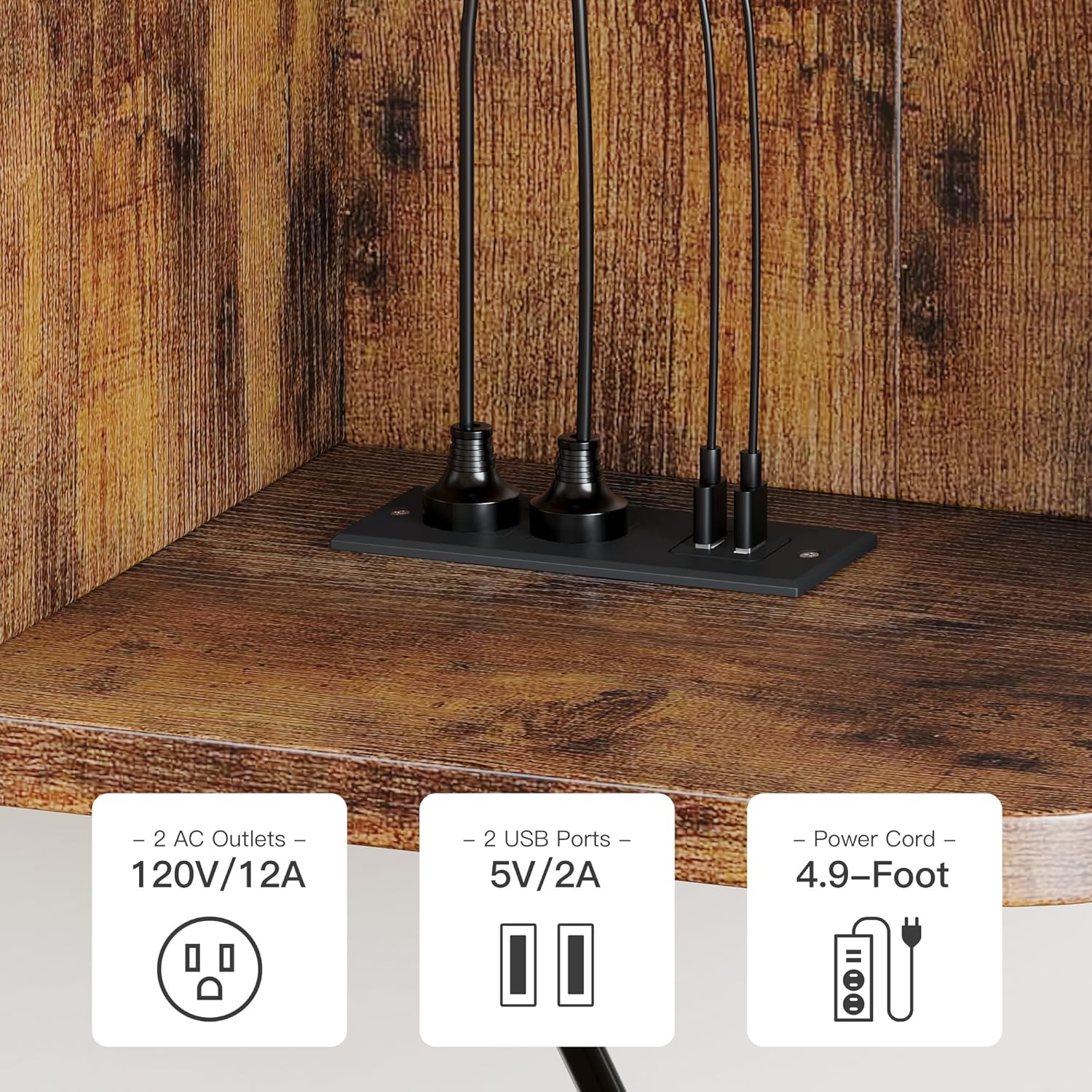
Figure 5.4.1: Integrated Power Outlet with 2 AC Outlets and 2 USB Ports.
5.5. Wall Mounting
This is a critical step. Incorrect installation can lead to product failure and injury.
- Determine Mounting Location: Choose a suitable wall location, considering the height of your TV and viewing comfort. Use a stud finder to locate wall studs if mounting on drywall.
- Marking Drill Points: Hold the assembled TV stand against the wall at the desired height. Use a level to ensure it is perfectly horizontal. Mark the positions for the mounting holes on the wall using a pencil.
Note: Some pre-drilled holes on the unit may not align perfectly with standard 16-inch stud spacing. It is recommended to measure carefully and, if necessary, drill new pilot holes on the back panel of the TV stand to align with your wall studs for maximum security. - Drilling Pilot Holes: For wooden studs, drill pilot holes slightly smaller than the self-tapping screws. For brick or concrete walls, drill holes appropriate for the expansion screws and wall anchors. For drywall where studs cannot be used, use heavy-duty toggle anchors (not always included, may need to be purchased separately) that can support the unit's weight plus contents.
- Installing Wall Anchors (if applicable): Insert expansion screws or other wall anchors into the drilled holes as per their instructions.
- Mounting the TV Stand: Carefully lift the TV stand and align its mounting holes with the drilled holes/anchors on the wall. Secure the stand to the wall using the provided self-tapping screws or appropriate hardware for your wall type. Tighten all screws firmly but do not overtighten.

Figure 5.5.1: Wall Mounting Hardware and Compatible Wall Types.

Figure 5.5.2: Product Dimensions and TV Size Compatibility.
6. Operating Instructions
6.1. Using the Power Outlet
Once the TV stand is securely mounted and the power cord is plugged into a wall outlet, the integrated power hub is ready for use. You can plug in your TV, soundbar, gaming console, or other devices into the 2 AC outlets. Use the 2 USB ports to charge compatible devices such as smartphones or tablets.
6.2. Storage and Organization
The TV stand features two smooth-gliding drawers for concealed storage of remotes, DVDs, or other accessories. The two open shelves provide space for media players, speakers, books, or decorative items.

Figure 6.2.1: Storage Options with Open Shelves and Drawers.
7. Maintenance
7.1. Cleaning
The TV stand is designed for easy cleaning. Wipe surfaces with a soft, damp cloth. Avoid using harsh chemicals or abrasive cleaners, as these can damage the finish. Promptly wipe up any spills to prevent staining.
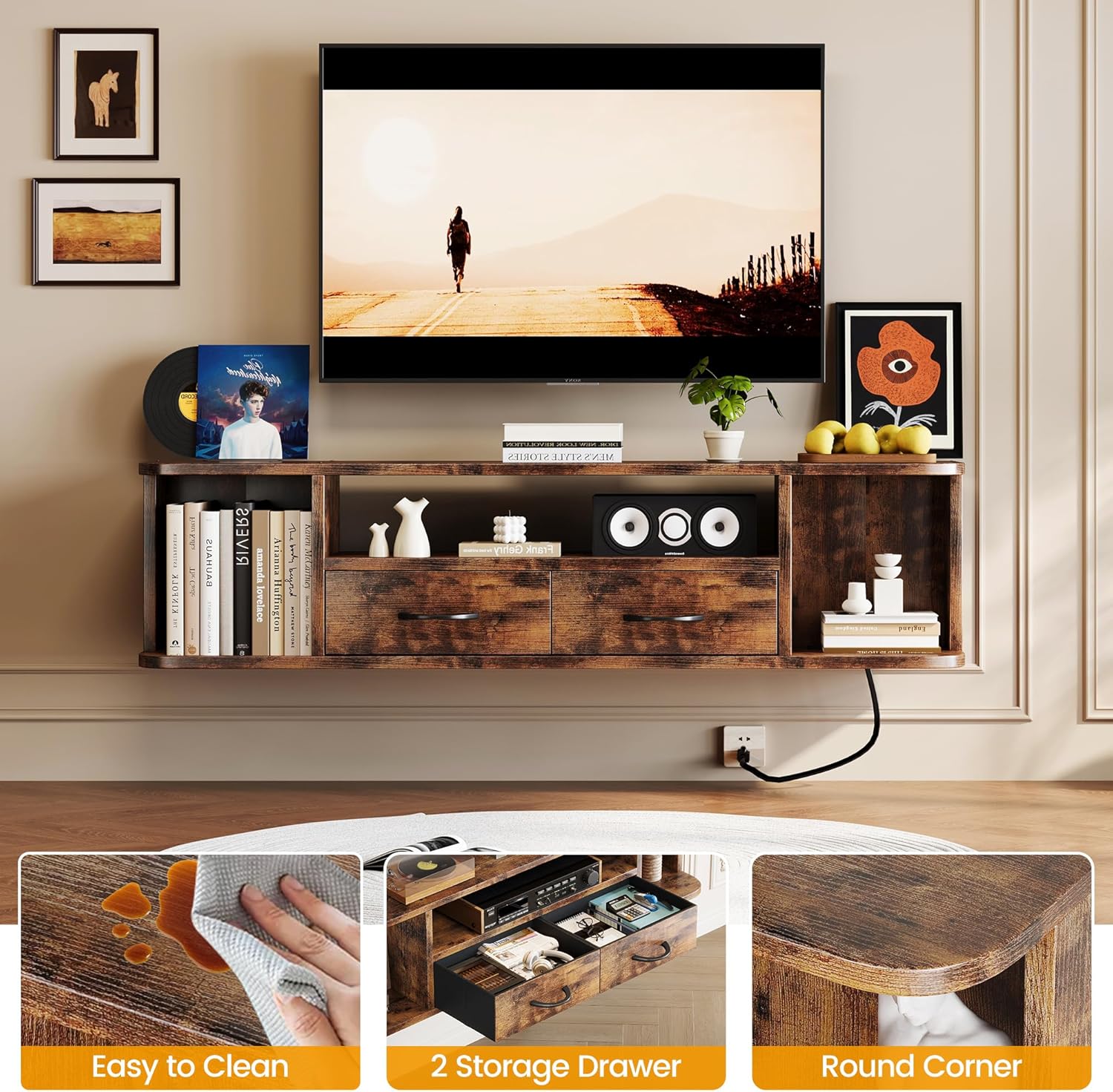
Figure 7.1.1: Easy to Clean Surface.
7.2. General Care
- Periodically check all screws and connections to ensure they are tight.
- Avoid placing excessively hot or cold items directly on the surface without protection.
- Do not drag heavy objects across the surface to prevent scratches.
8. Troubleshooting
8.1. Mounting Issues
- Stand feels unstable after mounting: Ensure all wall mounting screws are securely fastened into appropriate wall studs or heavy-duty anchors. If using drywall anchors, verify they are rated for the weight of the stand and its contents. Re-evaluate the wall type and consider reinforcing the mounting points.
- Mounting holes do not align with wall studs: It is common for pre-drilled holes not to match standard stud spacing. Use a stud finder to locate studs and drill new pilot holes on the back panel of the TV stand to align with the center of the studs. This provides the most secure installation.
8.2. Power Outlet Not Working
- No power to devices: Check if the main power cord is securely plugged into a functional wall outlet. Ensure the power outlet unit itself is properly seated and connected within the TV stand. Test the wall outlet with another device.
- USB ports not charging: Verify the device being charged is compatible with USB charging and that the cable is functional.
8.3. Drawers Not Operating Smoothly
- Drawers stick or are misaligned: Check that the drawer slides are correctly installed and aligned on both the drawer box and the TV stand frame. Ensure all screws securing the slides are tight. Adjust the drawer front if necessary.
9. Specifications
| Brand | Homeiju |
| Model Name | 6015 |
| Size | 52 Inch |
| Color | Brown |
| Product Dimensions | 51.18 x 9.06 x 11.81 inches (L x W x H) |
| Item Weight | 25.5 pounds |
| Weight Limit | 110 Pounds |
| Mounting Type | Wall Mount |
| Material | Wood |
| Finish Type | High-Gloss |
| Number of Shelves | 4 (2 open compartments) |
| Storage Options | Drawer, Shelf |
| Power Outlet | 2 AC Outlets (120V/12A), 2 USB Ports (5V/2A) |
| Power Cord Length | 4.9-Foot |
| Assembly Required | Yes |
| UPC | 721691981521 |
10. Warranty Information
Homeiju products are manufactured to high-quality standards and are warranted against manufacturing defects. Please refer to your purchase documentation or contact the retailer for specific warranty terms and conditions. Keep your proof of purchase for any warranty claims.
11. Customer Support
If you have any questions regarding the assembly, installation, operation, or maintenance of your Homeiju Floating TV Stand, or if you require replacement parts, please contact the retailer where you purchased the product. For direct manufacturer support, please visit the Homeiju store on Amazon or their official website for contact information.
Thank you for choosing Homeiju.