
1. Introduction
This manual provides instructions for the installation and operation of the NFHK NGFF NVME M-Key to 6-Port SATA 3.0 Adapter. This adapter is designed to expand the SATA connectivity of your system by utilizing an available M.2 NVMe M-Key slot on your motherboard, providing six additional SATA 3.0 ports for connecting mechanical hard drives, SSDs, or optical drives.
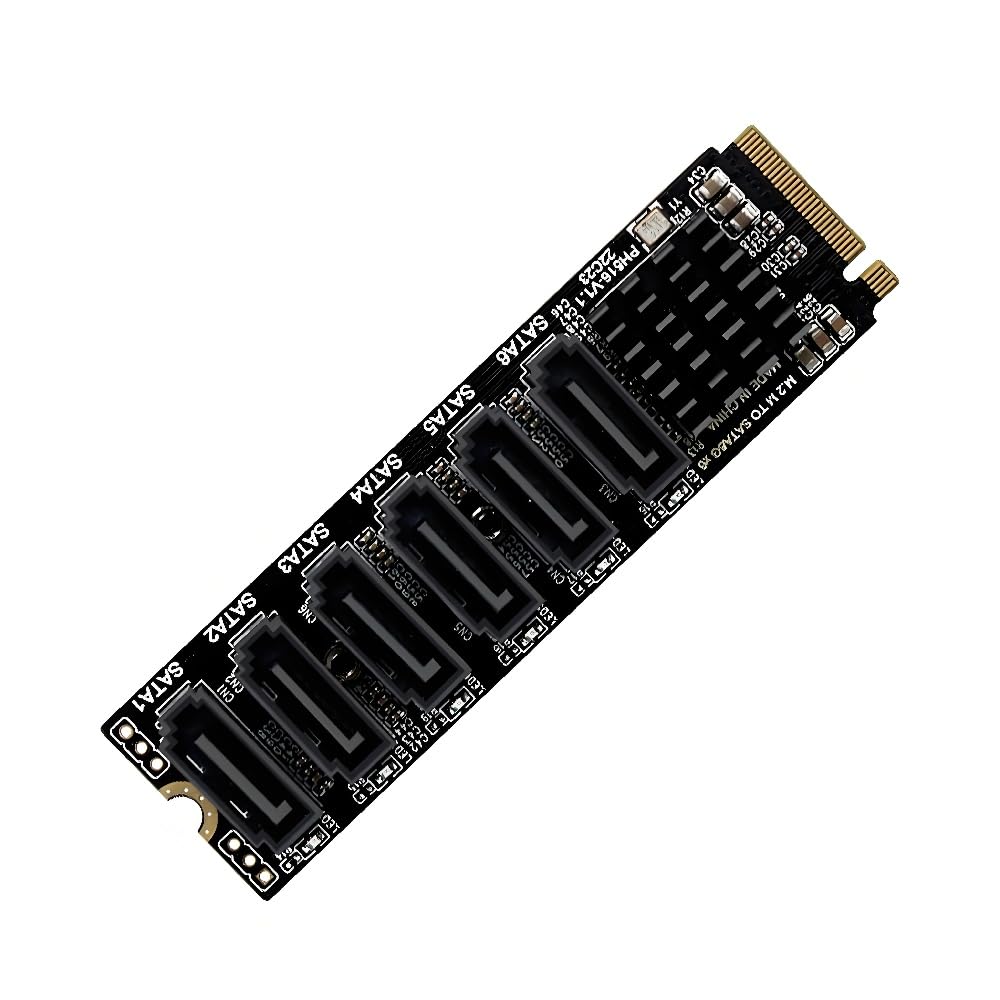
Figure 1: NFHK NGFF NVME M-Key to 6-Port SATA 3.0 Adapter. This image shows the adapter board with six SATA ports and the M-Key connector.
2. Key Features
- Input Interface: NGFF NVME M-key PCI Express.
- Output Interface: 6 x SATA 3.0 ports.
- Data Transfer Rates: Supports 6.0Gbps, 3.0Gbps, and 1.5Gbps.
- Compatibility: Fully compatible with SATA interface mechanical hard drives, SSDs, and optical drives.
- Operating System Support: Windows 7/8/10, Windows Server 2008 R2/2012 R2/2016/2019, Mac OS, Linux, FreeNAS, Synology, and various NAS operating systems.
- Advanced Features: Supports error reporting, recovery, and correction; partial and sleep power management states; Gen1i, Gen1x, Gen2i, Gen2m, Gen2x, and Gen3i.
- Native Command Queue (NCQ): Enhances performance and stability under high load.
- Thermal Management: Advanced heatsink on the chipset for lower operating temperatures and improved reliability.
3. Setup and Installation
Follow these steps to install the NFHK NGFF NVME M-Key to 6-Port SATA 3.0 Adapter into your system.
3.1 Package Contents
Before installation, ensure all components are present:
- 1x NFHK NGFF NVME M-Key to 6-Port SATA 3.0 Adapter
- 1x Mounting Screw
- 1x Screwdriver

Figure 2: Included accessories with the adapter, featuring a mounting screw and a small screwdriver.
3.2 Installation Steps
- Power Off System: Ensure your computer is completely powered off and disconnected from the power source before beginning installation.
- Locate M.2 Slot: Identify an available M.2 NVMe M-Key slot on your motherboard. This adapter requires an M-Key slot for proper installation.
- Insert Adapter: Carefully align the M-Key connector of the adapter with the M.2 slot on your motherboard. Gently push the adapter into the slot at an angle until it is seated securely.
- Secure Adapter: Once seated, push the adapter down and secure it with the provided mounting screw.
- Connect SATA Devices: Connect your SATA mechanical hard drives, SSDs, or optical drives to the six SATA 3.0 ports on the adapter using standard SATA data cables.
- Power On System: Reconnect your computer to the power source and power it on.

Figure 3: The adapter correctly installed into an M.2 slot on a motherboard, showing the six available SATA ports.
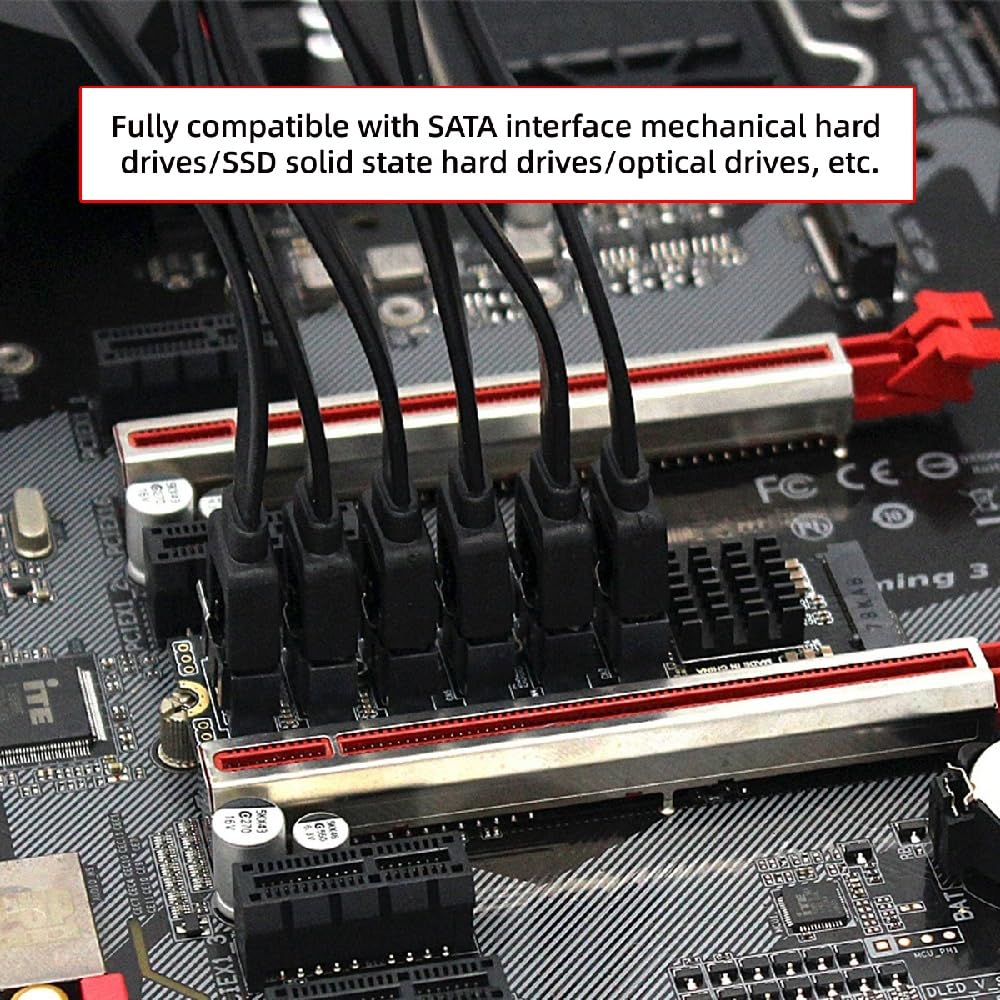
Figure 4: Multiple SATA data cables connected to the adapter, demonstrating its expansion capability.
Important Note: This adapter is designed for M.2 NVMe M-Key slots. Please ensure your motherboard has a compatible slot. The adapter does not require additional software installation or driver setup for basic functionality.

Figure 5: Visual representation of the M-Key connector type and a reminder to ensure the device interface is SATA compatible.
4. Operation
Once installed, the NFHK NGFF NVME M-Key to 6-Port SATA 3.0 Adapter functions as a direct expansion of your system's SATA capabilities.
- Device Recognition: Connected SATA devices (SSDs, HDDs, optical drives) will be recognized by your operating system as standard SATA devices.
- System Disk Support: An SSD connected to one of the adapter's SATA 3.0 interfaces can be used as a system disk.
- Data Transfer: The adapter supports SATA 3.0 speeds up to 6.0Gbps, providing fast data transfer for connected devices.
- No Hot Swapping: Please note that this adapter does not support hot-swapping of SATA devices. Devices should be connected or disconnected while the system is powered off.

Figure 6: Overview of SATA 3.0 (6Gbps) data transfer rates and compatibility with various SATA devices, including 2.5-inch and 3.5-inch drives.
5. Maintenance
The NFHK NGFF NVME M-Key to 6-Port SATA 3.0 Adapter is designed for reliable operation with minimal maintenance.
- Cleaning: Periodically inspect the adapter for dust accumulation. If necessary, gently clean with compressed air. Ensure the system is powered off before cleaning.
- Thermal Management: The adapter features an advanced heatsink to maintain optimal operating temperatures. Ensure adequate airflow within your computer case to support efficient cooling.
- Environmental Conditions: Operate the adapter within standard computer operating temperatures and humidity levels.

Figure 7: A detailed view of the ASM1166 high-speed chip and its heatsink, designed for stable and cool operation.
6. Troubleshooting
If you encounter issues with the adapter, consider the following troubleshooting steps:
- Device Not Detected:
- Ensure the adapter is securely seated in the M.2 NVMe M-Key slot.
- Verify that SATA data cables are properly connected to both the adapter and the SATA devices.
- Check that the SATA devices themselves are powered correctly.
- Confirm that your motherboard's M.2 slot is an M-Key type and supports NVMe.
- Slow Performance:
- Ensure you are using SATA 3.0 compatible drives and cables to achieve 6.0Gbps speeds.
- Check your operating system's device manager to confirm the adapter and connected drives are recognized at their optimal speed.
- System Instability:
- Ensure the adapter is firmly installed and not loose.
- The adapter supports error reporting, recovery, and correction features to enhance stability. If issues persist, consult your motherboard's manual or contact technical support.
7. Specifications
| Model | NF-SA-004-6P |
| Input Interface | NGFF NVME M-Key PCI Express |
| Output Interface | 6 x SATA 3.0 Ports |
| Data Transfer Rate | 6.0Gbps (SATA 3.0), 3.0Gbps (SATA 2.0), 1.5Gbps (SATA 1.0) |
| Chipset | ASM1166 (High Speed Chip) |
| Dimensions | Approximately 80mm (Length) x 22mm (Width) |
| Hot Swap Support | No |
| Operating System Support | Windows 7/8/10, Windows Server 2008 R2/2012 R2/2016/2019, Mac OS, Linux, FreeNAS, Synology, various NAS OS |

Figure 8: Labeled diagram of the adapter showing key components and interfaces.

Figure 9: Physical dimensions of the adapter, indicating a length of 80mm and a width of 22mm.
8. Compatibility
This adapter is compatible with a wide range of operating systems and hardware configurations:
- Motherboard: Requires an available M.2 NVMe M-Key slot.
- SATA Devices: Supports all standard SATA interface mechanical hard drives, SSDs, and optical drives (2.5-inch and 3.5-inch).
- Operating Systems: Windows 7, Windows 8, Windows 10, Windows Server 2008 R2, Windows Server 2012 R2, Windows Server 2016, Windows Server 2019, Mac OS, Linux, FreeNAS, Synology, and other NAS operating systems.