
1. Introduction
This manual provides essential information for the safe and efficient operation of the ZLYMTXHW AD350-4T2.2GB Frequency Inverter. The AD350 series is a high-performance vector control mini frequency inverter designed for general-purpose electrical motor control. It features advanced vector control technology, ensuring high control even at low speeds, high-speed precision, quick response, and a wide speed range for sophisticated motor control applications. Its modular design contributes to a small size, low temperature rise, reduced noise, and reliable performance. It includes built-in simple PID adjustment, programmable input/output terminals, RS485 terminals, and multi-function analog input/output capabilities.
2. Safety Information
WARNING: Always disconnect AC power to the terminals before opening the cover. Power off for at least 10 minutes before servicing to allow capacitors to discharge.
- Read all instructions carefully before installation and operation.
- Ensure proper grounding to prevent electrical shock.
- Do not operate the inverter with damaged wiring or components.
- Only qualified personnel should perform installation, wiring, and maintenance.
- Keep the inverter away from water, moisture, and flammable materials.
- Observe all local and national electrical codes.
3. Product Overview
The AD350 frequency inverter offers comprehensive control and protection features for various motor applications.
3.1 Key Features
- High-performance vector control technology.
- Modular design for compact size and reliability.
- Low temperature rise and reduced noise.
- Built-in simple PID adjustment.
- Programmable input and output terminals.
- RS485 communication connector.
- Multi-function analog input and output.
- Stepless speed regulation.
- Low frequency high torque.
- Instant click protection.
- Intelligent setting parameters.
3.2 Protection Technologies
The inverter incorporates 9 reprotection technologies to ensure safe and reliable operation of both the inverter and connected equipment:
- Over voltage protection
- Under voltage protection
- Over current protection
- Overload protection
- Over temperature protection
- Power module protection
- Ground protection
- Short circuit protection
- Stall protection
3.3 Product View

Figure 3.1: Front view of the ZLYMTXHW AD350 Frequency Inverter, showing the control panel with display, buttons (PRG, A, V, SET, JOG, RUN, STOP), and a rotary encoder.

Figure 3.2: Side view of the ZLYMTXHW AD350 Frequency Inverter, highlighting the heat sink fins and metal mounting brackets for secure installation.
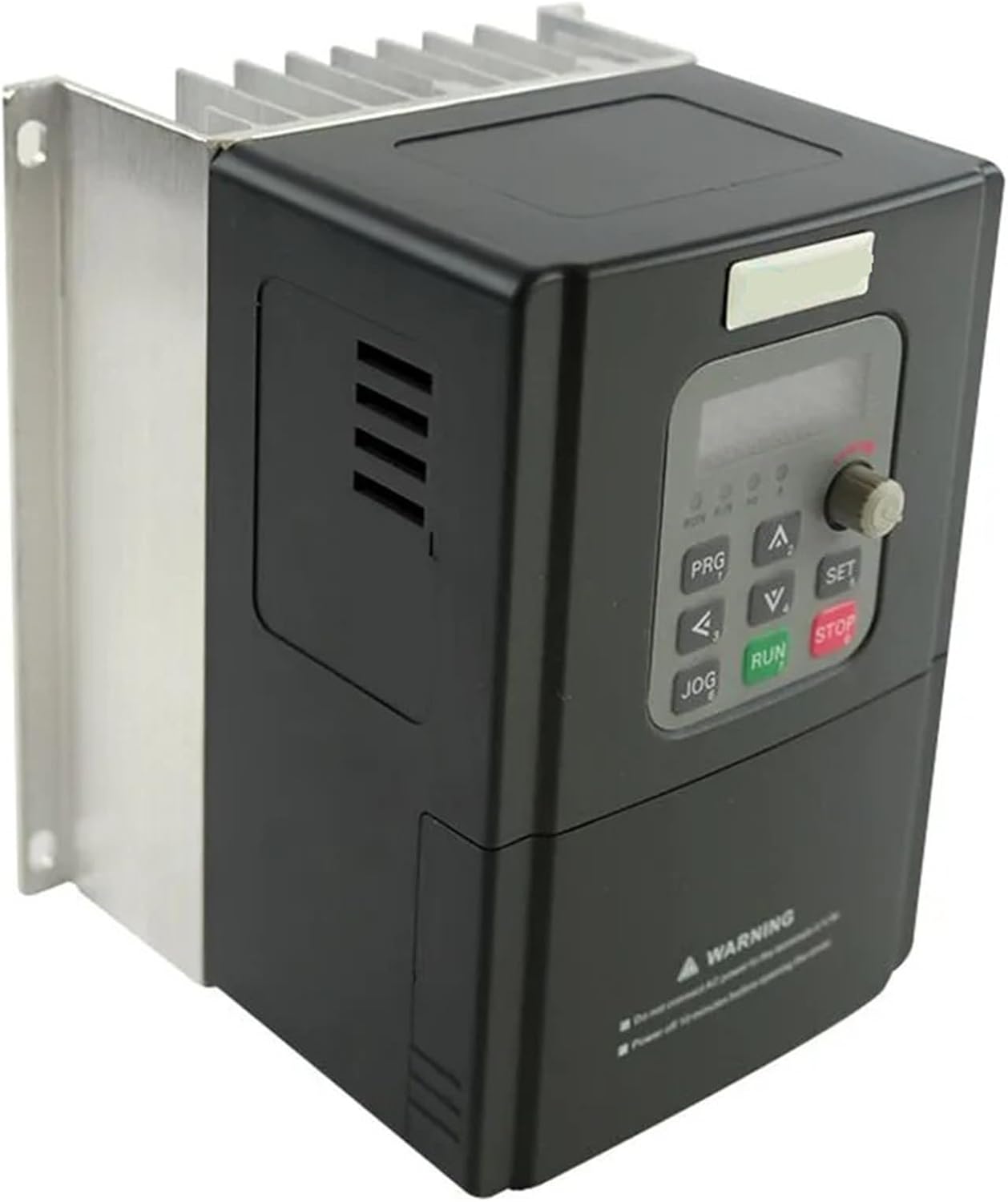
Figure 3.3: Angled side view of the ZLYMTXHW AD350 Frequency Inverter, providing a clearer perspective of the heat dissipation fins and overall compact design.

Figure 3.4: Internal view of the ZLYMTXHW AD350 Frequency Inverter, showing the cooling fan and two large capacitors, essential for power regulation and stability.

Figure 3.5: Top-down view of the ZLYMTXHW AD350 Frequency Inverter's cooling system, featuring the fan and heat sink, designed for efficient thermal management.
4. Setup and Installation
4.1 Installation Environment
- Ambient Temperature: The operating ambient temperature should be between -10°C and 50°C. Extreme temperatures can significantly impact the converter's service life.
- Mounting Surface: Install the frequency converter on a flame-retardant surface. Ensure sufficient space around the unit for proper heat dissipation.
- Vibration: Install in a location with minimal vibration, not exceeding 0.6G.
- Environmental Conditions: Avoid direct sunlight, damp, or wet locations. Do not install in areas with corrosive, flammable, or explosive gases. Protect from oil, dust, and metal dust.
4.2 Mechanical Installation
Proper mechanical installation is crucial for effective heat dissipation:
- Orientation: Install the frequency converter vertically to allow heat to dissipate upwards. Do not install upside down.
- Multiple Units: If installing multiple frequency converters in a cabinet, it is recommended to install them side-by-side. If vertical stacking is necessary, refer to the full product manual for instructions on installing a heat insulation deflector between units.
- Space Requirements: Ensure adequate heat dissipation space around the frequency converter. Also consider the heat dissipation of other components within the cabinet.
- Mounting Bracket: The mounting bracket must be made of flame-retardant material.
- Dusty Environments: For applications with metal dust, it is recommended to install the radiator cabinet outside. The space inside the fully sealed cabinet should be as large as possible.
5. Operating Instructions
The AD350 inverter provides advanced control functions to optimize motor performance and energy efficiency.
5.1 Motor Start-up Control
The inverter prevents instantaneous current doubling during motor start-up. This extends motor life and reduces operational costs by gradually increasing current instead of a sudden surge.
5.2 Intelligent Motor Speed Regulation
Motor speed can be precisely controlled by adjusting the output frequency of the inverter. This allows for fine-tuning of motor operation to match application requirements.
5.3 Energy Saving
The inverter reduces energy consumption by automatically detecting the load current and adjusting the output voltage. This optimizes power delivery, leading to significant energy savings and reduced operating costs.
5.4 Control Panel Operation
The control panel (refer to Figure 3.1) allows for programming and monitoring of the inverter. Use the PRG, A (Up), V (Down), SET, JOG, RUN, and STOP buttons, along with the rotary encoder, to navigate menus and adjust parameters. Consult the detailed product operation diagram (available in the full product manual) for specific parameter settings and navigation.
6. Typical Applications
The AD350 frequency inverter is suitable for a wide range of industrial and commercial applications:
- Pumps: Utilizes soft stop function to mitigate water hammer effects, reducing system maintenance costs.
- Ball Mills: Employs voltage ramp startup to decrease gear friction, saving costs and time.
- Fans: Reduces belt friction and mechanical conflicts, lowering maintenance expenses.
- Compressors: Uses current limitation for smooth startup, minimizing motor heating and extending service life.
- Conveyors: Implements soft start for a smooth and gradual startup process, preventing product displacement and liquid overflow.
- General applications include machine tools, textile machinery, papermaking equipment, food processing, packaging, wire drawing, mining equipment, steel equipment, chemical equipment, and various automatic production lines.
7. Technical Specifications
| Parameter | Specification |
|---|---|
| Model Number | AD350-4T0.75GB-3.7GB (Specific model: AD350-4T2.2GB) |
| Type | DC/AC Inverter |
| Weight | Approximately 4 kg |
| Power Range | 2T0.4-2.2KW / 4T0.75-3.7KW |
| Input Voltage | Two phase 220V / Three phase 380V ±15% |
| Control Mode | No PGA vector control, V/F control |
| Protection Features | Overcurrent, overload, overvoltage, undervoltage, overtemperature, phase loss, etc. (Up to 25 fail-safe functions) |
| Output Power (AD350-4T2.2GB) | 2.2KW |
| Cooling Mode | Forced air cooling |
| Package Dimensions | 0.39 x 0.39 x 0.39 inches |
| ASIN | B0FLV6545Y |
| Manufacturer | ZLYMTXHW |
Note: Some specifications, such as package dimensions, appear to be placeholder data and may not reflect the actual product. Refer to the product packaging for precise details. The weight of 1.76 ounces listed in some specifications is likely incorrect for this type of device; the product description indicates a weight of approximately 4 kg.
8. Maintenance
Regular maintenance ensures the longevity and optimal performance of your AD350 Frequency Inverter.
- Cleaning: Periodically clean the inverter's exterior and ventilation openings to prevent dust accumulation, which can hinder heat dissipation. Use a soft, dry cloth.
- Inspection: Regularly inspect all wiring connections for tightness and signs of wear or damage.
- Ventilation: Ensure that the installation environment maintains adequate airflow and that the cooling fan is operating correctly.
- Environmental Checks: Verify that the ambient temperature and humidity remain within the specified operating ranges.
- Professional Service: For internal cleaning or repair, contact qualified service personnel. Do not attempt to open the inverter casing without proper training and safety precautions.
9. Troubleshooting
This section provides general guidance for common issues. For detailed troubleshooting, refer to the complete product manual or contact technical support.
- Inverter Not Powering On:
- Check input power supply connections.
- Verify input voltage is within specified range (380V ±15%).
- Ensure circuit breakers or fuses are not tripped.
- Motor Not Running:
- Check motor wiring and connections.
- Verify control signals (RUN command).
- Check for any fault codes displayed on the inverter panel.
- Ensure motor parameters are correctly set in the inverter.
- Overload/Overcurrent Fault:
- Reduce motor load if possible.
- Check for mechanical issues with the motor or driven equipment.
- Verify motor current limits are set correctly.
- Inspect motor for damage or short circuits.
- Overheating Fault:
- Ensure adequate ventilation around the inverter.
- Clean any dust or debris from the heat sink and fan.
- Verify ambient temperature is within operating limits.
- Check if the cooling fan is operational.
10. Warranty and Support
For warranty information, technical support, or service inquiries, please refer to the documentation provided with your purchase or contact ZLYMTXHW customer service. Keep your purchase receipt as proof of purchase for warranty claims.
Contact information for support can typically be found on the manufacturer's official website or on the product packaging.