
1. Introduction
This manual provides detailed instructions for the safe and efficient operation, installation, and maintenance of the RGPVEYJIF MS-120-24 120W Single Switching Power Supply. This device is designed to convert AC input voltage to a stable 24V DC output, suitable for various industrial and commercial applications requiring a reliable power source.
Please read this manual thoroughly before using the product and retain it for future reference.
2. Safety Instructions
To prevent electric shock, fire, or damage to the unit, observe the following safety precautions:
- Ensure the input voltage switch is set correctly (100-120V AC or 200-240V AC) before connecting to power. Incorrect setting can cause damage.
- Installation should be performed by qualified personnel only.
- Do not operate the unit in wet or high-humidity environments.
- Ensure proper ventilation to prevent overheating. Do not block ventilation holes.
- Disconnect power before performing any installation, wiring, or maintenance.
- Do not open the casing of the power supply. There are no user-serviceable parts inside.
- Connect the ground terminal properly to prevent electric shock.
3. Product Overview
The RGPVEYJIF MS-120-24 is a compact 120W single output switching power supply. It features a metal enclosure with ventilation for heat dissipation and clearly labeled input/output terminals.
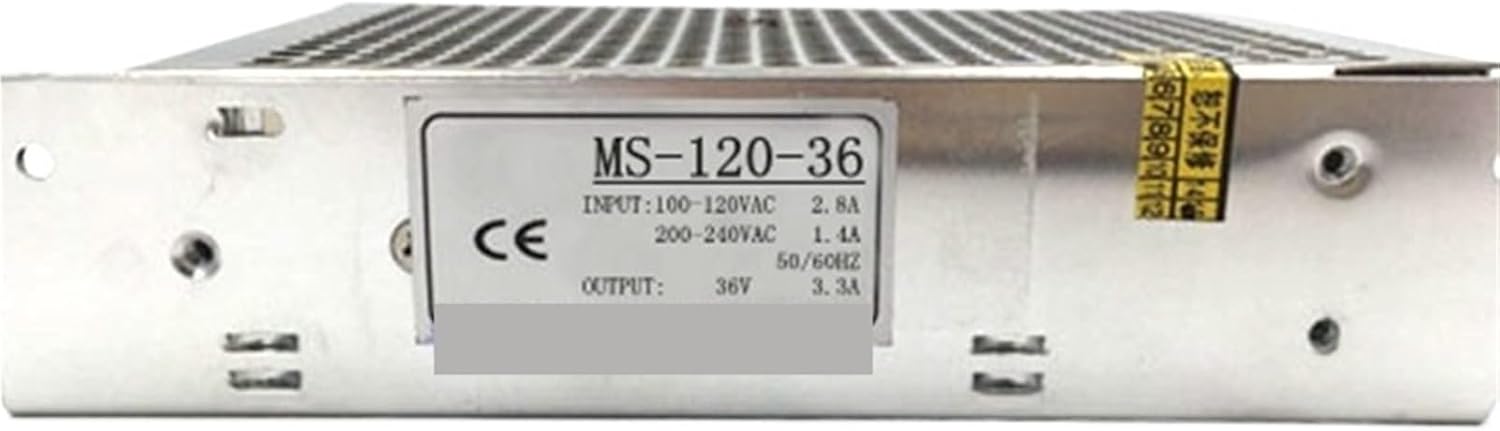
Figure 3.1: General view of the RGPVEYJIF MS-120-24 Switching Power Supply. This image shows the overall metallic casing and general form factor of the unit.

Figure 3.2: Close-up of the product label on the MS-120-24 power supply. The label indicates the model number, input voltage range (100-120VAC / 200-240VAC), input current, output voltage (24V), and output current (5A).

Figure 3.3: Top view of the RGPVEYJIF MS-120-24 power supply, highlighting the perforated metal casing designed for passive ventilation and heat dissipation.
4. Setup and Installation
4.1 Input Voltage Selection
The power supply supports both 100-120V AC and 200-240V AC input. Before connecting the power supply to the AC mains, ensure the voltage selector switch (if present, typically a small red switch on the side) is set to match your local mains voltage. Incorrect setting will damage the unit.
4.2 Wiring Instructions
Refer to the terminal block on the unit for proper wiring connections. Always ensure power is disconnected before wiring.
- AC Input: Connect the Live (L), Neutral (N), and Ground (⌂) wires from your AC source to the corresponding terminals.
- DC Output: Connect your load to the positive (+V) and negative (-V) terminals. Ensure correct polarity.
Use appropriate gauge wiring for the current draw to prevent overheating and ensure stable operation.
4.3 Mounting
Mount the power supply in a location that allows for adequate airflow around the unit to facilitate heat dissipation. Use the mounting holes provided on the chassis to secure the unit to a stable surface. Avoid mounting in enclosed spaces without ventilation.
5. Operating Instructions
Once properly installed and wired, the RGPVEYJIF MS-120-24 power supply operates automatically. Apply AC power to the input terminals, and the unit will provide a stable 24V DC output.
- Power On: Connect the AC input after verifying all connections and voltage selection.
- Output: The unit will supply 24V DC to the connected load.
- Overload Protection: The unit is equipped with overload protection. If the load exceeds the rated output, the power supply may shut down or enter a protection mode. Reduce the load to resume normal operation.
6. Maintenance
The RGPVEYJIF MS-120-24 power supply requires minimal maintenance. Regular inspection can help ensure long-term reliability.
- Cleaning: Periodically clean the exterior of the unit with a dry, soft cloth to remove dust and debris, especially from ventilation openings. Ensure power is disconnected before cleaning.
- Inspection: Regularly check wiring connections for tightness and signs of wear or damage. Inspect the unit for any physical damage or discoloration.
- Ventilation: Ensure that the ventilation holes are not obstructed to maintain proper airflow.
7. Troubleshooting
| Problem | Possible Cause | Solution |
|---|---|---|
| No output voltage | No AC input power Incorrect input voltage selection Overload protection activated Internal fault | Check AC power source and connections Verify voltage selector switch setting Reduce load, disconnect and reconnect power Contact support if problem persists |
| Output voltage unstable | Loose connections Overload condition Faulty load | Check and tighten all wiring connections Ensure load is within specifications Test with a different load |
| Unit is overheating | Insufficient ventilation Excessive ambient temperature Overload condition | Ensure clear airflow around the unit Relocate to a cooler environment Reduce load |
8. Specifications
| Model | MS-120-24 |
| Input Voltage | 100-120V AC / 200-240V AC (selectable) |
| Input Frequency | 47-63 Hz |
| Output Voltage | 24V DC |
| Output Current | 5A |
| Output Power | 120W |
| Efficiency | (Typically >80%, exact value not provided) |
| Dimensions (L x W x H) | Approximately 0.39 x 0.39 x 0.39 inches (Note: This dimension seems incorrect for a 120W power supply, likely a placeholder from source data. Actual dimensions may vary.) |
| Weight | 1.76 ounces (Note: This weight seems incorrect for a 120W power supply, likely a placeholder from source data. Actual weight may vary.) |
| Manufacturer | RGPVEYJIF |
Note: Specifications are subject to change without notice. Please refer to the product label for the most accurate information. The provided dimensions and weight appear to be placeholder values and may not reflect the actual physical characteristics of the power supply.
9. Warranty and Support
This product is manufactured by RGPVEYJIF. For warranty information, technical support, or service inquiries, please contact your point of purchase or the manufacturer directly. Please have your model number (MS-120-24) and purchase details ready when contacting support.
As per available information, the manufacturer is RGPVEYJIF. For specific warranty terms and conditions, please refer to the documentation provided with your purchase or visit the manufacturer's official website.