
Tamron 18-300mm f/3.5-6.3 Di III-A VC VXD (Model B061)
Instruction Manual
Tamron 18-300mm f/3.5-6.3 Di III-A VC VXD Lens
Model B061 for Nikon Z Mount
1. Introduction
Thank you for purchasing the Tamron 18-300mm f/3.5-6.3 Di III-A VC VXD lens. This versatile all-in-one zoom lens is designed for APS-C mirrorless cameras, offering an expansive 16.6x zoom ratio from wide-angle to ultra-telephoto. It is equipped with Tamron's advanced VXD (Voice-coil eXtreme-torque Drive) linear motor for high-speed and high-precision autofocus, and VC (Vibration Compensation) for stable shooting. Its compact and lightweight design makes it an ideal companion for various photographic endeavors, including landscapes, portraits, travel, and wildlife.

Figure 1.1: Side view of the Tamron 18-300mm f/3.5-6.3 Di III-A VC VXD Lens, showcasing its compact design and zoom ring markings.
2. What's in the Box
Please ensure all the following items are included in your package:
- Front Lens Cap
- Rear Lens Cap
- Lens Hood
3. Parts Identification
Familiarize yourself with the various parts of your new lens:

Figure 3.1: Angled front view of the lens, showing the zoom ring, focus ring, and lens lock switch.
- 1. Zoom Ring: Used to adjust the focal length from 18mm (wide-angle) to 300mm (telephoto).
- 2. Focus Ring: Used for manual focusing.
- 3. Lens Lock Switch: Locks the zoom ring at the 18mm position to prevent lens creep during transport.
- 4. AF/MF Switch: (If present on your specific model) Toggles between Autofocus and Manual Focus modes.
- 5. VC On/Off Switch: (If present on your specific model) Activates or deactivates the Vibration Compensation feature.
- 6. Lens Mount Index: Alignment mark for attaching the lens to the camera body.
- 7. Lens Hood Attachment Mark: Alignment mark for attaching the lens hood.

Figure 3.2: Front view of the lens, showing the front optical element and filter thread.

Figure 3.3: Rear view of the lens, showing the metal lens mount and electronic contacts.

Figure 3.4: The petal-shaped lens hood, designed to reduce flare and protect the front element.

Figure 3.5: The Tamron front lens cap, used to protect the front optical element when not in use.
4. Setup
4.1 Attaching the Lens
- Remove the rear lens cap from the lens and the body cap from your camera.
- Align the lens mount index mark on the lens with the corresponding mark on your camera body.
- Insert the lens into the camera mount and rotate it clockwise (for Nikon Z mount) until it clicks into place. Do not force the lens.
4.2 Detaching the Lens
- While holding down the lens release button on your camera body, rotate the lens counter-clockwise until it stops.
- Carefully remove the lens from the camera body.
- Attach the rear lens cap to the lens and the body cap to your camera to protect them from dust and damage.
4.3 Attaching the Lens Hood
- Align the lens hood attachment mark on the lens hood with the corresponding mark on the front of the lens.
- Insert the lens hood and rotate it clockwise until it clicks into place.
- To store the lens hood, reverse its direction and attach it to the lens.
5. Operating the Lens
5.1 Zooming
Rotate the zoom ring to change the focal length. The lens covers a range from 18mm (wide-angle) to 300mm (telephoto). For transport, you can engage the lens lock switch at the 18mm position to prevent the lens from extending unintentionally.
5.2 Focusing
This lens features a VXD linear motor for fast and precise autofocus. You can also switch to manual focus if desired.
- Autofocus (AF): Set your camera's focus mode to AF. The lens will automatically focus on your subject.
- Manual Focus (MF): Set your camera's focus mode to MF. Rotate the focus ring on the lens to manually adjust the focus.
5.3 Vibration Compensation (VC)
The Tamron VC mechanism helps reduce camera shake, especially useful in low-light conditions or when shooting at longer focal lengths. The VC function is typically controlled via your camera's menu settings for Nikon Z mount lenses. Refer to your camera's instruction manual for details on enabling or disabling image stabilization.
5.4 Close-Up Photography
The lens offers an impressive Minimum Object Distance (MOD) of 5.9 inches (0.15m) at the 18mm wide-angle end, achieving a maximum magnification ratio of 1:2. This allows for detailed close-up shots, bringing out the power and detail of small subjects.
6. Maintenance and Care
6.1 Cleaning the Lens
- Use a blower brush to remove dust from the lens surface.
- For smudges or fingerprints, use a clean, soft microfiber cloth specifically designed for optical lenses. Breathe lightly on the lens surface before wiping if necessary.
- Do not use organic solvents such as paint thinner or benzene to clean the lens.
6.2 Storage
- Store the lens in a cool, dry place away from direct sunlight and high humidity.
- Always attach the front and rear lens caps when the lens is not in use.
- If storing for an extended period, consider using a desiccant to prevent mold growth.
6.3 Weather-Sealed Construction
This lens features Moisture-Resistant Construction, providing enhanced protection against dust and moisture. While it offers improved durability in various conditions, it is not waterproof. Avoid exposing the lens to heavy rain or submerging it in water.
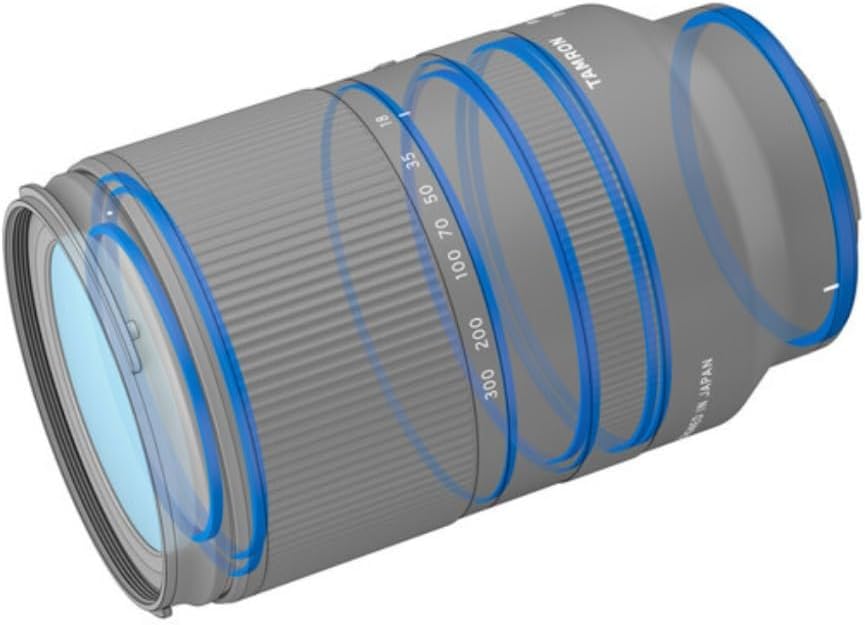
Figure 6.1: Diagram illustrating the weather-sealed construction of the lens, highlighting key sealing points.
7. Troubleshooting
If you encounter issues with your lens, please refer to the following common problems and solutions:
| Problem | Possible Cause | Solution |
|---|---|---|
| Lens does not focus. | Camera/lens focus mode set to MF; dirty lens contacts; lens not properly mounted. | Ensure camera and lens are set to AF; clean lens and camera contacts with a dry cloth; re-attach lens securely. |
| Images are blurry despite using VC. | VC is off; shooting conditions exceed VC capabilities; excessive camera shake. | Ensure VC is enabled in camera settings; use a faster shutter speed or tripod in very low light. |
| Lens creep (zoom extends on its own). | Gravity affecting the zoom mechanism. | Engage the lens lock switch at 18mm when carrying the camera. |
| Lens not recognized by camera. | Poor connection between lens and camera; outdated lens firmware. | Re-attach the lens; clean contacts; check Tamron's website for firmware updates using Tamron Lens Utility software. |
If the problem persists, please contact Tamron customer support or an authorized service center.
8. Specifications
| Feature | Detail |
|---|---|
| Model Name | B061 |
| Focal Length | 18-300mm |
| Maximum Aperture | f/3.5-6.3 |
| Compatible Mountings | Nikon Z |
| Lens Type | Telephoto Zoom Lens |
| Image Stabilization | VC (Vibration Compensation) |
| Autofocus Motor | VXD (Voice-coil eXtreme-torque Drive) |
| Minimum Object Distance (MOD) | 5.9 inches (0.15m) at 18mm |
| Maximum Magnification Ratio | 1:2 (at 18mm) |
| Filter Diameter | 67mm |
| Product Dimensions | 4.9 x 3 x 3 inches |
| Protective Features | Moisture-Resistant Construction, Fluorine Coating |
9. Warranty and Support
For detailed warranty information and customer support, please refer to the warranty card included with your product or visit the official Tamron website. Tamron provides comprehensive support for its products, including firmware updates via the Tamron Lens Utility software.
Official Tamron Website: www.tamron-usa.com
Related documents18-300mm f/3.5-6.3 Di III-A VC VXD (Model B061)


Ask a question about this manual
Ask about setup, troubleshooting, compatibility, parts, safety, or missing instructions. Manuals+ will review the question and use this page’s manual context to help answer it.