Introduction
This manual provides essential instructions for the safe operation, setup, and maintenance of your Generic E99 Pro Foldable Drone. Please read this manual thoroughly before operating the drone to ensure proper function and to prevent damage or injury.
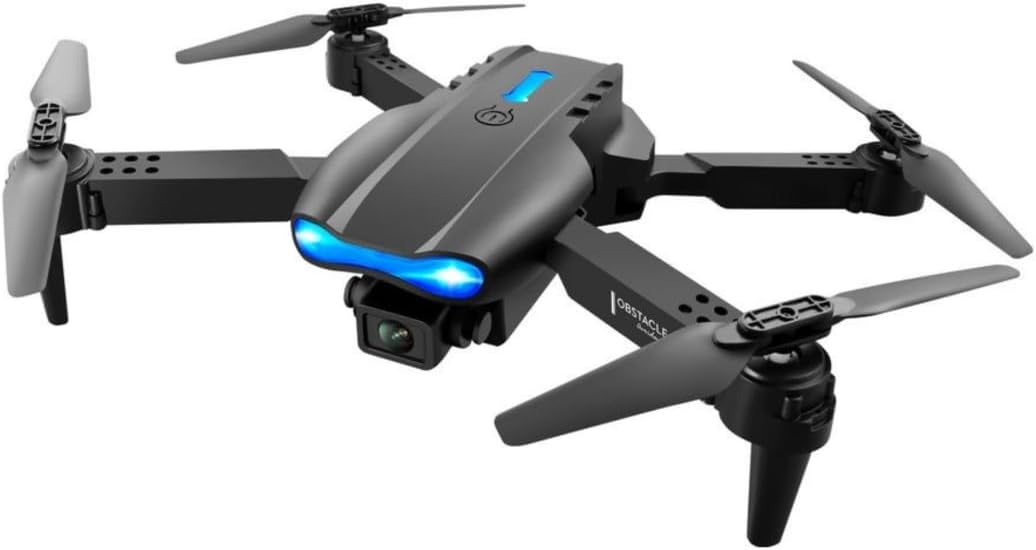
Image: The E99 Pro drone, its remote control, and a carrying case, illustrating the complete product package.
Safety Guidelines
- Age Recommendation: This drone is intended for users aged 14 and up. It is not a toy for children under 14.
- Flight Environment: Operate the drone in open areas, away from people, animals, buildings, and power lines. Avoid flying in strong winds or adverse weather conditions.
- Pre-Flight Check: Always ensure propellers are securely attached, batteries are fully charged, and the drone is calibrated before each flight.
- Battery Safety: Use only approved chargers and batteries. Do not overcharge or puncture batteries. Discontinue use if batteries show signs of damage or swelling.
- Respect Privacy: Be mindful of privacy laws when using the camera features.
- Emergency Stop: Familiarize yourself with the emergency stop procedure for immediate shutdown if necessary.
Product Overview
Package Contents
- E99 Pro Foldable Drone
- Remote Control
- Rechargeable Drone Batteries (Quantity may vary, typically 1-2)
- USB Charging Cable
- Spare Propellers
- Screwdriver
- User Manual
- Carrying Case
Drone Components

Image: An exploded view or detailed shot of the E99 Pro drone, highlighting key components such as propellers, motors, camera, and landing gear.
- Propellers: Four main propellers for lift and thrust.
- Motors: Four motors driving the propellers.
- Dual 4K HD Cameras: Front and bottom cameras for photo and video capture.
- Battery Compartment: Located on the drone's underside.
- LED Indicator Lights: For status and orientation.
- Foldable Arms: For compact storage and transport.
Setup
1. Unfolding the Drone
Gently unfold the drone arms until they lock into position. Ensure all four arms are fully extended before flight.
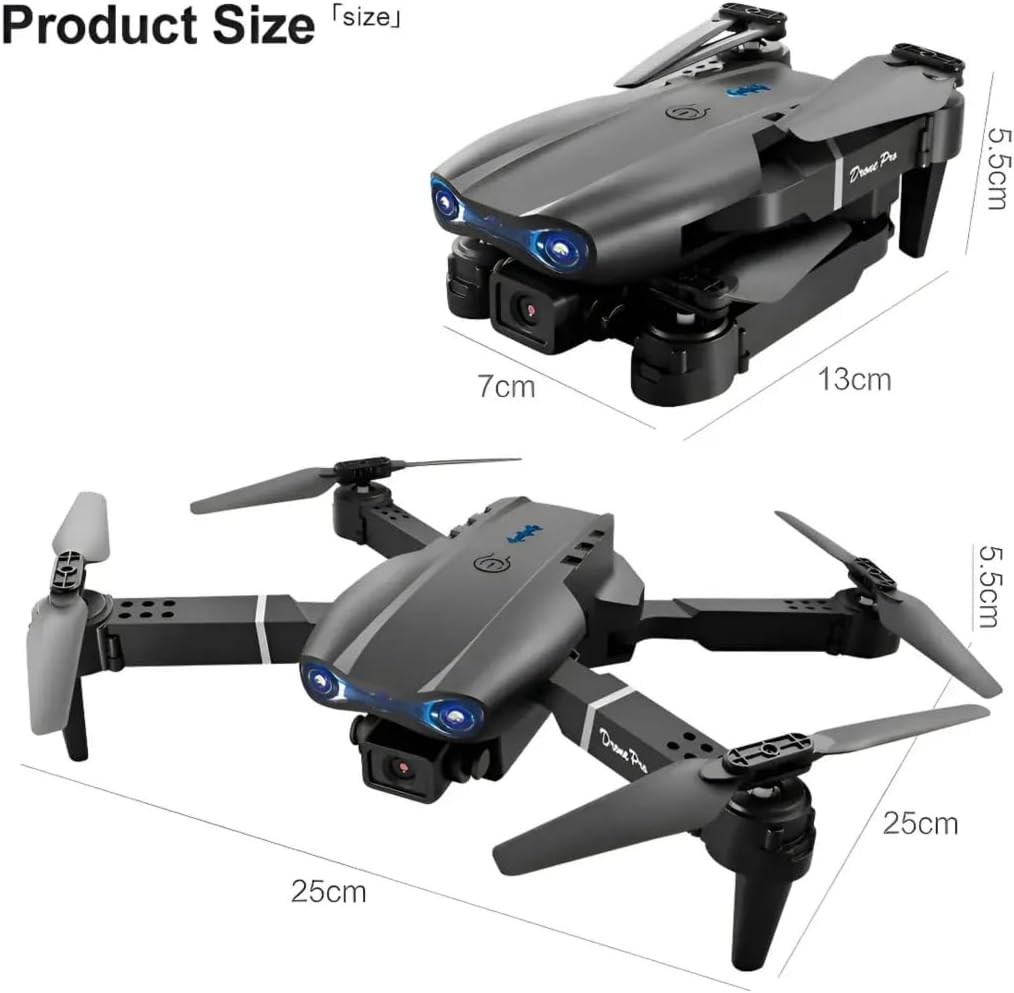
Image: The E99 Pro drone shown in both its folded and unfolded configurations, with dimensions indicating its compact size for storage and its operational size.
2. Battery Installation and Charging
Drone Battery: Insert the fully charged drone battery into the battery compartment on the drone's rear. Ensure it clicks into place securely. Connect the battery to the drone's power port if it's not integrated.
Remote Control Batteries: Open the battery cover on the back of the remote control and insert 3 AA batteries (not included) according to the polarity indicators. Close the cover.
Charging: Use the provided USB charging cable to charge the drone battery. Connect the cable to a USB power adapter (5V/1A recommended). The indicator light on the battery or charger will show charging status (e.g., red for charging, green for fully charged).
3. Propeller Installation (If Required)
If propellers are not pre-installed, attach them according to the markings (A and B) on the propellers and motor shafts. Ensure they are tightened securely but not overtightened. Refer to the diagram for correct orientation.
4. Remote Control Overview

Image: A detailed diagram of the E99 Pro drone's remote control, with labels pointing to the throttle lever, steering rod, one-key up/landing, headless mode/return home, 3D roll, fine-tuning buttons, and power switch.
- Throttle Lever (Left Joystick): Controls altitude (up/down) and rotation (left/right).
- Steering Rod (Right Joystick): Controls forward/backward and left/right movement.
- One-Key Up/Landing: Initiates automatic takeoff or landing.
- Headless Mode/Return Home: Activates headless mode (short press) or initiates return to home (long press).
- 3D Roll: Executes a 360° flip.
- Fine-Tuning Buttons: Adjust drone drift (forward/backward, left/right).
- Power Switch: Turns the remote control on/off.
- Speed Switch: Toggles between 3 speed modes.
5. App Download and Connection
Download the dedicated drone control app (refer to the packaging or a QR code in the box for the specific app name) from your smartphone's app store. Turn on the drone and your phone's Wi-Fi. Connect to the drone's Wi-Fi network (usually named "E99 Pro" or similar). Open the app to view the FPV feed and access advanced controls.
Operating Instructions
1. Pairing and Calibration
- Place the drone on a flat, level surface.
- Turn on the drone, then turn on the remote control.
- Push the left joystick (throttle) all the way up, then all the way down. The remote will beep, and the drone lights will stop flashing, indicating successful pairing.
- To calibrate the gyroscope, push both joysticks down and to the right simultaneously. The drone lights will flash rapidly and then become solid, indicating calibration is complete.
2. Takeoff and Landing
- One-Key Takeoff: After pairing and calibration, press the "One-Key Up/Landing" button. The drone will automatically ascend to a stable height.
- Manual Takeoff: Push both joysticks down and outwards to start the motors. Then, slowly push the left joystick (throttle) up to ascend.
- One-Key Landing: Press the "One-Key Up/Landing" button again. The drone will automatically descend and land.
- Manual Landing: Slowly pull the left joystick (throttle) down until the drone lands. Once landed, pull the left joystick all the way down and hold for a few seconds to stop the motors.
3. Flight Controls
- Ascend/Descend: Push the left joystick up/down.
- Turn Left/Right: Push the left joystick left/right.
- Fly Forward/Backward: Push the right joystick up/down.
- Fly Left/Right (Sideways): Push the right joystick left/right.
4. Special Functions
- Speed Modes: Press the speed switch button on the remote to cycle through 3 different speed settings (low, medium, high).
- Headless Mode: Short press the "Headless Mode/Return Home" button. In headless mode, the drone's orientation is relative to the pilot, regardless of its front direction. Press again to exit.
- 360° Flips: Press the "3D Roll" button, then push the right joystick in any direction to perform a flip. Ensure sufficient altitude (at least 2-3 meters) before attempting.
- Wind Resistance: The drone is designed with upgraded motors for stable flight in light wind conditions. Avoid flying in strong winds.

Image: The E99 Pro drone flying outdoors, with graphic elements suggesting its wind-resistant capabilities, demonstrating stable flight.
5. Camera Operation

Image: A close-up view of the E99 Pro drone's dual 4K HD camera system, illustrating features such as dual camera switch, 90-degree adjustment, and 120-degree wide-angle lens.
- Dual 4K HD Cameras: The drone features both a front and a bottom camera. Switch between cameras via the dedicated button on the remote or within the app.
- FPV Live Video: Connect your smartphone to the drone's Wi-Fi network and open the app to view real-time video feed.
- Photo/Video Capture: Use the dedicated buttons on the remote or within the app to take photos or start/stop video recording.
- Camera Adjustment: The camera offers 90° adjustment for varied shooting angles and a 120° wide-angle view. Adjustments are typically made manually before flight or digitally via the app.
Maintenance
- Battery Care: Always fully charge batteries before use. Do not store batteries fully charged or completely depleted for extended periods. Store in a cool, dry place.
- Cleaning: Use a soft, dry cloth to clean the drone body and camera lenses. Avoid using harsh chemicals.
- Propeller Replacement: If a propeller is damaged, replace it with a spare propeller of the correct type (A or B). Use the provided screwdriver to remove and install. Ensure the new propeller is securely fastened.
- Storage: When not in use, fold the drone and store it in its carrying case to protect it from dust and damage.
Troubleshooting
| Problem | Possible Cause | Solution |
|---|---|---|
| Drone does not respond to remote. | Not paired, low remote battery, drone battery low. | Re-pair drone and remote. Replace remote batteries. Charge drone battery. |
| Drone drifts during flight. | Not calibrated, wind interference, uneven surface at takeoff. | Re-calibrate on a flat surface. Use fine-tuning buttons. Avoid windy conditions. |
| Camera feed is not visible in app. | Not connected to drone's Wi-Fi, app not open, drone camera not active. | Ensure phone is connected to drone's Wi-Fi. Open the app. Check drone power. |
| Drone motors do not start. | Not paired, low battery, motors locked. | Re-pair. Charge battery. Perform manual takeoff sequence (joysticks down and outwards). |
| Short flight time. | Battery not fully charged, old battery, aggressive flying. | Ensure full charge. Consider replacing old batteries. Fly more conservatively. |
Specifications
- Model Name: E99 Pro
- Brand: Generic
- Color: Black
- Video Capture Resolution: 4K
- Effective Still Resolution: 8 MP
- Special Feature: Dual 4K UHD Camera
- Connectivity Technology: Bluetooth, Wi-Fi
- Skill Level: All
- Item Weight: 340 Grams (approx. 12 ounces)
- Battery Capacity: 1800 Milliamp Hours (per drone battery)
- Video Capture Format: MP4
- Control Type: Remote Control
- Material: Plastic
- Product Dimensions (Unfolded): Approximately 9.84"L x 9.84"W x 2.17"H
- Recommended Age: 14+
- Remote Control Batteries: 3 AA batteries (not included)
Warranty and Support
Specific warranty information for the Generic E99 Pro drone is not provided in this manual. Please refer to the product packaging, purchase documentation, or contact the retailer or manufacturer directly for details regarding warranty coverage and customer support.


