
1. Introduction
Thank you for choosing the UZNY Portable Tire Inflator Air Compressor, Model D03. This device is designed for convenient and efficient inflation of various items, including car tires, motorcycle tires, bicycle tires, and sports balls. Featuring a cordless design, digital gauge, auto-off function, and LED light, it provides a reliable solution for maintaining optimal pressure. Please read this manual thoroughly before use to ensure proper operation and safety.
2. Safety Information
To prevent injury or damage, always observe the following safety precautions:
- Keep the device away from children and pets.
- Do not operate the inflator in wet conditions or near flammable liquids or gases.
- Avoid prolonged continuous operation. Allow the device to cool down after 10-15 minutes of continuous use to prevent overheating.
- Ensure the air hose is securely connected to the valve stem before starting inflation.
- Do not over-inflate. Always refer to the recommended pressure for your specific item (e.g., vehicle owner's manual, tire sidewall, ball instructions).
- Do not point the air nozzle at people or animals.
- Store the device in a cool, dry place when not in use.
- Use only the provided charging cable and adapters.
- If the device emits unusual noises, smells, or smoke, discontinue use immediately and contact support.
3. Package Contents
Verify that all items are present in your package:
- UZNY Portable Tire Inflator (Model D03)
- Air Hose
- USB-C Charging Cable
- Presta Valve Adapter
- Needle Valve Adapter (for balls)
- Nozzle Adapter
- Storage Bag
- User Manual (this document)
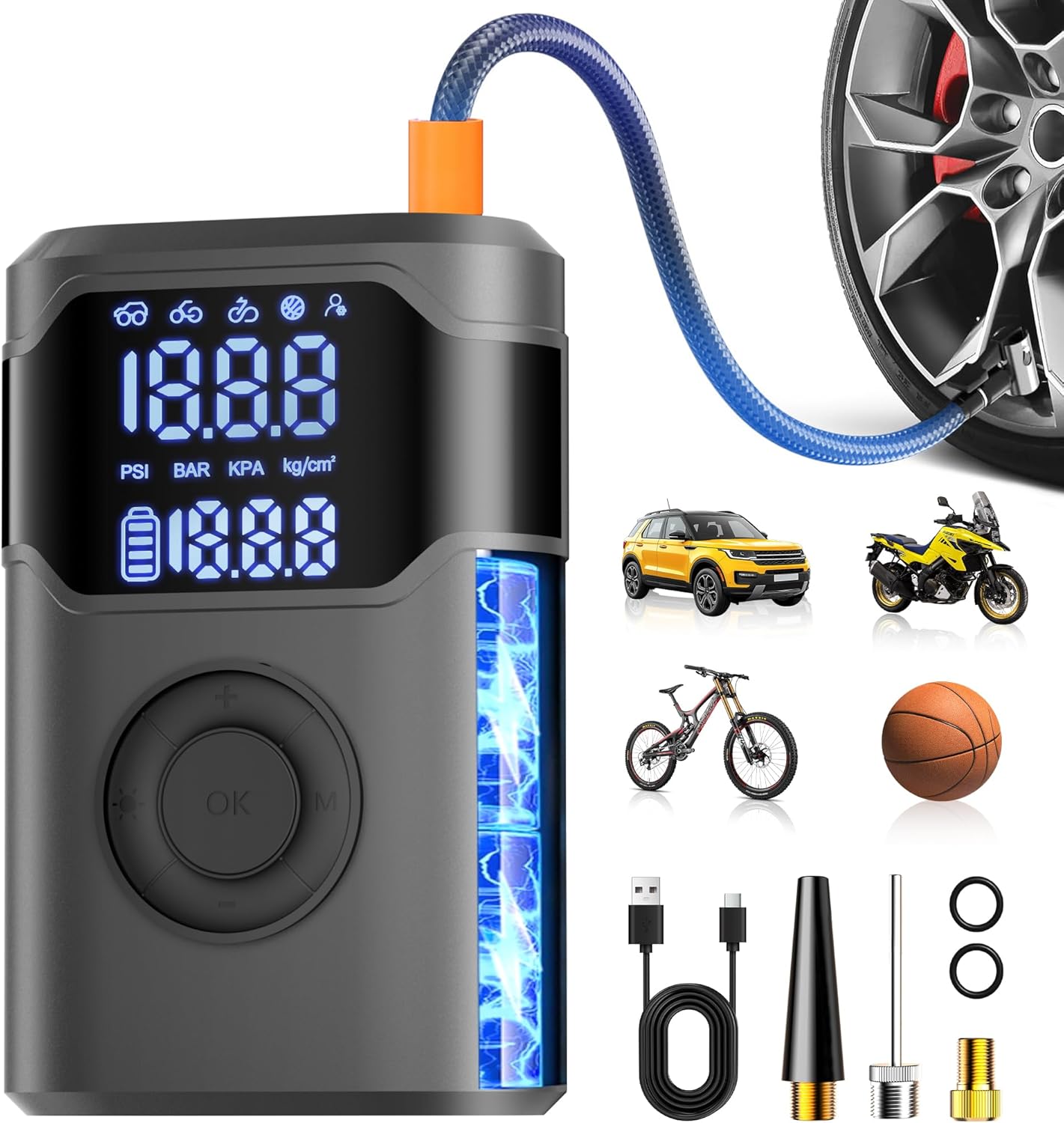
Image 1: The UZNY Portable Tire Inflator (Model D03) shown with its various accessories, including the air hose, USB-C charging cable, and different valve adapters for versatile use.
4. Product Overview
Familiarize yourself with the components of your UZNY Portable Tire Inflator:
- Digital Display: Shows real-time pressure, preset pressure, battery level, and selected mode/unit.
- Control Buttons:
- OK Button: Power on/off, start/stop inflation, confirm selection.
- '+' / '-' Buttons: Adjust preset pressure values.
- 'M' Button: Cycle through inflation modes (Car, Motorcycle, Bike, Ball) and pressure units (PSI, BAR, KPA, kg/cm²).
- Air Hose Port: Connection point for the air hose.
- LED Light: Provides illumination for use in low-light conditions.
- USB-C Charging Port: For recharging the device.
- USB-A Output Port: Functions as a power bank to charge other devices.
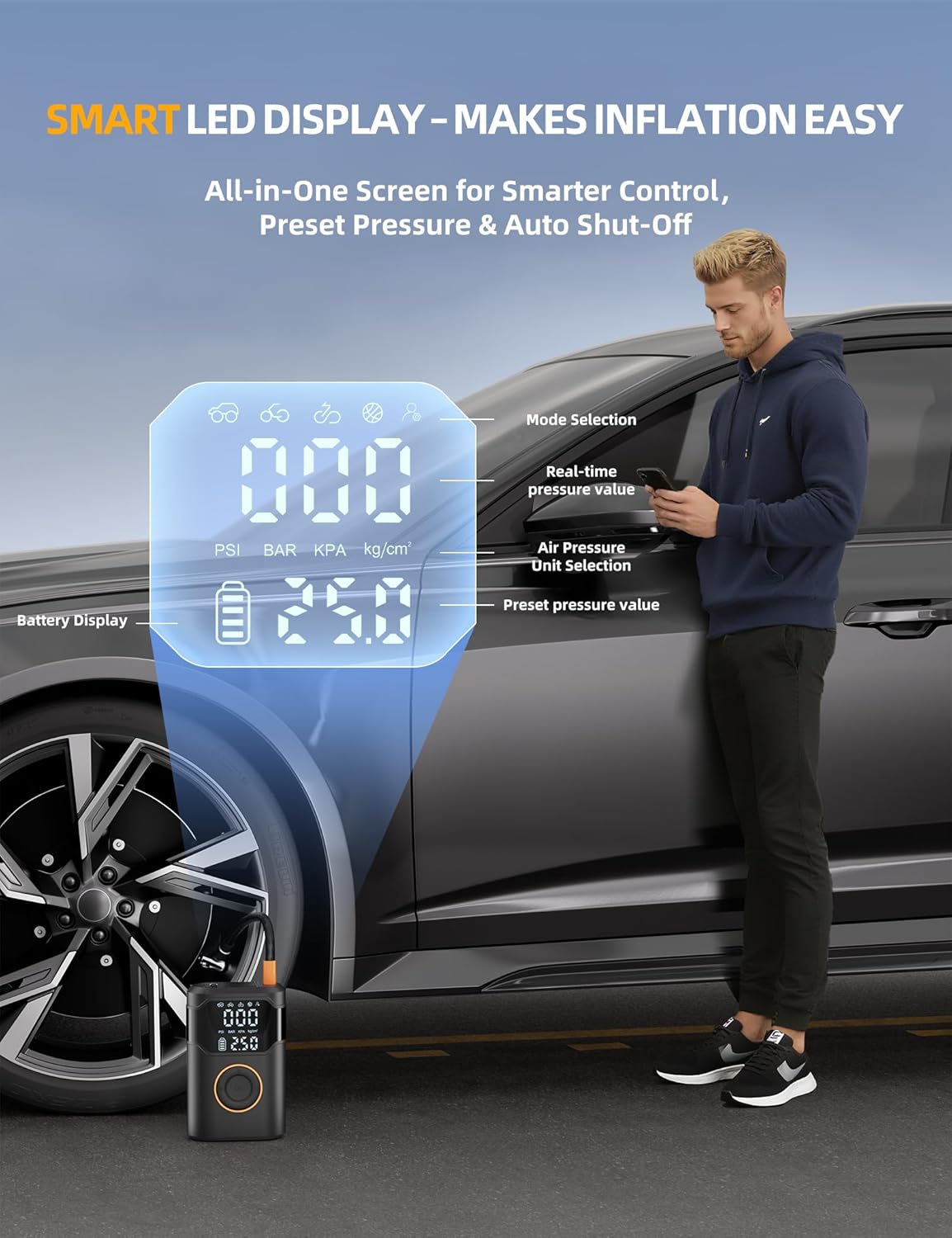
Image 2: A detailed view of the inflator's digital display, showing the battery indicator, real-time pressure, unit selection, mode selection icons, and the control buttons (OK, +, -, M).
5. Charging the Device
Before first use, fully charge the inflator. The device is powered by an internal lithium battery.
- Connect the provided USB-C charging cable to the inflator's USB-C port.
- Connect the other end of the USB-C cable to a compatible USB power adapter (not included) or a USB port on a computer.
- The battery indicator on the digital display will show charging status. It will typically show a full battery icon or stop blinking when fully charged.
- A full charge typically takes 3-4 hours.
Note: The device can also function as a power bank. Connect your external device to the USB-A output port to charge it.
6. Setup and Preparation
- Attach Air Hose: Screw the air hose securely into the air hose port on the top of the inflator.
- Select Adapter:
- For Schrader valves (common on cars, motorcycles, and some bikes), directly connect the air hose nozzle.
- For Presta valves (common on road bikes), screw the Presta valve adapter onto the Presta valve, then connect the air hose nozzle to the adapter.
- For sports balls, screw the needle valve adapter onto the air hose nozzle.
- For inflatable toys or swim rings, screw the nozzle adapter onto the air hose nozzle.
- Connect to Item: Securely attach the appropriate adapter/nozzle to the item you wish to inflate. Ensure a tight seal to prevent air leakage.
7. Operating Instructions
- Power On: Press and hold the OK button for 3 seconds to turn on the inflator. The digital display will illuminate.
- Check Current Pressure: Once connected to an item, the display will show the current pressure.
- Select Mode: Press the 'M' button repeatedly to cycle through the preset inflation modes: Car, Motorcycle, Bike, and Ball. Each mode has a default pressure value.
- Select Pressure Unit: In any mode, press and hold the 'M' button for 3 seconds to switch between pressure units (PSI, BAR, KPA, kg/cm²).
- Set Target Pressure: Use the '+' and '-' buttons to adjust the desired target pressure. Refer to the item's recommended pressure.
- Start Inflation: Press the OK button to begin inflation. The inflator will automatically stop once the target pressure is reached.
- Stop Inflation Manually: To stop inflation before the target pressure is reached, press the OK button again.
- Disconnect: Carefully disconnect the air hose from the item and then from the inflator. A small amount of air may escape during disconnection, which is normal.
- Power Off: Press and hold the OK button for 3 seconds to turn off the inflator. The device will also automatically power off after a period of inactivity.
Using the LED Light
The inflator includes an LED light for visibility in dark environments.
- With the device powered on, press the 'M' button twice quickly to turn on the LED light.
- Press the 'M' button twice quickly again to cycle through light modes (e.g., steady on, flashing, SOS).
- Press the 'M' button twice quickly a third time to turn off the LED light.

Image 3: The inflator's display illustrating the four preset inflation modes: Car, Motorcycle, Bike, and Ball, each with typical PSI ranges indicated.

Image 4: A compatibility chart detailing typical PSI ranges for passenger cars, mountain/city bikes, road bikes, motorcycles, balls, and swim rings, along with common size examples.
8. Maintenance
- Cleaning: Wipe the exterior of the inflator with a soft, damp cloth. Do not use harsh chemicals or abrasive cleaners. Ensure no water enters the ports.
- Storage: Store the device and its accessories in the provided storage bag in a cool, dry place, away from direct sunlight and extreme temperatures.
- Battery Care: To prolong battery life, charge the device at least once every three months if not used regularly. Avoid fully discharging the battery frequently.
9. Troubleshooting
| Problem | Possible Cause | Solution |
|---|---|---|
| Device does not power on. | Low battery; not holding OK button long enough. | Charge the device fully. Press and hold the OK button for 3 seconds. |
| Inflator not inflating. | Hose not securely connected; target pressure already reached; low battery. | Ensure hose is tight. Check current pressure. Charge the device. |
| Air leaks during inflation. | Loose connection; incorrect adapter. | Tighten all connections. Ensure the correct adapter is used and properly attached. |
| Inaccurate pressure reading. | Sensor obstruction; device malfunction. | Ensure the valve stem is clean. If problem persists, contact support. |
| Device overheats. | Prolonged continuous use. | Allow the device to cool down for at least 15 minutes before resuming use. |
10. Specifications
| Feature | Detail |
|---|---|
| Model Number | D03 |
| Brand | UZNY |
| Maximum Pressure | 150 PSI (Pound per Square Inch) |
| Power Source | Battery Powered (Lithium Polymer) |
| Input Charging | USB-C |
| Output (Power Bank) | USB-A |
| Special Features | Cordless, Digital Gauge, Auto-Off, LED Light |
| Item Weight | 540 g |
| Dimensions | Approximately 14.91 x 9.3 x 9.19 cm (Parcel Dimensions) |
| Included Components | Air Hose, USB-C Cable, Adapters (Presta, Needle, Nozzle) |
11. Warranty and Support
For warranty information or technical support, please refer to the purchase platform or contact the seller directly. Keep your proof of purchase for any warranty claims.