
Product Overview
The YITAHOME L Shaped Desk is a versatile and functional addition to any home office or gaming setup. Designed for maximizing workspace, it features an L-shaped configuration, integrated power outlets and USB ports, customizable RGB LED lighting, a lift-top section for sit-to-stand functionality, and ample storage including drawers and a file cabinet.
This desk is constructed from durable P2 MDF, ensuring stability and longevity. Its thoughtful design aims to enhance productivity and comfort for various activities, from working and studying to gaming.

Image: The YITAHOME L Shaped Desk in a modern office setting, showcasing its L-shape, integrated LED lighting, and multiple monitor setup.
Setup and Assembly
Assembly of the YITAHOME L Shaped Desk is required. It is recommended that two individuals participate in the assembly process to ensure ease and safety. A screwdriver is the primary tool needed for assembly, and all necessary fittings are included in the package.
Please refer to the included detailed instruction manual and diagrams for step-by-step guidance. Ensure all components are present before beginning assembly. The desk dimensions are approximately 59"D x 59"W x 36.4"H, so plan your space accordingly.

Image: A technical diagram illustrating the precise dimensions of the YITAHOME L Shaped Desk, including various sections and storage components.
Operating Instructions
LED Light Strips
The desk features RGB LED light strips that can be controlled via a dedicated phone application or a physical switch. The app allows for full customization of colors, selection from various modes including music sync, and setting timer functions to create an optimal ambiance for work or leisure.

Image: The YITAHome L Shaped Desk illuminated by multi-color RGB LED light strips, demonstrating the various color options and control methods via a smartphone app.
Integrated Charging Station
A convenient charging station is built into the desk, providing 2 USB ports and 4 standard AC power outlets. This station is powered by a 6.56ft power cord, allowing for easy charging of computers, laptops, phones, tablets, printers, and other electronic devices directly from your workspace.

Image: A close-up view of the integrated power strip on the desk, showing 4 AC outlets and 2 USB ports, with a phone charging via USB.
Lift-Top Functionality
The right section of the desk features a lift-top mechanism, enabling users to transition from a sitting to a standing working position. This feature helps alleviate stress from prolonged sitting and promotes better posture. The monitor riser also contributes to ergonomic setup.
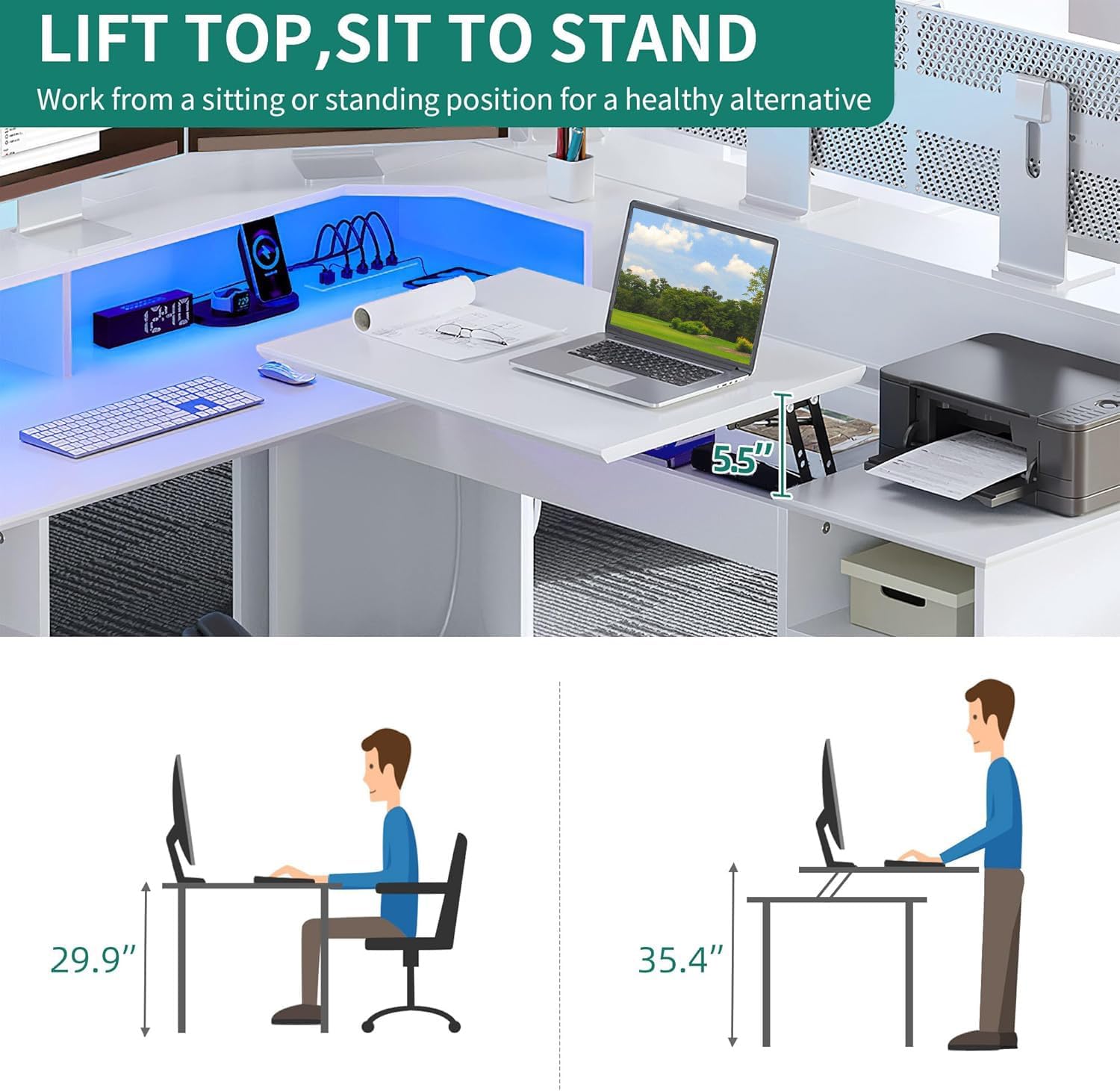
Image: An illustration demonstrating the lift-top feature of the desk, allowing for comfortable sit-to-stand transitions, with height comparisons for sitting and standing positions.
Storage Features
The desk provides extensive storage options, including two smooth-gliding drawers, a dedicated file cabinet, and open storage shelves. These features are designed to accommodate monitors, laptops, books, printers, documents, and other office essentials, helping to maintain an organized workspace.

Image: A close-up view of the multifunctional file drawer, showing its capacity for letter and A4 size hanging folders, and its use as a general storage cabinet.
Maintenance
To maintain the appearance and longevity of your YITAHOME L Shaped Desk, regularly wipe surfaces with a damp or dry cloth. Avoid using harsh chemicals or abrasive cleaners, as these may damage the laminated finish. Ensure liquids are promptly wiped away to prevent water damage.
Troubleshooting
- Assembly Difficulties: If you encounter issues with aligning parts or pre-drilled holes during assembly, double-check the instruction manual diagrams. Ensure you are using the correct hardware for each step. Sometimes, slight adjustments or loosening adjacent screws can help with alignment before final tightening.
- LED Lights Not Functioning: Verify that the LED light strip is properly connected to its power source and that the power cord is securely plugged into a working outlet. If using the app, ensure Bluetooth is enabled on your device and the app is correctly paired with the lights.
- Power Outlets Not Working: Check the main power cord connection to the wall outlet. Ensure the desk's internal power strip is securely connected. If an individual outlet is not working, try a different device to confirm the issue is with the outlet and not the device.
- Lift-Top Mechanism Stiffness: If the lift-top feels stiff, ensure no objects are obstructing its movement. The mechanism is designed for smooth operation, but new units may require a few cycles to loosen. Avoid forcing the top if it resists movement.
Specifications
| Feature | Detail |
|---|---|
| Brand | YITAHOME |
| Model Number | MAYIHQw7JL |
| Product Dimensions | 59"D x 59"W x 36.4"H |
| Color | White |
| Material | Engineered Wood (P2 MDF) |
| Weight | 75 Pounds |
| Maximum Weight Recommendation | 600 Pounds |
| Power Outlets | 4 AC Outlets (120V/12A) |
| USB Ports | 2 USB Ports (5V/2A) |
| Power Cord Length | 6.56 Feet |
| LED Lights | RGB, App/Switch Controlled, Music Sync, Timer Function |
| Storage Options | 2 Drawers, 1 File Cabinet, Open Shelves |
| Assembly Required | Yes (Recommended 2 people) |
| Included Components | 1 x L Shaped Desk, 1 x Instructions Manual, 1 x Packet of Fittings |
Warranty and Support
The YITAHOME L Shaped Desk comes with a limited manufacturer's warranty. This warranty typically covers defects in materials and workmanship under normal use. For specific details regarding the warranty period and coverage, please refer to the warranty information provided in your product packaging or contact YITAHOME customer support directly.
For any questions, concerns, or assistance with your product, please reach out to YITAHOME customer service. Contact information can usually be found on the brand's official website or within the product documentation.