
Nitehop ZQ07052
Nitehop 100W RGB 3in1 Profile Stage Spotlight User Manual
Model: ZQ07052
1. Introduction
Thank you for choosing the Nitehop 100W RGB 3in1 Profile Stage Spotlight. This manual provides essential information for the safe and effective operation, setup, and maintenance of your lighting fixture. Please read this manual thoroughly before use and retain it for future reference.
1.1. Product Overview
The Nitehop 100W RGB 3in1 Profile Stage Spotlight is a versatile lighting fixture designed for various applications including stage shows, DJ events, parties, and weddings. It features a powerful 100W RGB COB LED, offering pure and even color mixing with a flexible 25° beam angle and adjustable color temperature from 3200K to 5600K. Multiple control modes, including DMX512, ensure adaptability to professional lighting setups.

Image 1.1: The Nitehop 100W RGB 3in1 Profile Stage Spotlight, showcasing its compact design and adjustable bracket.
1.2. What's in the Box

Image 1.2: Visual representation of the items included in the product packaging.
- 1x Nitehop 100W RGB 3in1 Profile Stage Spotlight (Lamp)
- 1x Mounting Handle/Bracket
- 2x Knobs + Gaskets for mounting
- 1x Power Cable
- 1x Instruction Manual
2. Safety Information
WARNING: To prevent fire and electric shock, do not expose this fixture to rain or moisture. Do not operate the fixture if the power cord is frayed or broken. Always disconnect from power before servicing or cleaning.
- Ensure the power supply voltage matches the fixture's requirements (AC110V-240V).
- Do not open the housing; there are no user-serviceable parts inside. Refer all servicing to qualified personnel.
- Avoid direct eye exposure to the light source.
- Ensure adequate ventilation around the fixture to prevent overheating. Do not block ventilation openings.
- Mount the fixture securely using appropriate hardware and ensure it is stable.
- Keep the fixture away from flammable materials.
- This product is for indoor use only unless otherwise specified.
3. Product Features
- High-Efficiency Full-Color Light Source: Equipped with a 100W RGB COB bead for pure, even color mixing. Features a high-definition optical lens for clear, soft, and finely distributed light.
- Flexible Lighting Control: Supports manual focus and spot zoom for precise adjustment of focus and spot size. Includes built-in dynamic effects such as jump, gradient, pulse, and strobe (1-20Hz).
- Multi-Mode Intelligent Operation: Offers autonomous, voice-activated, master-slave, and DMX control modes. Compatible with standard DMX512, featuring 7-channel control and a three-core XLR input/output interface.
- Long Life and Stable Performance: LED light source boasts an average lifespan of 10,000 hours. Supports 0-100% linear dimming and 1-20Hz strobe effects. Operates with an AC110V-240V input voltage range.
- Sturdy and Durable Design: Constructed from aluminum, iron, and reinforced plastic. Features a 4-digit digital display interface for intuitive control.

Image 3.1: Key features including the optical lens, manual focus, adjustable beam, and heat dissipation system.
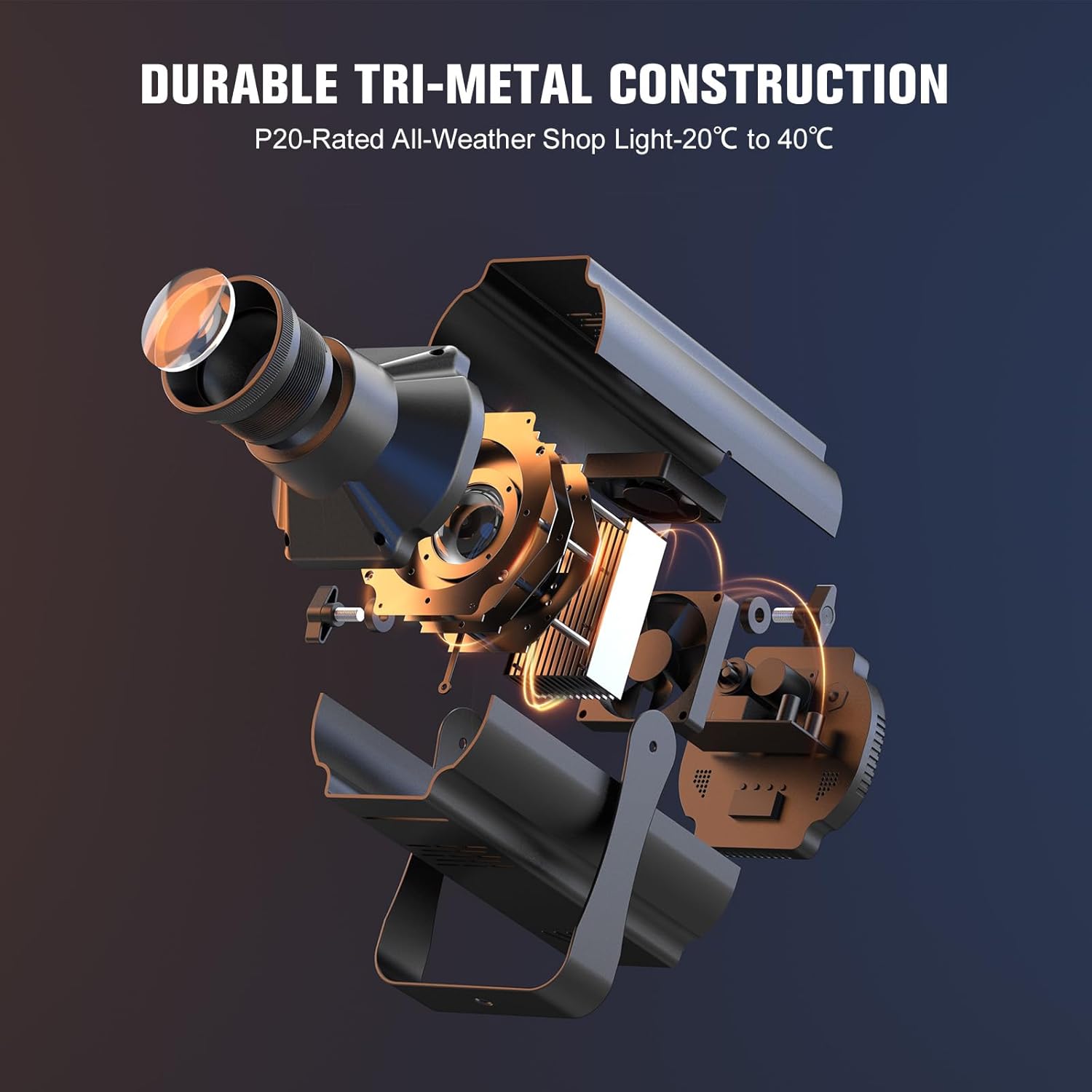
Image 3.2: An exploded diagram illustrating the internal structure and durable tri-metal construction of the spotlight.
4. Setup
4.1. Mounting the Fixture
- Attach the included mounting handle/bracket to the sides of the spotlight using the provided knobs and gaskets. Ensure they are tightened securely.
- Determine the desired mounting location. The bracket allows for floor standing, truss mounting (with an additional clamp, not included), or wall mounting.
- Secure the fixture firmly to the chosen surface or truss. Always ensure the mounting point can support the weight of the fixture.
4.2. Power Connection
- Connect the power cable to the power input on the rear of the fixture.
- Plug the other end of the power cable into a compatible AC110V-240V power outlet.
- The fixture will power on and the digital display will illuminate.
5. Operating Instructions
5.1. Control Panel Overview
The rear of the fixture features a 4-digit digital display and four menu buttons (MENU, UP, DOWN, ENTER) for navigating settings and selecting modes.
5.2. Control Modes
- Manual Control: Use the menu buttons to directly select colors, effects, and adjust parameters.
- DMX512 Control: Connect a DMX controller to the XLR input/output ports. The fixture supports 7 DMX channels for comprehensive control over color, dimming, and effects. Refer to the DMX chart in the full manual for channel assignments.
- Auto Mode: The fixture cycles through pre-programmed lighting sequences automatically.
- Sound-Activated Mode: The lighting effects respond to ambient sound or music detected by the built-in microphone.
- Master-Slave Mode: Link multiple fixtures together. Set one unit as the master, and others as slaves. Slave units will mirror the master's operation.
5.3. Color Mixing and Effects
The 100W RGB COB LED allows for a wide spectrum of colors and dynamic effects.

Image 5.1: Examples of various colors and color mixes achievable with the RGB 3-in-1 LED.
- RGB 3in1: Create custom colors by mixing Red, Green, and Blue intensities.
- Dynamic Effects: Utilize built-in Jump, Gradient, Pulse, and Strobe effects. Strobe speed is adjustable from 1-20Hz.
5.4. Beam Adjustment
The fixture offers manual control over the light beam.

Image 5.2: Demonstrates the ability to adjust the beam from a wide, soft floodlight to a narrow, sharp spotlight.
- Manual Focus: Rotate the lens ring to achieve a sharp or soft focus for your projection.
- Spot Zoom: Adjust the beam angle to create a wide floodlight or a narrow pinspot.
5.5. Dimming
The fixture supports smooth linear dimming from 0% to 100%.

Image 5.3: Visualizing the smooth 0-100% dimming functionality.
6. Maintenance
Regular maintenance ensures optimal performance and extends the lifespan of your Nitehop Profile Stage Spotlight.
- Cleaning: Periodically clean the exterior of the fixture with a soft, dry cloth. For the lens, use a soft, lint-free cloth and a mild lens cleaning solution. Do not use harsh chemicals or abrasive materials.
- Ventilation: Ensure all ventilation openings are clear of dust and debris to maintain proper airflow and prevent overheating.
- Inspection: Regularly inspect the power cable for any signs of damage (cuts, fraying). If damage is found, discontinue use and replace the cable immediately. Check all mounting hardware for tightness.
- Storage: When not in use, store the fixture in a cool, dry place, protected from dust and extreme temperatures.
7. Troubleshooting
If you encounter issues with your Nitehop Profile Stage Spotlight, refer to the following common problems and solutions:
| Problem | Possible Cause | Solution |
|---|---|---|
| Fixture does not power on | No power supply; faulty cable; power switch off | Check power connection, wall outlet, and power cable. Ensure the power switch is on. |
| No light output | Dimmer setting too low; fixture in blackout mode; LED failure | Increase dimmer level. Check DMX settings for blackout. If LED failure, contact support. |
| Incorrect colors or effects | Incorrect DMX address; wrong mode selected; DMX signal issue | Verify DMX address and mode settings. Check DMX cable connections. |
| Fixture overheating | Blocked ventilation; prolonged use in high ambient temperature | Ensure ventilation openings are clear. Operate in a well-ventilated area. Allow cooling time. |
| Beam is blurry or unfocused | Focus ring not adjusted | Manually adjust the focus ring on the lens until the desired sharpness is achieved. |
If the problem persists after attempting these solutions, please contact Nitehop customer support.
8. Specifications

Image 8.1: Physical dimensions and weight of the spotlight.
- Model Number: ZQ07052
- Light Source: 100W RGB 3in1 COB LED
- Beam Angle: 25°
- Color Temperature Range: 3200K-5600K
- Control Modes: Autonomous, Voice-activated, Master-Slave, DMX512 (7-channel)
- Dimming: 0-100% Linear
- Strobe: 1-20Hz
- Lifespan: Approximately 10,000 hours
- Input Voltage: AC110V-240V
- Material: Aluminum, Iron, Plastic
- Product Dimensions: 15.52"L x 7.47"W x 7.47"H
- Item Weight: 5.73 pounds
- Manufacturer: Shenzhen Zhuoqiong Technology Co., Ltd.
9. Warranty and Support
For warranty information and customer support, please refer to the documentation provided at the time of purchase or contact your retailer/manufacturer directly. Keep your proof of purchase for any warranty claims.