
1. Product Overview
The GISNPA 5-in-1 Digital PH Water Tester is a versatile instrument designed for precise measurement of various water quality parameters. This device integrates functions to measure pH (acidity and alkalinity), TDS (Total Dissolved Solids), EC (Electrical Conductivity), Salinity (salt content), and Temperature. It is engineered for high accuracy and ease of use across a wide range of applications, including household drinking water, hydroponics, swimming pools, aquariums, and laboratories.

Image 1.1: The GISNPA 5-in-1 Digital PH Water Tester, showcasing its compact design and digital display, with water splashing around the probe end.
2. Key Features
- 5-in-1 Functionality: Measures pH, TDS, EC, Salinity, and Temperature with a single device. Mode switching is performed via the MODE/CAL key.
- Multiple Salinity Test Modes: Offers three modes for diverse applications: general salinity (0-9999 ppm), seawater (10-200 ppt), and food (0.01-25%). Note that TDS and salinity share units; ensure the correct mode is selected for accurate salinity readings.
- High Accuracy: Equipped with platinum-plated electrodes and a high-precision algorithm for swift and accurate reactions.
- Data Hold Function: Stabilize the measured value instantly by pressing the HOLD/TEMP button.
- LCD Backlit Display: Features a large green backlit LCD for clear viewing in various lighting conditions.
- Automatic Temperature Compensation (ATC): Ensures optimal readings by resolving inaccuracies caused by varying liquid temperatures, with an extended range of 0 °C-60 °C (32 °F-140 °F).
- Auto Power-Off: Automatically turns off after 5 minutes of inactivity to conserve battery life.

Image 2.1: Diagram illustrating the components of the high-accuracy electrode, including the Glass PH Sensor, Temperature Sensor, TDS/EC/Salinity sensor, and Reference Electrode.

Image 2.2: Close-up view of the meter's LCD backlit display, showing clear readings for pH and temperature.
3. What's in the Box
Upon opening the package, please verify that all the following items are included:
- GISNPA 5-in-1 Digital PH Water Tester
- pH Buffer Powder (4.00, 6.86, and 9.18) - 3 sachets
- User Manual
- LR44 Batteries (3, pre-installed or included separately)
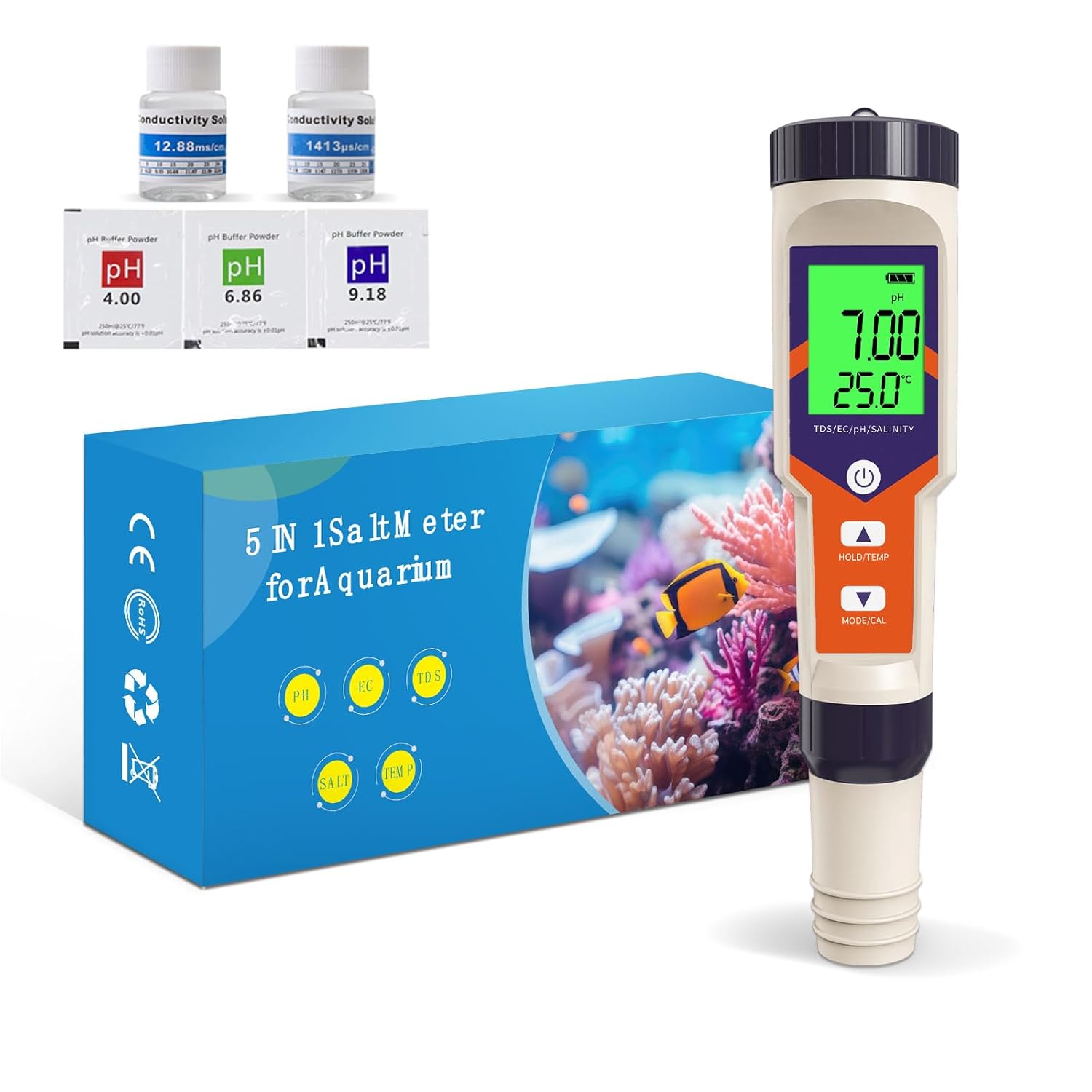
Image 3.1: Contents of the product package, showing the 5-in-1 meter, calibration powders, and packaging.
4. Setup and Battery Installation
The meter typically comes with batteries pre-installed. If not, or if replacement is needed:
- Locate the battery compartment, usually at the top of the device.
- Open the compartment cover.
- Insert three LR44 button cell batteries, ensuring correct polarity (+/-).
- Close the battery compartment securely.
Before first use, remove the protective cap from the electrode. Rinse the electrode with distilled water and gently wipe dry.
5. Calibration
For accurate measurements, regular calibration is essential. The meter supports automatic calibration for pH and can be calibrated for EC/TDS/Salinity.
5.1. pH Calibration
The meter comes with pH 4.00, 6.86, and 9.18 buffer powders. Prepare the calibration solutions by dissolving each powder sachet in 250ml of distilled water. Ensure the water temperature is approximately 25°C (77°F) for optimal accuracy.
- Turn on the meter by pressing the power button.
- Press the MODE/CAL button to switch to pH mode.
- Immerse the electrode into the pH 6.86 buffer solution. Stir gently and wait for the reading to stabilize.
- Long press the MODE/CAL button until "CAL" appears on the screen. The meter will automatically recognize the buffer solution and calibrate. Once calibration is complete, the meter will return to measurement mode.
- Rinse the electrode with distilled water.
- Repeat the process for pH 4.00 solution (for acidic range) and pH 9.18 solution (for alkaline range) if needed, following the same steps. Calibrating with 6.86 first, then 4.00 and/or 9.18, provides a more accurate range.


Image 5.1: pH buffer powders for calibration (4.00, 6.86, and 9.18), essential for accurate pH measurements.
5.2. EC/TDS/Salinity Calibration
While the meter is factory calibrated for EC/TDS/Salinity, recalibration may be necessary over time. Use a standard 1413 µS/cm or 12.88 mS/cm (12880 µS/cm) conductivity solution.
- Turn on the meter.
- Press the MODE/CAL button to switch to EC mode.
- Immerse the electrode into the standard conductivity solution (e.g., 1413 µS/cm). Stir gently and wait for the reading to stabilize.
- Long press the MODE/CAL button until "CAL" appears. The meter will automatically calibrate.
- Rinse the electrode with distilled water.

Image 5.2: Example of conductivity calibration solutions (12.88ms/cm and 1413us/cm) used for EC/TDS/Salinity calibration.
6. Operating Instructions
Follow these steps for general operation and specific measurements.
6.1. General Operation
- Power On/Off: Press the power button (usually marked with a circle and vertical line) to turn the meter on or off.
- Mode Switching: Press the MODE/CAL button repeatedly to cycle through pH, TDS, EC, Salinity, and Temperature display modes.
- Data Hold: Press the HOLD/TEMP button briefly to freeze the current reading on the display. Press again to release.
- Temperature Unit Conversion: Long press the HOLD/TEMP button to switch between Celsius (°C) and Fahrenheit (°F).
6.2. pH Measurement
- Ensure the meter is in pH mode.
- Immerse the electrode into the sample solution. The liquid level should be above the electrode but below the meter body.
- Stir gently and wait for the reading to stabilize. The pH value and temperature will be displayed.
- Record the reading once stable.

Image 6.1: A visual pH scale ranging from 0 to 14, indicating common substances and their corresponding pH levels, from acidic to alkaline.
6.3. TDS Measurement
TDS (Total Dissolved Solids) indicates the total concentration of dissolved substances in water.
- Switch the meter to TDS mode (usually displayed in ppm).
- Immerse the electrode into the sample solution.
- Stir gently and wait for the reading to stabilize.
- Record the TDS reading.

Image 6.2: Chart illustrating TDS levels in PPM and their corresponding water quality classifications, from drinking water to not recommended for drinking.

Image 6.3: Explanation of why TDS is measured, highlighting that high TDS indicates potential impurities and regular testing ensures water purity and safety.
6.4. EC Measurement
EC (Electrical Conductivity) measures the ability of water to conduct an electric current, which is related to the concentration of dissolved ions.
- Switch the meter to EC mode (usually displayed in µS/cm or mS/cm).
- Immerse the electrode into the sample solution.
- Stir gently and wait for the reading to stabilize.
- Record the EC reading.
6.5. Salinity Measurement
The meter offers specific modes for general, seawater, and food salinity testing.
- Switch the meter to the desired Salinity mode (ppm, ppt, or %).
- Immerse the electrode into the sample solution.
- Stir gently and wait for the reading to stabilize.
- Record the salinity reading.

Image 6.4: Visual representation of the three salinity test modes: Food Test (0.5%-2%), Seawater Test (30-35PPT), and Pool Test (2700-3400PPM).

Image 6.5: Diagram explaining the conversion between salinity units: 10000 PPM = 10 PPT = 1%.
6.6. Temperature Measurement
The meter displays temperature simultaneously with other measurements. You can switch between Celsius and Fahrenheit.
- Immerse the electrode into the sample solution.
- The temperature will be displayed on the lower part of the screen.
- Long press the HOLD/TEMP button to toggle between °C and °F.
6.7. Applications
The GISNPA 5-in-1 meter is suitable for a wide range of water testing needs:
- Household drinking water quality monitoring.
- Hydroponics and plant nutrient solution management.
- Swimming pool and spa water balance.
- Aquarium and fish tank water parameter checks.
- Laboratory testing and educational purposes.
- Detecting salt content in edible salt, saltwater ponds, and koi ponds.

Image 6.6: The pH meter being used to test water in a swimming pool, indicating optimal pH and salt levels for pool maintenance.

Image 6.7: The pH meter used in a hydroponic setup, emphasizing the importance of precise pH and EC measurements for healthy plant growth.

Image 6.8: Visual guide for optimal pH levels in aquariums, differentiating between freshwater and saltwater fish environments.
7. Maintenance
Proper maintenance ensures the longevity and accuracy of your meter.
- Cleaning the Electrode: After each use, rinse the electrode thoroughly with distilled or deionized water to remove any residue. Do not use tap water or harsh chemicals.
- Storage: Always replace the protective cap on the electrode when not in use. Store the meter in a cool, dry place. For prolonged storage, ensure the electrode is kept moist. Some pH meters require storage in a KCL solution; however, this specific model's instructions do not indicate this requirement.
- Battery Replacement: Replace batteries when the low battery indicator appears on the display to ensure consistent performance.
- Regular Calibration: Calibrate the meter regularly, especially if readings become inconsistent or after prolonged storage.
8. Troubleshooting
If you encounter issues with your GISNPA 5-in-1 Digital PH Water Tester, refer to the following common problems and solutions:
| Problem | Possible Cause | Solution |
|---|---|---|
| Inaccurate or Unstable Readings |
|
|
| Display is Blank or Faint |
|
|
| Meter Does Not Respond to Button Presses |
|
|
9. Specifications
| Parameter | Detail |
|---|---|
| Product Dimensions | 7 x 1.3 x 1.3 inches |
| Weight | 3.04 ounces |
| Item Model Number | YY-9909A |
| Batteries Required | 3 LR44 batteries (included) |
| Manufacturer | GISNPA |
| pH Range | 0.00 - 14.00 pH |
| TDS Range | 0 - 9999 ppm (general salinity shares this unit) |
| EC Range | 0 - 9999 µS/cm (microSiemens/cm) |
| Salinity Range |
|
| Temperature Range | 0 °C - 60 °C (32 °F - 140 °F) |
| Automatic Temperature Compensation (ATC) | Yes |
| Display | LCD with green backlight |
10. Warranty and Support
GISNPA is committed to providing high-quality products. While specific warranty details are not provided in this manual, please retain your purchase receipt as proof of purchase. For any technical support, troubleshooting assistance, or warranty inquiries, please contact GISNPA customer service through the retailer where the product was purchased or visit the official GISNPA website for contact information.
For more information about GISNPA and their commitment to water quality, you can visit their brand store: GISNPA Official Store.