
1. Introduction
This manual provides instructions for the assembly, operation, and maintenance of your Harpaq U-Shaped Full Corner Bed Frame, Model BS06. Please read all instructions carefully before assembly and use to ensure safe and proper functionality.
Safety Warnings
- Do not exceed the maximum weight recommendation of 800 pounds.
- Be cautious of sharp edges during assembly and use.
- Always follow the assembly instructions carefully to prevent instability or collapse.
- Ensure all connections are securely tightened before use.
2. Package Contents
All necessary components and hardware for assembly are included in the package. Please verify all parts are present and undamaged before beginning assembly. Refer to the separate assembly guide for a detailed list of parts.
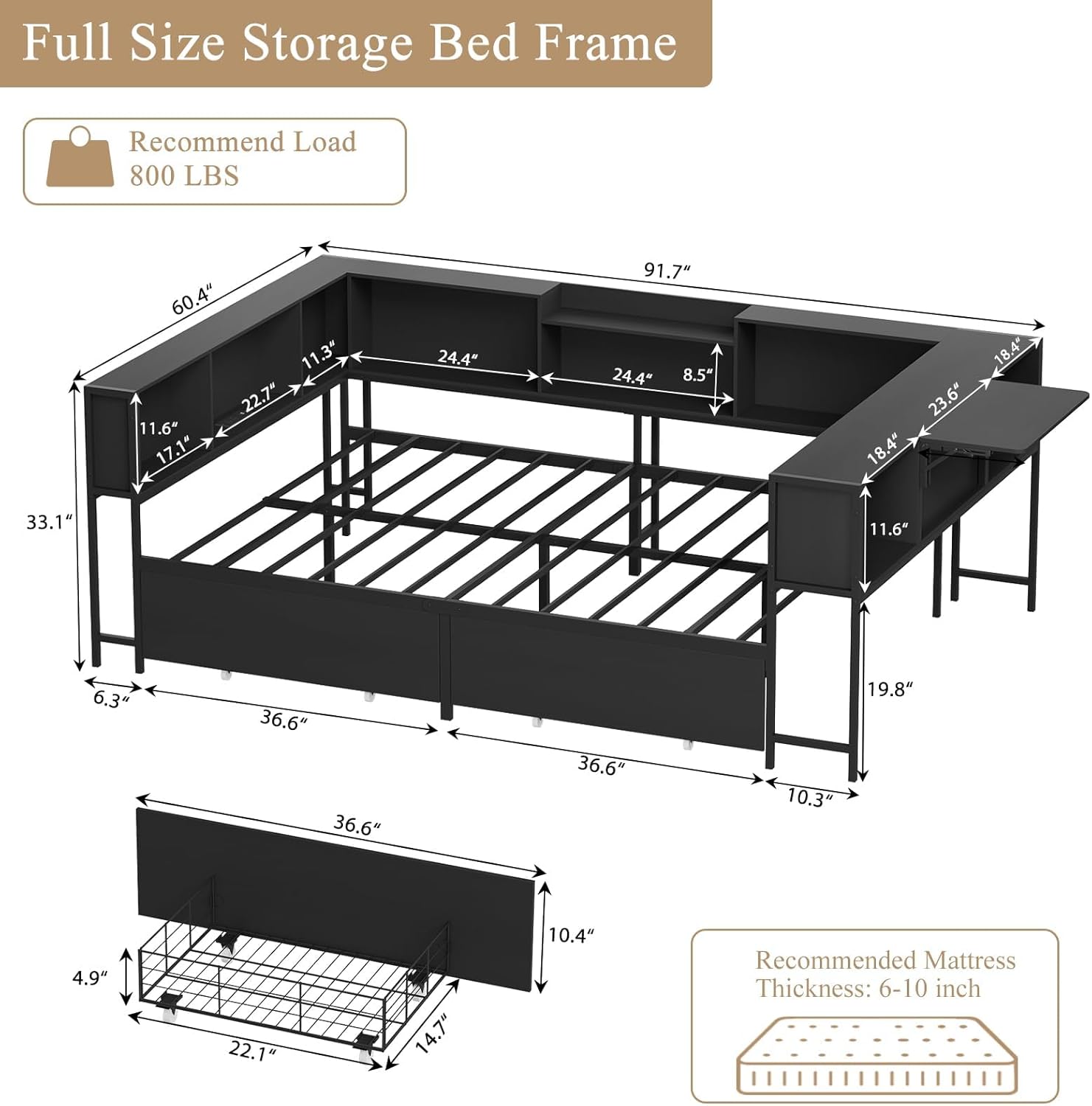
Figure 2.1: Overall dimensions and components of the Harpaq U-Shaped Full Corner Bed Frame.
3. Assembly Instructions
Detailed step-by-step assembly instructions are provided in a separate guide included with your product. Please follow these instructions carefully. Assembly typically requires two people for optimal safety and ease.
Key Assembly Considerations:
- The bed frame features a sturdy metal construction with 10 reinforced bars for reliable weight support.
- Twin wraparound connections are designed to reinforce stability.
- Ensure all bolts and screws are tightened securely but do not overtighten.

Figure 3.1: Details on support legs, embedded design, and U-slot mattress stopper for assembly and stability.

Figure 3.2: Structural overview of the bed frame components.
4. Operating Instructions
4.1 Foldable Desktop
The bed frame includes a foldable desktop designed for living and work. To use, simply extend the desktop from its stowed position. The metal hardware provides support. To stow, fold the desktop back into its compact position.

Figure 4.1: Foldable desktop in extended position.

Figure 4.2: Overview of the bed frame with the foldable desktop extended.
4.2 Charging Station
The headboard features a built-in charging station with two USB ports (5V/2.1A) and two AC outlets (125V/12A). Use these to charge electronic devices such as phones, tablets, or headphones directly from the bed frame. The power cord is 4.9 feet long.

Figure 4.3: Integrated charging station with USB and AC outlets.

Figure 4.4: Charging station specifications.
4.3 Storage Drawers
Two large-capacity storage drawers are located underneath the bed frame. Each drawer is equipped with four smooth wheels for easy access. These drawers are suitable for storing bed linen, clothing, and other essentials.

Figure 4.5: Under-bed storage drawers with wheels.

Figure 4.6: Under-bed storage drawers in use.
4.4 Bookcase Headboard
The U-shaped design incorporates a wrap-around storage bookcase, ideal for organizing books, vinyl records, toys, and other items. This feature helps maximize space in your bedroom.
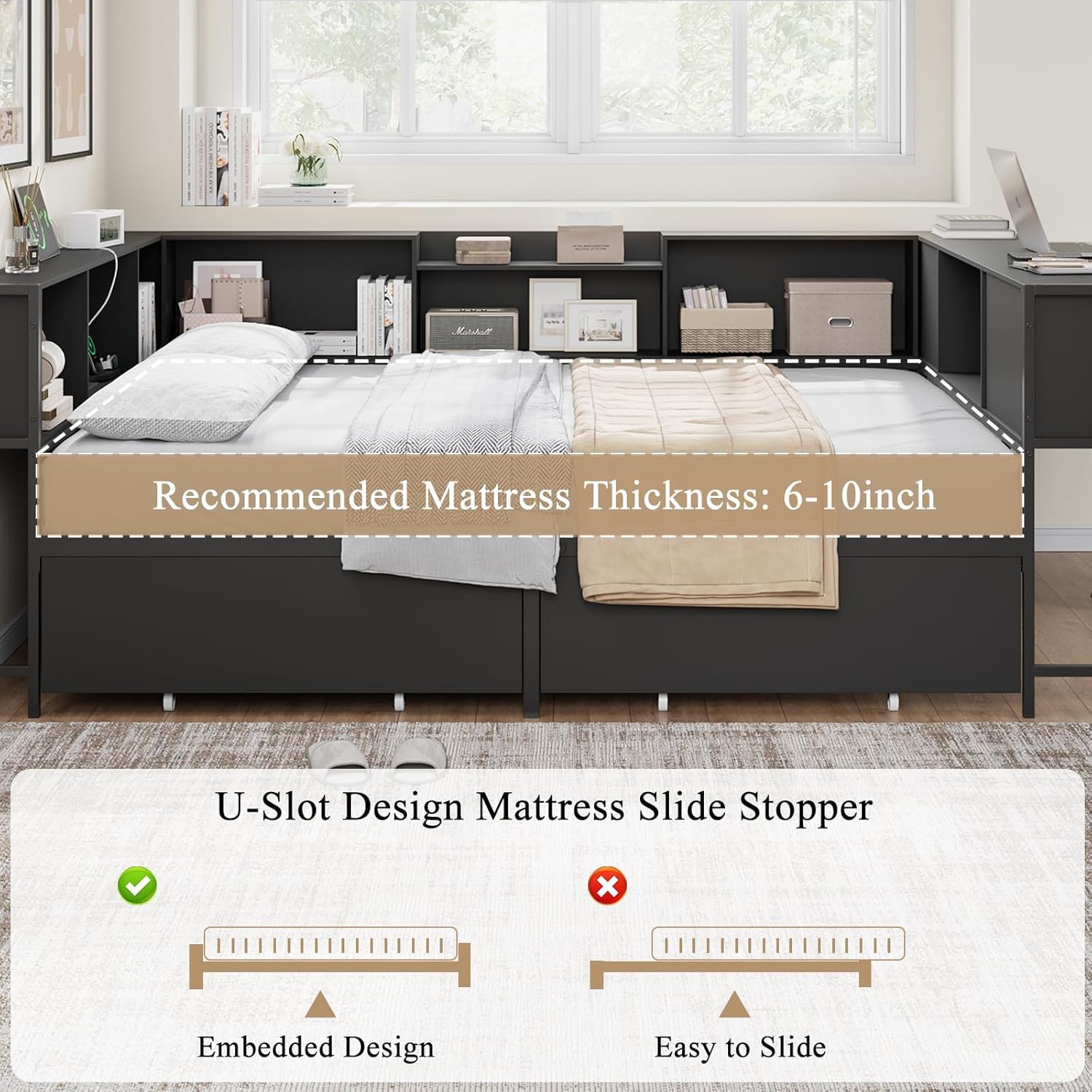
Figure 4.7: U-slot design for mattress stability and recommended mattress thickness.

Figure 4.8: Mattress placement within the U-slot design.
5. Maintenance
To maintain the appearance and longevity of your bed frame, dust regularly with a soft, dry cloth. Avoid using harsh chemicals or abrasive cleaners, as these may damage the finish. Periodically check all connections and tighten if necessary.
6. Troubleshooting
If you encounter any issues with your Harpaq U-Shaped Full Corner Bed Frame, please review the assembly instructions to ensure all steps were followed correctly and all connections are secure. For further assistance, contact customer support.
7. Specifications
| Feature | Detail |
|---|---|
| Model Number | BS06 |
| Size | U-Shaped Full |
| Product Dimensions | 91.7"L x 60.4"W x 33.1"H |
| Color | Black |
| Material | Engineered Wood, Metal |
| Item Weight | 128 pounds |
| Weight Capacity | Up to 800 pounds |
| Special Features | Charging Station, Foldable Desktop, No Box Spring Needed, With 2 Storage Drawers & Bookcase Headboard |
| Charging Station | 2 USB ports (5V/2.1A), 2 AC outlets (125V/12A) |
| Power Cord Length | 4.9 feet |
| Recommended Mattress Thickness | 6-10 inches |
| Assembly Required | Yes |
| Manufacturer | Harpaq |
8. Product Video
Video 8.1: An official product video showcasing the Harpaq U-Shaped Bed Frame, highlighting its features such as the foldable desktop, storage drawers, and charging station.
9. Warranty and Support
This product is typically covered by a 90-day return policy. For specific warranty details, product support, or to inquire about replacement parts, please refer to your purchase documentation or contact Harpaq customer service directly. Contact information can usually be found on the seller's page or within your order details.