
Regevo AVA-S450
Regevo Bluetooth 5.4 Turntable Model AVA-S450 User Manual
Your guide to setting up, operating, and maintaining your Regevo turntable.
1. Introduction
Thank you for choosing the Regevo Bluetooth 5.4 Turntable Model AVA-S450. This manual provides essential information for the safe and efficient operation of your new record player. Please read it thoroughly before use and retain it for future reference.
2. Product Overview
The Regevo AVA-S450 is a versatile turntable designed for playing vinyl records and offering modern connectivity options. It features a classic wooden design combined with contemporary technology.
Key Features:
- Bluetooth 5.4 Connectivity: Supports both receiving audio from external devices (e.g., smartphones) and transmitting audio to Bluetooth-enabled speakers or headphones.
- Integrated Stereo Speakers: Two 5-watt stereo speakers provide clear and warm audio playback.
- Multiple Playback Speeds: Compatible with 33, 45, and 78 RPM records. An included 45 RPM adapter supports single records.
- USB Recording: Convert vinyl records to MP3 or WAV digital files directly to a USB flash drive.
- Versatile Connectivity: Includes RCA output for external amplifiers/speakers, a 3.5mm AUX input for connecting other audio sources, and a headphone jack for private listening.
- Automatic Stop Function: The tonearm automatically lifts at the end of a record, protecting both the stylus and the vinyl.
- Removable Dust Cover: Protects the platter and tonearm from dust and scratches.

Figure 1: Regevo Bluetooth 5.4 Turntable Model AVA-S450. This image displays the turntable in its mahogany finish, with the clear dust cover open, revealing a vinyl record placed on the platter and the tonearm positioned over it. The control panel with the volume knob and function buttons is visible on the front right.
3. Setup
3.1 Unpacking
Carefully remove all components from the packaging. Ensure all parts listed in the 'Included Components' section of the specifications are present. Retain the packaging for future transport or storage.
3.2 Placement
Place the turntable on a stable, level surface away from direct sunlight, heat sources, and excessive dust or vibrations. Ensure adequate ventilation around the unit.
3.3 Power Connection
Connect the provided power adapter to the DC IN port on the back of the turntable and then plug it into a standard wall outlet.
3.4 Dust Cover
Attach the removable dust cover to the hinges at the back of the turntable. This cover protects the unit when not in use.
4. Operating Instructions
4.1 Playing Vinyl Records
- Power On: Turn the VOLUME knob clockwise to power on the unit.
- Select Speed: Adjust the speed selector switch (33/45/78 RPM) to match the record you are playing. Use the 45 RPM adapter for single records if needed.
- Place Record: Carefully place your vinyl record on the turntable platter.
- Position Tonearm: Release the tonearm lock. Gently lift the tonearm using the cue lever and position the stylus over the desired track on the record.
- Lower Tonearm: Slowly lower the tonearm using the cue lever. The stylus will make contact with the record, and playback will begin.
- Adjust Volume: Use the VOLUME knob to adjust the playback volume.
- Auto-Stop: The turntable features an auto-stop function that will lift the tonearm and stop the platter rotation when the record finishes.

Figure 2: Three-speed selectable playback. This image illustrates the turntable's compatibility with 7-inch, 10-inch, and 12-inch vinyl records, highlighting its support for 33, 45, and 78 RPM speeds.
4.2 Bluetooth Functionality
The Regevo AVA-S450 supports both Bluetooth audio reception and transmission.
4.2.1 Bluetooth Receiving (Playing from External Device to Turntable)
- Select BT IN Mode: Press the MODE button on the turntable until the Bluetooth indicator light flashes, indicating it is in receiving mode.
- Pair Device: On your smartphone or tablet, enable Bluetooth and search for 'Regevo AVA-S450'. Select it to pair.
- Play Audio: Once paired, you can play audio from your external device through the turntable's built-in speakers.
4.2.2 Bluetooth Transmitting (Playing Turntable to External Bluetooth Speaker/Headphones)
- Select BT OUT Mode: Press the MODE button on the turntable until the Bluetooth indicator light is solid, indicating it is in transmitting mode.
- Enable Pairing on External Device: Put your Bluetooth speaker or headphones into pairing mode.
- Connect: The turntable will automatically search for and connect to nearby Bluetooth audio devices. Once connected, audio from your vinyl records will play through the external device.

Figure 3: Bluetooth 5.4 functionality. This diagram visually explains how the turntable can receive music from a mobile phone (Bluetooth Receiving) and transmit vinyl audio to external smart speakers or headphones (Bluetooth Transmitting).
4.3 USB Recording
You can convert your vinyl records into digital MP3 or WAV files using a USB flash drive.
- Insert USB Drive: Insert a formatted USB flash drive into the USB port on the turntable.
- Start Playback: Begin playing the vinyl record you wish to record.
- Start Recording: Press the USB RECORD button (refer to the control panel diagram for location). The recording indicator light will illuminate.
- Stop Recording: Press the USB RECORD button again to stop recording. The recorded files will be saved to your USB drive.

Figure 4: Vinyl-to-Digital Recording. This image demonstrates the process of converting vinyl audio into digital MP3 files, which are then saved onto a USB flash drive connected to the turntable.
4.4 External Connections
The turntable offers various ports for connecting to other audio equipment.
- RCA Output: Connect the RCA output jacks (red for right, white for left) to the corresponding audio input on an external amplifier or powered speakers.
- AUX Input: Use a 3.5mm audio cable to connect an external audio source (e.g., MP3 player, smartphone) to the AUX IN port. Select AUX mode on the turntable to play audio from this source.
- Headphone Port: Plug standard 3.5mm headphones into the headphone jack for private listening.

Figure 5: Connectivity Options. This diagram details the RCA output for external speakers, AUX-In for audio devices like MP3 players, the USB port for playback and recording, and the headphone port for connecting headphones.
5. Maintenance
5.1 Cleaning the Unit
- Always unplug the unit from the power outlet before cleaning.
- Use a soft, dry cloth to wipe the exterior surfaces. Do not use abrasive cleaners, waxes, or solvents.
- The dust cover can be cleaned with a soft, damp cloth and mild soap, then dried thoroughly.
5.2 Stylus Care
- The stylus is delicate. Handle it with extreme care.
- Clean the stylus periodically using a soft brush, brushing gently from back to front.
- A worn stylus can damage records and degrade sound quality. Replace the stylus when signs of wear appear (typically after 300-500 hours of playback).
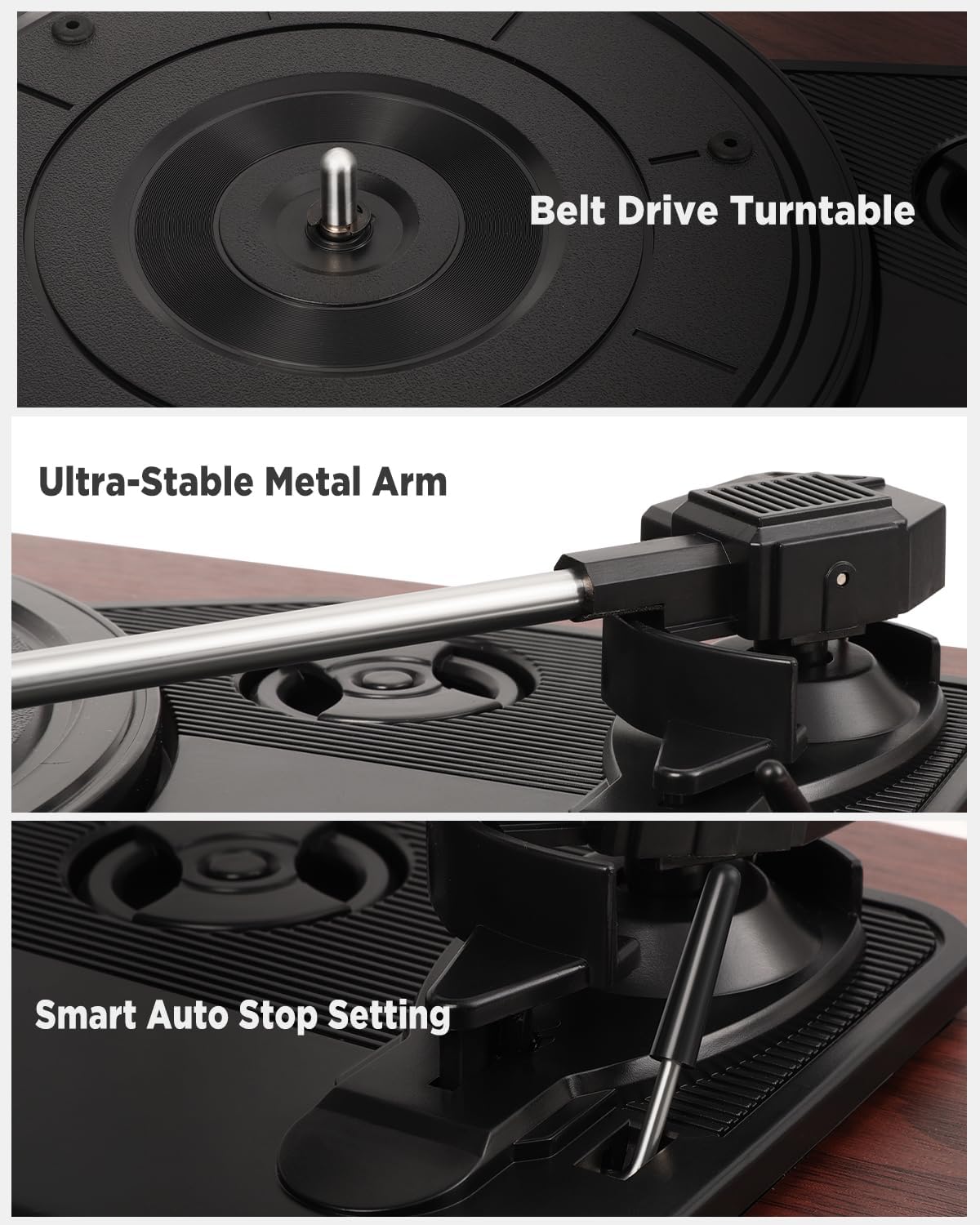
Figure 6: Internal Components. This image provides detailed views of the belt drive turntable, the ultra-stable metal tonearm, and the smart auto-stop setting mechanism.
6. Troubleshooting
| Problem | Possible Cause | Solution |
|---|---|---|
| No power | Power adapter not connected; outlet not active. | Ensure power adapter is securely connected and plugged into a working outlet. |
| No sound from speakers | Volume too low; incorrect mode selected; external speakers not connected/powered. | Increase volume. Ensure correct mode (e.g., PHONO for vinyl) is selected. If using external speakers, check their power and connections. |
| Record skipping | Record is dirty or scratched; stylus is worn or dirty; turntable not level; excessive vibration. | Clean record. Clean or replace stylus. Place turntable on a stable, level surface. Avoid placing near vibrating objects. |
| Bluetooth connection issues | Device too far; incorrect Bluetooth mode; interference. | Ensure devices are within range. Select correct Bluetooth mode (BT IN or BT OUT). Reduce interference from other wireless devices. |
| USB recording not working | USB drive not formatted correctly; USB drive full; USB drive not inserted properly. | Ensure USB drive is formatted to FAT32. Check available space. Reinsert USB drive. |
7. Specifications
- Brand: Regevo
- Model Name: AVA-S450
- Model Number: 3388651
- Color: Mahogany
- Connectivity: Bluetooth 5.4, RCA Output, 3.5mm AUX Input, 3.5mm Headphone Jack, USB Port
- Playback Speeds: 33 1/3 RPM, 45 RPM, 78 RPM
- Speakers: 2 x 5W Stereo Integrated Speakers
- Power Source: Corded Electric
- Special Features: Removable Dust Cover, Integrated Bluetooth Receiver, RCA Output, Adjustable Speed, Automatic Stop Setting
- Compatible Devices: Headphones, External Speakers, MP3 Players, Smartphones, Tablets
- Included Components: Power Adapter, Instruction Manual
- UPC: 627179150406
8. Warranty and Support
8.1 Manufacturer's Warranty
This Regevo turntable is covered by a 2-year manufacturer's warranty from the date of purchase. This warranty covers defects in materials and workmanship under normal use. Please retain your proof of purchase for warranty claims.
8.2 Customer Support
For any questions, technical assistance, or warranty inquiries, please contact Regevo customer service. Support is available 24 hours a day, 7 days a week.
Please refer to the contact information provided with your product packaging or visit the official Regevo website for the most up-to-date support details.
Ask a question about this manual
Ask about setup, troubleshooting, compatibility, parts, safety, or missing instructions. Manuals+ will review the question and use this page’s manual context to help answer it.