
Introduction
The Beffkkip ZK-AS21P is a high-performance 2.1 channel Bluetooth amplifier board designed for various audio applications. Featuring a TPA3255 chip, it delivers clean and powerful sound with two 300-watt stereo channels and support for a 600-watt subwoofer. This manual provides essential information for the safe and effective setup, operation, and maintenance of your amplifier board.
Safety Information
- Ensure the power supply voltage is within the specified range of 18-50V DC.
- Observe correct polarity when connecting the power supply. Reversing polarity can damage the device. A warning symbol on the board indicates this.
- Do not expose the amplifier board to moisture or extreme temperatures.
- Avoid touching components while the device is powered on.
- Ensure proper ventilation to prevent overheating. The integrated fan assists with cooling.
- Keep out of reach of children.
Package Contents
Upon opening the package, verify that all items are present and in good condition:
- Beffkkip ZK-AS21P Amplifier Board
- Quick Start Guide
- (Additional accessories may vary by package)
Product Overview
The ZK-AS21P amplifier board features a comprehensive layout for easy integration into your audio projects. Below is a diagram highlighting its key functions and wiring points.

Figure 1: ZK-AS21P Amplifier Board Functions and Wiring Diagram. This image shows the layout of the board, including the multifunctional knob, volume controls, input ports (LINE IN, USB/sound card), and speaker/subwoofer output terminals.
Key components include:
- Multifunctional Knob: Controls power, playback (pause, skip tracks).
- Volume Knobs: Individual controls for overall volume, left/right channel bass, left/right channel treble, subwoofer volume, and subwoofer frequency.
- Input Ports: LINE IN (3.5 mm audio jack) and USB/sound card input.
- Output Terminals: Dedicated terminals for right channel speaker, left channel speaker, and subwoofer speaker.
- Power Input: 18-50 VDC (5.5-2.5 DC female connector or 2P terminal block).
- Internal Components: Gold-plated high-current shielded DC connector, 6x high-capacity energy storage capacitors, 6x high-end electrolytic capacitors, 2x digital amplifier dedicated inductors, thickened silent heat sink, and 6x JRC2068 operational amplifiers.
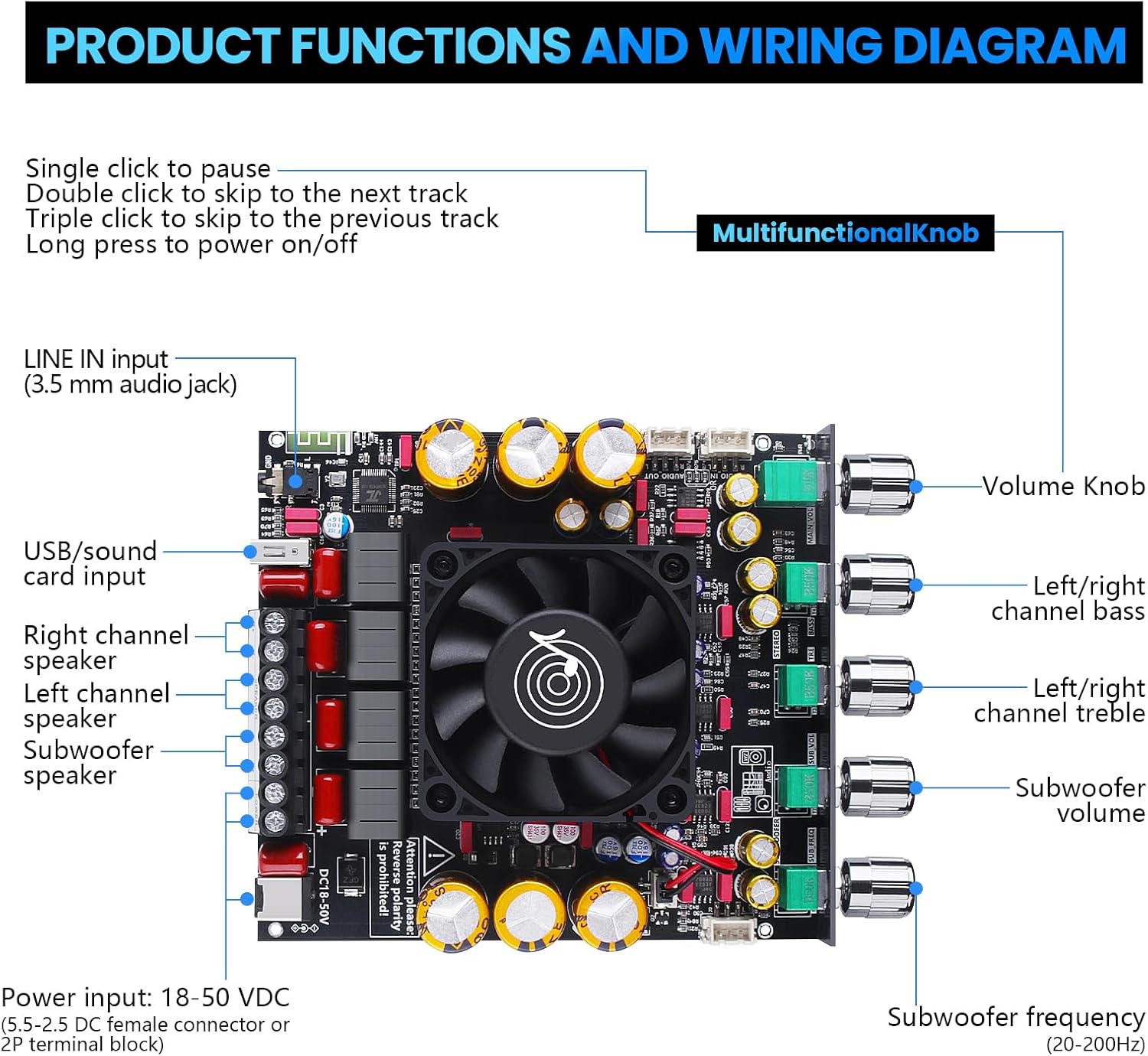
Figure 2: ZK-AS21P Amplifier Board Internal Components. This image highlights the various capacitors, inductors, heat sink, and operational amplifiers on the board.
Setup
1. Power Connection
Connect a DC power supply (18-50V) to the power input terminal. Ensure correct polarity: positive to positive, negative to negative. Reverse polarity will damage the board.
2. Speaker and Subwoofer Connection
Connect your passive speakers to the Left and Right channel speaker terminals. Connect your passive subwoofer to the subwoofer speaker terminals. Ensure secure connections for optimal performance.
3. Audio Input
- Bluetooth: Power on the device. The amplifier will enter Bluetooth pairing mode. Search for "ZK-AS21P" on your audio source device (e.g., smartphone, tablet) and connect.
- LINE IN: Connect an audio source (e.g., MP3 player, computer) to the 3.5 mm LINE IN jack using an audio cable.
- USB/Sound Card: Connect a device via the USB port for digital audio input.
4. Expansion Options
The ZK-AS21P offers several expansion possibilities for advanced users:

Figure 3: ZK-AS21P Expansion Options. This diagram illustrates three advanced configurations: Subwoofer Expansion, Modifying for Qualcomm Bluetooth, and using as a Microphone Preamp Board.
- Option 1: Subwoofer Expansion: Connect a pure power amplifier board to the subwoofer small signal output for enhanced subwoofer performance. Requires a power supply of 15-35VDC for the pure power amplifier board.
- Option 2: Modify Qualcomm Bluetooth: Integrate a Qualcomm decoding board via Expansion Port 1 and Expansion Port 2. Note: When using these ports, remove the three 0-ohm resistors R76, R75, and R74. The Qualcomm decoding board requires a power supply of 8-32VDC.
- Option 3: Microphone Preamp Board: Connect a microphone preamp board to Expansion Port 1 (connected to the microphone preamp board reverb input). The microphone preamp board requires a power supply of 8-26VDC.
Operating Instructions
Multifunctional Knob Operations
- Long Press: Power on/off the amplifier.
- Single Click: Pause/play audio.
- Double Click: Skip to the next track.
- Triple Click: Skip to the previous track.
Audio Adjustments
Use the individual rotary knobs to fine-tune your audio output:
- Volume Knob: Adjusts the overall output volume.
- Left/Right Channel Bass: Controls the bass level for the main stereo channels.
- Left/Right Channel Treble: Controls the treble level for the main stereo channels.
- Subwoofer Volume: Adjusts the output volume of the subwoofer.
- Subwoofer Frequency (20-200Hz): Sets the crossover frequency for the subwoofer, determining which low frequencies are sent to the subwoofer.
Maintenance
To ensure the longevity and optimal performance of your ZK-AS21P amplifier board, follow these maintenance guidelines:
- Cleaning: Disconnect power before cleaning. Use a soft, dry cloth to wipe the surface of the board. Avoid using liquid cleaners or solvents.
- Ventilation: Ensure the cooling fan and heat sink remain free of dust and obstructions. Periodically clean any accumulated dust with compressed air.
- Storage: When not in use for extended periods, store the board in a cool, dry place away from direct sunlight and moisture.
- Handling: Handle the board by its edges to avoid touching sensitive components.
Troubleshooting
| Problem | Possible Cause | Solution |
|---|---|---|
| No sound output. |
|
|
| Poor Bluetooth connection or frequent disconnections. |
|
|
| Distorted or unclear sound. |
|
|
| Overheating. |
|
|
Specifications
General Specifications
| Feature | Detail |
|---|---|
| Product Model | ZK-AS21P |
| Amplifier Chip | 2 x TPA3255 |
| Fixed Gain | 21.5dB |
| Operating Voltage Range | 18-53.5VDC |
| Stereo (BTL) Output Power | 315W per channel |
| Mono (PBTL) Output Power | 600W |
| Number of Channels | 2.1 (Left, Right Channels + Subwoofer) |
| Protection Mechanisms | Input undervoltage, overheating, overcurrent, short-circuit protection |
| Item Weight | 15.5 ounces |
| Package Dimensions | 6.42 x 5.59 x 2.05 inches |
| Manufacturer | Beffkkip |
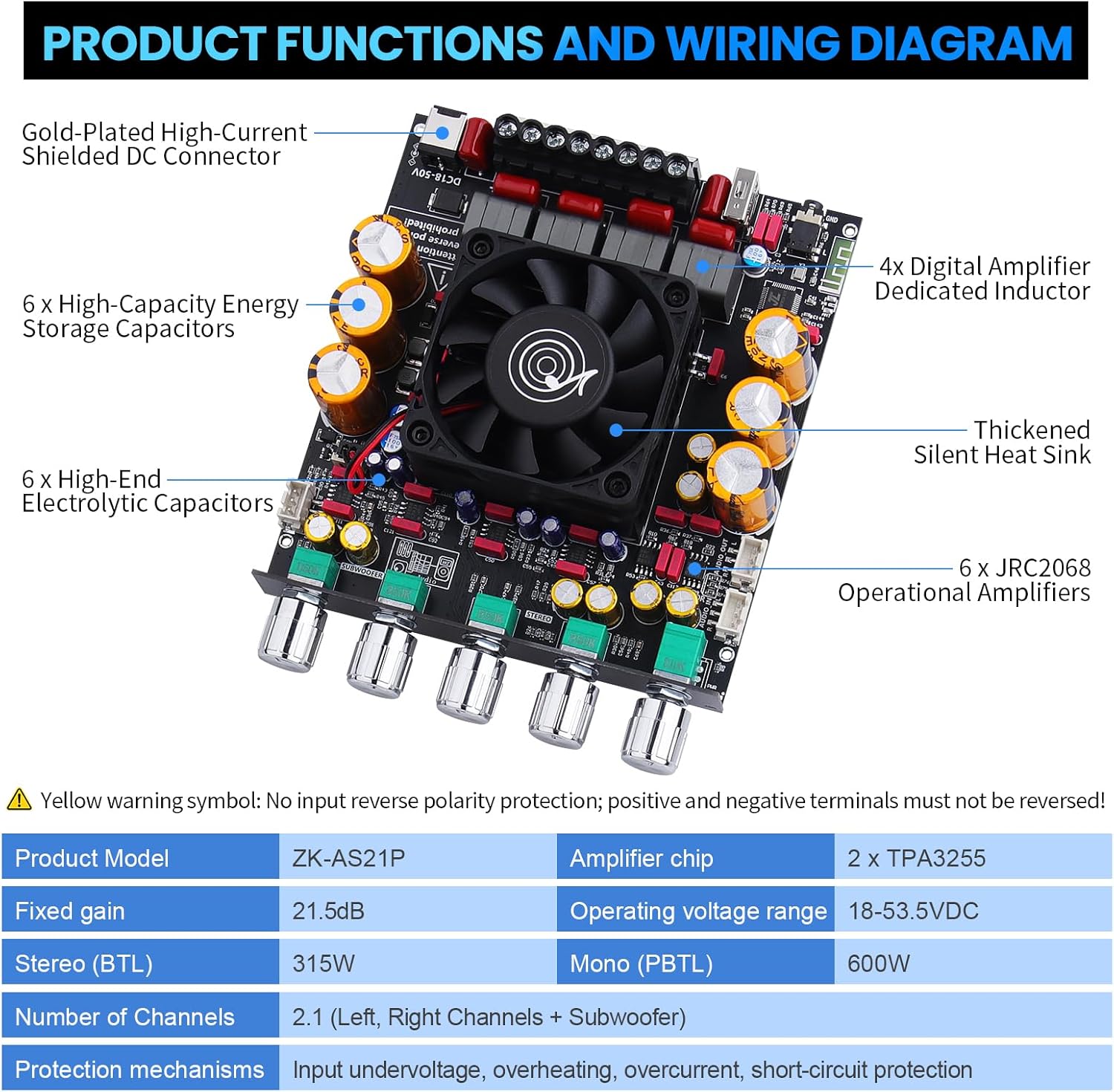
Figure 4: ZK-AS21P Amplifier Board Specifications. This table details the model, amplifier chip, gain, voltage range, power output, channels, and protection features.
Physical Dimensions
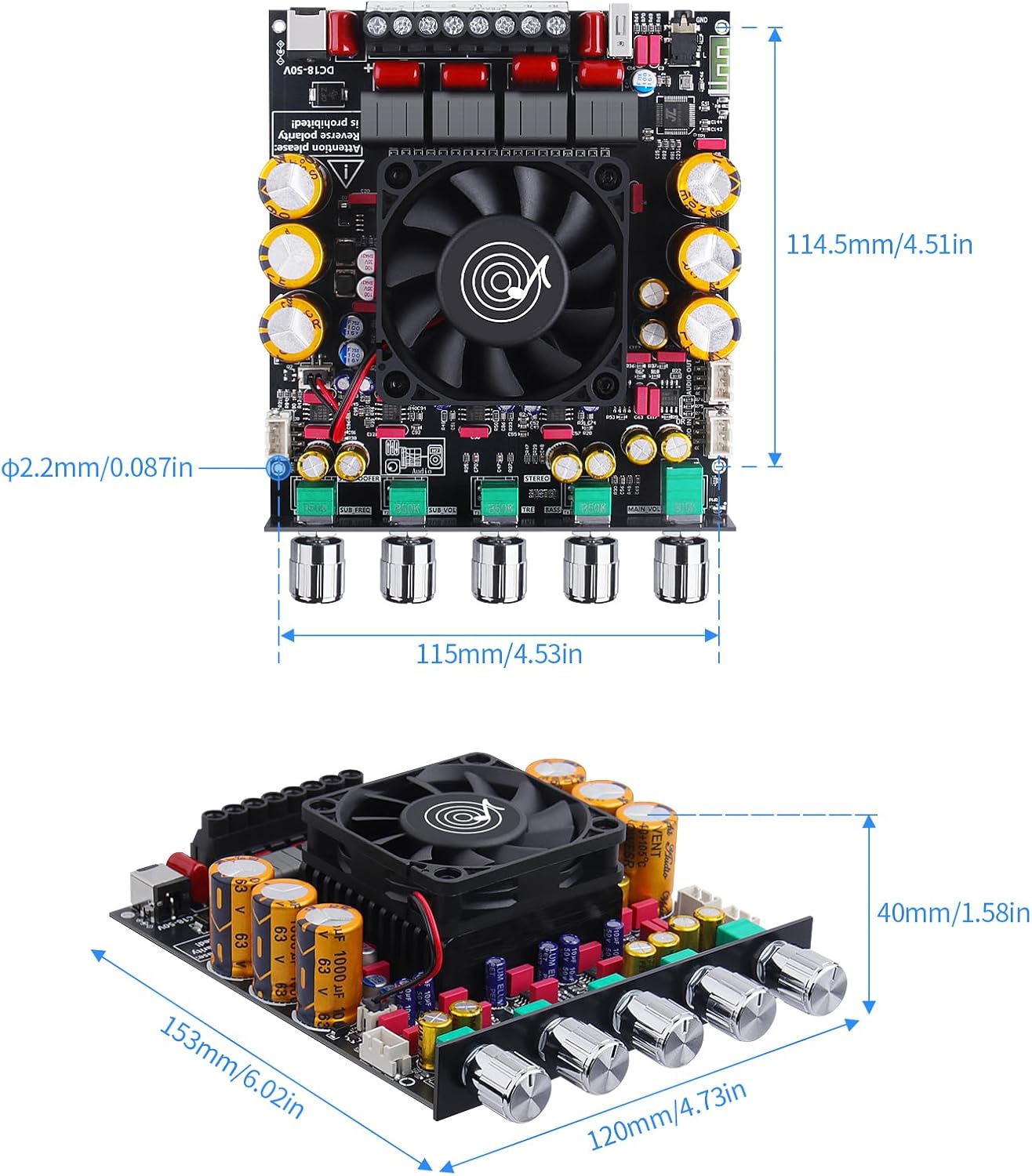
Figure 5: ZK-AS21P Amplifier Board Dimensions. This image provides measurements for the length, width, and height of the amplifier board.
Power Output Comparison Table
The following table illustrates the expected power output based on input voltage and speaker impedance. Note that 50V operation requires an overvoltage protection power supply.

Figure 6: Power Output Comparison Table. This table shows the output power for R+L channels and subwoofer at different input voltages (18V, 24V, 36V, 48V, 50V) and speaker impedances (4Ω, 8Ω), along with the minimum current required.
Warranty and Support
For warranty information and technical support, please refer to the documentation provided with your purchase or contact Beffkkip customer service through their official channels. Keep your purchase receipt as proof of purchase for any warranty claims.