
1. Introduction
This manual provides essential information for setting up, operating, and maintaining your YAWYORE Gaming PC Desktop Computer MX570. Please read these instructions carefully before using your new computer to ensure optimal performance and longevity.
The YAWYORE MX570 is a high-performance desktop computer designed for gaming, content creation, and office tasks. It features an AMD Ryzen 7 5700X processor, an NVIDIA GeForce RTX 5060 graphics card, 32GB DDR4 RAM, and a 1TB M.2 NVMe SSD, complemented by a 240mm liquid cooler and ARGB fans for efficient cooling and customizable aesthetics.
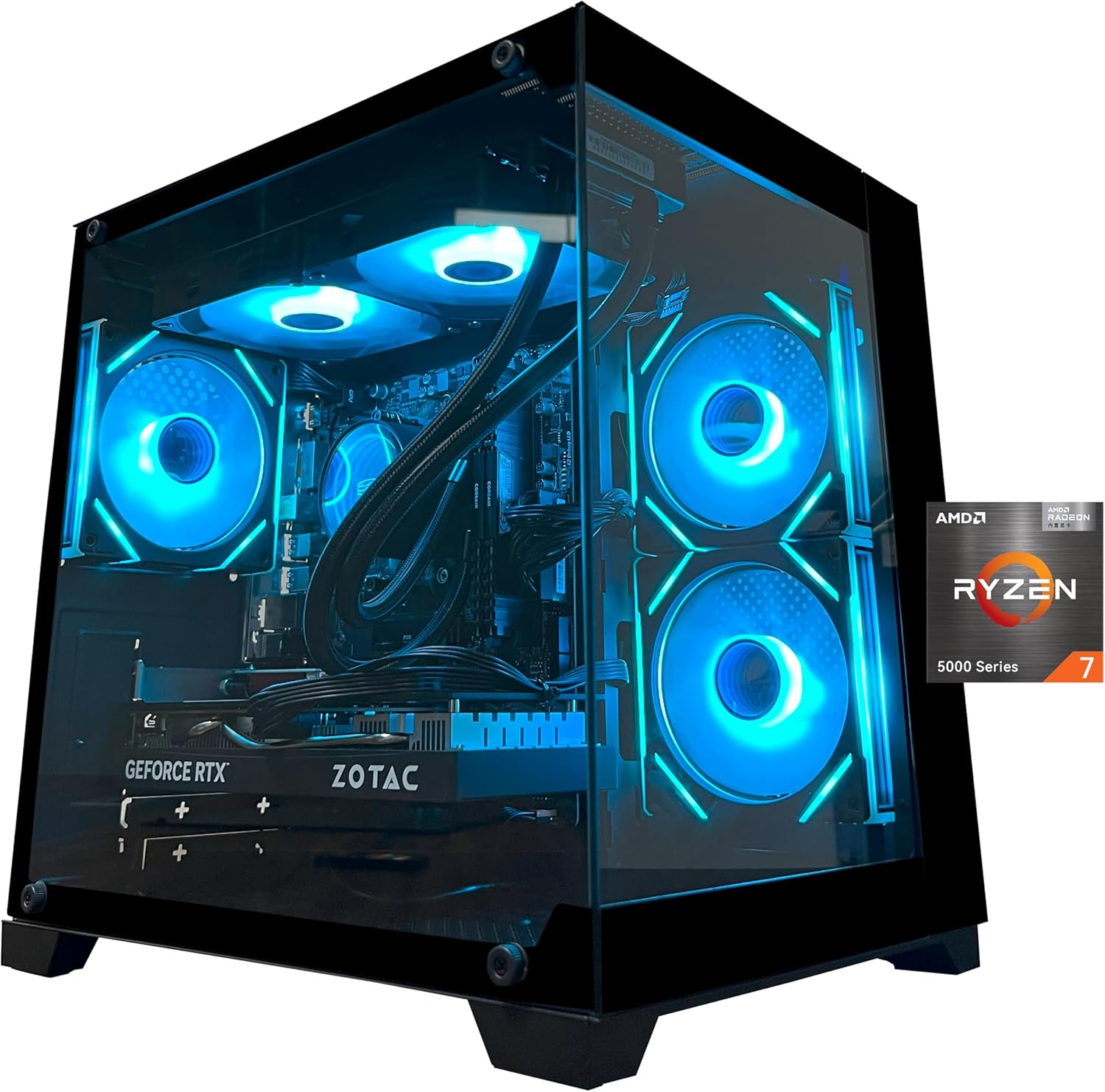
Image 1.1: YAWYORE Gaming PC Desktop Computer MX570.
2. Setup
2.1 Unpacking and Initial Inspection
- Carefully remove the computer from its packaging.
- Open the side panel of the chassis and remove any internal shock-absorbing foam or packaging materials. This foam is placed to protect internal components during shipping and must be removed before operation.
- Inspect the computer for any visible damage that may have occurred during transit. If you find any damage, contact customer support immediately.
- Ensure all accessories, such as the power cable, Wi-Fi antenna, and ARGB remote control, are present.
2.2 Connecting Peripherals
Refer to the diagrams below for connecting your monitor, keyboard, mouse, and other peripherals.
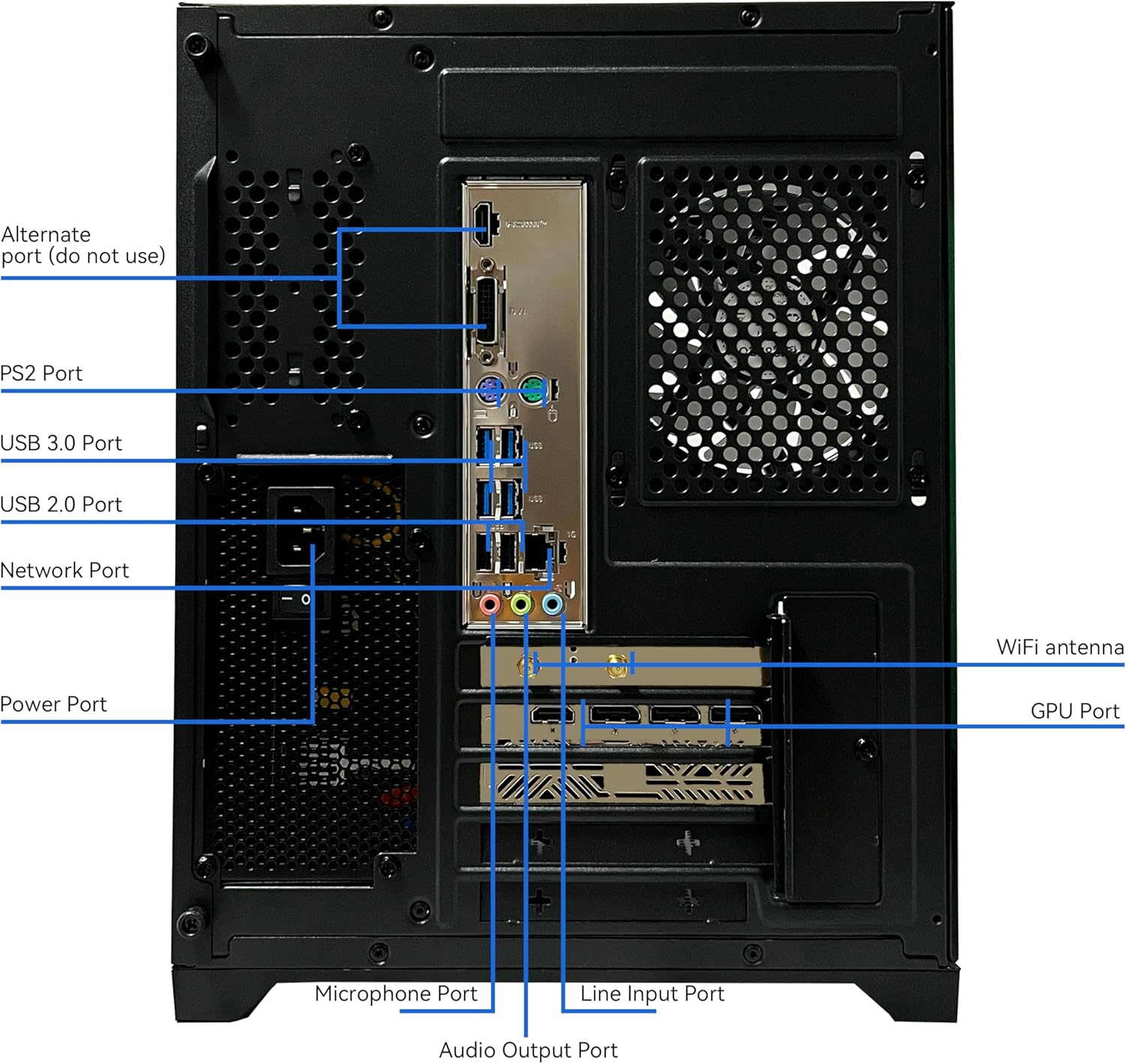
Image 2.1: Rear I/O Ports.
- Power Port: Connect the power cable here.
- GPU Port: Connect your monitor to the graphics card (RTX 5060) output ports (HDMI, DisplayPort) for optimal performance. Do not use the alternate port on the motherboard unless specifically instructed for troubleshooting.
- Network Port: Connect an Ethernet cable for wired internet access.
- USB 3.0 Ports (Blue): For high-speed peripherals like external hard drives or gaming mice.
- USB 2.0 Ports (Black): For standard peripherals like keyboards and mice.
- Audio Output Port: Connect speakers or headphones.
- Microphone Port: Connect a microphone.
- Wi-Fi Antenna: Screw in the provided Wi-Fi antenna for wireless internet connectivity.

Image 2.2: Front Panel I/O Ports.
- Power Button: Press to turn the computer on or off.
- Restart Button: Press to restart the computer.
- USB 3.0 Port: Front panel high-speed USB port.
- USB 2.0 Port: Front panel standard USB port.
- Microphone Port: Front panel microphone input.
- Audio Output Port: Front panel headphone/speaker output.
2.3 Power On
- Ensure all cables are securely connected.
- Plug the power cable into a wall outlet.
- Press the Power Button on the front panel of the computer.
- Follow the on-screen instructions to complete the Windows 11 initial setup.
3. Operating Instructions
3.1 General Operation
Your YAWYORE Gaming PC comes pre-installed with Windows 11. Navigate the operating system using your connected keyboard and mouse. For detailed information on Windows 11 features, refer to Microsoft's official documentation.
3.2 ARGB Lighting Control
The computer features Addressable RGB (ARGB) fans and liquid cooler. Use the provided remote control to customize the lighting effects and colors according to your preference.

Image 3.1: ARGB Remote Control for customizable lighting.
3.3 Gaming and Performance
The YAWYORE MX570 is optimized for smooth gaming and demanding applications. Ensure your graphics drivers are up to date for the best performance. The system is capable of running modern titles at high settings.

Image 3.2: Examples of games running on the YAWYORE MX570.

Image 3.3: Multi-purpose scenarios for the YAWYORE MX570.
4. Specifications
The YAWYORE Gaming PC Desktop Computer MX570 is equipped with the following key components:
- CPU: AMD Ryzen 7 5700X (8-Core, 16-Thread, up to 4.6GHz)
- Motherboard: MSI B550M-A PRO
- GPU: NVIDIA GeForce RTX 5060 8GB GDDR7 Graphics Card (Brand may vary)
- RAM: 32GB DDR4 3200MHz (16GB x 2)
- SSD: 1TB M.2 NVMe PCIe 4.0
- Power Supply: 650W (80 Plus Bronze certified)
- Cooling: 240mm Liquid Cooler (ARGB) + 3 x 12cm ARGB fans with intelligent temperature control
- Wireless Connectivity: Wi-Fi + Bluetooth
- Operating System: Windows 11
- USB Ports: 4 x USB 2.0, 5 x USB 3.0
- Dimensions: Approximately 18.9 x 17.4 x 14.2 inches (Package Dimensions)
- Item Weight: Approximately 24.9 pounds
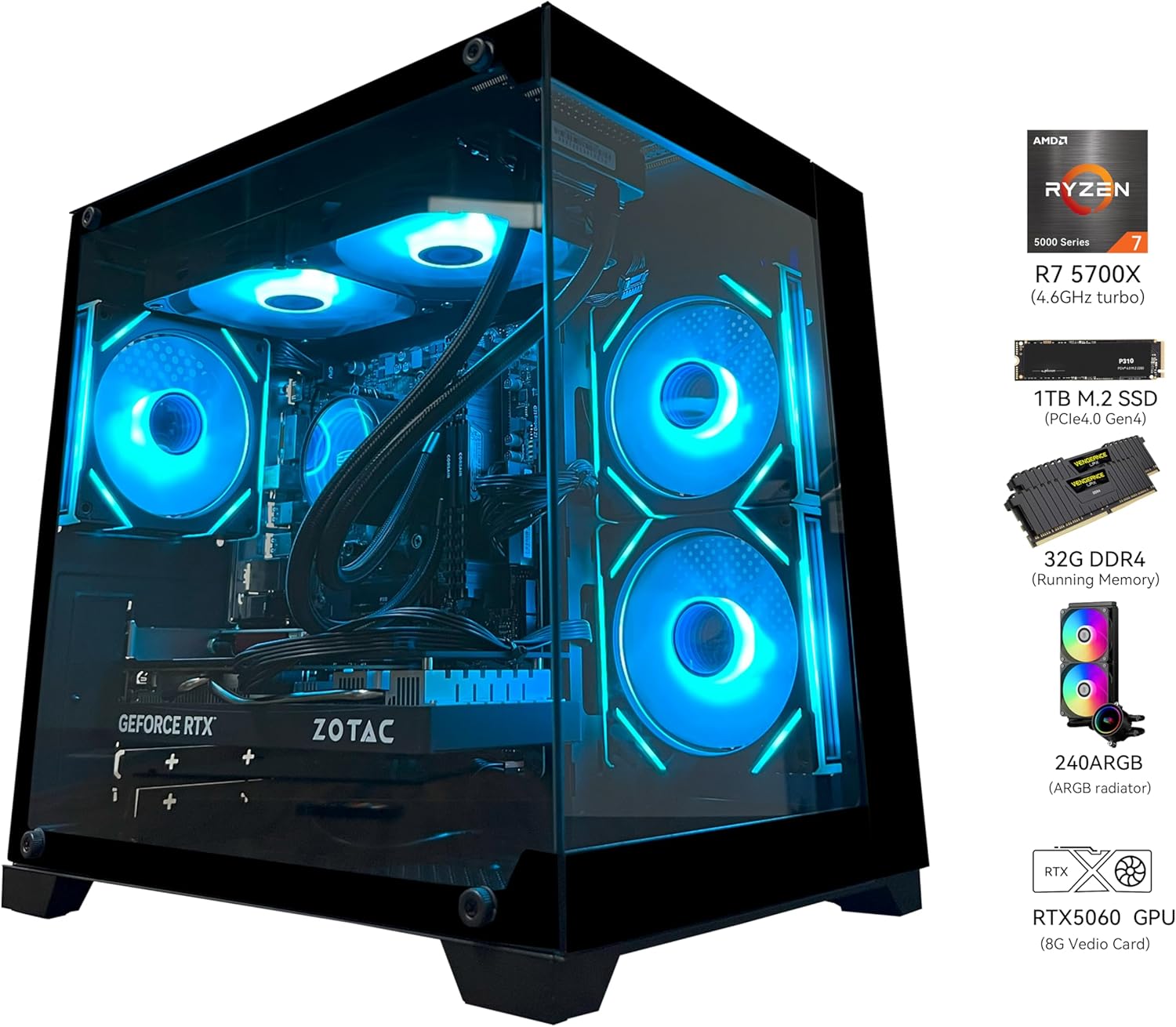
Image 4.1: YAWYORE MX570 with key component highlights.

Image 4.2: AMD Ryzen 7 5700X CPU details.

Image 4.3: NVIDIA GeForce RTX 5060 GPU features.

Image 4.4: RAM and SSD details.

Image 4.5: ARGB 240 Liquid Cooler.

Image 4.6: Intelligent temperature control and airflow.
4.1 Physical Dimensions

Image 4.7: Chassis Dimensions (approximate).
- Height: 360mm
- Width: 270mm
- Depth: 350mm
5. Maintenance
5.1 Cleaning
- Exterior: Use a soft, damp cloth to wipe down the exterior of the chassis. Avoid abrasive cleaners.
- Interior: Periodically, with the computer powered off and unplugged, use compressed air to clear dust from fans, heatsinks, and internal components. Ensure proper ventilation by keeping air vents clear.
5.2 Software Updates
- Regularly update your Windows operating system to ensure security and performance.
- Keep your graphics card drivers updated. Visit the NVIDIA website for the latest drivers for your RTX 5060.
- Update motherboard drivers and BIOS as recommended by MSI.
6. Troubleshooting
If you encounter any issues with your YAWYORE Gaming PC, please consider the following common troubleshooting steps:
- No Power: Ensure the power cable is securely connected to both the computer and the wall outlet. Check the power switch on the power supply unit (if present).
- No Display: Verify that your monitor is connected to the graphics card (RTX 5060) output ports, not the motherboard's integrated graphics ports. Check monitor power and input source.
- System Lag/Performance Issues: Ensure all drivers are updated. Check for background applications consuming resources. Monitor temperatures to ensure components are not overheating.
- Fan Noise: While the system is designed for quiet operation, excessive noise might indicate dust buildup. Refer to the cleaning section.
- System Activation, Hardware Defects, or Shipping Damage: If you experience problems with system activation, suspect hardware defects, or notice shipping damage, please contact the seller through Amazon's seller information.
7. Warranty and Support
For any issues related to system activation, hardware defects, or shipping damage, please contact the seller directly through the Amazon seller information. They are available to provide assistance and support for your YAWYORE Gaming PC.
Please retain your proof of purchase for warranty claims.

