
1. Introduction
Thank you for choosing the HOMCOM Ergonomic Kneeling Chair. This manual provides essential information for the proper assembly, use, and maintenance of your new chair. Designed to promote a healthier sitting posture, this chair helps distribute weight evenly and encourages an upright position, reducing strain on your back and lumbar area.

Image 1.1: The HOMCOM Ergonomic Kneeling Chair, featuring a blue fabric seat and knee pads, and a light wooden rocking frame.
2. Important Safety Information
Attention:
- Use the ergonomic chair gradually. It is recommended to take a break every 15-30 minutes to maintain comfort as your body adjusts to the new sitting posture.
- Assemble the chair strictly following the provided instructions.
- The chair is designed to support a maximum weight of 120 kg (264 lbs). Do not exceed this weight limit.
- Ensure all screws and fasteners are securely tightened before use. Periodically check for loose connections.
3. Components Overview
The HOMCOM Ergonomic Kneeling Chair consists of the following main components:
- Seat Cushion: Padded for comfort, upholstered in linen-effect fabric.
- Knee Pads: Two padded cushions designed to support the knees and shins, also upholstered in linen-effect fabric.
- Backrest: Padded support for the lower back, upholstered in linen-effect fabric.
- Wooden Frame: Constructed from high-quality birch wood, forming the rocking base and support structure.
- Assembly Hardware: Screws, bolts, and tools required for assembly.

Image 3.1: Dimensional diagram of the chair, illustrating its height (93cm), length (84cm), and width (51cm), along with individual cushion measurements.
4. Assembly Instructions
The HOMCOM Ergonomic Kneeling Chair is designed for easy assembly. Please follow the step-by-step instructions and diagrams included in the packaging of your product. Ensure all components are present before beginning assembly.
- Unpack all components and verify against the parts list in your product packaging.
- Attach the seat cushion and knee pads to the wooden frame using the provided hardware.
- Secure the backrest to the main frame.
- Ensure all screws are tightened firmly but do not overtighten to avoid damaging the wood.
- Once assembled, gently test the chair for stability before full use.
5. Operating Instructions
The ergonomic kneeling chair is designed to encourage an active and healthy sitting posture. Here’s how to use it effectively:
- Sitting Position: Sit with your buttocks on the main seat cushion and your knees resting comfortably on the knee pads. This position naturally tilts your pelvis forward, aligning your spine and engaging your core muscles.
- Rocking Movement: The chair features a dynamic rocking design. Utilize this movement to stay active, improve circulation, and enhance concentration during prolonged periods of sitting.
- Back Support: Lean back against the backrest for additional lumbar support when needed.
- Acclimatization: As this chair promotes a different sitting posture, it may take time to adjust. Begin by using the chair for short periods (15-30 minutes) and gradually increase usage time as your body adapts.

Image 5.1: A user demonstrating the correct sitting posture on the kneeling chair, with knees resting on the lower pads and back straight.

Image 5.2: This image illustrates the benefits of the kneeling chair, including even weight distribution, open hips, and core engagement, contributing to a healthy lifestyle. A note advises gradual acclimatization.

Image 5.3: Visual representation of the ergonomic advantages, such as promoting direct vision, an erect posture, preventing hunchback, offering knee support, and reducing lower limb swelling.
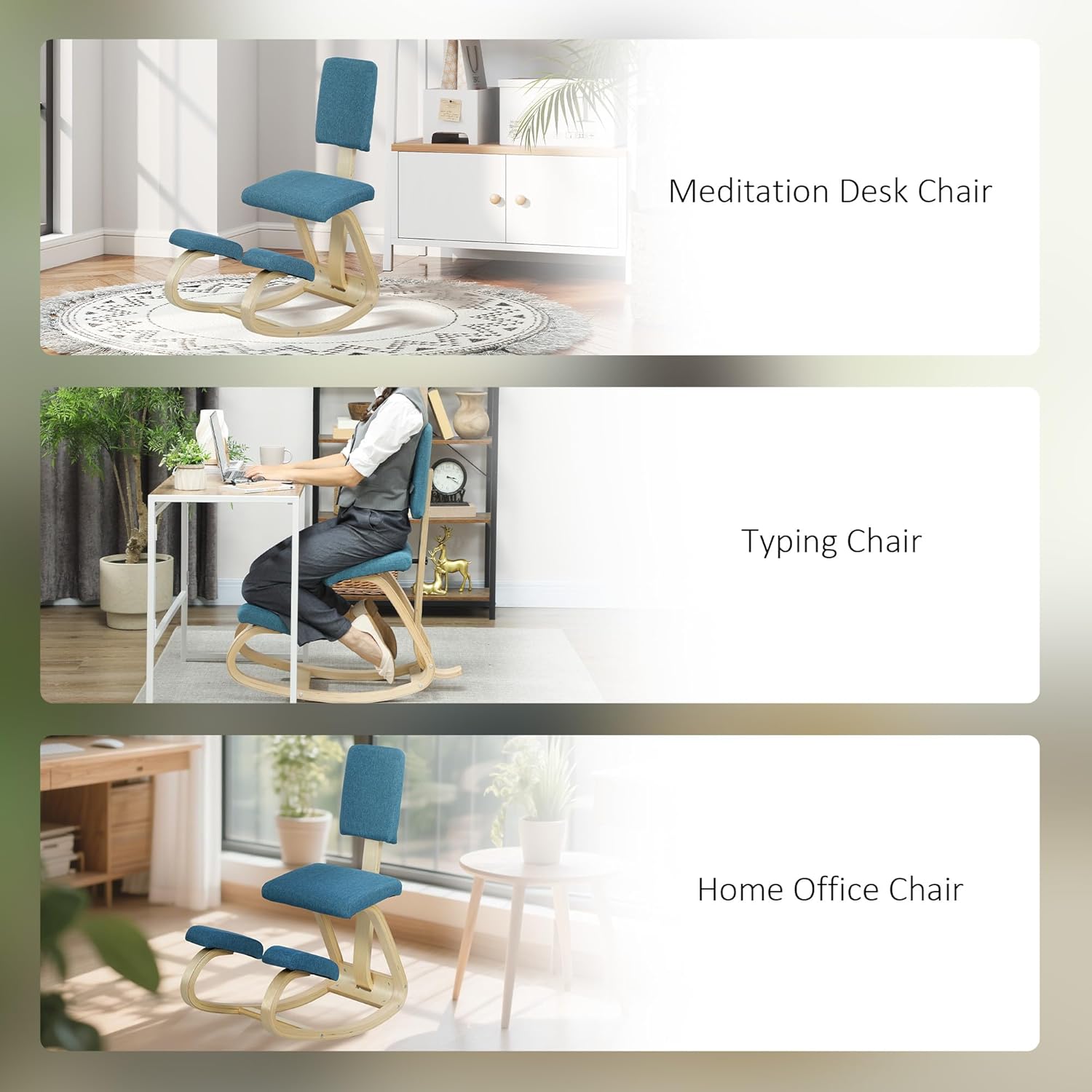
Image 5.4: Examples of the chair's versatile use, including as a meditation desk chair, a typing chair, and a general home office chair.
6. Maintenance
To ensure the longevity and appearance of your HOMCOM Ergonomic Kneeling Chair, follow these simple maintenance guidelines:
- Cleaning: Wipe the fabric surfaces with a damp cloth. For stubborn stains, use a mild fabric cleaner and follow the product instructions. Avoid harsh chemicals.
- Wood Care: The birch wood frame can be cleaned with a dry or slightly damp cloth. Avoid excessive moisture.
- Inspection: Periodically check all screws and connections to ensure they remain tight. Retighten if necessary.
- Placement: Avoid placing the chair in direct sunlight or near heat sources, as this can cause the wood to dry out or the fabric to fade.

Image 6.1: A detailed view of the chair's sturdy birch wood rocking base, highlighting its construction.
7. Troubleshooting
If you encounter any issues with your HOMCOM Ergonomic Kneeling Chair, please refer to the following common solutions:
- Instability/Wobbling: Check all assembly screws and ensure they are securely tightened. Uneven floor surfaces can also cause wobbling; try moving the chair to a level surface.
- Discomfort: If you experience discomfort, remember to acclimate gradually to the new sitting posture. Take frequent breaks. Ensure you are sitting correctly with your knees on the pads and your buttocks on the seat.
- Squeaking Noises: Inspect all joints and connections. A small amount of lubricant (e.g., silicone spray) can be applied to moving parts if the noise persists, ensuring it does not stain the fabric or wood.
8. Specifications
| Feature | Detail |
|---|---|
| Brand | HOMCOM |
| Model Number | IT921-788V00DB0631 |
| Color | Turquoise |
| Overall Dimensions (L x W x H) | 51 x 84 x 93 cm (20.1 x 33.1 x 36.6 inches) |
| Product Weight | 6.3 kg (13.9 lbs) |
| Weight Capacity | 120 kg (264 lbs) |
| Material | Linen-effect fabric, Birch wood |
| Special Features | Ergonomic design, Rocking movement, Back support |
| Care Instructions | Wipe clean with a cloth |
9. Warranty and Support
For warranty information or technical support, please refer to the documentation provided with your purchase or contact HOMCOM customer service through their official website or the retailer where the product was purchased. Please have your model number (IT921-788V00DB0631) and purchase date available when contacting support.