
Introduction
This manual provides comprehensive instructions for the installation, operation, and maintenance of the Generic i-PRO WV-S66300-Z3LN 2MP Outdoor 32x PTZ Network Camera with AI Engine. Please read this manual thoroughly before using the product to ensure correct and safe operation. Keep this manual for future reference.
1. Setup
1.1 Package Contents
Verify that all items are present in the package:
- i-PRO WV-S66300-Z3LN Network Camera
- Replacement Battery Module
- User Manual (this document)
1.2 Physical Installation
The camera features a compact 12x8x3 inch housing and weighs only 2 pounds, enabling straightforward mounting and placement in various outdoor settings.
- Select a suitable location: Choose an outdoor location that provides optimal surveillance coverage and is protected from direct impact.
- Mount the camera: Securely attach the camera to the chosen surface using appropriate mounting hardware (not included). Ensure the camera is stable and properly aligned.
- Adjust camera angle: Loosen the adjustment screws, position the camera to the desired viewing angle, and then tighten the screws to secure it.
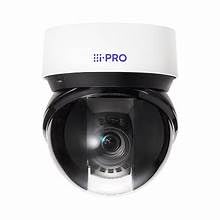
Figure 1: i-PRO WV-S66300-Z3LN Network Camera. This image shows the compact design of the camera, suitable for outdoor installation.
1.3 Network Connection
The camera supports both Ethernet and Wi-Fi connectivity for seamless integration into your security network.
- Ethernet Connection: Connect an Ethernet cable from your network router or switch to the camera's Ethernet port.
- Wi-Fi Connection: Refer to the camera's on-screen setup guide or companion software for instructions on connecting to a wireless network. This typically involves selecting your Wi-Fi network and entering the password.
Ensure a stable network connection for efficient remote monitoring and control.
2. Operating Instructions
2.1 Basic Operation and PTZ Functionality
The camera features advanced pan-tilt-zoom (PTZ) capabilities, allowing for flexible camera positioning and comprehensive area monitoring coverage.
- Pan: Rotate the camera horizontally to cover a wider area.
- Tilt: Adjust the camera vertically to change the viewing height.
- Zoom: Utilize the 32x optical zoom to magnify distant subjects while maintaining image clarity.
Control these functions via the dedicated surveillance software or mobile application.
2.2 AI Engine and Intelligent Monitoring
The built-in AI engine enables intelligent monitoring with sophisticated real-time analytics. This includes features such as object detection, intrusion detection, and other advanced security capabilities.
- Configuration: Access the camera's web interface or software to configure AI rules and alerts.
- Alerts: Set up notifications for specific events detected by the AI engine.
2.3 Image Quality and Recording
The camera delivers 2MP resolution (1080p) footage, ensuring exceptional clarity and detailed surveillance. Configure recording settings (e.g., continuous, motion-activated) through the surveillance software.
3. Maintenance
3.1 General Cleaning
Regularly clean the camera lens and housing to ensure optimal performance. Use a soft, damp cloth. Avoid abrasive cleaners or solvents.
3.2 Battery Module Replacement
The camera includes a replacement battery module. Refer to the specific instructions provided with the battery module for safe replacement procedures. Ensure the camera is powered off before attempting any battery replacement.
4. Troubleshooting
| Problem | Possible Cause | Solution |
|---|---|---|
| No image/video feed | Power issue, network disconnection, software error. | Check power supply. Verify network cable connection or Wi-Fi status. Restart camera and viewing software. |
| Poor image quality | Dirty lens, low light conditions, incorrect settings. | Clean the camera lens. Ensure adequate lighting. Adjust image settings in the software. |
| PTZ functions unresponsive | Software glitch, network lag. | Restart the viewing software. Check network stability. Update camera firmware. |
If the problem persists after attempting these solutions, please contact customer support.
5. Specifications
| Feature | Detail |
|---|---|
| Model | WV-S66300-Z3LN |
| Brand | Generic |
| Resolution | 2MP (1080p) |
| Optical Zoom | 32x |
| Connectivity | Ethernet, Wi-Fi |
| Special Features | Built-in AI Engine, PTZ Functionality |
| Dimensions (approx.) | 12 x 8 x 3 inches |
| Weight (approx.) | 2 pounds |
| Included Components | Replacement Battery Module |
6. Warranty Information
This product comes with a 1 Year manufacturer warranty. Please retain your proof of purchase for warranty claims. The warranty covers defects in materials and workmanship under normal use. It does not cover damage caused by misuse, accidents, unauthorized modifications, or natural disasters.
7. Customer Support
For technical assistance, troubleshooting beyond this manual, or warranty inquiries, please contact your retailer or the manufacturer's customer support. Refer to the product packaging or manufacturer's website for specific contact details.