
1. Introduction
The Mateksys H7A3-WING Flight Controller is a high-performance control unit designed for RC Multirotor and Fixed-Wing FPV Aircraft. Featuring an STM32H7A3RIT6 MCU, advanced sensors, and comprehensive power management, it provides reliable and precise flight control. This manual will guide you through the setup, operation, and maintenance of your H7A3-WING Flight Controller.
Key features include:
- High-Performance Processor: STM32H7A3RIT6 (280MHz Cortex-M7) with 1.4MB RAM & 2MB Flash for fast, reliable flight control.
- Advanced Sensors & Logging: ICM42688P IMU, SPL06-001 Baro, AT7456E OSD & MicroSD Blackbox for precise navigation and data recording.
- Versatile Power System: 3~6S LiPo (9~30V) input with 5V/4.5V, 9V/12V BECs & 8A Vx (5-7.2V); 200mA 3.3V LDO.
- Precise Power Monitoring: I2C digital monitor (±0.1% voltage, ±2% current) with 100A continuous/164A burst; no calibration needed.
2. What's in the Box
Upon opening your package, you should find the following components:
- 1x H7A3-WING Flight Controller
- 1x USB (Type-C)/Beep (Passive buzzer) Extender with 6pin cable
- 1x 20cm JST-SH-6P to JST-SH-6P cable for USB extender
- 2x 20cm JST-GH-4P to JST-GH-4P cable for CAN & I2C port
- 1x Rubycon ZLH 35V 470uF capacitor
- Dupont 2.54 pins (Board is shipped unsoldered)

Figure 1: Contents of the H7A3-WING package, including the flight controller, USB extender, cables, capacitor, and pins.
3. Physical Layout and Dimensions
Understanding the physical layout of the H7A3-WING is crucial for proper installation and wiring. The board features various ports and pads for power, signal, and peripheral connections.

Figure 2: Detailed layout of the H7A3-WING Flight Controller, showing pin assignments and component locations.

Figure 3: Dimensions of the H7A3-WING Flight Controller, measuring 54 x 36 x 13 mm with a 30.5 x 30.5mm mounting pattern.
The board's compact size and standard mounting pattern (30.5 x 30.5mm, Φ4mm with Grommets Φ3mm) make it suitable for a wide range of RC aircraft. The USB extender provides convenient access for configuration.
4. Setup and Wiring
Proper wiring is essential for the safe and reliable operation of your flight controller. Refer to the layout diagram (Figure 2) for pin assignments.
4.1 Power Connection
The H7A3-WING supports 3-6S LiPo input (9-30V). Connect your battery to the designated BAT/ESC pads. Ensure correct polarity to prevent damage.
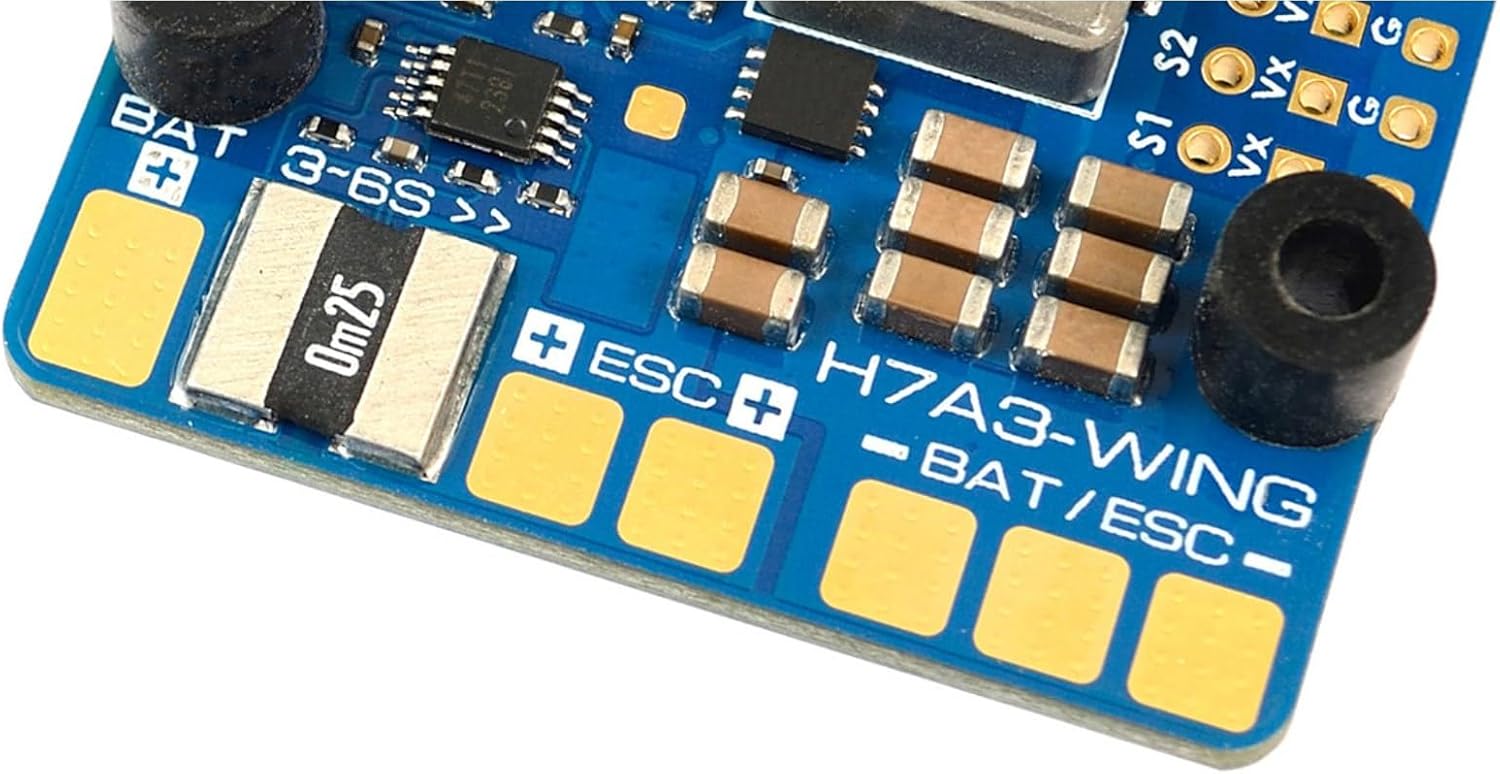
Figure 4: Close-up view of the BAT/ESC power input pads on the H7A3-WING Flight Controller.
The included Rubycon ZLH 35V 470uF capacitor should be soldered to the main battery pads to help filter power noise, especially when using high-power ESCs.
4.2 Peripheral Connections
- ESCs: Connect your Electronic Speed Controllers (ESCs) to the PWM outputs (S1-S11).
- Receiver: Connect your receiver to one of the 6 UARTs. The board supports various receiver protocols.
- GPS/Compass: Use the I2C or a spare UART for GPS and compass modules. The 4-pin JST-GH connector is provided for I2C.
- Digital Video OSD: Supported by any spare UART.
- MicroSD Card: Insert a MicroSD card into the socket for blackbox datalogging.
- USB Extender: Connect the USB extender for convenient access to the Type-C port for configuration and firmware updates.

Figure 5: Overview of the H7A3-WING Flight Controller, highlighting key components and connection points.
4.3 Firmware Flashing and Configuration
The H7A3-WING supports ArduPilot firmware (MATEKH7A3, 4.6 or newer). Connect the flight controller to your computer via the USB extender. Use the appropriate ground station software (e.g., Mission Planner for ArduPilot) to flash the firmware and configure parameters. Ensure all sensors are calibrated correctly before flight.
5. Operating Instructions
Once the flight controller is set up and configured, you can proceed with operating your RC aircraft.
5.1 Pre-Flight Checks
- Verify all connections are secure.
- Check battery voltage and ensure it's within the safe operating range.
- Confirm proper control surface movement and motor direction.
- Ensure GPS lock (if applicable) and a stable compass reading.
5.2 Flight Modes
Configure various flight modes in your ground station software to suit your flying style and aircraft type. Common modes include Stabilize, AltHold, Loiter, and various autonomous modes for fixed-wing aircraft.
5.3 OSD (On-Screen Display)
The built-in AT7456E OSD provides real-time flight data overlay on your FPV video feed. Customize the OSD layout and displayed information through your flight controller's configuration software.
5.4 Datalogging (Blackbox)
The MicroSD socket allows for blackbox datalogging, recording flight parameters for post-flight analysis and tuning. This is invaluable for diagnosing issues and optimizing performance.
6. Maintenance
Regular maintenance helps ensure the longevity and reliability of your H7A3-WING Flight Controller.
- Physical Inspection: Periodically inspect the board for any signs of damage, loose connections, or corrosion.
- Cleaning: Keep the board clean and free from dust, dirt, and moisture. Use compressed air or a soft brush for cleaning.
- Firmware Updates: Check for new firmware releases from Mateksys or ArduPilot to benefit from bug fixes and new features. Follow the update instructions carefully.
- MicroSD Card: Regularly back up and format your MicroSD card to ensure optimal datalogging performance.
7. Troubleshooting
If you encounter issues with your H7A3-WING Flight Controller, consider the following troubleshooting steps:
- No Power:
- Check battery connection and voltage.
- Inspect for short circuits or damaged power cables.
- Verify BEC outputs are providing correct voltage to peripherals.
- No Connection to PC:
- Ensure USB extender is properly connected.
- Try a different USB cable or port.
- Install necessary USB drivers for the flight controller.
- Check if the flight controller is in DFU mode for flashing.
- Flight Instability:
- Recalibrate accelerometers and gyroscopes.
- Check motor directions and propeller orientation.
- Review PID tuning parameters.
- Inspect for vibrations affecting the IMU.
- OSD Not Displaying:
- Verify video input/output connections.
- Check OSD settings in the configuration software.
- Ensure the video format (PAL/NTSC) matches your camera/VTX.
For more detailed troubleshooting, refer to the official ArduPilot documentation for the MATEKH7A3 target or the Mateksys support resources.
8. Specifications
| Component | Detail |
|---|---|
| MCU | STM32H7A3RIT6, 280MHz Cortex-M7, 1.4MB RAM, 2MB Flash |
| IMU | ICM42688P |
| Barometer | SPL06-001 |
| OSD | AT7456E |
| Blackbox | MicroSD socket |
| UARTS | 6x (1,2,3,4, 5, 6) with built-in inversion |
| PWM Outputs | 11x |
| I2C | 1x |
| CAN | 1x |
| ADC | 4x (VBAT, Current, VB2, Cur2) |
| LEDs | 3x for FC STATUS (Blue, Red) and 3.3V indicator (Red) |
| USB/Beep Extender | Type-C (USB2.0) |
| JST-GH1.25_4pin | 2x for CAN and I2C |
| 9V/12V Output | ON/OFF switchable |
| Digital Video OSD | Supported by any spare UART |
| Vbat Input | 9~30V (3~6S LiPo) |
| BEC 5V/4.5V | 2.5A cont. /3A peak |
| BEC 9V/12V | 2A cont. /3A peak |
| BEC Vx | 8A cont. /12A Peak, output 5V Default, 6V or 7.2V option |
| LDO 3.3V | Max. 200mA |
| Current Sensing Resistor | 0.00025 ohm |
| Load Current (Continuous) | 100A |
| Load Current (Burst) | 164A |
| Voltage Accuracy | ± 0.1% |
| Current Accuracy | ± 2% |
| INA2xx I2C Address | 0x45 (69) |
| FC Firmware | ArduPilot: MATEKH7A3 (4.6 or newer) |
| Mounting | 30.5 x 30.5mm, Φ4mm with Grommets Φ3mm |
| Dimensions | 54 x 36 x 13 mm |
| Weight | 30g with USB extender |
9. Warranty Information
This product is covered by a limited manufacturer's warranty against defects in materials and workmanship. The warranty period typically extends for a specified duration from the date of purchase. Please retain your proof of purchase for warranty claims. The warranty does not cover damage caused by improper installation, misuse, accidents, modifications, or unauthorized repairs. For specific warranty terms and conditions, please refer to the manufacturer's official website or contact their customer support.
10. Customer Support
For technical assistance, troubleshooting, or further inquiries regarding your Mateksys H7A3-WING Flight Controller, please visit the official Mateksys website for documentation, FAQs, and contact information. You may also find helpful resources and community support forums dedicated to ArduPilot firmware and flight controllers.
Note: Always ensure you are using the latest stable firmware and configuration tools for optimal performance and compatibility.


