
1. Introduction
Thank you for choosing the ZapRun Adult Electric Scooter, Model W9. This powerful and versatile electric scooter is designed for adult commuters and recreational riders, offering a blend of performance, safety, and convenience. Featuring a 1000W motor, 10-inch pneumatic off-road tires, dual brakes, and dual shock absorbers, it provides a smooth and exhilarating ride across various terrains. This manual provides essential information for the safe assembly, operation, maintenance, and troubleshooting of your scooter. Please read it thoroughly before your first ride to ensure optimal performance and longevity of your device.
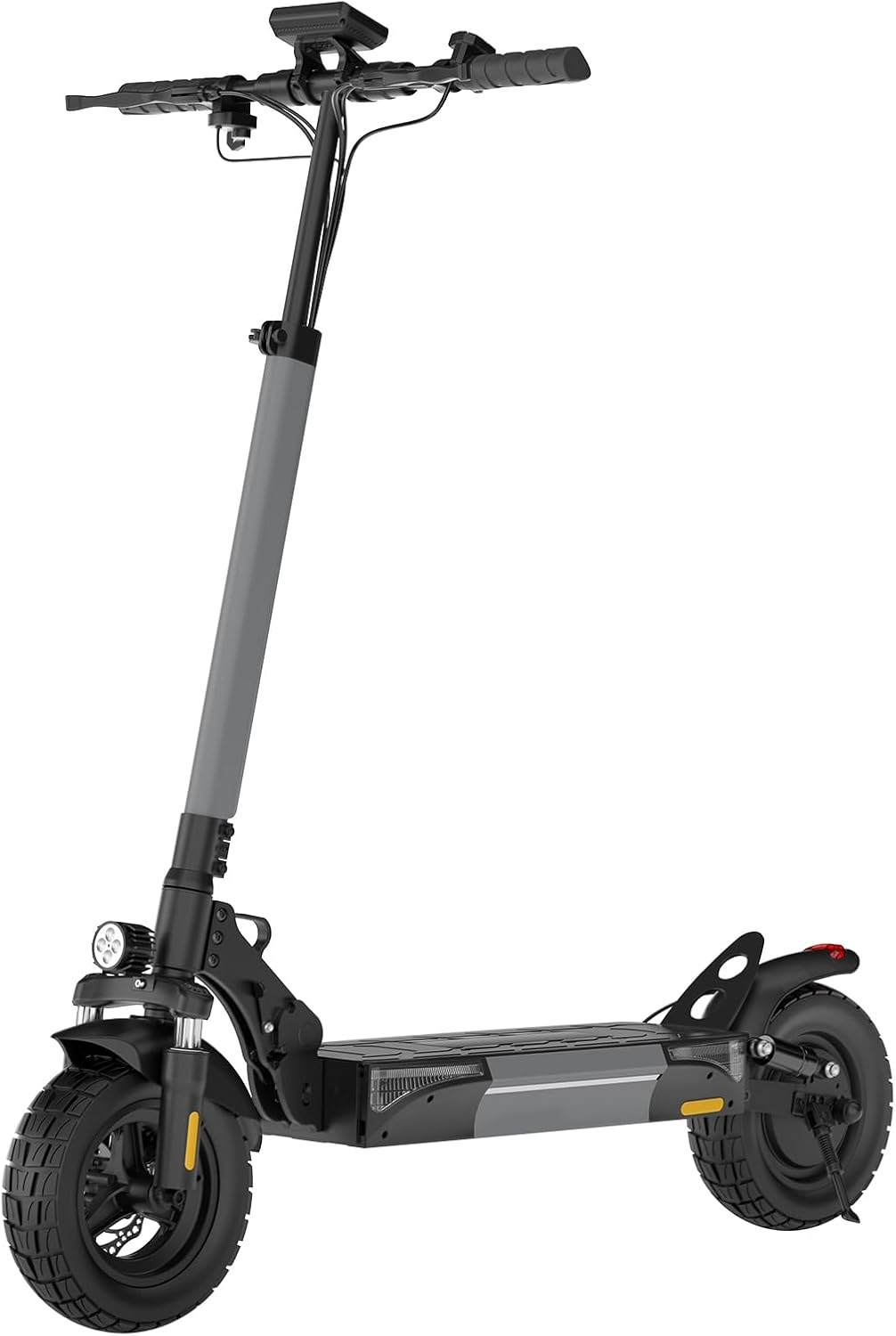
Image: The ZapRun Adult Electric Scooter, Model W9, showcasing its sleek design and robust build.
2. Safety Information
Your safety is paramount. Always adhere to the following guidelines:
- Wear a Helmet: Always wear a certified helmet and other protective gear (knee pads, elbow pads) when riding.
- Local Regulations: Familiarize yourself with and obey all local traffic laws and regulations regarding electric scooter usage.
- Pre-Ride Check: Before each ride, inspect the brakes, tires (for proper inflation and wear), and ensure all quick-release mechanisms are securely fastened.
- Riding Conditions: Avoid riding in heavy rain, on icy surfaces, or in extremely low visibility conditions. The scooter has an IPX4 waterproof rating, meaning it is resistant to splashing water from any direction, but it is not designed for submersion or heavy rain.
- Weight Limit: Do not exceed the maximum weight limit of 264 lbs (120 kg).
- Age Range: This scooter is designed for adult use.
- UL2272 Certified: This scooter is UL2272 certified for electrical safety.
- Awareness: Be aware of your surroundings, pedestrians, and other vehicles. Ride defensively.
- No Stunts: Do not attempt stunts, jumps, or aggressive maneuvers.
3. Product Features
The ZapRun W9 Electric Scooter is engineered with advanced features for a superior riding experience:
3.1. Powerful Motor & Performance
Equipped with a 1000W high motor, the scooter can reach a maximum speed of 28 MPH and conquer inclines up to 25 degrees with ease. This powerful motor ensures rapid acceleration and consistent performance.

Image: Key features of the ZapRun scooter including motor power, speed, range, and suspension.

Image: Detailed view of the 1000W rear-drive motor integrated into the wheel.
3.2. Tires & Suspension
The 10-inch pneumatic off-road tires provide excellent grip and shock absorption, allowing for smooth rides over various terrains including potholes, gravel, and uneven surfaces. Coupled with dual shock absorbers, the ride comfort is significantly enhanced.

Image: Close-up of the 10-inch pneumatic off-road tire and integrated motor.

Image: Illustration highlighting the dual shock absorbers for enhanced ride comfort.
3.3. Braking System
For maximum safety, the scooter features professional-grade dual disc brakes combined with electronic braking, providing instant and reliable stopping power.

Image: View of the dual disc brakes and hidden electronic braking system on the rear wheel.
3.4. Battery & Speed Modes
A high-capacity 14Ah battery provides an impressive range of up to 28 miles on a single charge. Choose from three intelligent speed modes: ECO (10 MPH) for efficiency, STD (18 MPH) for balanced cruising, and TURBO (28 MPH) for maximum speed.

Image: Visual representation of the three available speed modes.

Image: Diagram showing the internal battery structure and capacity.
3.5. Lighting & Signals
For enhanced visibility and safety, the scooter is equipped with ultra-bright LED headlights, brake lights, and turn signals.

Image: The scooter's lighting system, including headlights, ambient lights, and turn signals.
3.6. Portability & Design
Weighing 48.5 lbs, the scooter features a quick-folding mechanism for easy storage and transport. The adjustable handlebar (44.5"-52.8") accommodates riders of different heights, making it ideal for urban commuting and easy storage in car trunks or small spaces.

Image: Demonstrating the folding design for convenient storage in a car trunk.
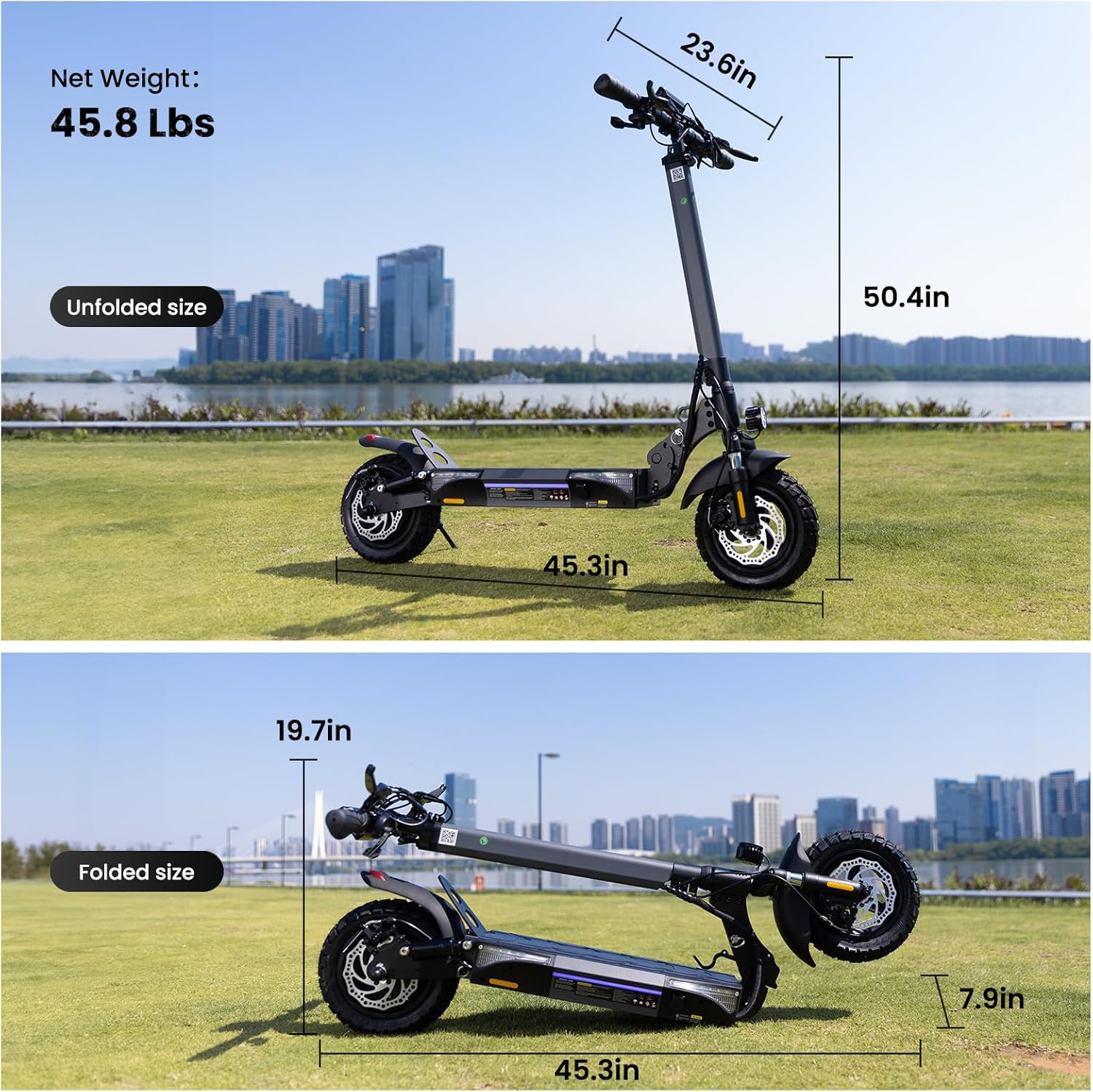
Image: Visual guide to the unfolded and folded dimensions of the scooter.

Image: The scooter's foldable and adjustable handlebar design for easy transport.
3.7. Smart Connectivity
Stay in control with the smart app integration. Monitor speed, battery level, and trip distance, track rides, and receive maintenance alerts directly on your smartphone. The scooter also features a large LCD screen for real-time information.
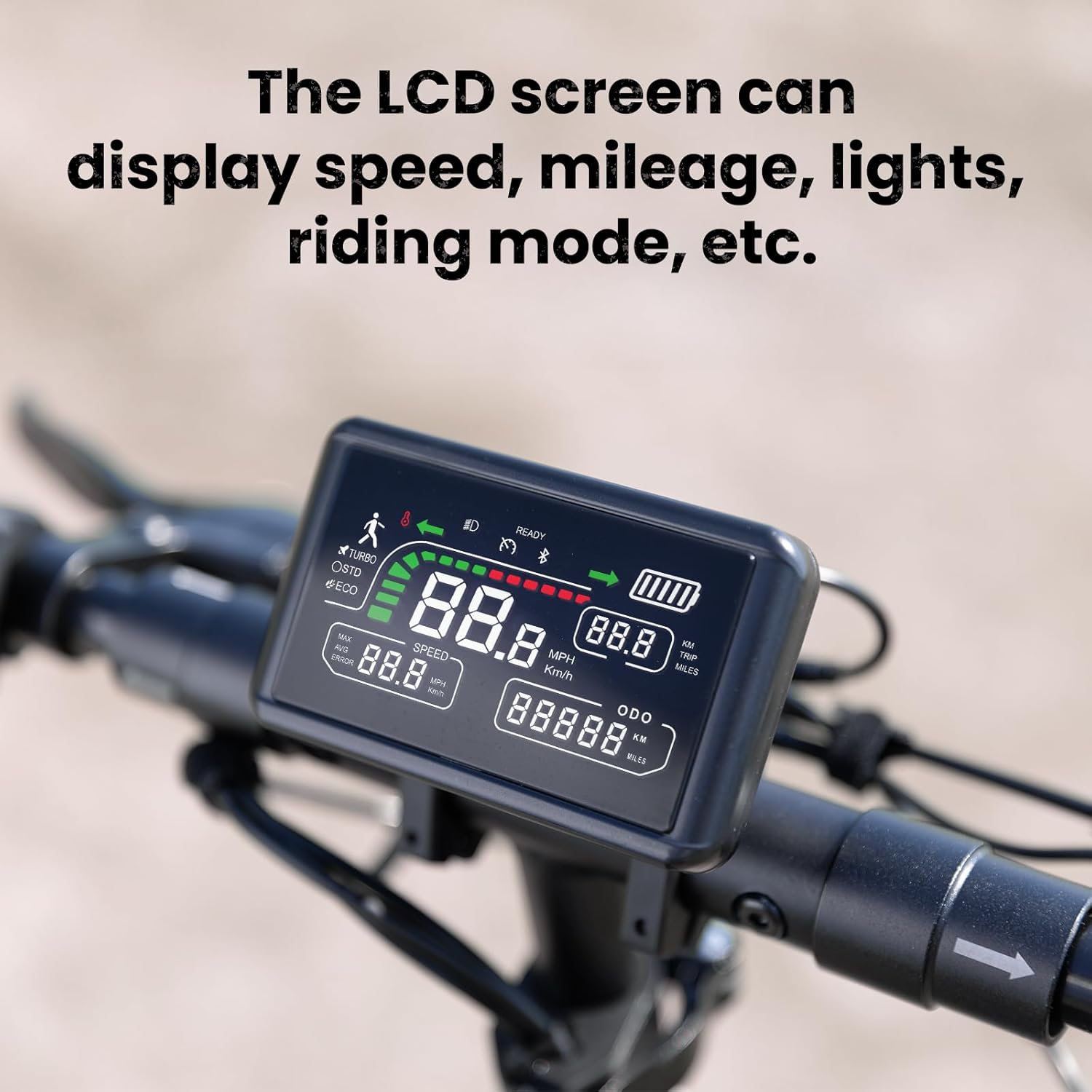
Image: The LCD screen displaying various riding metrics.

Image: The large LCD display providing comprehensive riding information.
4. Setup
- Unboxing: Carefully remove all components from the packaging. Retain packaging for future storage or transport.
- Unfolding:
- Place the scooter on a flat surface.
- Locate the folding mechanism latch near the base of the handlebar stem.
- Release the latch and carefully lift the handlebar stem until it locks into the upright position. Ensure it clicks securely into place.
- Handlebar Adjustment:
- Loosen the quick-release clamp on the handlebar stem.
- Adjust the handlebar to a comfortable height.
- Securely tighten the quick-release clamp.
- Initial Charging:
- Before first use, fully charge the scooter for optimal battery performance.
- Connect the charger to the charging port on the scooter and then to a power outlet.
- The charging indicator light on the charger will change (e.g., from red to green) when fully charged. Charging time is approximately 6-8 hours.
- Tire Pressure Check: Ensure tires are inflated to the recommended pressure (refer to tire sidewall or specifications section).
5. Operating Instructions
- Power On/Off: Press and hold the power button on the display for a few seconds to turn the scooter on or off.
- Speed Modes:
- Press the mode button (usually indicated by 'M' or a gear icon) to cycle through the three speed modes: ECO (10 MPH), STD (18 MPH), and TURBO (28 MPH).
- Select the appropriate mode based on your riding environment and desired speed.
- Acceleration: Gently press the throttle lever to accelerate. Apply gradual pressure for smooth acceleration.
- Braking: Use the brake levers on the handlebars to engage the dual disc brakes. For emergency stops, apply both brakes simultaneously.
- Lights & Signals:
- Press the light button to turn on/off the LED headlight and tail light.
- Use the turn signal switch to indicate turns.
- LCD Display: The LCD screen provides real-time information including current speed, battery level, riding mode, and total mileage.
- App Integration: Download the ZapRun app (if available) from your smartphone's app store. Connect via Bluetooth to access additional features like ride tracking, settings adjustments, and diagnostics.
- Cruise Control: The scooter features a cruise control function for comfortable riding on flat roads. Activate it by maintaining a consistent speed for a few seconds.
6. Maintenance
Regular maintenance ensures the longevity and safe operation of your scooter:
- Cleaning: Wipe down the scooter with a damp cloth after each ride. Do not use high-pressure water jets or immerse the scooter in water.
- Tire Care: Regularly check tire pressure and inflate to the recommended PSI. Inspect tires for wear, punctures, or damage.
- Battery Care:
- Charge the battery fully after each use, especially if storing for extended periods.
- Avoid completely draining the battery.
- Store the scooter in a cool, dry place away from direct sunlight and extreme temperatures.
- Brake Inspection: Periodically check brake pads and cables for wear and proper function. Adjust as needed.
- Fasteners: Ensure all screws, bolts, and quick-release mechanisms are tight and secure.
- General Inspection: Look for any signs of damage, loose parts, or unusual noises. Address any issues promptly.
7. Troubleshooting
| Problem | Possible Cause | Solution |
|---|---|---|
| Scooter does not power on | Low battery; Loose connections; Power button issue | Charge the battery fully; Check all cable connections; Contact support if issue persists |
| Reduced range or speed | Under-inflated tires; Overload; Battery degradation; Riding uphill frequently | Inflate tires to correct PSI; Ensure rider weight is within limits; Charge battery fully; Adjust riding style |
| Brakes not effective | Worn brake pads; Loose brake cable; Disc damage | Inspect and replace brake pads; Adjust brake cable tension; Seek professional repair |
| Unusual noises during ride | Loose components; Debris in wheels; Motor issue | Check all fasteners; Clear any debris; Contact support for motor issues |
If you encounter problems not listed here or require further assistance, please contact ZapRun customer support.
8. Specifications
| Feature | Detail |
|---|---|
| Brand | ZapRun |
| Model Name | W9 |
| Motor Power | 1000W |
| Max Speed | 28 MPH |
| Max Range | 28 Miles |
| Battery Capacity | 14Ah |
| Charging Time | 8 Hours |
| Tire Size | 10 Inches |
| Tire Type | Pneumatic Off-Road |
| Brake Style | Dual Disc Brakes |
| Suspension Type | Dual Suspension |
| Weight Limit | 264 Pounds |
| Item Weight | 48.5 Pounds |
| Product Dimensions (LxWxH) | 45.2"L x 23.6"W x 50.4"H |
| Frame Material | Aluminum |
| Special Features | Adjustable Handlebar, Lights, Foldable, APP Connectivity |
| Waterproof Rating | IPX4 |
9. Warranty and Support
ZapRun offers a comprehensive warranty for your electric scooter:
- Warranty Description: ZapRun offers a 365 days or 180 days warranty for different components.
- Customer Support: If you have any questions, require technical assistance, or need to claim warranty service, please contact ZapRun customer support. Refer to the product packaging or the official ZapRun website for the most current contact information.
Please ensure you fully charge the scooter before riding for the first time to ensure optimal performance and battery longevity.