
1. Product Overview
This manual provides detailed instructions for the assembly, operation, and maintenance of your LayBurst 60-inch Farmhouse Executive Desk and 40-inch Mobile File Cabinet set. This versatile furniture set is designed to enhance your workspace with its stylish design, ample storage, and integrated charging capabilities.
Important Note: The desk and the file cabinet are shipped in two separate packages and may arrive at different times. This packaging method is used to ensure the safe delivery of all components. Please ensure you have received both packages before beginning assembly.
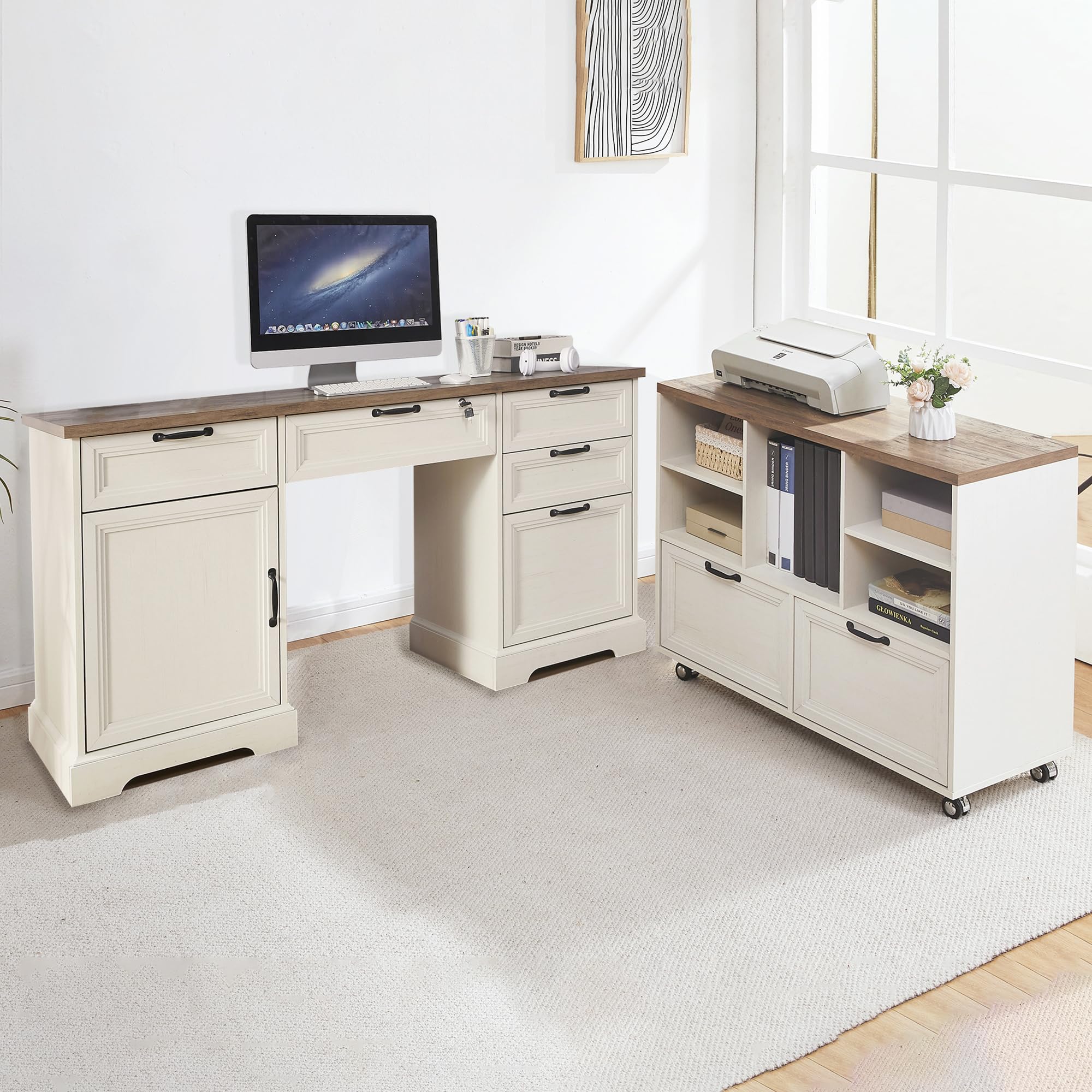
Image 1.1: The LayBurst 60-inch Farmhouse Executive Desk and 40-inch Mobile File Cabinet set, showcasing its L-shaped configuration and overall design.
2. Product Specifications
| Feature | Detail |
|---|---|
| Brand | LayBurst |
| Model Number | pyh20250806 |
| Desk Dimensions (D x W x H) | 22"D x 60"W x 30.1"H |
| Desk Weight | 115 Pounds |
| Cabinet Dimensions (D x W x H) | 15.7"D x 39.3"W x 30.3"H |
| Cabinet Weight | 70.5 Pounds |
| Material | High-Quality MDF (Engineered Wood) |
| Color | White with Rustic Wood Top |
| Special Features | Built-In USB Outlet, 2 AC Outlets, 1 Type-C Port, Lockable Main Drawer, Wheeled File Cabinet, Adjustable Shelves |
| Number of Drawers | 4 (Desk) + 2 (File Cabinet) |
| Number of Cabinets | 2 (Desk) |
| Number of Shelves | 2 (Desk Cabinet) + 5 (File Cabinet) |
| Assembly Required | Yes |
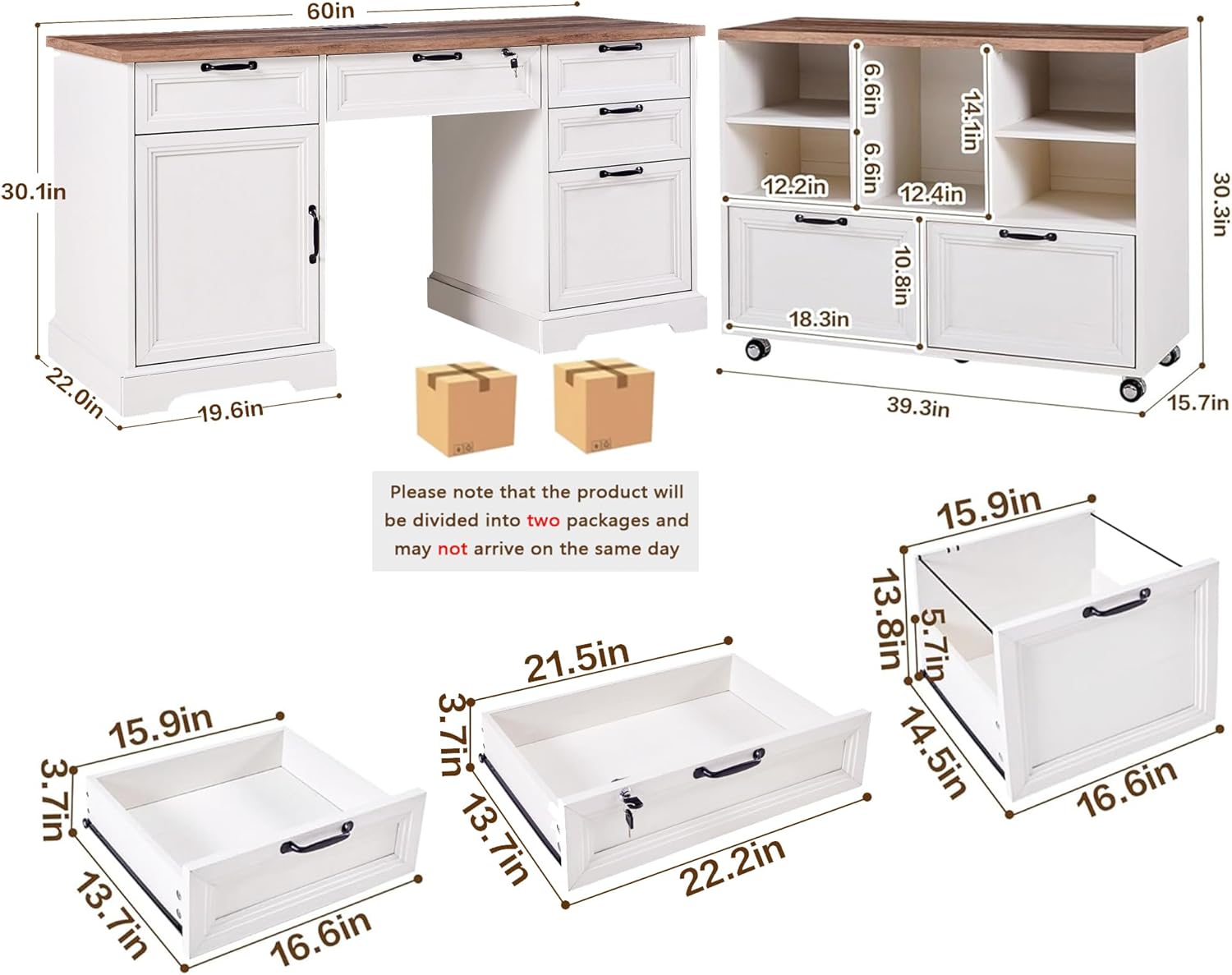
Image 2.1: Detailed dimensions for both the executive desk and the mobile file cabinet, including drawer sizes and overall unit measurements.
3. Assembly Instructions
Your LayBurst desk and file cabinet set requires assembly. Please refer to the separate 'Installation Instructions' booklet included in your packaging for detailed, step-by-step guidance. Ensure all parts are present and undamaged before beginning assembly.
3.1 Pre-Assembly Checklist
- Verify all packages have arrived.
- Unpack all components and lay them out on a clean, soft surface to prevent scratches.
- Identify all hardware and panels using the parts list in the instruction booklet.
- Gather necessary tools (e.g., screwdriver, hammer) as specified in the instructions.
3.2 General Assembly Tips
- Follow the numerical or alphabetical order of steps provided in the manual.
- Do not overtighten screws to avoid damaging the wood.
- Seek assistance for lifting heavy components to prevent injury.
- Keep children and pets away from the assembly area.
4. Operating Instructions
4.1 Desk Storage Features
The executive desk offers various storage options:
- Lockable Main Drawer: Located centrally, this drawer can be locked to secure important documents or personal items. Insert the key and turn to lock/unlock.
- Three Smaller Drawers: Positioned on the right side, these drawers are suitable for miscellaneous office supplies.
- Adjustable File Cabinet (Desk): The bottom right drawer is designed to hold letter, A4, and legal-sized files. Adjust the hanging file bars as needed.
- Partitioned Storage Cabinet: On the left side, this cabinet features adjustable shelves for customizable storage of books, binders, or other items.

Image 4.1: The desk features a lockable main drawer, three additional drawers, and a cabinet with adjustable shelving for diverse storage needs.
4.2 Mobile File Cabinet Operation
The 40-inch mobile file cabinet is designed for flexibility and stability:
- Mobility: Equipped with wheels, the cabinet can be easily moved to different positions.
- L-Shaped Configuration: Place the cabinet vertically on either side of the desk to create an L-shaped workspace.
- Extended Workspace: Position the cabinet horizontally to extend your desk surface.
- Stability: Two of the wheels include brakes. Engage these brakes to secure the cabinet in place and prevent unintended movement.
- Storage: The cabinet includes two spacious drawers for files and five open shelves for books or decorative items.

Image 4.2: The mobile file cabinet features smooth-rolling wheels, two of which have locking mechanisms for stability, and spacious drawers for file storage.
4.3 Built-In Charging Station
The desk features an integrated charging station for convenient power access:
- Power Outlets: Two standard AC power outlets (125V/12A) are available for laptops, monitors, or other electronics.
- USB Ports: Includes one USB-A port (5V/2A) and one USB-C port (5V/3A, 9V/2A, 12V/1.5A) for charging smartphones, tablets, and other compatible devices.
- Power Cord: The charging station is connected via a 6.5ft power cord. Plug this cord into a wall outlet to activate the charging features.

Image 4.3: The integrated charging station provides two AC outlets, one USB-A port, and one USB-C port for convenient power access.
Video 4.1: This video demonstrates the various storage compartments of the LayBurst executive desk and mobile file cabinet, including the lockable drawer, other drawers, and cabinet shelves.
5. Maintenance and Care
To ensure the longevity and appearance of your LayBurst desk and file cabinet, follow these care guidelines:
- Cleaning: Wipe surfaces with a soft, damp cloth. Avoid harsh chemicals or abrasive cleaners, which can damage the finish.
- Spills: Clean up spills immediately to prevent staining or damage to the engineered wood.
- Heat and Moisture: Avoid placing hot items directly on the surface. Use coasters for drinks to protect against moisture rings.
- Sunlight: Prolonged exposure to direct sunlight can cause fading. Position the furniture away from direct sun or use window coverings.
- Hardware: Periodically check and tighten all screws and fasteners to maintain structural integrity.
6. Troubleshooting
6.1 Common Issues and Solutions
| Problem | Possible Cause | Solution |
|---|---|---|
| Drawers stick or do not slide smoothly. | Misaligned drawer slides or debris in the tracks. | Check the alignment of the drawer slides and ensure they are securely fastened. Clean any dust or debris from the tracks. |
| Charging station not working. | Power cord not plugged in or loose connection. | Ensure the charging station's power cord is fully plugged into a functional wall outlet. Check for any loose connections within the charging unit. |
| File cabinet wheels not locking. | Brake mechanism not fully engaged. | Press down firmly on the brake levers of the two locking wheels until they click into place. |
| Desk or cabinet feels wobbly. | Loose fasteners or uneven floor. | Tighten all assembly screws. If the floor is uneven, use furniture levelers or shims under the base. |
7. Warranty and Support
For any questions, concerns, or to report missing or damaged parts, please contact LayBurst customer support. Refer to your purchase documentation for specific warranty details and contact information.
Customer Support: Please visit the official LayBurst store on Amazon or refer to the contact information provided with your product packaging.