
1. Product Overview
The Joy Pebble Espresso Machine CM8031-BLACK is a semi-automatic espresso machine designed for home use, featuring a 15-bar pump, integrated grinder, milk frother, and steam wand. This manual provides detailed instructions for its safe and efficient operation.

Image 1.1: Front view of the Joy Pebble Espresso Machine CM8031-BLACK, showing the bean hopper, control panel, portafilter, and two espresso cups.
2. What's in the Box
Carefully unpack all components and ensure the following items are present:
- Joy Pebble Espresso Machine (CM8031-BLACK)
- Portafilter
- Single & Dual Wall Filter Baskets
- Tamper
- Milk Jug
- Cleaning Brush
- Cleaning Pin
- Tool Box
- Instruction Manual (this document)

Image 2.1: All components included with the Joy Pebble Espresso Machine, laid out on a table.
3. Setup
- Placement: Place the machine on a stable, level, and dry surface. Ensure adequate clearance around the machine for ventilation.
- Water Tank: The 75 oz (77.8 oz) transparent water tank is removable for easy filling. Remove the water tank from the back of the machine, fill it with fresh, cold water up to the MAX line, and securely place it back into position.
- Bean Hopper: Open the lid of the bean hopper located on top of the machine. Pour fresh whole coffee beans into the hopper. Close the lid securely.
- Initial Rinse: Before first use, perform an initial rinse cycle. Fill the water tank, place a large container under the portafilter and steam wand, and run a cycle without coffee to flush the system. Refer to the 'Operating' section for basic brewing steps.
- Power Connection: Plug the power cord into a grounded electrical outlet.

Image 3.1: Illustration of the removable 77.8oz water tank being accessed from the side of the machine.
4. Operating Instructions
4.1 Grinding Coffee Beans
The machine features an integrated grinder with 30 precise grind settings. Adjust the coarseness based on your preference and coffee type.
- Adjust Grind Setting: Use the grind adjustment dial to select your desired coarseness. Finer settings (lower numbers) are for slower extraction, coarser settings (higher numbers) for faster extraction.
- Grind Time: The machine allows adjustment of grinding time to control the amount of coffee powder.
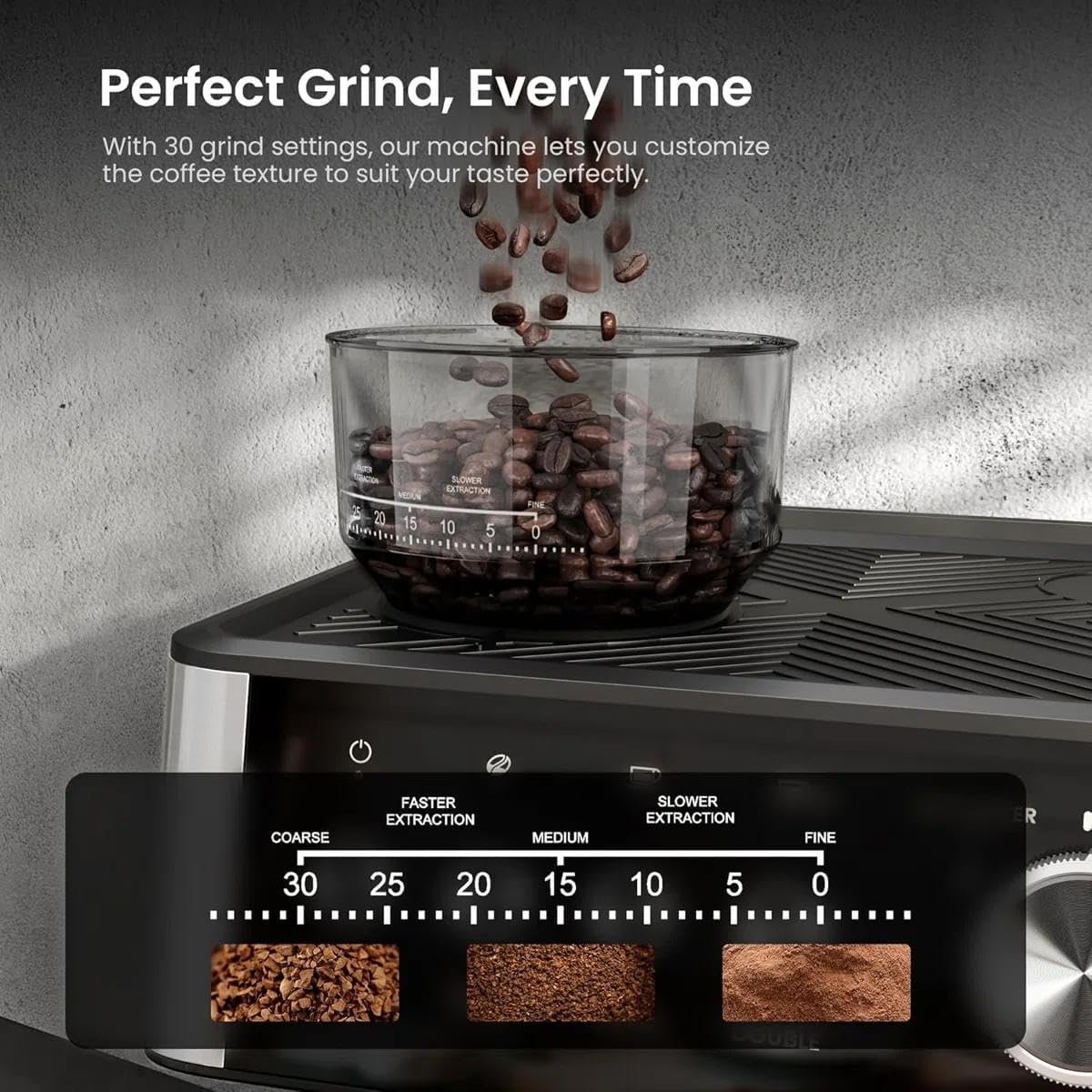
Image 4.1: Close-up of the bean hopper and grind setting display, illustrating the 30 grind levels from coarse to fine.
4.2 Brewing Espresso
Follow these steps for brewing a single or double espresso:
- Prepare Portafilter: Insert the appropriate filter basket (single or dual wall) into the portafilter.
- Grind: Place the portafilter under the grinder outlet. Press the 'GRIND' button to start grinding. The machine is engineered with an upgraded grinding path to prevent clogging.
- Tamp: Once ground, use the tamper to press the coffee grounds firmly and evenly into the filter basket.
- Attach Portafilter: Securely attach the portafilter to the group head by twisting it into place.
- Select Brew: Place your cup(s) under the portafilter spouts. Press the 'SINGLE' or 'DOUBLE' button to start brewing. The PID Intelligent Temperature Control System ensures optimal extraction temperature.
- Pre-Infusion: The machine utilizes low-pressure pre-infusion to allow coffee grounds to absorb water evenly before full pressure extraction.

Image 4.2: Visual guide showing the four main steps for brewing coffee: Grinding beans, Tamping grounds, Brewing espresso, and Frothing milk.
4.3 Using the Steam Wand (Milk Frother)
The powerful steam wand allows you to create rich, delicate milk foam for cappuccinos and lattes.
- Prepare Milk: Fill the milk jug with cold milk.
- Activate Steam: Turn the control knob to the 'STEAM' position. Wait for the machine to reach optimal steaming temperature.
- Froth Milk: Immerse the steam wand tip just below the surface of the milk. Open the steam valve to release steam. Move the jug up and down to create microfoam.
- Clean Wand: Immediately after frothing, wipe the steam wand with a damp cloth to remove any milk residue. Briefly purge steam to clear the nozzle.

Image 4.3: A hand holding a milk jug while the steam wand froths milk, creating silky smooth microfoam.
4.4 Hot Water Function
The machine can dispense hot water for tea or Americanos.
- Activate Hot Water: Turn the control knob to the 'HOT WATER' position.
- Dispense: Place a cup under the hot water spout and allow the desired amount of hot water to dispense.

Image 4.4: Split image showing the milk frother in action on the left and the hot water function dispensing into a glass on the right.
5. Maintenance
5.1 Daily Cleaning
- Portafilter and Filter Baskets: After each use, remove the portafilter, discard coffee grounds, and rinse the portafilter and filter basket under hot water.
- Steam Wand: As mentioned in section 4.3, wipe and purge the steam wand immediately after use.
- Drip Tray: Empty and rinse the drip tray regularly.
- Exterior: Wipe the exterior of the machine with a soft, damp cloth. Do not use abrasive cleaners.
5.2 Descaling
Regular descaling is essential to maintain machine performance and extend its lifespan. The frequency depends on water hardness and usage.
- Use a commercial descaling solution specifically designed for espresso machines.
- Follow the instructions provided with the descaling solution.
- Rinse the machine thoroughly with several cycles of fresh water after descaling.
5.3 Grinder Cleaning
Periodically clean the grinder path to ensure optimal performance and prevent clogging, especially with oily beans.
- Ensure the machine is unplugged.
- Remove any remaining beans from the hopper.
- Use the provided cleaning brush to clear any coffee residue from the grinding path.
6. Troubleshooting
If you encounter issues with your espresso machine, refer to the following common problems and solutions:
| Problem | Possible Cause | Solution |
|---|---|---|
| No coffee dispenses | Water tank empty; clogged filter basket; machine not primed. | Refill water tank; clean filter basket; perform initial rinse cycle. |
| Weak espresso / too fast extraction | Coffee grounds too coarse; not enough coffee; tamping too light. | Adjust grind to a finer setting; increase coffee dose; tamp more firmly. |
| Espresso drips slowly / too slow extraction | Coffee grounds too fine; too much coffee; tamping too hard. | Adjust grind to a coarser setting; reduce coffee dose; tamp lighter. |
| No steam from wand | Steam wand clogged; machine not at steam temperature. | Clean steam wand with cleaning pin; wait for steam indicator light. |
| Grinder not working | Bean hopper empty; grinder clogged. | Refill bean hopper; clean grinder path. |
If the problem persists after attempting these solutions, please contact customer support.
7. Specifications
| Brand | Joy Pebble |
| Model Name | CM8031-BLACK |
| Color | Black |
| Product Dimensions | 13"D x 11.15"W x 16.1"H |
| Weight | 16.8 LBS (approximate, inferred from image) |
| Special Features | Auto Clean Function, Cup Warmer, Milk Frother, Removable Tank, Integrated Grinder, PID Intelligent Temperature Control |
| Coffee Maker Type | Espresso Machine |
| Operation Mode | Semi-Automatic |
| Water Tank Capacity | 75 oz (77.8 oz) |
| Coffee Input Type | Whole Bean |
| Grind Settings | 30 precise settings |
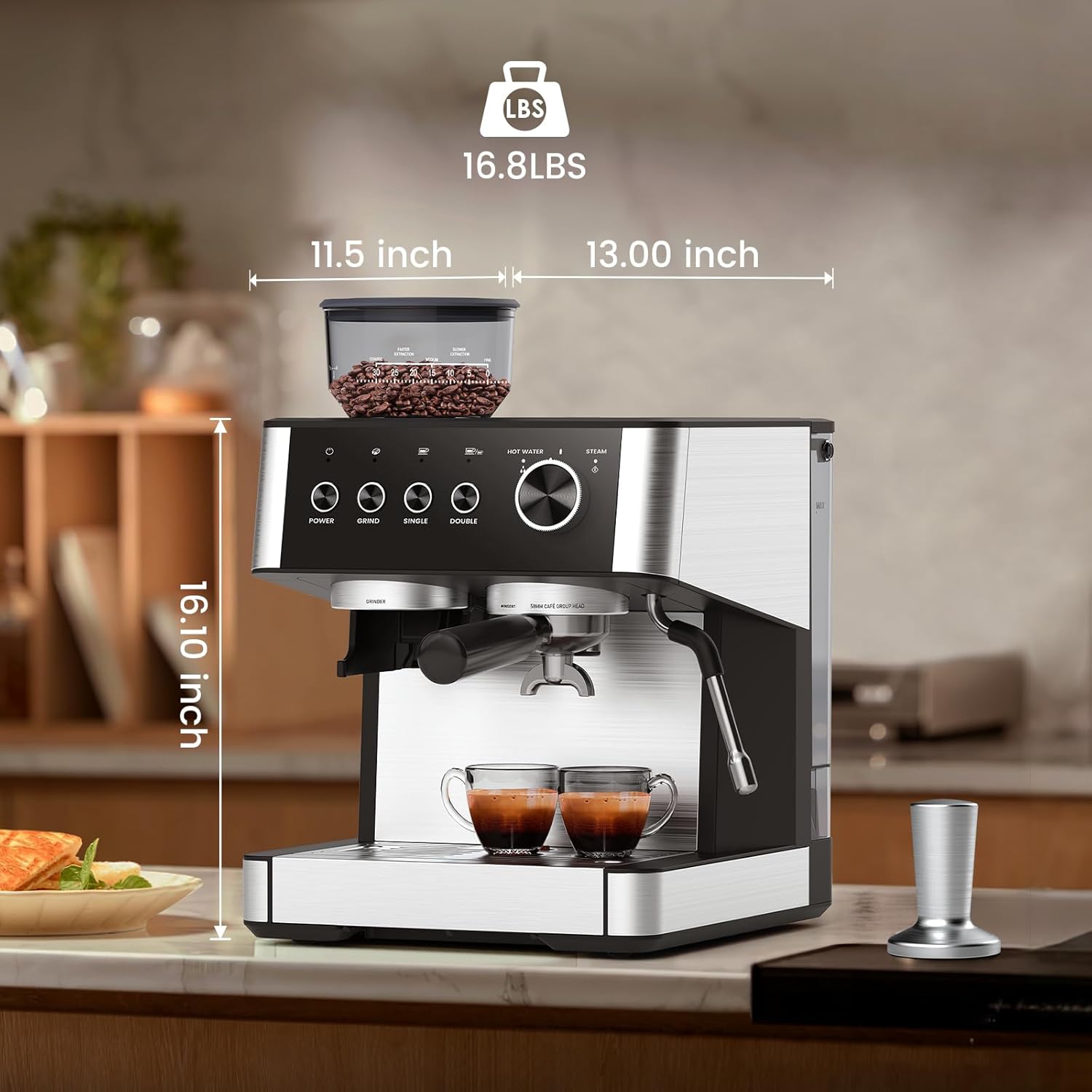
Image 7.1: Diagram illustrating the dimensions (13.00"D x 11.5"W x 16.10"H) and weight (16.8 LBS) of the espresso machine.
8. Warranty and Support
For warranty information and customer support, please refer to the documentation included with your purchase or visit the official Joy Pebble website. Keep your proof of purchase for warranty claims.
The machine features a safety design with automatic shut-off after 2 hours of inactivity to save energy.

Image 8.1: Illustration highlighting the automatic power-off feature after 2 hours of non-use, emphasizing energy saving and safety.

