
1. Introduction
This manual provides essential information for the proper installation, operation, and maintenance of the Cijprinter Service Module 383556. This module is designed as a replacement or spare part for VJ 1240 and VJ 1280 industrial continuous inkjet (CIJ) printers. Adhering to the guidelines in this manual will help ensure optimal performance and longevity of the module and the associated printer system.
2. Product Overview
The Service Module 383556 is a critical component for the VJ 1240 and VJ 1280 CIJ printers. It integrates various functionalities necessary for the printer's operation, ensuring reliable ink delivery and system control. This module is manufactured to original specifications to ensure compatibility and performance.
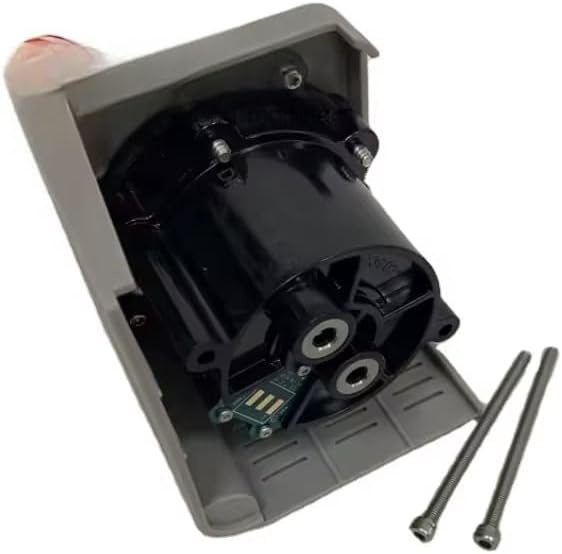
Figure 2.1: The Cijprinter Service Module 383556 with its protective casing partially open, revealing the main internal unit and connection points. Two mounting screws are visible beside the module.
The module's robust design is intended for industrial environments, providing a reliable solution for maintaining printer functionality.
3. Setup and Installation
Installation of the Service Module 383556 should only be performed by qualified service personnel. Improper installation can lead to system damage or operational failure. Always refer to the comprehensive service manual for the VJ 1240 or VJ 1280 printer for detailed, model-specific installation procedures.
3.1. Safety Precautions
- Ensure the printer is powered off and disconnected from the main power supply before beginning any installation or service work.
- Wear appropriate personal protective equipment (PPE), including gloves and eye protection.
- Handle the module with care to avoid damage to electronic components or connectors.
3.2. General Installation Steps (Consult Printer Manual for Specifics)
- Locate the existing service module within the VJ 1240/1280 printer chassis.
- Carefully disconnect all electrical and fluid connections from the old module. Note their positions for re-connection.
- Remove any mounting hardware securing the old module.
- Gently remove the old module from its bay.
- Insert the new Service Module 383556 into the designated bay, ensuring proper alignment.
- Secure the new module with the appropriate mounting hardware.
- Reconnect all electrical and fluid connections to the new module, ensuring they are secure and correctly oriented.
- Perform a visual inspection to confirm all connections are tight and the module is properly seated.

Figure 3.1: The Service Module 383556 shown alongside its packaging, which includes mounting screws and O-rings for sealing connections. This illustrates the components typically supplied with the module.
4. Operating Instructions
The Service Module 383556 operates as an integral part of the VJ 1240/1280 printer system. Its function is largely automated and controlled by the printer's main control unit. There are no direct user-operable controls on the module itself.
4.1. Post-Installation Checks
- After installation, power on the printer and observe its startup sequence.
- Check the printer's display for any error messages or warnings related to the service module.
- Perform a test print to confirm proper ink flow and print quality.
- Monitor the printer's performance during initial operation to ensure stability.
Any operational issues should be addressed by consulting the VJ 1240/1280 printer's troubleshooting guide or contacting technical support.
5. Maintenance
The Service Module 383556 is designed for minimal maintenance. However, regular inspection of its connections and surrounding area within the printer is recommended as part of the overall printer maintenance schedule.
5.1. Recommended Maintenance Practices
- Visual Inspection: Periodically inspect the module and its connections for any signs of leaks, corrosion, or loose wiring.
- Cleaning: Keep the area around the module clean and free from dust, ink residue, or other contaminants. Use a soft, lint-free cloth for cleaning. Do not use harsh chemicals.
- Connection Integrity: Ensure all fluid and electrical connections remain secure.
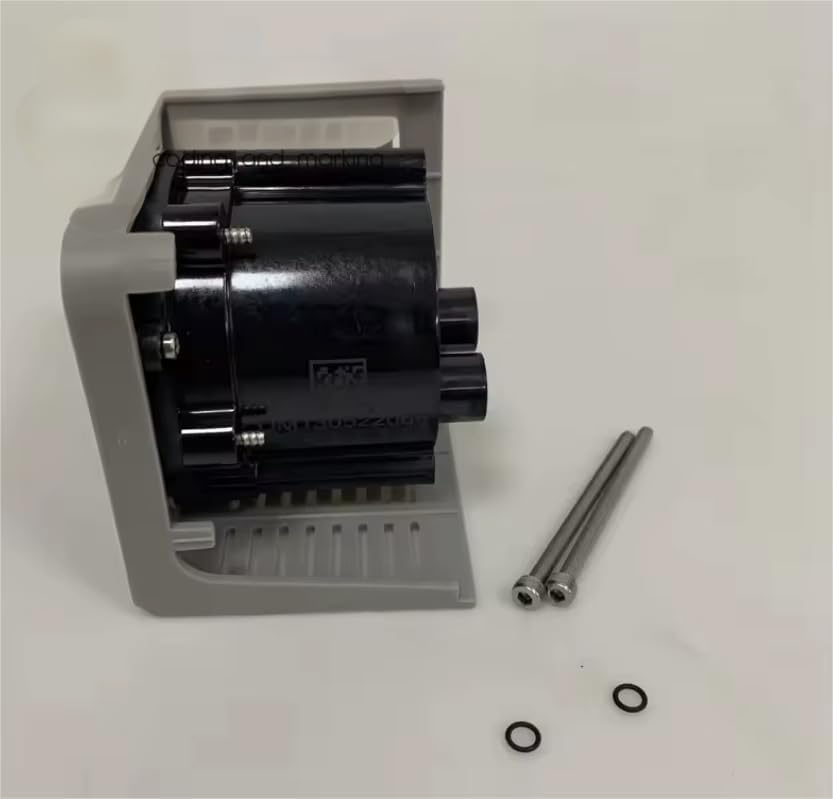
Figure 5.1: A side view of the Service Module 383556, highlighting its robust casing and the precise fit of its components. The O-rings and screws are shown separately, emphasizing their role in secure installation and sealing.
6. Troubleshooting
If issues arise after installing the Service Module 383556, consider the following general troubleshooting steps. For specific error codes or complex problems, refer to the VJ 1240/1280 printer's dedicated service manual.
6.1. Common Issues and Solutions
| Problem | Possible Cause | Solution |
|---|---|---|
| Printer not recognizing module | Loose electrical connection, incorrect installation. | Check all electrical connectors for secure fit. Re-install module if necessary, ensuring proper seating. |
| Ink leakage around module | Loose fluid connection, damaged O-ring, improper sealing. | Inspect fluid connections and O-rings. Tighten connections or replace O-rings if damaged. |
| Printer errors related to module function | Module malfunction, software incompatibility. | Consult the VJ 1240/1280 printer's service manual for specific error codes. Contact technical support if the issue persists. |
7. Specifications
| Attribute | Detail |
|---|---|
| Model Number | 383556 |
| Compatibility | VJ 1240, VJ 1280 Industrial Printers |
| Weight | 0.5 kg (approximately 1.1 lbs) |
| Product Dimensions (Approx.) | 18 x 18 x 18 cm (7.09 x 7.09 x 7.09 inches) |
| Origin | China |
| HS Code | 8443992990 |
8. Warranty and Support
For warranty information regarding the Cijprinter Service Module 383556, please refer to the purchase documentation or contact your authorized Cijprinter dealer or the seller directly. Warranty terms may vary based on region and supplier.
For technical support, installation assistance, or advanced troubleshooting, please contact the manufacturer or your product supplier. Always provide the module's model number (383556) and the specific printer model (VJ 1240 or VJ 1280) when seeking support.
Note: This manual provides general guidance. Always consult the official VJ 1240/1280 printer service manual for detailed, model-specific instructions and safety information.