
Introduction
This manual provides comprehensive instructions for the assembly, operation, and maintenance of your VOWNER 47-inch Vanity Desk. Please read all instructions carefully before use to ensure safe and proper functionality.
Important Safety Information
- Always follow the assembly instructions provided.
- Do not exceed the weight capacity of the vanity.
- Be cautious of pinch points during assembly.
- Keep electrical cords away from heat sources.
- Do not overload electrical outlets.
- Unplug all electrical components when not in use.
Package Contents
Verify that all components are present before beginning assembly.
- Vanity Desk
- Vanity Stool
- Lighted Mirror
- Integrated Power Outlet (2 AC, 2 USB)
- Assembly Hardware (screws, dowels, etc.)
- Assembly Instructions

Image: Complete VOWNER Vanity Desk setup, including the lighted mirror, stool, and integrated power outlet.
Setup and Assembly
Assembly of your VOWNER Vanity Desk requires careful attention to the provided instructions. It is recommended to have two people for certain steps.
- Unpack Components: Carefully remove all parts from the packaging and lay them out on a clean, soft surface to prevent scratches.
- Identify Hardware: Match all screws, dowels, and other hardware to the parts list in the separate assembly guide.
- Assemble Base Units: Follow the step-by-step diagrams to construct the drawer units and central desk section.
- Attach Desktop: Secure the desktop to the assembled base units.
- Install Drawers: Insert the 9 drawers into their respective slots. Ensure smooth operation.
- Mount Mirror: Carefully attach the lighted mirror to the back of the vanity desk. Connect the power cable for the mirror lighting.
- Install Power Outlet: Secure the integrated power outlet unit to the designated area on the side of the vanity. Plug it into a wall socket.
- Assemble Stool: Follow instructions to assemble the cushioned stool.

Image: Detailed dimensions of the vanity desk and mirror, useful for planning placement and assembly.
Operating Instructions
Lighted Mirror Operation
The integrated LED mirror features adjustable lighting modes and brightness levels.
- Power On/Off: Locate the touch sensor on the mirror surface. Tap once to turn the lights on or off.
- Change Color Mode: With the lights on, tap the touch sensor repeatedly to cycle through the three color temperature modes: Warm White, Natural White, and Cool White.
- Adjust Brightness: With the lights on, press and hold the touch sensor to smoothly adjust the brightness level. Release when the desired brightness is achieved.

Image: Illustration of the three available lighting color modes: Warm White, Natural White, and Cool White, with adjustable brightness.
Power Outlet Usage
The vanity desk includes a built-in power strip for convenient charging and powering of devices.
- AC Outlets: Two standard 125V/12A AC outlets are provided for hair dryers, curling irons, and other small appliances.
- USB Ports: Two 5V/2A USB ports are available for charging smartphones, tablets, and other USB-powered devices.
- Safety Note: Ensure the vanity's main power cord is securely plugged into a functional wall outlet. Do not exceed the maximum load capacity of the power strip.
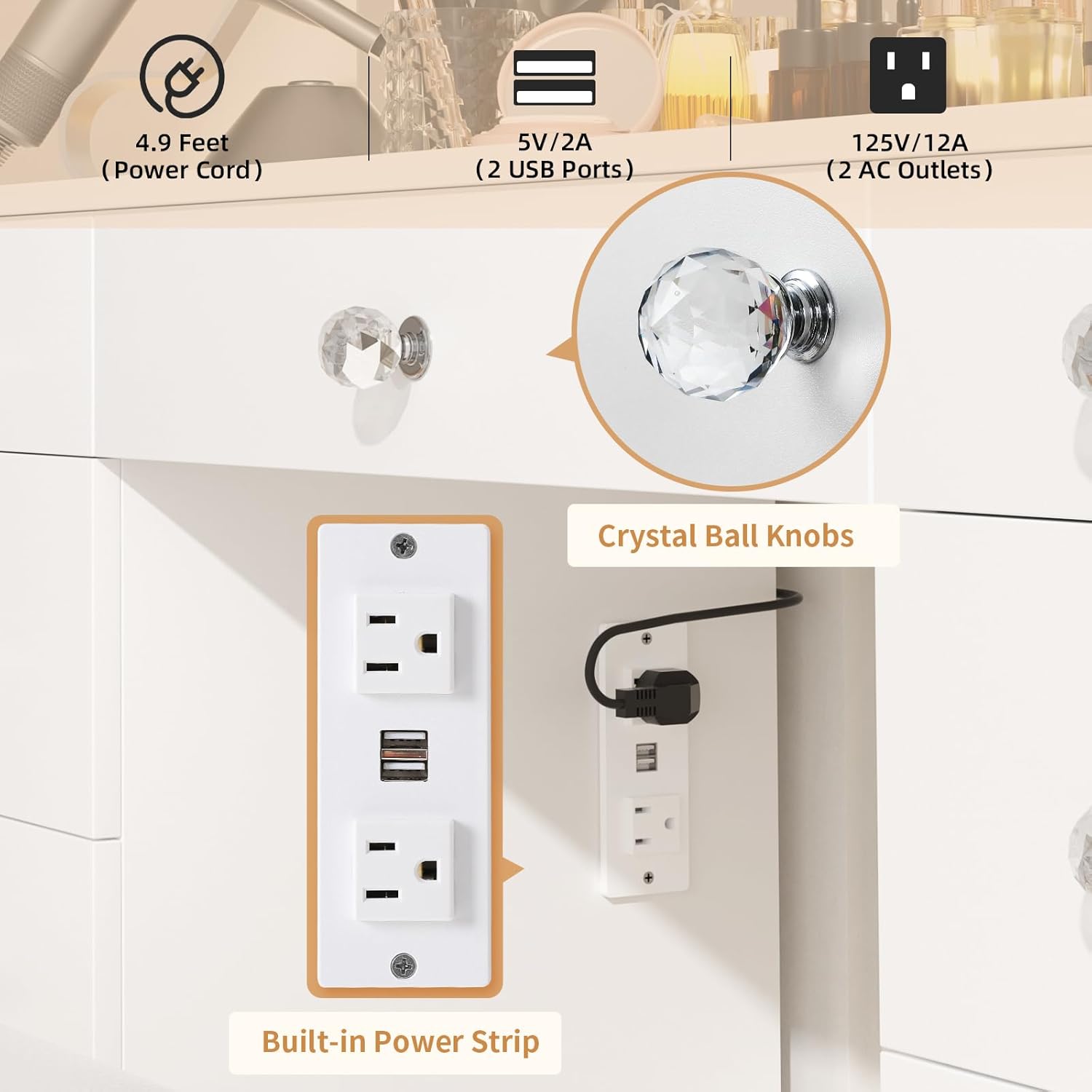
Image: Close-up of the integrated power strip, showing two AC outlets and two USB ports, with a power cord connection.
Maintenance and Care
- Cleaning: Wipe the vanity surfaces with a dry, soft cloth. For stubborn marks, a slightly damp cloth with mild soap can be used, followed by immediate drying. Avoid harsh chemicals or abrasive cleaners.
- Mirror Care: Clean the mirror surface with a glass cleaner and a lint-free cloth. Do not spray cleaner directly onto the mirror to prevent liquid from seeping into the electrical components.
- Drawer Maintenance: Periodically check drawer slides for smooth operation. If needed, clean dust and debris from the tracks.
- Electrical Components: Ensure all electrical connections are secure. If any damage is observed, discontinue use and contact customer support.
Troubleshooting
| Problem | Possible Cause | Solution |
|---|---|---|
| Mirror lights do not turn on. | Power cable disconnected; faulty power outlet; touch sensor malfunction. | Check power cable connection to mirror and wall outlet. Test wall outlet with another device. Contact customer support if issue persists. |
| Power outlets/USB ports not working. | Vanity's main power cord disconnected; overloaded circuit; faulty power strip. | Ensure the vanity's main power cord is plugged in. Reduce the number of devices connected. Contact customer support. |
| Drawers are stiff or misaligned. | Improper assembly; debris in drawer slides. | Review assembly instructions for correct drawer slide installation. Clean drawer tracks. |
| Sparking from power strip when plugging in devices. | Normal inrush current; loose connection; faulty outlet. | A small spark can be normal. Ensure devices are fully inserted. If sparking is excessive or persistent, discontinue use and contact customer support immediately. |
| Stool feels unstable. | Loose assembly screws. | Tighten all assembly screws on the stool. Do not overtighten. |
| Mirror light brightness or color mode not changing. | Touch sensor malfunction. | Ensure finger is clean and dry when operating the touch sensor. If unresponsive, contact customer support. |
Specifications
| Feature | Detail |
|---|---|
| Brand | VOWNER |
| Model Number | VOWNER-630 |
| Product Dimensions (D x W x H) | 15.7"D x 47.2"W x 53.5"H |
| Color | White |
| Material Type | Engineered Wood Desktop |
| Item Weight | 112.5 Pounds |
| Number of Drawers | 9 |
| Lighting Modes | 3 Color (Warm White, Natural White, Cool White) |
| Brightness Adjustment | Adjustable |
| Power Outlet | 2 AC Outlets (125V/12A), 2 USB Ports (5V/2A) |
| Power Cord Length | 4.9 Feet |
| Included Components | Vanity desk, vanity stool, power outlet |
Warranty Information
VOWNER products are designed for quality and durability. For specific warranty details regarding your vanity desk, please refer to the warranty card included in your package or contact VOWNER customer support directly. Keep your purchase receipt as proof of purchase for any warranty claims.
Customer Support
If you encounter any issues or have questions regarding your VOWNER Vanity Desk, please contact our customer support team for assistance.
- Online Support: Visit the official VOWNER website for FAQs and support resources.
- Email Support: Refer to your product packaging or included documentation for customer service email addresses.
- Phone Support: Refer to your product packaging or included documentation for customer service phone numbers.
When contacting support, please have your model number (VOWNER-630) and purchase date available.