
JOYMOR UTV
JOYMOR 2-Seater 24V Ride On UTV Truck Instruction Manual
Model: UTV | Brand: JOYMOR
1. Safety Information
WARNING: Adult assembly required. Adult supervision is required at all times when the vehicle is in use. Read all instructions before operating the vehicle.
- Age and Weight Limits: This vehicle is designed for children aged 3-8 years (one child) or 2-3 years (two toddlers). The maximum weight capacity is 135 lbs (61 kg). Do not exceed these limits.
- Protective Gear: Always ensure children wear appropriate safety gear, such as a helmet, when operating the vehicle.
- Operating Environment: Use the vehicle on flat, dry surfaces away from roads, pools, or steep inclines. Avoid operating in wet conditions or near hazards.
- Safety Features: Ensure the 3-point safety belts are securely fastened and the lockable doors are closed before driving.
- Battery Safety: Only use the provided charger and battery. Do not modify the electrical system.
2. Package Contents
Please check that all items are present and undamaged before assembly.
- JOYMOR 2-Seater 24V Ride On UTV Truck Body
- Wheels (4x)
- Steering Wheel
- Seats (2x)
- 24V Rechargeable Battery
- Battery Charger
- Remote Control
- Assembly Hardware (screws, washers, nuts)
- Instruction Manual
3. Assembly Instructions
Assembly is required. Follow these steps carefully. Refer to the diagrams for visual guidance.
3.1 Unpacking and Initial Setup
Carefully remove all components from the packaging. Place them on a clean, flat surface.

Figure 3.1: Fully assembled JOYMOR 2-Seater 24V Ride On UTV Truck.
3.2 Wheel Installation
Attach the four wheels to the vehicle axles using the provided hardware. Ensure they are securely fastened but can rotate freely.

Figure 3.2: Front view of the UTV, showing the large wheels and robust design.
3.3 Battery Connection and Charging
Locate the battery compartment, typically under the seat. Connect the battery terminals. Before first use, fully charge the 24V battery for 8-12 hours using the provided charger. Do not overcharge.
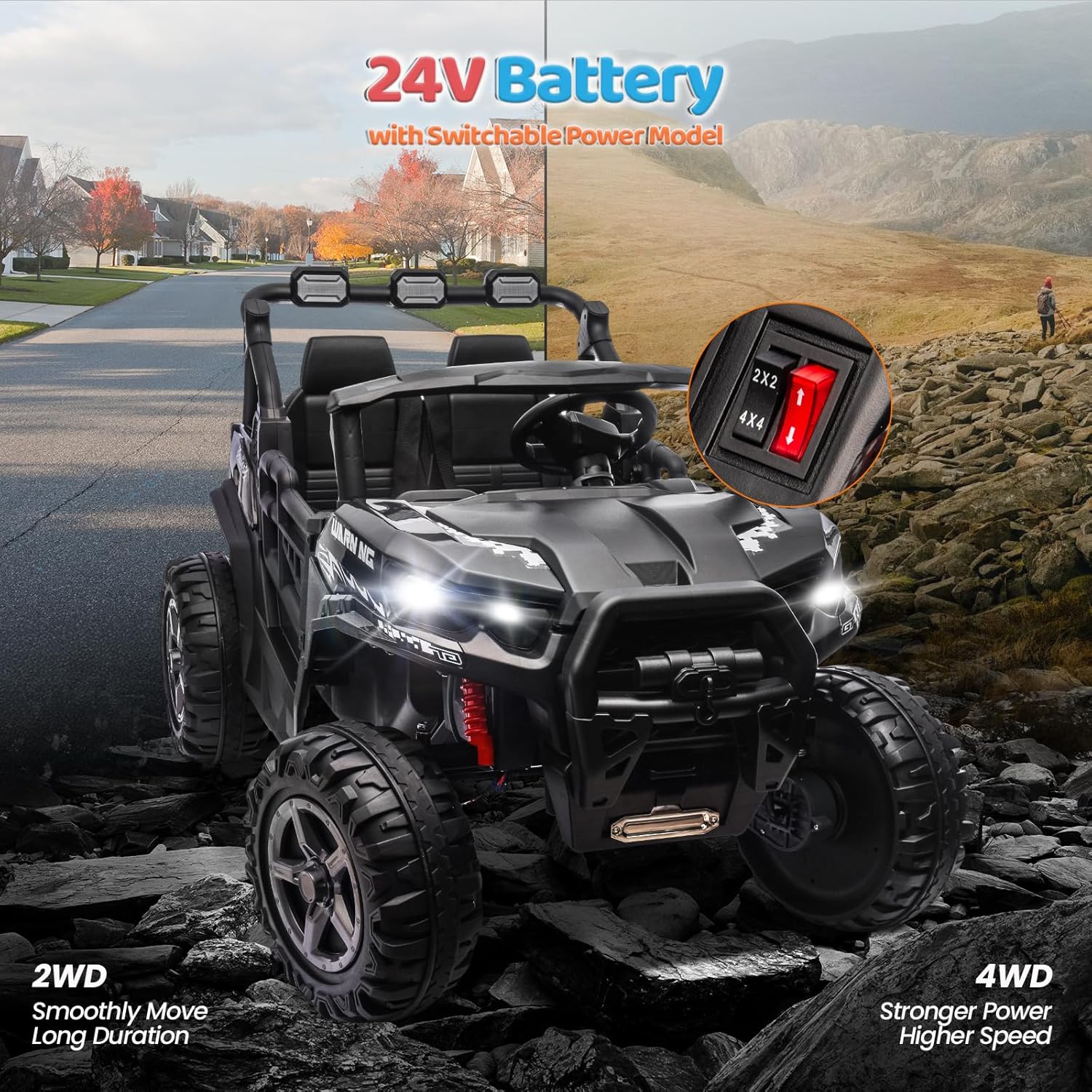
Figure 3.3: Illustration of the 24V battery system and drive mode switch.
3.4 Steering Wheel and Seat Installation
Install the steering wheel onto the steering column. Secure the seats in their designated positions. Ensure the safety belts are accessible and functional.

Figure 3.4: View of the interior, showing the two seats and safety belts.
Video 3.1: This video demonstrates the vehicle's features, including opening the doors and fastening the seatbelt.
4. Operating Instructions
4.1 Starting the Vehicle
Press the orange power button on the dashboard to turn on the vehicle. The LED lights will illuminate, and a startup sound may play.

Figure 4.1: Multifunctional dashboard with power button and controls.
Video 4.1: This video demonstrates pressing the start button and activating the vehicle's lights.
4.2 Driving Modes (Manual & Remote Control)
The UTV offers two driving modes:
- Manual Driving: The child operates the vehicle using the steering wheel and foot pedal.
- Remote Control: An adult can override manual controls using the included remote control for safety and guidance. The remote allows for steering, forward/backward movement, and speed selection.

Figure 4.2: Illustrates both manual driving by children and remote control operation by an adult.
Video 4.2: This video demonstrates the remote control functionality, including forward, backward, and turning the vehicle.
4.3 Speed and Drive Mode Selection
Use the switches on the dashboard to select between slow and fast speeds, and between 2-wheel drive (2WD) for longer duration or 4-wheel drive (4WD) for stronger power and higher speed.
Figure 4.3: Dashboard switches for speed and drive mode selection.
Video 4.3: This video demonstrates switching between slow/fast speeds and 2WD/4WD modes.
4.4 Multimedia Functions
The vehicle includes a built-in audio device with preset sounds. You can also connect an external device via Bluetooth to play your own music. The steering wheel features a horn button.
Video 4.4: This video demonstrates music playback, volume control, Bluetooth connection, and the horn function.
5. Maintenance
- Battery Care:
- Recharge the battery after each use.
- If storing the vehicle for an extended period, charge the battery once a month to prolong its lifespan.
- Do not allow the battery to completely drain.
- Cleaning: Wipe the vehicle with a soft, damp cloth. Do not use abrasive cleaners or solvents. Avoid spraying water directly onto electrical components.
- Tire Inspection: Regularly check the tires for wear and tear. Ensure they are free from debris that could affect performance.
- General Inspection: Periodically check all screws, nuts, and bolts to ensure they are tight. Inspect the wiring for any damage.
6. Troubleshooting
| Problem | Possible Cause | Solution |
|---|---|---|
| Vehicle does not move | Battery is low or not connected; Power switch is off; Loose wiring; Motor issue. | Charge the battery; Ensure power switch is ON; Check all electrical connections; Contact customer support if motor is suspected. |
| Remote control not working | Remote batteries are dead; Remote not paired; Interference. | Replace remote batteries; Refer to pairing instructions in the full manual; Move to an area with less interference. |
| Vehicle moves slowly | Low battery; Overload (exceeding weight capacity); Operating on rough terrain; Slow speed mode selected. | Recharge battery; Reduce load; Operate on smoother surfaces; Switch to fast speed mode. |
| Lights or music not working | Loose wiring; Component failure. | Check connections to lights/speakers; Contact customer support. |
7. Specifications
- Brand: JOYMOR
- Model: UTV
- Battery: 24V
- Motors: 4 x 35W Drive Motors
- Maximum Speed: Up to 4.5 mph
- Seating Capacity: 2-Seater (1 child 3-8 years, or 2 toddlers 2-3 years)
- Maximum Weight Capacity: 135 lbs (61 kg)
- Recommended Age: 36 months and up
- Dimensions (L x W x H): 32" x 28" x 49"
- Material: Plastic
- Features: Remote Control, 3 Speed Settings, 2WD/4WD Switch, Spring Suspension, LED Lights, Built-in Music, Bluetooth Connectivity, Horn, Lockable Doors, 3-Point Safety Belts, Heavy-Duty Off-Road Tires.
8. Warranty and Support
For warranty information, product support, or to inquire about replacement parts, please contact JOYMOR DIRECT customer service. Keep your purchase receipt for warranty claims.
- Returns: 30-day easy returns policy.
- Protection Plans: Optional 2-Year Protection Plan available.
- Contact: Refer to the contact information provided with your purchase or visit the official JOYMOR website.
Related documentsUTV

Ask a question about this manual
Ask about setup, troubleshooting, compatibility, parts, safety, or missing instructions. Manuals+ will review the question and use this page’s manual context to help answer it.