1. Introduction
This manual provides essential information for the safe and efficient installation, operation, and maintenance of your Fujitsu S26113-E567-V50-02 DPS-500XB A Server Power Supply. Please read this manual thoroughly before attempting to install or operate the unit. Retain this manual for future reference.
2. Safety Information
WARNING: Improper installation or use can result in electric shock, fire, or damage to the equipment. Always follow these safety guidelines:
- Installation should only be performed by qualified personnel.
- Ensure the power supply is disconnected from the main power source before installation, removal, or maintenance.
- Do not open the power supply casing. There are no user-serviceable parts inside, and dangerous voltages are present.
- Ensure proper ventilation around the power supply to prevent overheating.
- Do not expose the unit to moisture or extreme temperatures.
- Use only compatible cables and connectors.
3. Product Overview
The Fujitsu S26113-E567-V50-02 DPS-500XB A is a 500W server power supply designed for reliable power delivery in server environments. It features standard ATX connector types for broad compatibility.
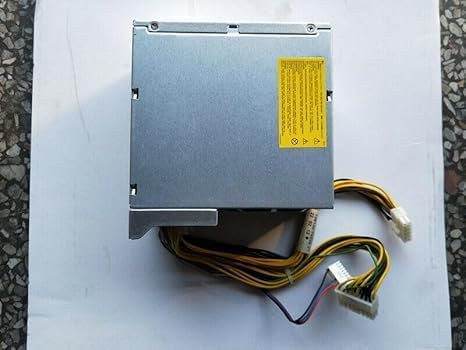
Figure 3.1: Top view of the power supply, showing the main casing and a yellow warning label indicating safety precautions and electrical hazards.
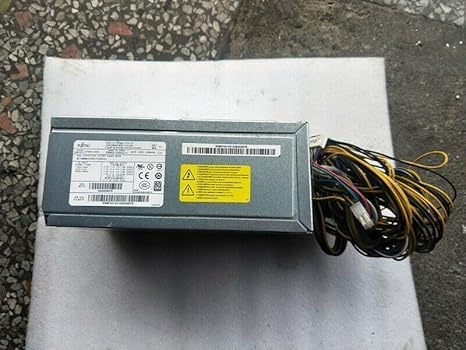
Figure 3.2: Side view of the power supply, illustrating the integrated power cables with their respective connectors and a white label containing model and serial information.
4. Setup and Installation
This power supply is designed for integration into server systems. Professional installation is highly recommended.
- Preparation: Ensure the server system is completely powered off and disconnected from all power sources.
- Removal (if replacing): Carefully remove the old power supply, noting the connections of all cables.
- Mounting: Position the new Fujitsu S26113-E567-V50-02 DPS-500XB A power supply into the designated bay within the server chassis. Secure it using the appropriate screws.
- Cable Connection: Connect the ATX main power connector to the motherboard. Connect all necessary peripheral power cables (e.g., CPU, drives, expansion cards) to their respective components. Ensure all connections are firm and secure.
- Final Check: Double-check all connections and ensure no cables are obstructing airflow or cooling fans.
- Power On: Reconnect the server to the main power source and power on the system.
5. Operating Instructions
Once properly installed, the power supply operates automatically with the server system. It provides stable power to all connected components.
- Power On: The power supply will activate when the server system is powered on.
- Power Off: The power supply will power down when the server system is properly shut down.
- Indicators: Refer to your server's documentation for specific power indicator lights, as the power supply itself typically does not have external user-facing indicators.
6. Maintenance
Regular maintenance helps ensure the longevity and stable operation of your power supply.
- Dust Removal: Periodically clean dust from the power supply's fan and vents using compressed air. Ensure the server is powered off and unplugged before cleaning.
- Ventilation: Ensure that the server chassis and the power supply's vents are not obstructed to allow for adequate airflow.
- Inspection: Occasionally inspect cables for any signs of wear, fraying, or damage.
7. Troubleshooting
If you encounter issues, consider the following basic troubleshooting steps:
- No Power:
- Check if the power cable is securely connected to both the power supply and the wall outlet.
- Verify the wall outlet is functional.
- Ensure the server's power switch is in the 'On' position.
- System Instability/Random Shutdowns:
- Check for proper ventilation and ensure the power supply is not overheating.
- Verify all internal power connections are secure.
- If issues persist, the power supply may be faulty or insufficient for the system's load. Consider professional diagnosis.
- Unusual Noises:
- A loud fan might indicate dust buildup or a failing fan. Clean the fan or consider replacement if noise persists.
For complex issues, consult a qualified technician or the server manufacturer's support.
8. Specifications
| Feature | Specification |
|---|---|
| Model Number | S26113-E567-V50-02 DPS-500XB A |
| Brand | Generic (Compatible with Fujitsu systems) |
| Output Wattage | 500W |
| Connector Type | ATX |
| Compatible Devices | Server Systems (also listed as Gaming Console, verify compatibility for specific use) |
| Product Dimensions (L x W x H) | 0.39 x 0.39 x 0.39 inches (Note: This dimension may refer to packaging or a component, actual PSU dimensions will be larger) |
| UPC | 776730300139 |
| Manufacturer | GEESONG |
9. Warranty and Support
For warranty information and technical support, please refer to the documentation provided by your seller or contact the manufacturer directly. Keep your purchase receipt as proof of purchase.


