
1. Product Overview
This manual provides detailed instructions for the installation, operation, and maintenance of your Hodozzy third brake light reversing camera. Designed specifically for Peugeot Partner and Citroen Berlingo models from 2008 to 2020, this camera enhances rear visibility and safety during reversing maneuvers.

Image 1.1: Hodozzy Reversing Camera installed as a third brake light, illustrating its wide field of view.
2. Package Contents
Please verify that all items listed below are included in your package:
- Reversing Camera (integrated into third brake light housing)
- Video Cable (10 meters)
- Power Cable (1 meter)
- Adapter Cable
- User Manual (this document)

Image 2.1: Contents of the Hodozzy Reversing Camera package.
3. Specifications
| Effective Resolution | 1 Megapixel |
| Video Resolution (CVBS) | 640 x 480 (Mirror Image) |
| Video Resolution (AHD) | 1280 x 720 (Mirror Image) |
| Video Format | PAL |
| Viewing Angle | 140° |
| Operating Temperature | -20 °C to +60 °C |
| Input Voltage | 12 V |
| Input Current | 100 mA |
| Waterproof Rating | IP67 |
| Optical Sensor Technology | CMOS Infrared |
| Lens Type | Wide Angle |
| Optical Sensor Size | 1/3 inch |
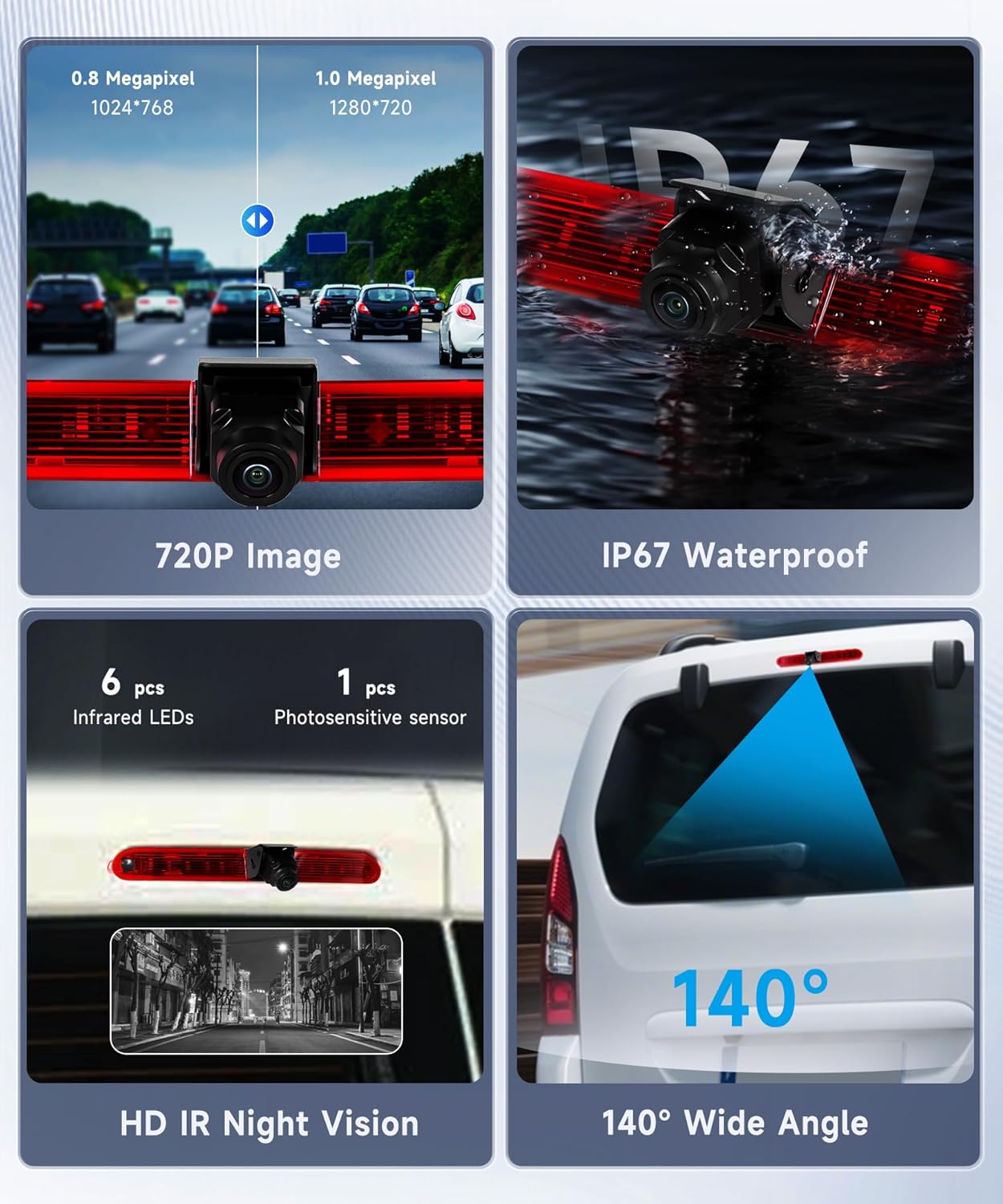
Image 3.1: Key features and specifications of the Hodozzy Reversing Camera.
4. Compatibility
This Hodozzy reversing camera is designed for direct replacement of the third brake light on the following vehicle models:
- Peugeot Partner: 2008 - 2020 models
- Citroen Berlingo: 2008 - 2020 models
Ensure your vehicle's model and year fall within this range for proper fitment and functionality.

Image 4.1: Visual representation of the camera's compatibility and installed appearance on supported vehicles.
5. Safety Information
Please read and understand all safety instructions before installing or operating the product. Failure to do so may result in injury or damage to the product or vehicle.
- Always disconnect the vehicle's battery before performing any electrical work.
- Ensure all wiring connections are secure and properly insulated to prevent short circuits.
- Do not obstruct the camera's view or the vehicle's third brake light.
- This camera is an aid for reversing and does not replace the driver's responsibility to check surroundings manually.
- If you are unsure about any installation steps, consult a qualified automotive technician.
6. Installation
The installation process involves replacing your vehicle's existing third brake light with the Hodozzy reversing camera unit. No drilling is required.
6.1. Tools Required
- Screwdriver set (appropriate for your vehicle's brake light screws)
- Wire strippers/crimpers
- Electrical tape or heat shrink tubing
- Multimeter (optional, for verifying power connections)
6.2. Installation Steps
- Prepare the Vehicle: Ensure the vehicle is turned off and the parking brake is engaged. Disconnect the negative terminal of the vehicle's battery to prevent electrical shorts.
- Remove Existing Brake Light: Locate the third brake light on your Peugeot Partner or Citroen Berlingo. Carefully unscrew and remove the existing brake light assembly. Disconnect any electrical connectors.
- Install Camera Unit: The Hodozzy camera unit is designed to fit directly into the original third brake light housing. Insert the camera unit and secure it with the original screws or provided hardware.
- Connect Power Cable: Connect the camera's power cable (1 meter) to the vehicle's reversing light circuit. The red wire connects to the positive (+) lead of the reversing lamp, and the black wire connects to ground (GND). This ensures the camera activates when reverse gear is engaged.
- Connect Video Cable: Route the 10-meter video cable from the camera unit to your car's display unit (e.g., car radio, monitor). Connect the yellow RCA connector from the camera to the video input of your display.
- Adjust Camera Angle: The camera features a 15° adjustable angle. Loosen the adjustment screw, set the desired viewing angle, and then tighten the screw to secure it.
- Test Functionality: Reconnect the vehicle's battery. Turn on the ignition and engage reverse gear. Verify that the camera image appears on your display.
- Finalize Installation: Once confirmed working, ensure all cables are neatly routed and secured, and all connections are properly insulated.

Image 6.1: Wiring diagram for camera installation and mode switching.

Image 6.2: Camera angle adjustment mechanism.
7. Operation
7.1. Automatic Activation
Once properly installed and wired to the reversing light circuit, the camera will automatically activate and display the rear view on your connected monitor when the vehicle is shifted into reverse gear.
7.2. Video Mode Switching (AHD/CVBS)
The camera supports both AHD (1280 x 720p) and CVBS (640 x 480) video modes. You can switch between these modes by manipulating the white control wire on the power cable:
- CVBS Mode: Connect the white control wire. This mode supports auxiliary reversing lines.
- AHD 720P Mode: Cut the white control wire. This mode provides higher resolution.
Ensure your monitor is compatible with the selected video mode.
7.3. Night Vision
The integrated infrared (IR) night vision technology allows for clear visibility in low-light conditions or complete darkness, helping you identify obstacles and pedestrians during night-time reversing.
8. Maintenance
To ensure optimal performance and longevity of your Hodozzy reversing camera, follow these maintenance guidelines:
- Cleaning: Regularly clean the camera lens with a soft, damp cloth to remove dirt, dust, or water spots. Avoid abrasive cleaners that could scratch the lens.
- Waterproofing: The camera has an IP67 waterproof rating, meaning it is protected against dust and temporary immersion in water. However, avoid directing high-pressure water jets directly at the camera for extended periods.
- Cable Inspection: Periodically check all cables and connections for any signs of wear, damage, or corrosion. Ensure they remain securely fastened.

Image 8.1: The camera's IP67 waterproof design ensures durability in various weather conditions.
9. Troubleshooting
If you encounter issues with your Hodozzy reversing camera, refer to the following common problems and solutions:
| Problem | Possible Cause | Solution |
|---|---|---|
| No image on monitor |
|
|
| Poor image quality / Flickering |
|
|
| Night vision not working |
|
|
10. Warranty and Support
Manufacturer's Warranty: This Hodozzy product comes with a 2-year manufacturer's warranty, covering defects in materials and workmanship from the date of purchase.
Customer Support: If you require technical assistance, have questions about installation, or need to claim warranty service, please contact Hodozzy customer support. You can typically find contact information on the seller's page where you purchased the product.
For Amazon purchases, you can contact the seller directly:
- Go to the product page on Amazon.
- Click on the seller's name (e.g., "Hodozzy") under the "Sold by" section.
- On the seller's page, look for a "Ask a question" or "Contact Seller" button.


