Introduction
This manual provides comprehensive instructions for the NAVIFORCE NF6104 Digital Analog Watch. It covers essential information regarding its features, setup, operation, maintenance, and specifications to ensure optimal performance and longevity of your timepiece. Please read this manual carefully before using your watch.
Product Overview
The NAVIFORCE NF6104 is a versatile watch featuring a dynamic multi-layer dial with both traditional analog hands and prominent digital displays. It offers various functions including time, day, date, alarm, stopwatch, and timer. Designed for durability, it includes robust construction and 30-meter water resistance.

Image 1: Front view of the NAVIFORCE NF6104 watch, showcasing its dual analog and digital display, multiple pushers, and grey silicone strap.
Key Features
- Dual Display: Integrates both analog hands for classic timekeeping and a clear digital display for additional information.
- Precise Quartz Movement: Ensures accurate and reliable timekeeping.
- Water Resistance (3ATM): Resistant to splashes, rain, and hand washing. Not suitable for swimming or showering.
- Protective Mineral Glass: The dial is protected by sturdy mineral glass, offering clarity and resistance against everyday scratches and impacts.
- Functions: Includes alarm, stopwatch, and timer capabilities.
Setup Instructions
Before initial use, please set the time and date on your watch.
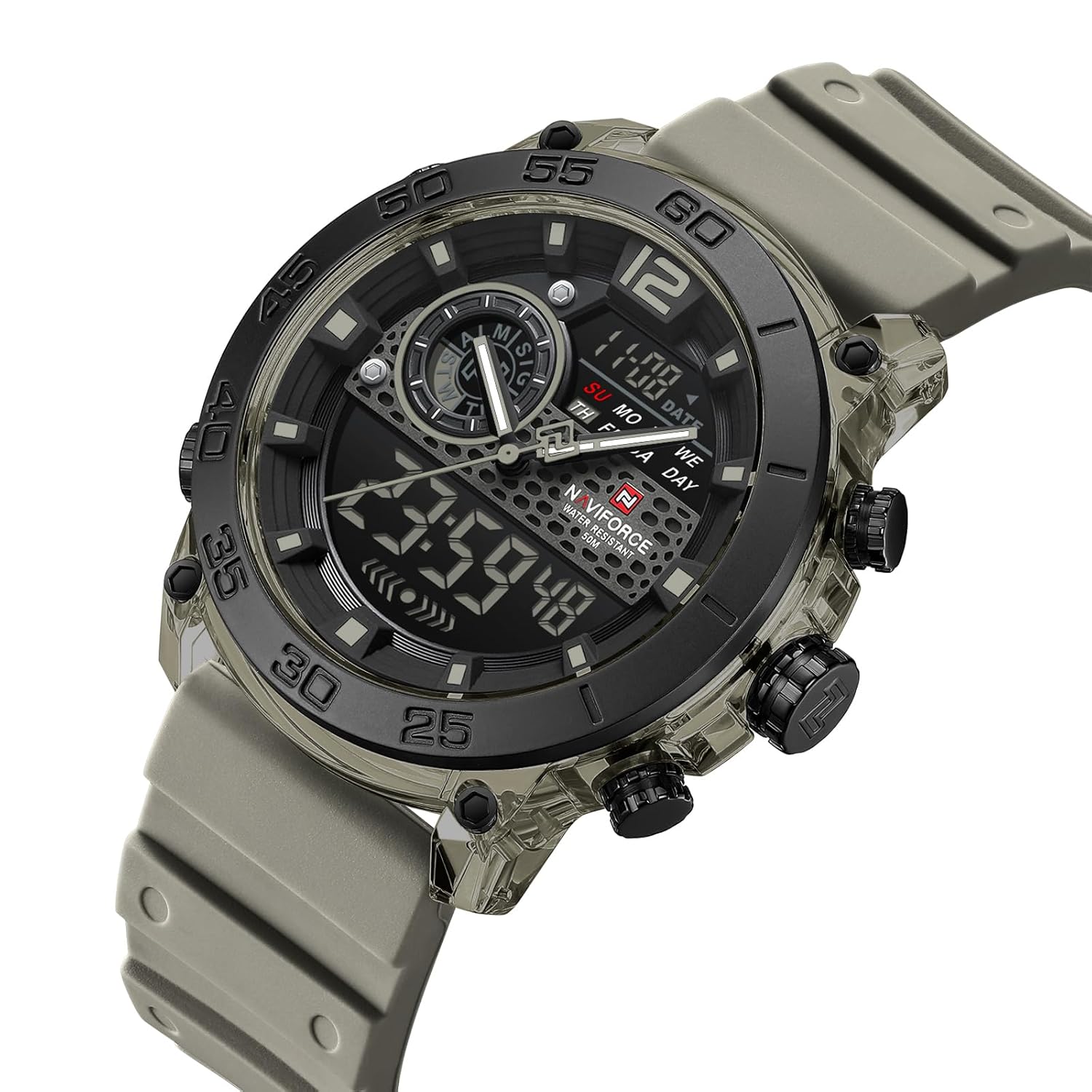
Image 2: Angled view of the NAVIFORCE NF6104 watch, highlighting the side pushers and crown used for setting functions.
Setting Analog Time
- Pull the crown (center knob on the right side) out to the first position.
- Rotate the crown clockwise or counter-clockwise to adjust the analog hands to the desired time.
- Push the crown back into its normal position to start the analog timekeeping.
Setting Digital Time and Date
The digital display typically has multiple modes (Time, Date, Alarm, Stopwatch). Refer to the watch's pushers (buttons) for navigation and setting.
- Mode Button: Usually located on the bottom-left, cycles through display modes (Time, Alarm, Stopwatch, Timer).
- Adjust Button: Often on the top-left, used to enter setting mode for the current display.
- Start/Stop Button: Typically on the top-right, used to increment values during setting or start/stop functions.
- Reset/Light Button: Usually on the bottom-right, used to reset values or activate the backlight.
- In normal time display mode, press the Adjust button (top-left) until the seconds begin to flash, indicating setting mode.
- Press the Mode button (bottom-left) to cycle through the settings: Seconds → Hour → Minute → Year → Month → Day.
- Use the Start/Stop button (top-right) to increase the flashing value. Hold it down for faster adjustment.
- Once all settings are correct, press the Adjust button again to exit setting mode.
Operating Instructions
Using the Alarm Function
- Press the Mode button until "AL" (Alarm) appears on the digital display.
- Press the Adjust button to enter alarm setting mode; the hour digits will flash.
- Use the Start/Stop button to set the desired alarm hour.
- Press the Mode button to move to the minute setting, then use Start/Stop to set the minutes.
- Press the Adjust button to exit alarm setting.
- To turn the alarm ON/OFF, in alarm mode, press the Start/Stop button. An alarm icon will appear/disappear.
Using the Stopwatch Function
- Press the Mode button until "ST" (Stopwatch) appears on the digital display.
- Press the Start/Stop button to start the stopwatch.
- Press Start/Stop again to pause it.
- Press the Reset/Light button to reset the stopwatch to zero.
Using the Backlight
Press the Reset/Light button (bottom-right) to illuminate the digital display for a few seconds in low-light conditions.
Maintenance
Proper care will extend the life and appearance of your NAVIFORCE NF6104 watch.
- Cleaning: Wipe the watch case and strap with a soft, damp cloth. Avoid harsh chemicals or abrasive materials.
- Water Resistance: The watch is 3ATM water resistant. This means it can withstand splashes, rain, and hand washing. Do not submerge the watch, swim, or shower with it. Ensure the crown is fully pushed in before any contact with water.
- Temperature: Avoid exposing the watch to extreme temperatures (hot or cold) or sudden temperature changes.
- Impact: Protect the watch from strong impacts or shocks.
- Battery: When the digital display becomes dim or functions irregularly, it may be time to replace the battery. This should be done by a qualified watch technician.

Image 3: Rear view of the NAVIFORCE NF6104 watch, showing the stainless steel case back with engraved model information and water resistance rating.
Troubleshooting
| Problem | Possible Cause | Solution |
|---|---|---|
| Analog hands not moving. | Crown is pulled out; battery depleted. | Push crown in; replace battery. |
| Digital display is blank or dim. | Battery depleted. | Replace battery. |
| Water inside the watch. | Crown not fully pushed in; exposed to excessive water pressure. | Immediately take to a qualified technician for inspection and drying. Avoid further water contact. |
| Incorrect digital time/date. | Not set correctly; accidental button press. | Refer to "Setting Digital Time and Date" section to re-adjust. |
Specifications

Image 4: Image illustrating the dimensions of the NAVIFORCE NF6104 watch, showing a lug-to-lug measurement of approximately 49mm and a case diameter of 45mm.
| Feature | Detail |
|---|---|
| Model Number | NF6104 |
| Movement Type | Quartz |
| Display Type | Analog and Digital |
| Case Diameter | 45 mm |
| Band Material | Silicone |
| Band Color | Grey |
| Water Resistance | 3 ATM (Splash/Rain Resistant) |
| Dial Window Material | Mineral Glass |
| Item Weight | 300 g |
| Product Dimensions | 13 x 12 x 12 cm (packaging) |
Warranty and Support
Your NAVIFORCE NF6104 watch comes with a manufacturer's warranty. Please retain your proof of purchase for any warranty claims.
For technical support, service, or warranty inquiries, please contact your retailer or the official NAVIFORCE customer service channels. Refer to the packaging or official brand website for specific contact information.

Image 5: The NAVIFORCE NF6104 watch displayed on a wrist, showing its size and fit.