
1. Safety Information
Please read and understand all safety instructions before assembling or using the JUMMICO Gaming Chair. Failure to follow these instructions may result in injury or damage to the product.
- Assembly Required: This chair requires self-assembly. Refer to the included assembly guide for detailed steps.
- Weight Capacity: Do not exceed the maximum weight capacity of 150 kg (330 lbs). Exceeding this limit can compromise the chair's stability and lead to injury.
- Stable Surface: Always use the chair on a flat, stable surface to prevent tipping.
- Children and Pets: Keep children and pets away from the chair during assembly. Ensure all small parts are out of their reach.
- Regular Checks: Periodically check all bolts and screws to ensure they are tight. Retighten as necessary.
2. Product Overview
The JUMMICO Gaming Chair is designed for comfort and an immersive experience, featuring LED lighting, ergonomic support, and a massage function. It is constructed with durable materials for long-lasting use.

Image: The JUMMICO Gaming Chair with vibrant LED lighting, positioned in a modern gaming room setup.
Key Features:
- Comfortable Fabric: Made from premium, breathable fabric for enhanced comfort compared to polyurethane.
- LED Lighting: Over 366 preset RGB modes for an immersive gaming atmosphere, controlled via remote.
- Lumbar Massage Function: Integrated massage points in the lumbar cushion to help relax back muscles.
- Ergonomic Design: Adjustable recline from 90° to 135°, retractable footrest, and 360° swivel for optimal posture and relaxation.
- Durable Construction: Features a 1.8 mm thick metal frame, stable 5-star metal base, and SGS certified gas lift for reliability and a 150 kg load capacity.
3. Setup and Assembly
Your JUMMICO Gaming Chair requires assembly. Please refer to the detailed assembly instructions included in the product packaging. Ensure all components are present before beginning assembly.
Key Assembly Components:
- Backrest
- Seat Base
- Armrests
- 5-Star Base
- Casters (Wheels)
- Gas Lift Cylinder
- Mechanism Plate
- Lumbar Cushion (with massage function)
- Headrest Pillow
- Retractable Footrest
- Hardware (screws, washers, Allen key)

Image: Diagram illustrating the robust components of the chair's base, including the gas lift, 5-star metal base, and casters.
Important: Follow the step-by-step instructions in your physical manual carefully. Do not overtighten screws during initial assembly; tighten them fully once all components are loosely fitted.
4. Operating Instructions
4.1. Height Adjustment
- To raise the seat: Lift your body weight slightly off the seat and pull the lever located under the right side of the seat upwards. Release the lever at the desired height.
- To lower the seat: Remain seated and pull the lever located under the right side of the seat upwards. Release the lever at the desired height.
4.2. Backrest Recline Adjustment
The backrest can be adjusted between 90° and 135°.

Image: Illustration of the chair's recline mechanism, demonstrating angles from 90° to 135° and the retractable footrest.
- To recline: Pull the recline lever (typically on the right side, below the seat) upwards and lean back to the desired angle. Release the lever to lock the position.
- To return upright: Pull the recline lever upwards and lean forward. Release the lever to lock.
4.3. Retractable Footrest
- To extend: Pull the footrest out from under the seat.
- To retract: Push the footrest back under the seat until it is fully stored.
4.4. Lumbar Massage Function
The lumbar cushion features a massage function.

Image: Close-up view of the lumbar cushion, showing the two vibrating massage points.
- To activate: Connect the USB cable from the lumbar cushion to a suitable USB power source (e.g., power bank, computer USB port, or USB wall adapter).
- To deactivate: Disconnect the USB cable.
4.5. LED Lighting
The chair features LED lighting with over 366 preset RGB modes, controlled by a remote.

Image: The JUMMICO Gaming Chair showcasing different LED lighting patterns and colors.
- To activate/change modes: Use the provided remote control to cycle through the various RGB lighting modes, adjust brightness, and change speed.
- Power Source: Ensure the LED lighting is connected to a suitable power source (e.g., USB power bank, not included).
5. Maintenance
Proper maintenance will extend the life and appearance of your JUMMICO Gaming Chair.
- Cleaning Fabric: For general cleaning, use a soft cloth dampened with mild soap and water. Avoid harsh chemicals or abrasive cleaners. Test any cleaning solution on an inconspicuous area first.
- Frame and Base: Wipe metal parts with a dry or slightly damp cloth.
- Casters: Periodically clean hair and debris from the casters to ensure smooth movement.
- Fasteners: Regularly check and tighten all screws and bolts to maintain stability.
- Avoid Direct Sunlight: Prolonged exposure to direct sunlight can cause fabric fading.
6. Troubleshooting
If you encounter issues with your JUMMICO Gaming Chair, refer to the following common solutions:
- Chair is Wobbly:
- Ensure all screws and bolts are securely tightened.
- Check that the 5-star base is correctly attached to the gas lift.
- Gas Lift Not Functioning:
- Verify that the gas lift lever is properly connected to the mechanism plate.
- Ensure the plastic cap on top of the gas lift cylinder has been removed during assembly.
- Casters Not Rolling Smoothly:
- Remove any hair or debris wrapped around the caster wheels.
- Ensure casters are fully inserted into the 5-star base.
- LED Lights Not Working:
- Check the USB connection to the power source.
- Ensure the remote control has working batteries and is pointed towards the receiver.
- Massage Function Not Working:
- Verify the USB cable for the lumbar cushion is securely connected to a functional USB power source.
If problems persist, please contact JUMMICO customer support.
7. Specifications
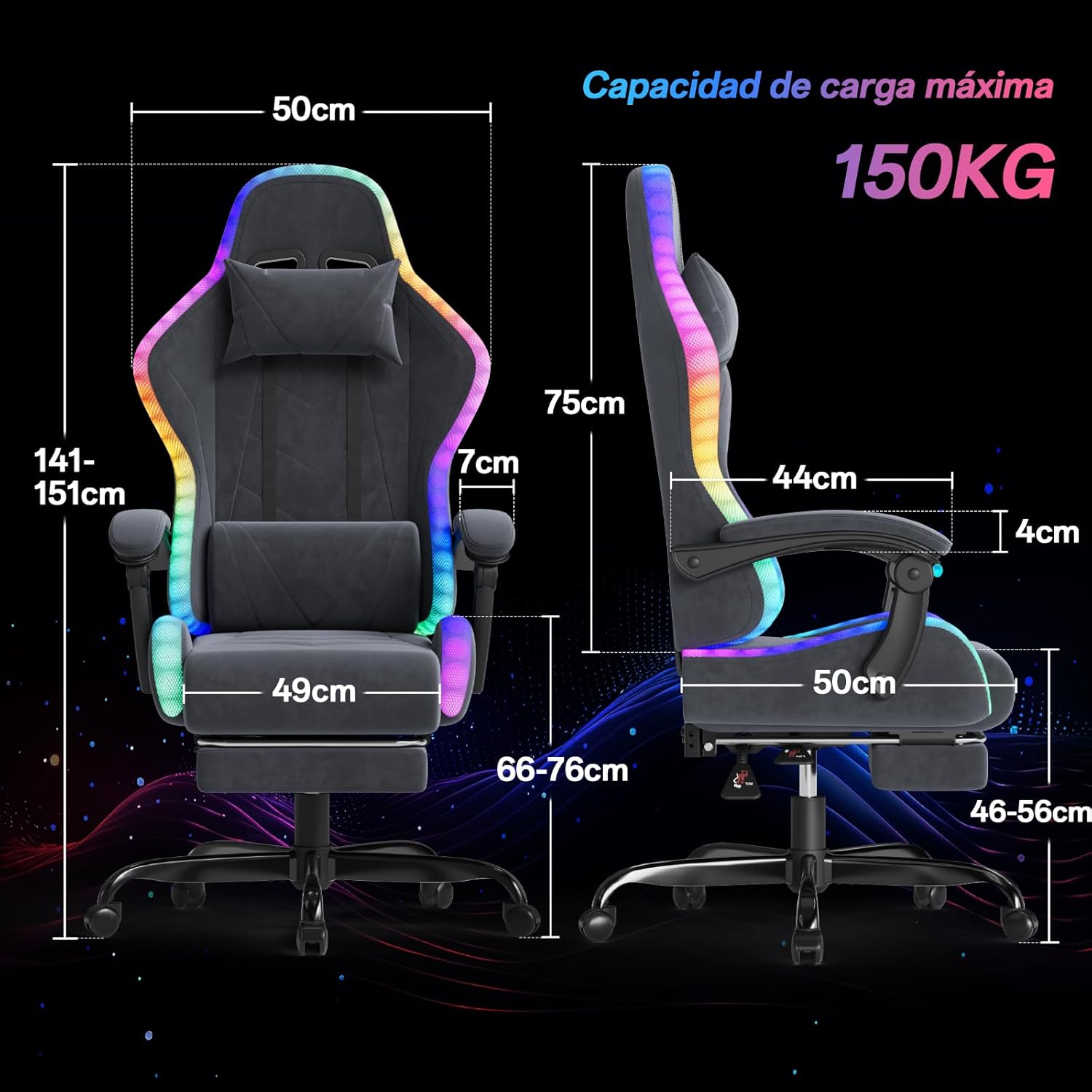
Image: Detailed dimensions of the JUMMICO Gaming Chair, highlighting key measurements and maximum load capacity.
| Feature | Specification |
|---|---|
| Brand | JUMMICO |
| Model Name | Gaming Stuhl Stoff mit LED |
| Color | Light Grey |
| Product Dimensions (D x W x H) | 50 x 50 x 120-151 cm (Adjustable Height) |
| Item Weight | 17 Kilograms |
| Maximum Weight Recommendation | 150 Kilograms |
| Frame Material | Metal |
| Seat Material Type | Fabric |
| Filling Material | Foam |
| Back Style | High Back |
| Recline Angle | 90° to 135° |
| Swivel | 360° |
| Assembly Required | Yes |
| UPC | 788418914590 |
| ASIN | B0FL7VPZM8 |
8. Warranty and Support
JUMMICO is committed to providing high-quality products and customer satisfaction. While specific warranty details are not provided in this manual, please retain your proof of purchase for any warranty claims.
Customer Support:
For any questions, concerns, or assistance with your JUMMICO Gaming Chair, please contact our specialized customer support team. Refer to the contact information provided with your purchase or visit the official JUMMICO website for support options.
We are dedicated to ensuring your satisfaction and providing prompt assistance.
