
OWIPAW GNS003B
OWIPAW GNS003B Solid Wood Nightstand with Charging Station Instruction Manual
Model: GNS003B
Introduction
Thank you for choosing the OWIPAW GNS003B Solid Wood Nightstand. This nightstand is designed to provide convenient storage and charging capabilities for your bedroom or living space. It features a solid wood construction, two spacious drawers, an open shelf, and an integrated charging station with AC outlets, USB, and Type-C ports. Please read this manual thoroughly before assembly and use to ensure proper installation and safe operation.

Image: The OWIPAW GNS003B Solid Wood Nightstand, showcasing its design and features.
Safety Information
Please observe the following safety guidelines to prevent injury or damage to the product:
- Always follow the assembly instructions carefully.
- Keep electrical components away from water and moisture.
- Do not overload the charging station. Refer to the specifications for power limits.
- This product may have pinch points during assembly and use; handle with care.
- Ensure the nightstand is properly anchored to prevent tipping, especially if children are present.
- Do not exceed the weight limits for the tabletop (75 lbs) and drawers (35 lbs per drawer).
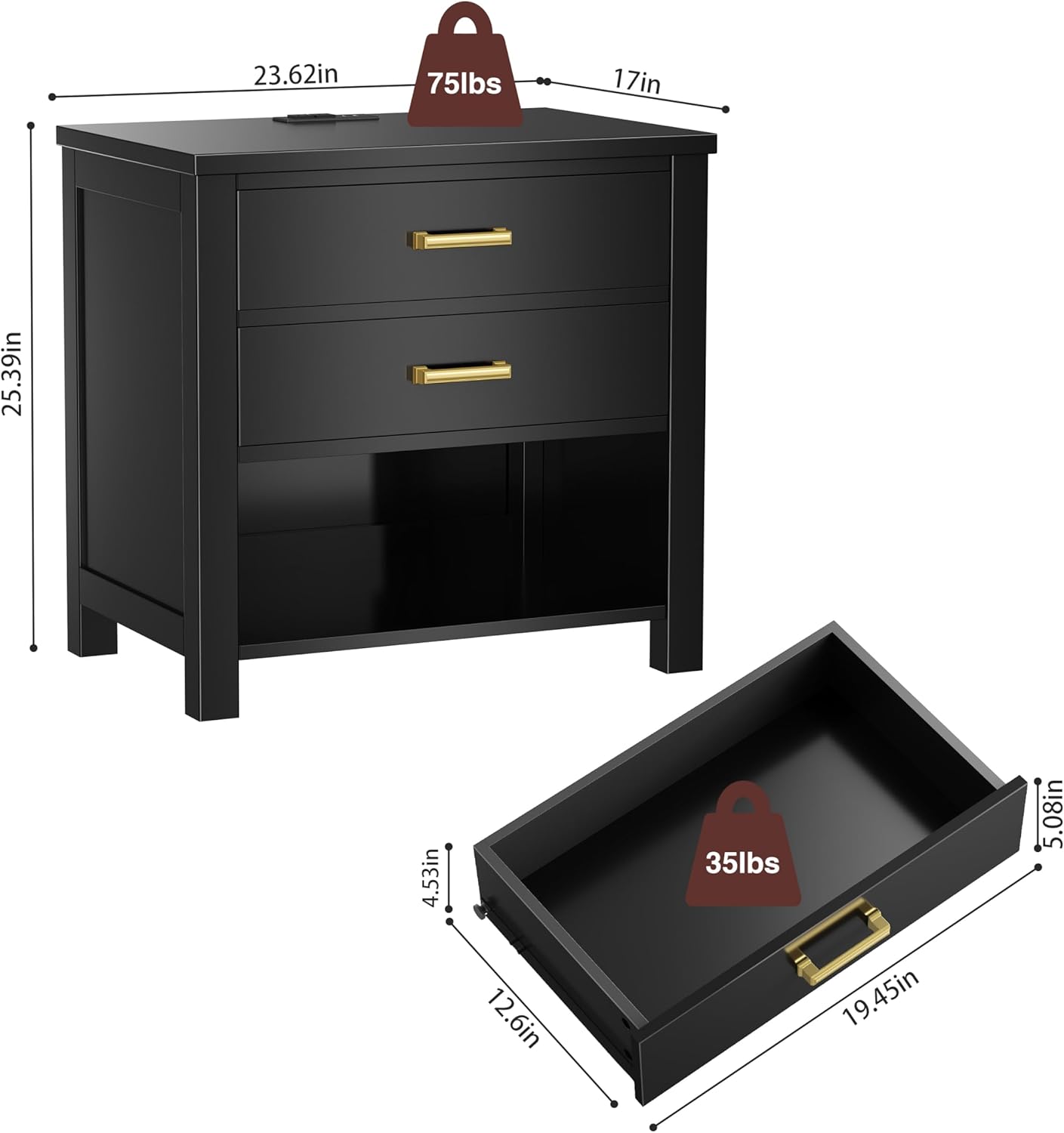
Image: Dimensions and weight capacity of the nightstand, highlighting safe load limits.
Package Contents
Before beginning assembly, ensure all parts and hardware are present. Refer to the included step-by-step instructions for a detailed list of components. Typically, your package will include:
- Nightstand panels (top, sides, back, drawer fronts, drawer sides/backs, shelf)
- Hardware kit (screws, dowels, cam locks, drawer slides, handles)
- Charging station unit with power cord
- Assembly tools (e.g., screwdriver)
- Instruction manual
Setup and Assembly
Assembly of the OWIPAW GNS003B nightstand is designed to be straightforward with the provided step-by-step instructions. It is recommended to assemble the unit on a soft, clean surface to prevent scratches. A Phillips head screwdriver is typically required, and one may be included in the package.
For a detailed visual guide, please refer to the official assembly video below:
Video: Detailed assembly instructions for the OWIPAW Nightstand. This video provides a step-by-step visual guide to help you assemble your nightstand correctly.
Key assembly steps generally include:
- Unpack all components and verify against the parts list.
- Attach drawer slides to the side panels.
- Assemble the main frame of the nightstand.
- Construct the drawers and install the metal handles.
- Insert the drawers into the assembled frame.
- Install the charging station into the designated slot on the tabletop.

Image: Visual representation of the nightstand's structural components and design elements.
Operating Instructions
Charging Station
The integrated charging station provides convenient power access for your electronic devices. It includes:
- 2 Standard AC Outlets (120V, 12A)
- 1 USB Port (5V, 2.1A)
- 1 Type-C Port (5V, 2.1A)
To use the charging station, simply plug the nightstand's power cord into a wall outlet. Then, connect your devices to the appropriate ports. Ensure devices are compatible with the provided voltage and amperage.

Image: The nightstand's charging station in use, illustrating its various ports.
Storage Drawers and Open Shelf
The nightstand features two smooth-gliding drawers and an open shelf for organized storage. The drawers are suitable for personal items, books, or electronic accessories. The open shelf provides easy access to frequently used items or decorative displays.

Image: The nightstand's drawers and open shelf, demonstrating their storage capacity.
Maintenance
To maintain the appearance and longevity of your OWIPAW nightstand, follow these simple care instructions:
- Cleaning: Wipe the surface with a dry, soft cloth. For spills, immediately wipe with a slightly damp cloth and then dry thoroughly. Avoid harsh chemicals or abrasive cleaners.
- Waterproof Top: The tabletop features a waterproof surface, making it easy to clean and resistant to minor spills. However, prolonged exposure to liquids should be avoided.
- General Care: Avoid placing hot items directly on the surface. Use coasters for drinks. Keep the nightstand away from direct sunlight and extreme temperature changes to prevent wood warping or fading.

Image: Details of the nightstand's construction, including its waterproof top for easy maintenance.
Troubleshooting
If you encounter any issues with your nightstand, please refer to the following common solutions:
- Missing Parts: If any parts are missing upon unboxing, please contact customer service immediately with your purchase details.
- Drawers Not Sliding Smoothly:
- Ensure drawer slides are correctly aligned and securely fastened.
- Check for any obstructions in the drawer tracks.
- Verify that the drawer box itself is assembled squarely.
- Charging Station Not Working:
- Confirm the nightstand's power cord is securely plugged into a functional wall outlet.
- Check if the wall outlet itself is receiving power.
- Ensure your device's charging cable is properly connected to the charging station.
- Avoid overloading the outlets; unplug some devices if necessary.
- Wobbling: Ensure all screws and fasteners are tightened securely. Place the nightstand on a level surface.
Specifications
| Feature | Detail |
|---|---|
| Brand | OWIPAW |
| Model Name | GNS003B |
| Product Dimensions (L x W x H) | 24"L x 24"W x 25"H (Note: Other dimensions like 24"D x 17"W x 25"H and 24"W × 18"D × 24"H are also listed. Please refer to the assembly guide for precise measurements.) |
| Item Weight | 50.7 pounds |
| Frame Material | Rubber Wood, Solid Wood, Engineered Wood |
| Color | Black |
| Number of Drawers | 2 |
| Charging Station | 2 AC Outlets (120V/12A), 1 USB Port (5V/2.1A), 1 Type-C Port (5V/2.1A) |
| Power Cord Length | Approximately 4.9 feet |
| Handle Material | Zinc Alloy |
| Product Care Instructions | Wipe with Dry Cloth |
| Recommended Uses | Bedroom, Living Room, Office (Indoor use only) |
Warranty and Support
OWIPAW is committed to providing high-quality products and excellent customer service.
- Warranty: This product comes with a limited warranty. For specific details regarding the warranty period and coverage, please refer to the documentation included with your purchase or contact customer support.
- Customer Support: Our customer service team is available 24 hours a day to provide assistance. If you encounter any issues or have questions, please do not hesitate to contact us. We are dedicated to providing satisfactory solutions.
- Returns: If the product itself has no quality issues, free returns may not be supported. For other questions regarding returns or exchanges, please contact our support team.

Image: Customer service and warranty details for OWIPAW products.
Ask a question about this manual
Ask about setup, troubleshooting, compatibility, parts, safety, or missing instructions. Manuals+ will review the question and use this page’s manual context to help answer it.