
1. Product Overview
The SLEKVERSA 28K 3 Zone Mini Split Air Conditioner and Heater is a versatile system designed for multi-room climate control. It features one outdoor 28,000 BTU condenser and three indoor air handlers (9,000 BTU + 9,000 BTU + 12,000 BTU) with individual controllers. This system provides year-round comfort with air conditioning, a powerful heat pump, dehumidifier, fan, and speed-up turbo function. Each indoor unit allows for individual temperature control.

Figure 1: Overview of the SLEKVERSA 28K 3 Zone Mini Split System, showing the outdoor condenser, three indoor units, remote controls, and WiFi app interface.
Key Features:
- Multi-room Cooling and Heating: Equipped with one 28,000 BTU outdoor condenser and three indoor units (9,000 BTU + 9,000 BTU + 12,000 BTU) for individual room climate control.
- Powerful Performance: Inverter and heat pump system capable of operating in ambient temperatures from -13°F to 140°F.
- Energy Efficiency: 20 SEER2 rating with innovative inverter technology for up to 30% energy savings. ETL and AHRI certified.
- Smart Control: Adjust settings and monitor performance via smartphone app or remote control. Includes a 24-hour timer.
- Low Noise & Easy Maintenance: Features quiet sleep mode and screen-off function. Filters are easily removable and washable.
2. Safety Information
Before installation, operation, or maintenance, please read this manual thoroughly to ensure safe and efficient use. Failure to follow these instructions may result in property damage, personal injury, or death.
- Installation must be performed by a qualified HVAC professional.
- Always wear appropriate personal protective equipment (PPE), including safety belts and helmets, especially when working at heights.
- Ensure the power supply is disconnected before performing any electrical work or maintenance.
- Do not install the unit near heat sources, steam sources, or in areas with flammable/explosive gases or corrosive substances.
- Ensure proper ventilation and clearance around both indoor and outdoor units to prevent obstructions.
- Verify all electrical connections are secure and comply with local codes.
3. Installation Guide
This section provides a step-by-step guide for installing your SLEKVERSA Mini Split system. Professional installation is highly recommended.
3.1 Preparation Before Installation
Gather all necessary tools and materials as shown in the installation video. Ensure the installation environment meets the specified requirements:
- No heat source or steam source nearby.
- No obstructions around the inlet and outlet of indoor and outdoor units.
- No smoke, oil, flammable, explosive, or corrosive gases in the vicinity.
Video 1: Detailed installation steps for the split air conditioner, covering tool preparation, unit placement, and connections.
3.2 Indoor Unit Installation
Select an appropriate installation location for each indoor unit. The wall should be hard, flat, and firm to prevent vibration and noise.
- Clearance Requirements: Ensure adequate space around the unit for optimal airflow and maintenance. Refer to the diagram in Video 1 (around 1:30 mark) for specific distances from ceiling, floor, and obstacles.
- Fix Mounting Plate: Use a level to ensure the mounting plate is horizontal. Punch holes in the wall and use expansion screw kits to firmly fix the plate. Do not use nails.
- Drill Wall Hole: After determining where the pipes will go through the wall, drill a hole inclined outward by 5-10 degrees, with a diameter of 60-80mm. Use an anti-dust bag. Avoid wires, plumbing, and gas lines.
- Install Connection Cable: Pass the power cable out from the back of the indoor unit and fix it on the terminal board. Use a clamp to secure the cables.
- Knock-out Panel: According to the piping direction, remove the knock-out panel with a knife and remove burrs to prevent the drain pipe from being broken.
- Connect Refrigerant Piping: Aim at the pipe center, tighten the taper nut with fingers, then tighten with two wrenches. Refer to the torque table in Video 1 (around 5:30 mark) for correct torque values based on pipe size.
- Install Drain Hose: Connect the drain hose with the water outlet pipe, fix it firmly with adhesive tape. The length should be more than 5cm to prevent water leakage.
- Wrap the Piping: Wrap refrigerant piping, wires, and drain pipe with wrapping tape.
- Mount Indoor Unit: Put the refrigerant piping out of the wall hole. Put the indoor unit on the mounting plate. Push the lower part of the indoor unit until a 'click' sound is heard to ensure it's firmly fixed.
- Pipe Protecting Ring and Putty: To protect piping and wires, install a pipe protecting ring and seal with putty.
3.3 Outdoor Unit Installation
The outdoor unit must be installed in a firm and flat place to prevent vibration and noise.
- Safety First: If installing the air conditioner in a higher place, the operator should wear a safety belt and helmet.
- Install Outdoor Unit Bracket: Use a level to ensure the bracket is horizontal and vertical. Use at least 6 expansion bolts to make sure brackets are fixed firmly on the wall.
- Fix Outdoor Unit: Put the outdoor unit onto the brackets. Use 4 screws to fix the feet of the outdoor unit.
- Connect Refrigerant Piping: Remove the nut from the stop valves. Aim at the pipe center of the stop valve, tighten the taper nut with fingers, then tighten with two wrenches. Refer to the torque table in Video 1 (around 12:30 mark) for correct torque values.
- Fix Cables: Remove the electrical box cover. Fix cables to the terminal board according to the wiring diagram on the E-parts cover. Must follow the wiring diagram inside the box cover. Use a clamp to fix cables. Put the electrical box cover back.
3.4 Vacuumizing and Refrigerant Charging
Before vacuumizing, check all the nuts of the indoor and outdoor units are tightened.
- Connect Vacuum Pump: Connect the stop valve, charging hose, manifold valve, and vacuum pump as shown in the diagram in Video 1 (around 14:55 mark).
- Vacuumize: Turn on the handle Lo to vacuumize. Vacuumize for at least 15 minutes, making sure the value on the pressure gauge is ≤0.1MPa.
- Pressure Check: Keep pressure for 3-5 minutes after vacuumizing. Make sure pressure springback is ≤0.05MPa.
- Open Valves: Open 1/4 liquid valve, and remove the charging hose. Open all the liquid valves and gas valves. Screw all the caps and tighten up.
3.5 Refrigerant Adjustment
When the length of the connecting pipe is changed, extra refrigerant may need to be added or reduced to maintain optimal performance. Refer to the table below:
| Length of connection pipe | Added or reduced refrigerant | Amount of refrigerant for the unit |
|---|---|---|
| <3m | CC≤12000Btu: reduce 20g/m | ≤1Kg |
| CC≥18000Btu: reduce 50g/m | ||
| 3-5m | Not needed | ≤2Kg |
| 5-15m | CC≤12000Btu: add 20g/m | ≤1Kg |
| CC≥18000Btu: add 30g/m |
4. Operating Instructions
Your SLEKVERSA Mini Split system offers multiple functions and modes for customized comfort.
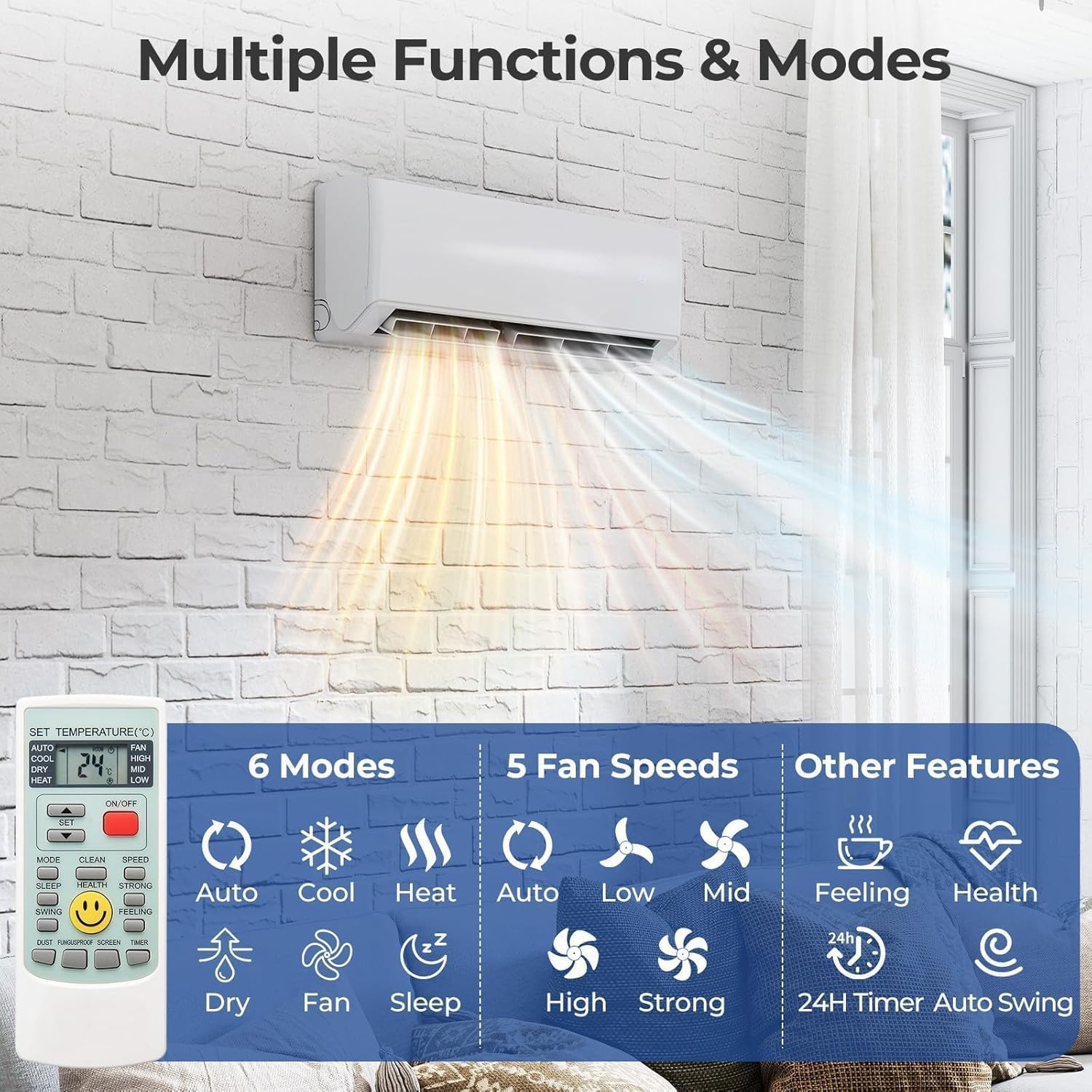
Figure 2: Remote control interface displaying available modes (Auto, Cool, Heat, Dry, Fan, Sleep) and fan speed options (Auto, Low, Mid, High, Strong).
4.1 Basic Operation Modes
- Cool Mode: Provides cooling down to 61°F.
- Heat Mode: Provides heating up to 88°F.
- Dry Mode (Dehumidifier): Reduces humidity in the room.
- Fan Mode: Circulates air without heating or cooling.
- Auto Mode: Automatically selects the operating mode based on the room temperature.
- Sleep Mode: Adjusts temperature and fan speed for comfortable sleep and reduced noise.
4.2 Smart Control (Wi-Fi Connection)
Control your air conditioner from anywhere using your smartphone. Follow these steps to connect your device via Wi-Fi:
Video 2: Instructions for connecting the mini split air conditioner to Wi-Fi using the Smart Life app.
- Download the App: Scan the QR code from the manual or search for "Smart Life" in your device's app store (AppStore for iOS, PlayStore for Android).
- Activate the App: The first time you download and set up the app, it needs to be activated. You can scan an activation QR code or input an activation code.
- Register: Input your email address or select your country and confirm your smartphone number to receive a verification code. Set a password.
- Login: Input your account and password to log in. If using for the first time, create a family and set the unit's location (e.g., "Living room").
- Add Device (CF Mode - Quick Connection): Press DISPLAY or ECO 6 times within 8 seconds to reset the WiFi module until "CF" appears on the panel. Confirm the indicator is rapidly blinking in the app and enter your Wi-Fi password.
- Add Device (AP Mode - Access Point): If "AP" appears on the panel, you need to reset the WiFi module by pressing DISPLAY / ECO 6 times within 8 seconds until the panel shows "AP". Select AP mode in the app, connect to the device's Wi-Fi hotspot (SmartLife-*****) and then return to the app to connect.
- Control the AC: Once connected, you can control your AC unit via the app.
5. Maintenance
Regular maintenance ensures the longevity and efficient operation of your air conditioner.
5.1 Filter Cleaning
The air filters should be cleaned regularly to maintain air quality and unit efficiency. The filters can be easily removed and cleaned.
- Turn off the unit and disconnect power before cleaning.
- Open the front panel of the indoor unit.
- Remove the air filters.
- Clean the filters with a vacuum cleaner or wash them with lukewarm water (below 40°C).
- Allow filters to dry completely in a shaded area before reinstalling.
- Close the front panel.
6. Troubleshooting
If you encounter issues with your unit, refer to the following basic troubleshooting steps. For complex problems, contact a qualified technician.
- Unit Not Turning On: Check power supply, circuit breaker, and ensure the remote control batteries are functional.
- Poor Cooling/Heating: Verify correct mode selection, temperature settings, and ensure air filters are clean. Check for any obstructions to airflow.
- Unusual Noises: Minor noises during operation are normal. Excessive or unusual noises may indicate a loose component or fan issue.
- Water Leakage: Check the drain hose for kinks or blockages. Ensure the drain hose is sloped downwards to allow proper drainage.
- Electrical Leakage: If there is electricity leakage, turn off power immediately and contact a professional for examination.
7. Specifications
| Feature | Value |
|---|---|
| Brand | SLEKVERSA |
| Model Number | zW8bnQUhN3uY3UdQOW8hiAY4sx8Z |
| Product Dimensions | 34.84 x 10.83 x 14.41 inches |
| Item Weight | 26.3 pounds |
| Form Factor | Mini-Split |
| Cooling Power | 12000 British Thermal Units (per largest indoor unit) |
| Voltage | 230V |
| Noise Level | 42.8 Decibels |
| Seasonal Energy Efficiency Ratio (SEER) | 20 |
| Capacity | 1050 Cubic Feet |
| Special Feature | Heating & Cooling Function, WiFi Control |
8. Warranty and Support
This product comes with a 30-day manufacturer's warranty. For any issues or technical support, please refer to the contact information provided with your purchase documentation or visit the SLEKVERSA store on Amazon.
For additional support, you may contact customer service through the Amazon platform.