
MineCtrl BS-6-SC
MineCtrl ZBPOWER 6000mAh Universal Battery Pack for Reclining Furniture
Model: BS-6-SC
Introduction
This instruction manual provides essential information for the safe and efficient use of your MineCtrl ZBPOWER 6000mAh Universal Battery Pack. Please read this manual thoroughly before initial use and retain it for future reference.
Important Safety Information
- Always fully charge the battery before initial use.
- Do not expose the battery pack to extreme temperatures, direct sunlight, or moisture.
- Do not disassemble, puncture, or modify the battery pack.
- Use only the provided charger for recharging the battery.
- Keep out of reach of children and pets.
- Ensure proper connection to avoid short circuits.
- This battery pack is UL and EMC certified for safety.
Package Contents
Verify that all items are present in your package:
- 1 x MineCtrl ZBPOWER 6000mAh Battery Pack
- 1 x 29V2A Power Adapter (Charger)
- 1 x 6.6ft Extension Cable
- 1 x 4.0ft Y Splitter (for dual chair connection)
- 1 x User Manual (this document)

Image: Contents of the MineCtrl ZBPOWER 6000mAh Universal Battery Pack package, including the battery unit, power adapter, extension cable, and Y splitter.
Setup Instructions
1. Initial Charging
- Connect the 29V2A Power Adapter to a wall outlet.
- Connect the charging cable from the power adapter to the charging port on the battery pack.
- Allow the battery pack to charge fully until the indicator light changes (e.g., from red to green). This may take several hours for the first charge.
2. Connecting to Reclining Furniture
The battery pack is designed for universal 2-pin compatibility (one flat and one round pin connector).
- Locate the power input cable on your reclining furniture. This cable typically connects to a wall adapter.
- Disconnect the furniture's power cable from its original power source.
- Connect the furniture's power input cable directly to one of the output ports on the MineCtrl battery pack. Ensure the 2-pin connector is securely inserted.
- If additional length is needed, use the provided 6.6ft Extension Cable between the furniture's power cable and the battery pack.

Image: Illustration of the universal 2-pin connector (one flat, one round) for input and output, highlighting compatibility. Note: Not compatible with USB, 5-pin, RJ45, or barrel plug connectors.
3. Connecting Dual Chairs (Optional)
If you wish to power two pieces of reclining furniture from a single battery pack, use the 4.0ft Y Splitter:
- Connect the Y Splitter's single input end to one of the output ports on the battery pack.
- Connect the power input cables from each of your two reclining furniture pieces to the two output ends of the Y Splitter.

Image: A diagram illustrating how to connect the Y-splitter to the battery pack and then to two separate reclining furniture pieces, enabling a single battery to power dual chairs.
Operating Instructions
Once connected, your reclining furniture will operate as usual, drawing power from the battery pack instead of a wall outlet. This allows for flexible furniture placement without cord limitations.
- Battery Life: The 6000mAh battery offers up to 600 running cycles and can lift up to 275 lbs on a full charge.
- Power Consumption: Furniture with additional features like lights or USB charging ports will consume battery power faster, requiring more frequent recharging.
- Low Power Warning: The battery pack may provide an audible tone or visual indicator when the charge is low, signaling that a recharge is needed.
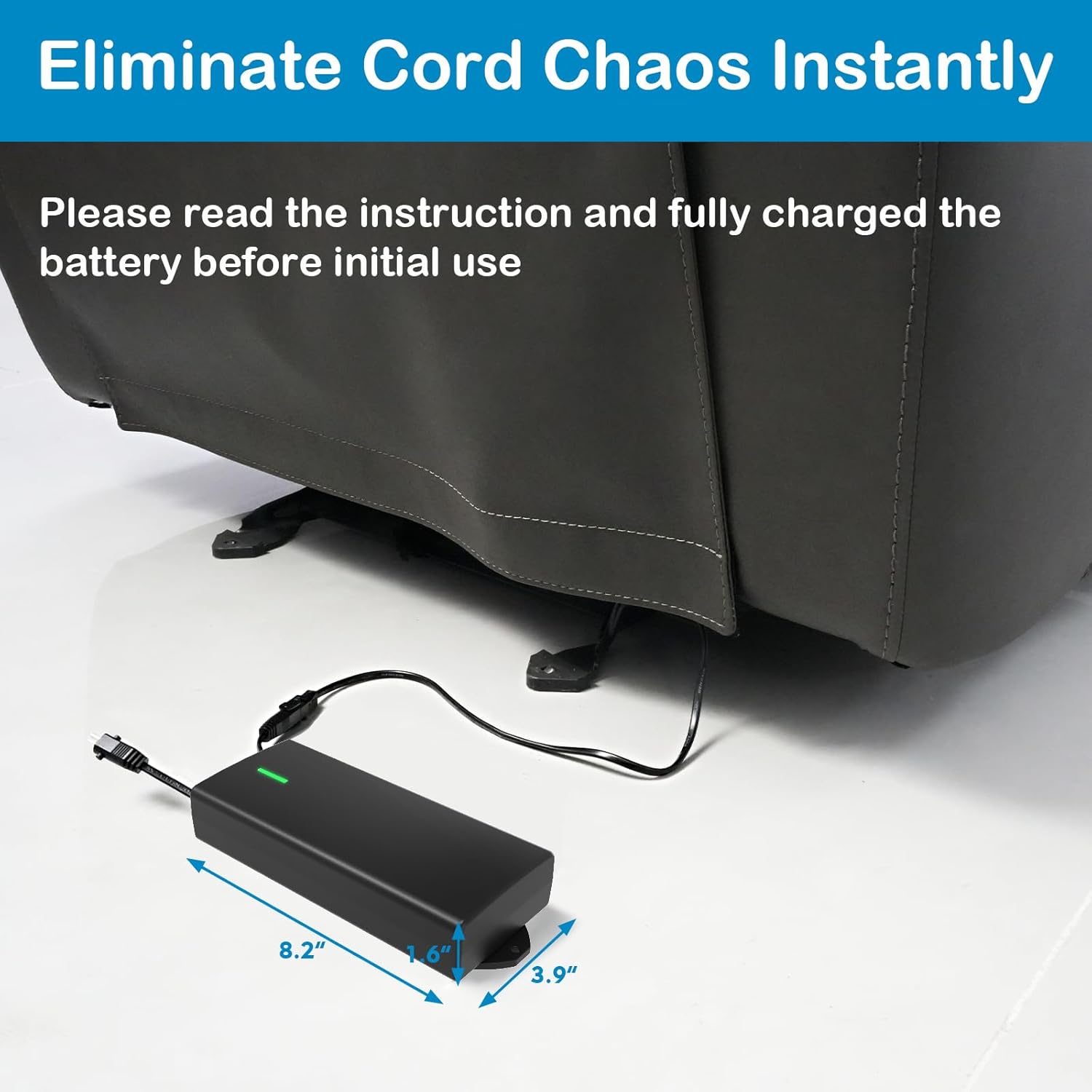
Image: The MineCtrl battery pack connected to a recliner, illustrating its compact size and how it eliminates cord clutter. Dimensions are shown as 8.2" length, 1.6" height, and 3.9" width.
Maintenance
- Recharging: Recharge the battery pack when the low power warning is activated or when you notice a decrease in furniture motor performance.
- Storage: If storing the battery pack for an extended period without use, ensure it is fully charged and recharge it at least every three months to maintain battery health.
- Cleaning: Wipe the exterior of the battery pack with a dry, soft cloth. Do not use liquid cleaners or immerse the unit in water.
Troubleshooting
| Problem | Possible Cause | Solution |
|---|---|---|
| Furniture does not operate. | Battery is depleted. Incorrect connection. Incompatible connector type. | Recharge the battery pack fully. Ensure all 2-pin connectors are securely seated. Verify your furniture uses a 2-pin (flat and round) connector. This battery is not compatible with USB, 5-pin, RJ45, or barrel plug connectors. |
| Battery drains quickly. | Furniture has high power consumption features (e.g., heat, lights, USB ports). Battery not fully charged. | This is normal for furniture with additional features; more frequent charging will be required. Ensure the battery is fully charged before use. |
| Battery pack not charging. | Charger not connected properly. Faulty charger or battery. | Check connections between the power adapter and the battery pack, and the wall outlet. Contact customer support if the issue persists. |
If you encounter issues not listed here or if the suggested solutions do not resolve the problem, please contact customer support.
Specifications
| Feature | Detail |
|---|---|
| Model Number | BS-6-SC |
| Battery Capacity | 6000mAh |
| Output Voltage | 12 Volts (DC) |
| Output Current | 100 Milliamps |
| Connector Type | 2-Pin (Flat and Round) |
| Dimensions (L x W x H) | Approximately 8.2 x 3.9 x 1.6 inches |
| Item Weight | 3.61 pounds |
| Material | Plastic |
| Certifications | UL and EMC certified |
Warranty and Customer Support
Your MineCtrl ZBPOWER 6000mAh Universal Battery Pack comes with a 1-year, hassle-free replacement warranty.
For any product support, questions, or warranty claims, please feel free to get in touch with our dedicated customer support team. Refer to your purchase documentation or the seller's contact information for assistance.
Ask a question about this manual
Ask about setup, troubleshooting, compatibility, parts, safety, or missing instructions. Manuals+ will review the question and use this page’s manual context to help answer it.