
1. Introduction
Thank you for choosing the Zevemomo Tempered Glass Display Cabinet. This 4-tier curio cabinet is designed to showcase your cherished collectibles, ornaments, and other items with elegance. Featuring tempered glass construction, LED lighting, and a secure locking mechanism, this cabinet provides both display functionality and protection. This manual provides essential information for the safe assembly, operation, and maintenance of your new display cabinet.

Image 1.1: The Zevemomo Tempered Glass Display Cabinet (Single Door-WHITE) showcasing various items in a living room.
2. Safety Information
Please read and understand all safety instructions before assembly and use. Failure to follow these instructions may result in injury or damage to the product.
- Always follow the assembly instructions provided.
- Use the adjustable feet to level the cabinet and prevent tipping.
- Do not overload the cabinet; it has a maximum weight capacity of 110 pounds.
- Keep the cabinet away from heat sources.
- Do not place heavy objects on the top shelf to prevent the cabinet from tipping over.
- Assembly requires a minimum of two people for safety and ease.
3. Package Contents
Before beginning assembly, ensure all parts listed below are present and undamaged. If any parts are missing or damaged, please contact customer support.
- Glass doors
- Glass shelves (4 tiers)
- Wooden top and base panels
- LED lights and remote control
- Installation manual
- Assembly hardware (screws, connectors, etc.)
- Anti-tip device
- Adjustable feet
- Security door lock and keys
- Stainless steel handle
4. Setup and Assembly
Assembly of this display cabinet requires patience and at least two people. Please follow the included detailed installation manual for step-by-step instructions. The general process involves:
- Unpacking and Inspection: Carefully unpack all components and verify against the package contents list. Handle glass panels with care.
- Base Assembly: Assemble the base panel and attach the adjustable feet. Ensure the base is level.
- Frame Construction: Connect the vertical support pillars to the base and then to the top panel, creating the main frame.
- Shelf Installation: Insert the glass shelves into the designated slots or supports.
- Door Installation: Attach the glass door(s) using the provided hinges and install the stainless steel handle and security lock.
- LED Light Installation: Install the LED lights in the top panel as per the instructions.
- Anti-Tip Device: Securely attach the anti-tip device to the cabinet and to a wall stud to prevent accidental tipping.

Image 4.1: Product dimensions for planning placement and assembly.

Image 4.2: Key components such as the LED light, security door lock, stainless steel handle, and adjustable feet.
5. Operating Instructions
This cabinet features integrated LED lighting for enhanced display of your items.
5.1. LED Lighting Control
The LED lights are controlled by the included remote control. Ensure the LED lights are properly connected to a power source.
- Power On/Off: Use the 'ON' and 'OFF' buttons on the remote to turn the lights on or off.
- Color Selection: Select from multiple colors using the color buttons on the remote to match your desired ambiance.
- Brightness Adjustment: Use the brightness control buttons (e.g., '+' and '-') to adjust the intensity of the light.
- Mode Selection: The remote may include various lighting modes (e.g., flash, fade) to create dynamic effects. Refer to the remote's specific instructions for detailed mode functions.
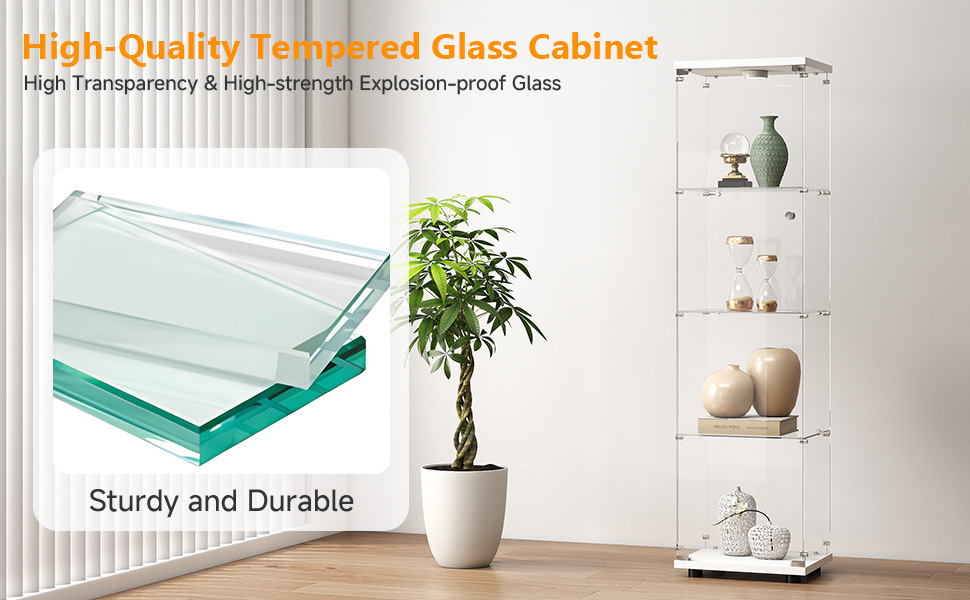
Image 5.1: The LED lighting system and remote control for customizing light colors and effects.
5.2. Security Lock
The cabinet is equipped with a security lock to protect your valuable items. Use the provided keys to lock and unlock the door.
6. Maintenance
Regular maintenance will help preserve the appearance and longevity of your display cabinet.
- Cleaning Glass: Use a soft, lint-free cloth and a non-abrasive glass cleaner to clean glass surfaces. Avoid spraying cleaner directly onto the glass; instead, apply it to the cloth first.
- Cleaning Wooden Panels: Wipe wooden panels with a soft, damp cloth. Avoid harsh chemicals or abrasive cleaners that could damage the finish.
- Dusting: Regularly dust all surfaces with a dry, soft cloth.
- Hardware Check: Periodically check all screws and connections to ensure they are tight. Retighten if necessary.
- LED Lights: Ensure LED lights are free from dust accumulation to maintain optimal performance.

Image 6.1: The high-quality tempered glass used in the cabinet, designed for durability.
7. Troubleshooting
If you encounter any issues with your display cabinet, refer to the following common problems and solutions:
| Problem | Possible Cause | Solution |
|---|---|---|
| Cabinet is wobbly or unstable. | Uneven floor; adjustable feet not properly set; loose connections. | Adjust the leveling feet at the base. Ensure all assembly screws are tightened. Verify anti-tip device is securely installed. |
| LED lights do not turn on. | Power connection issue; remote battery dead; faulty LED strip. | Check power connection to the LED lights. Replace remote control battery. If problem persists, contact customer support. |
| Door does not close properly or is misaligned. | Hinges are loose or misaligned; cabinet not level. | Check and tighten hinge screws. Ensure the cabinet is level using the adjustable feet. |
| Lock mechanism is stiff or not working. | Lock mechanism needs lubrication; key is bent or damaged. | Apply a small amount of graphite lubricant to the lock mechanism. Use only the original keys. |
8. Specifications
- Brand: Zevemomo
- Model Name: Glass Display Cabinet
- Color: White
- Product Dimensions (D x W x H): 13.58" x 15.67" x 64.69"
- Material: Tempered Glass, Wood
- Number of Shelves: 4
- Weight Limit: 110 Pounds (total)
- Special Feature: Adjustable Feet, Multi-Color LED Lighting with Remote Control, Security Lock
- Mounting Type: Floor Mount (with anti-tip device for wall attachment)
- Assembly Required: Yes
- Item Weight: Approximately 41 Pounds
- UPC: 990484105912

Image 8.1: The cabinet's large capacity, suitable for displaying a wide range of items.
9. Warranty and Support
For warranty information, please refer to the documentation provided with your purchase or contact the retailer where the product was acquired. Specific warranty terms may vary.
If you require further assistance, have questions about assembly, or need to report missing/damaged parts, please contact Zevemomo customer support through the retailer's platform or the official Zevemomo website.