
1. Introduction
This manual provides detailed instructions for the installation, operation, and maintenance of your NHOPEEW 9-inch Android Car Stereo. This unit is specifically designed for Kia Rio and Kia Pride models manufactured between 2015 and 2017. Please read this manual thoroughly before using the product to ensure proper functionality and safety.
2. Product Overview
Key Features
- Operating System: Latest Android operating system for smooth performance.
- Memory: 2GB RAM and 64GB ROM for efficient multitasking and app storage.
- Display: 9-inch 2.5D Tempered Glass Mirror capacitive touchscreen with 1024x600 HD resolution.
- Connectivity: Wireless/Wired Apple CarPlay & Android Auto, Mirror Link (iOS/Android), 5G/WiFi, Bluetooth.
- Navigation: Built-in GPS receiver supporting online and offline maps.
- Audio: Hi-Fi sound effects, DSP Sound Processor, EQ settings (Pop, Rock, Jazz, Classical, Flat, User, Voice), FM/RDS Radio, subwoofer output.
- Additional Functions: Steering Wheel Control (SWC), 28 UI Desktop Themes, 1080P HD Video Playback, Split Screen, Dual USB Input, AHD Backup Camera support.
What's in the Box
Upon unpacking, please verify that all the following components are included:
- NHOPEEW Kia Rio Pride Android Radio Unit
- Power Cable
- Backup Camera
- GPS Antenna
- Microphone (MIC)
- RCA Cable
- USB Cable
- Rear Camera Input Cable
- Installation Tool
- User Manual (this document)
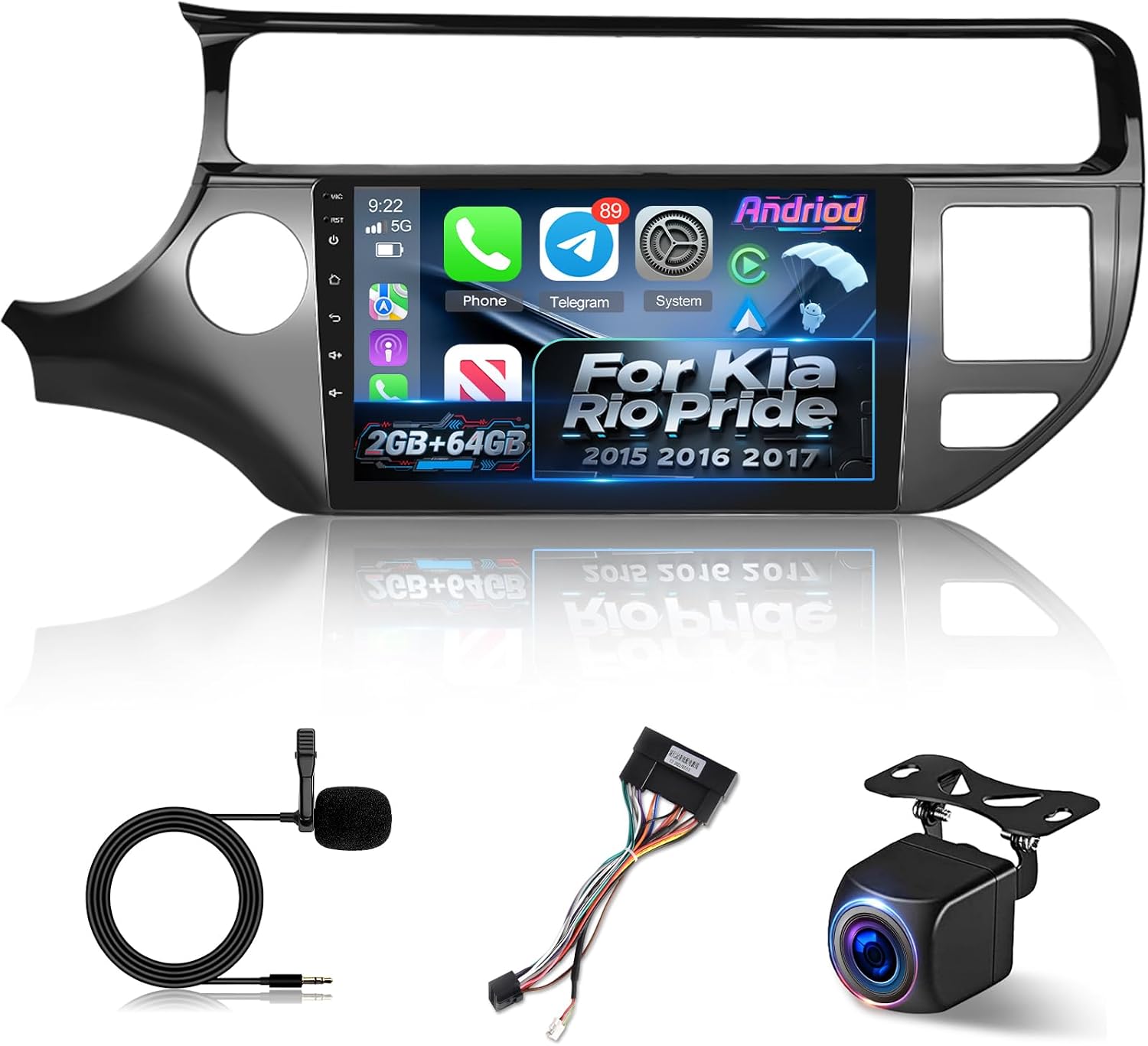
Image 2.1: The NHOPEEW 9-inch Android Car Stereo unit along with its essential accessories, including the microphone, wiring harness, and backup camera.

Image 2.2: A visual representation of the product list and key dimensions of the NHOPEEW Android Car Stereo unit.
3. Setup and Installation
The NHOPEEW Android Car Stereo is designed for a plug-and-play installation in compatible Kia Rio and Kia Pride models (2015-2017). Basic mechanical skills are recommended for installation. If you are unsure, professional installation is advised.
Installation Steps (General Guide)
- Preparation: Ensure the vehicle's ignition is off and the battery is disconnected to prevent electrical damage.
- Remove Old Unit: Carefully remove the existing car stereo and dashboard bezel. Refer to your vehicle's service manual for specific instructions.
- Connect Wiring: Use the provided power cable and other accessory cables (RCA, USB, GPS antenna, backup camera, microphone) to connect the new NHOPEEW unit. The wiring harnesses are designed for direct connection to your vehicle's existing ports.
- Test Functionality: Before fully securing the unit, reconnect the battery and briefly test the stereo's basic functions (power on, audio, touchscreen response).
- Secure Unit: Mount the NHOPEEW stereo into the dashboard opening and reattach the bezel. Ensure all connections are secure and no wires are pinched.
- Final Checks: Verify all features, including CarPlay/Android Auto, GPS, and backup camera, are working correctly.

Image 3.1: A comparison showing the vehicle's dashboard before and after the installation of the NHOPEEW Android Car Stereo, highlighting the integrated fit.
4. Operating Instructions
4.1 Display and Interface
The unit features a 9-inch 2.5D Tempered Glass Mirror capacitive touchscreen with a resolution of 1024x600. This display offers rich, full color expression and vivid visuals. Navigate the interface by tapping, swiping, and pinching gestures.

Image 4.1: Illustration of the 1024x600 HD touchscreen, emphasizing its 2.5D tempered glass and responsive touch capabilities.
4.2 Wireless CarPlay & Android Auto
Connect your iOS or Android smartphone wirelessly via Bluetooth and Wi-Fi to access phone features directly on the stereo's display. This allows for hands-free calls, messaging, music playback, navigation, and voice control (e.g., Siri, Google Assistant).

Image 4.2: The user interface demonstrating active Wireless CarPlay and Android Auto connections, displaying various smartphone applications.
4.3 Mirror Link
The unit supports Mirror Link for both iOS and Android devices. Connect your phone via USB cable or Wi-Fi to mirror your phone's screen onto the stereo's display, allowing you to interact with your phone's apps, media, and content directly from the car stereo.
4.4 GPS Navigation
The built-in GPS receiver supports both online and offline navigation. Connect to Wi-Fi or a mobile hotspot to download maps or use real-time navigation apps. The system is compatible with popular navigation applications.

Image 4.3: A visual representation of the GPS Navigation feature, showing a map interface with route guidance and various navigation app icons.
4.5 WiFi Connection
Easily connect the car stereo to a Wi-Fi network or your mobile hotspot. Once connected, you can browse the internet, download applications, stream media, and access online services like YouTube, TikTok, and Spotify.

Image 4.4: The car stereo displaying various online applications and demonstrating 5G WiFi and hotspot connectivity for internet access and streaming.
4.6 Audio Settings (Hi-Fi/EQ/FM/RDS)
The unit features a DSP Sound Processor for crystal-clear audio. Customize your listening experience with the graphic equalizer, offering preset modes (Pop, Rock, Jazz, Classical, Flat, User, Voice) and sound delay adjustments. It also supports subwoofer output. The built-in FM/RDS radio allows you to enjoy your favorite radio stations with enhanced information display.

Image 4.5: The interface for the DSP Sound Processor, showing options for equalizer settings, sound balance, and surround sound adjustments.
4.7 Steering Wheel Control (SWC)
The stereo supports integration with your vehicle's existing steering wheel controls, allowing you to manage audio playback, volume, and other functions without taking your hands off the wheel.
5. Maintenance
To ensure the longevity and optimal performance of your NHOPEEW Android Car Stereo, follow these general maintenance guidelines:
- Cleaning: Use a soft, dry cloth to clean the screen and exterior. For stubborn smudges, a slightly damp cloth with a mild, non-abrasive cleaner suitable for electronics can be used. Avoid harsh chemicals.
- Temperature: Avoid exposing the unit to extreme temperatures, both hot and cold, for extended periods.
- Software Updates: Periodically check for available software updates to ensure the system runs efficiently and has the latest features and security patches.
- Connections: Ensure all cables and connections remain secure. Avoid pulling on cables forcefully.
6. Troubleshooting
If you encounter issues with your NHOPEEW Android Car Stereo, refer to the following common troubleshooting steps:
- No Power: Check all power connections. Ensure the vehicle's battery is properly connected and charged. Verify the fuse for the stereo is intact.
- No Sound: Check speaker connections. Ensure volume is not muted or set to minimum. Verify audio settings (EQ, balance, fader).
- Touchscreen Unresponsive: Try restarting the unit. Ensure the screen is clean and free of debris.
- GPS Signal Lost: Ensure the GPS antenna is properly installed and has a clear view of the sky. Check network connection for online maps.
- CarPlay/Android Auto Not Connecting: Ensure Bluetooth and Wi-Fi are enabled on both the stereo and your smartphone. Try restarting both devices. Verify your phone's operating system is compatible.
- System Slow/Freezing: Close unnecessary applications. Clear cache if possible. A factory reset may be necessary as a last resort (note: this will erase all user data).
For persistent issues, please contact NHOPEEW customer support.
7. Specifications
| Feature | Specification |
|---|---|
| Model Name | A7378A3018H1MI2ZMYC |
| Operating System | Android |
| Memory Storage Capacity | 64 GB |
| Display Size | 9 Inches |
| Screen Resolution | 1024 x 600 |
| Connectivity Technology | Bluetooth, Wi-Fi |
| Special Features | GPS Navigation, Hi-Fi/EQ, WiFi Connection, Wireless/Wired Android Auto, Wireless/Wired CarPlay |
| Map Type | Worldwide |
| Item Weight | 3.19 pounds |
| Package Dimensions | 11.81 x 8.27 x 2.95 inches |
| Vehicle Service Type | Car (Kia Rio/Pride 2015-2017) |
8. Warranty and Support
Warranty Information
The NHOPEEW Android Car Stereo comes with a 24-month manufacturer's warranty covering quality-related issues. Additionally, a 30-day money-back guarantee is provided for any reason.
Customer Support
For any questions, concerns, or warranty claims, please contact NHOPEEW customer service. Refer to the Amazon product page for the most current contact details, including email address.
Optional protection plans are available for purchase:
- 2-Year Protection Plan
- 3-Year Protection Plan
- Complete Protect (monthly billing)