Introduction
The Unihertz Jelly Star is a compact 4G mini smartphone designed for portability and functionality. This manual provides essential information for setting up, operating, maintaining, and troubleshooting your device.

Image: Front and back view of the Unihertz Jelly Star Mini Smartphone, showcasing its compact size and transparent design.
Setup
What's in the Box
Verify that all items are present in your product package:
- Unihertz Jelly Star Phone
- Phone Case
- Power Adapter
- Screen Protector
- SIM Tray Ejector
- USB Cable
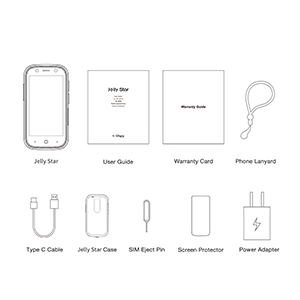
Image: A visual representation of the Unihertz Jelly Star phone and its accompanying accessories, including the user guide, warranty card, phone lanyard, Type C cable, Jelly Star case, SIM eject pin, screen protector, and power adapter.
SIM Card Installation
The Jelly Star supports dual Nano SIM cards. To install your SIM card(s):
- Locate the SIM card tray on the side of the device.
- Insert the SIM tray ejector tool into the small hole next to the tray and press firmly until the tray pops out.
- Place your Nano SIM card(s) into the tray with the gold contacts facing down.
- Carefully reinsert the SIM tray into the phone until it clicks into place.
Initial Power On
Press and hold the Power button located on the side of the device until the Unihertz logo appears. Follow the on-screen prompts to complete the initial setup, including language selection, Wi-Fi connection, and Google account setup.
Network Compatibility
The Unihertz Jelly Star is compatible with T-Mobile and Verizon networks only. Please ensure your carrier supports this device for optimal performance.
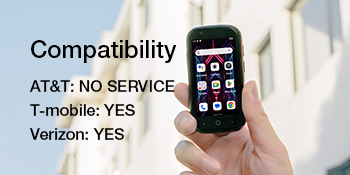
Image: A graphic indicating network compatibility for the Unihertz Jelly Star, showing 'T-Mobile: YES' and 'Verizon: YES', with 'AT&T: NO SERVICE'.
Operating Instructions
Basic Navigation
The Jelly Star features a 3-inch touchscreen display. Navigate by tapping, swiping, and pinching. Physical buttons include Power, Volume Up/Down, and a programmable button for custom functions.
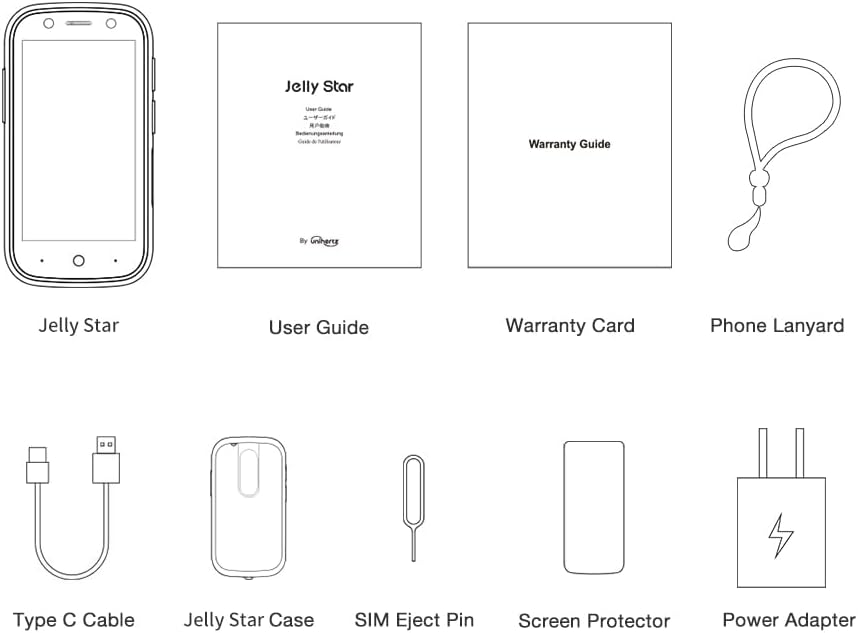
Image: A person holding the Unihertz Jelly Star, highlighting its compact 3-inch screen and ease of one-handed use.
Performance
Powered by a 6nm MediaTek Helio G99 processor and equipped with 8GB RAM and 256GB ROM, the Jelly Star offers smooth performance for daily tasks and applications.
Battery Life
The device includes a 2000mAh battery, providing reliable power throughout the day. Battery life may vary based on usage patterns.
Connectivity Features
The Jelly Star offers versatile connectivity options:
- NFC: For contactless payments and data transfer.
- 3.5mm Audio Jack: For wired headphones.
- Infrared Port: For controlling compatible devices.
- Fingerprint Unlock: For secure and quick access.
- USB OTG: For connecting USB accessories.
- FM Radio: For listening to radio broadcasts.
- GPS: For navigation and location services.
- Bluetooth: For wireless peripheral connections.
- Wi-Fi: For internet access.
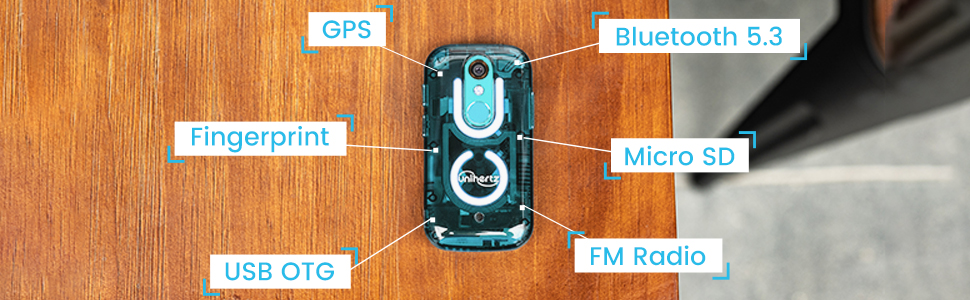
Image: An overhead view of the Unihertz Jelly Star with labels pointing to its various connectivity features, including GPS, Bluetooth 5.3, Fingerprint sensor, Micro SD card slot, USB OTG port, and FM Radio.
Camera
The device features a 48MP main camera for capturing photos and videos.
Transparent Back Design with LED Light
The Jelly Star incorporates a transparent back design with a dynamic LED notification light, offering both style and practical notifications.
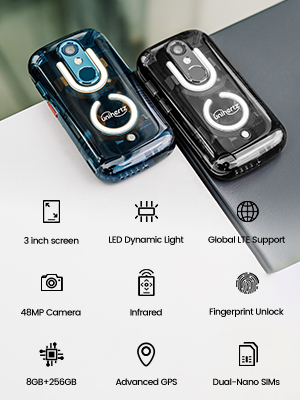
Image: A list of key features for the Unihertz Jelly Star, including 3-inch screen, LED Dynamic Light, Global LTE Support, 48MP Camera, Infrared, Fingerprint Unlock, 8GB+256GB, Advanced GPS, and Dual-Nano SIMs.
Official Product Video
Video: An official product video showcasing the Unihertz Jelly Star Mini Phone, highlighting its 3-inch screen, tiny form factor, 4G capabilities, and transparent design.
Maintenance
Charging
Use only the provided power adapter and USB cable to charge your device. Ensure the charging port is clean and dry before connecting the charger.
Cleaning
To clean your Jelly Star, gently wipe the screen and body with a soft, lint-free cloth. Avoid using harsh chemicals or abrasive materials.
Software Updates
Regularly check for and install software updates to ensure your device has the latest features, security patches, and performance improvements. You can usually find this option in the device's settings menu under 'System' or 'About phone'.
Troubleshooting
If you encounter issues with your Unihertz Jelly Star, try the following common troubleshooting steps:
- Device not powering on: Ensure the battery is charged. Connect the device to the charger and wait a few minutes before attempting to power it on again.
- Network connectivity issues: Check if your SIM card is properly inserted. Verify that mobile data is enabled in settings. Restart the device.
- Applications crashing or freezing: Close and reopen the application. Clear the app's cache or data in settings. Restart the device.
- Slow performance: Close unnecessary background applications. Clear cached data. Consider performing a factory reset if issues persist (back up your data first).
For more complex issues or persistent problems, please refer to the support section.
Specifications
| Feature | Detail |
|---|---|
| Product Dimensions | 3.75 x 1.95 x 0.74 inches |
| Item Weight | 4.3 ounces |
| Operating System | Android 13.0 |
| Connectivity | Bluetooth, Infrared, NFC, USB, Wi-Fi |
| GPS | True |
| Audio Jack | 3.5 mm |
| Color | Blue |
| Battery Capacity | 2000 Milliamp Hours |
| Memory Storage | 256 GB |
| Screen Size | 3 Inches |
| RAM | 8 GB |
| CPU Model | MediaTek Helio G99 |
| CPU Speed | 2200 MHz |
| Resolution | 480 x 854 |
Warranty and Support
The Unihertz Jelly Star comes with a one-year warranty. For technical support or customer service inquiries, please contact Unihertz directly. They offer long-term technical support and efficient online customer service.