
Introduction
Thank you for choosing the Mainstay Toaster Oven Combo. This manual provides essential information for the safe and efficient operation, maintenance, and care of your new appliance. Please read all instructions carefully before first use and keep this manual for future reference.
1. Setup
1.1 Unpacking and Placement
- Carefully remove all packaging materials and any promotional labels from the toaster oven.
- Place the toaster oven on a stable, heat-resistant, and level surface. Ensure there is adequate clearance (at least 4 inches) on all sides and above the appliance for proper ventilation.
- Do not place the appliance near flammable materials or heat sources.
1.2 Initial Cleaning
- Before first use, wipe the exterior of the toaster oven with a damp cloth.
- Wash the baking pan and baking rack in warm, soapy water. Rinse thoroughly and dry completely before placing them inside the oven.
1.3 Product Overview

Video 1.1: An overview of the Mainstay Toaster Oven, demonstrating its features and compact design. This video provides a visual guide to the appliance's size and basic components.
2. Operating Instructions
2.1 Control Knobs
Your toaster oven features two easy-to-use control knobs:
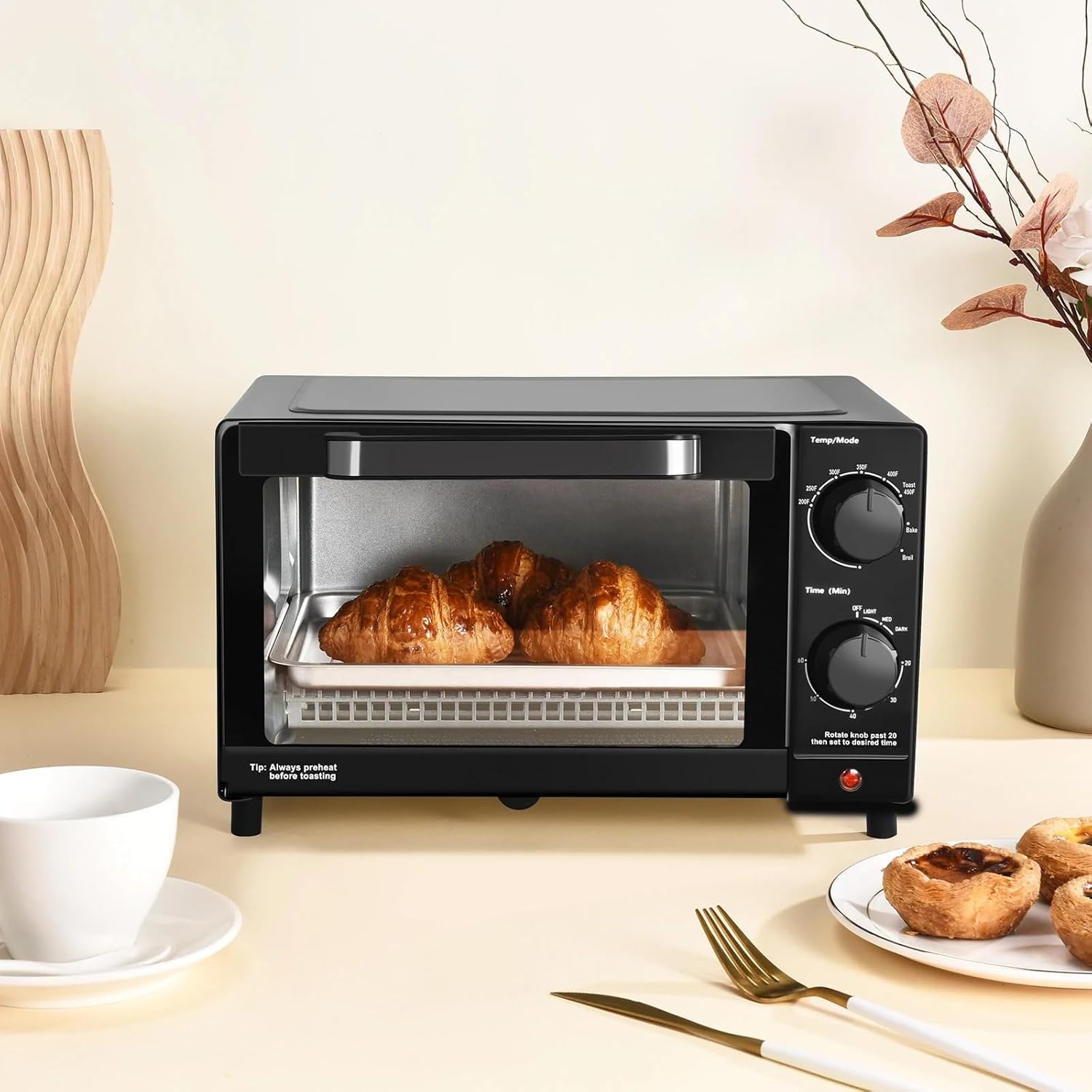
- Temperature/Mode Knob: Used to select the desired cooking temperature (from Warm to 450°F) and cooking mode (Toast, Bake, Broil).
- Time (Min) Knob: Used to set the cooking duration, up to 60 minutes. For toasting, rotate past the 10-minute mark, then set to your desired toast shade (Light, Medium, Dark).


2.2 Cooking Functions
- Toast: Ideal for bread, bagels, and frozen waffles. Adjust the timer for desired browning. Always preheat before toasting for best results.
- Bake: Use for baking cookies, pastries, or reheating leftovers. Set the temperature and time according to your recipe.
- Broil: Perfect for browning the top of dishes or cooking thin cuts of meat. Monitor food closely to prevent burning.
2.3 Capacity and Usage Examples
This compact toaster oven is designed for convenience and efficiency, fitting a 9-inch pizza or up to 4 slices of bread.



3. Maintenance
3.1 Cleaning
- Always unplug the toaster oven and allow it to cool completely before cleaning.
- The exterior can be wiped with a damp cloth and mild detergent. Do not use abrasive cleaners or scouring pads.
- The baking pan and baking rack are removable and can be washed in warm, soapy water. Rinse and dry thoroughly.
- The crumb tray (located at the bottom) slides out for easy cleaning. Remove crumbs regularly to prevent buildup and potential fire hazards.

4. Troubleshooting
If you encounter any issues with your Mainstay Toaster Oven, please refer to the following common problems and solutions:
- Appliance does not turn on: Ensure the power cord is securely plugged into a working electrical outlet. Check if the timer knob is set to a cooking duration.
- Food is not cooking evenly: Ensure the toaster oven is placed on a level surface. Allow adequate preheating time before placing food inside. Rotate food halfway through cooking if necessary.
- Excessive smoke: This may be due to food residue or crumbs. Unplug the appliance, let it cool, and clean the interior, especially the crumb tray.
- Toast is too light/dark: Adjust the timer knob to a lighter or darker setting for subsequent use.
If the problem persists after trying these solutions, please contact customer support.
5. Specifications
| Brand | Mainstay |
| Model Name | MS54100112163 |
| Color | Black |
| Product Dimensions | 11.65"D x 13.26"W x 8.34"H |
| Item Weight | 7.05 pounds |
| Capacity | 4 Slice / 9-inch Pizza |
| Control Type | Knob Control |
| Special Features | Versatile Settings, Compact Capacity, Efficient Heating (2 Quartz Elements), Adjustable 60-Minute Timer, Auto Shutoff, Easy Clean |
| Included Components | Baking Pan, Baking Rack |
6. Warranty
This Mainstay Toaster Oven Combo is covered by a manufacturer's warranty against defects in materials and workmanship. Please refer to the product packaging or the official Mainstay website for specific warranty terms and conditions. Keep your proof of purchase for warranty claims.
7. Customer Support
For any questions, assistance, or to report an issue with your Mainstay Toaster Oven Combo, please contact Mainstay Customer Support. Contact information can typically be found on the product packaging or the official Mainstay website. Please have your model number (MS54100112163) ready when contacting support.