
1. Introduction
Thank you for purchasing the Fancihabor Upholstered Bed Frame with Storage Headboard and Charging Station. This manual provides detailed instructions for assembly, operation, maintenance, and troubleshooting to ensure safe and efficient use of your new bed frame. Please read this manual thoroughly before beginning assembly and retain it for future reference.
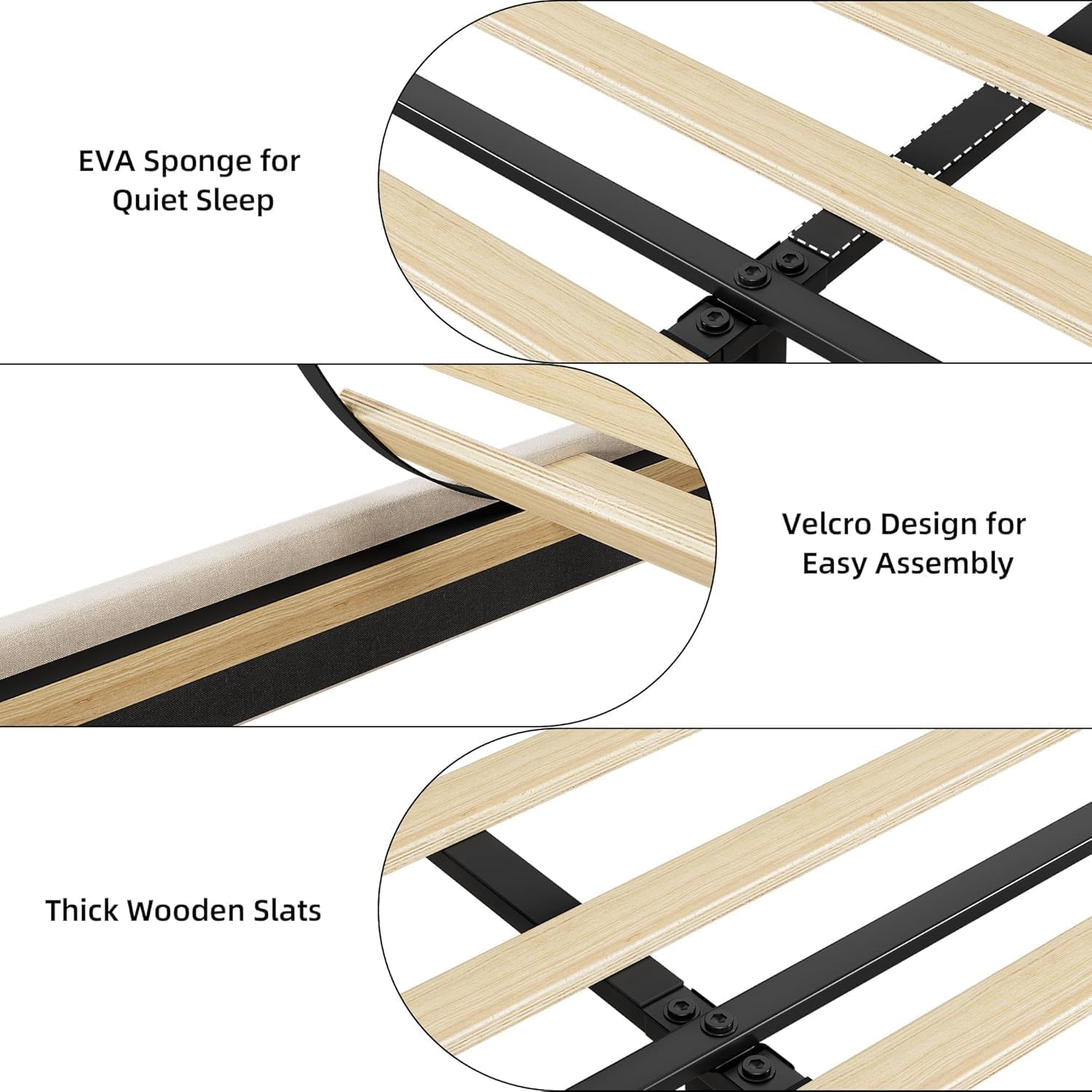
Image 1: Fancihabor Upholstered Bed Frame with Storage Headboard and Charging Station.
2. Safety Information
WARNING: Failure to follow these safety instructions could result in injury or damage to the product.
- Keep all parts and packaging materials away from children.
- Ensure all connections are secure before use. Periodically check and tighten fasteners.
- Do not stand or jump on the bed frame.
- Do not exceed the maximum weight capacity of 1,000 pounds.
- Use only in a dry, indoor environment.
- When using the charging station, ensure cables are not pinched or damaged. Do not overload the outlets.
- Assembly requires at least two adults.
3. Package Contents
Before assembly, verify that all components are present and undamaged. If any parts are missing or damaged, contact customer support.
- Upholstered Headboard with Integrated Charging Station
- Side Rails (Left and Right)
- Footboard with Storage Drawers (King size includes 2 drawers)
- Wooden Slats with Velcro Fasteners
- Center Support Beam(s)
- Support Legs
- Hardware Pack (screws, bolts, Allen wrench, etc.)
- Instruction Manual

Image 2: Illustrative diagram of bed frame components and dimensions (Full size shown for reference). King size will have two drawers.
4. Setup & Assembly
Follow these steps carefully for proper assembly. It is recommended to assemble the bed frame in the room where it will be used.
- Unpack Components: Lay out all parts on a clean, soft surface (e.g., a rug or blanket) to prevent scratches. Identify each component using the parts list.
- Attach Side Rails to Headboard: Secure the side rails to the headboard using the provided hardware. Ensure the upholstered fabric is not pinched.
- Attach Footboard: Connect the footboard to the side rails. Ensure all bolts are finger-tight before fully tightening.
- Install Center Support: Assemble and attach any center support beams and legs as indicated in the specific assembly diagram (refer to the diagram included in your hardware pack).
- Place Wooden Slats: Unroll the wooden slats onto the bed frame. The slats feature a Velcro design for easy and secure attachment to the frame, ensuring they stay in place and simplify assembly.
- Secure Slats: Press down firmly on the Velcro strips to ensure the slats are securely fastened. The thick wooden slats and EVA sponge contribute to a quiet and stable sleep environment.
- Final Tightening: Once all components are in place, systematically tighten all bolts and screws using the provided Allen wrench. Do not overtighten.
- Insert Drawers: Slide the storage drawers into their designated compartments in the footboard. The drawers are equipped with casters for smooth operation.

Image 3: Detail of bed frame construction, highlighting EVA sponge, Velcro design, and thick wooden slats for stability and quiet operation.
5. Operating Instructions
5.1. Storage Headboard and Charging Station
The integrated storage headboard provides a convenient shelf for small items such as books, glasses, or decorative pieces. The built-in charging station allows you to power your electronic devices directly from your bed.
- Power Connection: Locate the power cord extending from the bed frame (typically from the foot end). Plug this cord into a standard 110V/12A AC wall outlet.
- USB Ports: The headboard includes 2 USB ports. Connect your USB charging cables to these ports to charge smartphones, tablets, or other USB-powered devices.
- AC Outlet: An additional AC power outlet is provided for devices requiring a standard wall plug.
- Usage: Place your devices on the headboard shelf while charging. Ensure cables are neatly arranged to prevent tripping hazards or damage.

Image 4: Detailed view of the charging station, showing the 110V/12A AC outlets and USB ports.
5.2. Storage Drawers
The bed frame includes integrated storage drawers in the footboard, offering convenient space for linens, off-season clothing, or other items. The King size model is equipped with two drawers.
- Accessing Drawers: Gently pull the drawer handles to slide the drawers out. Each drawer is fitted with casters for smooth and easy movement.
- Storage Capacity: Utilize the spacious interior for organizing your belongings, helping to keep your room tidy and clutter-free.
- Closing Drawers: Push the drawers back into the frame until they are fully closed and flush with the footboard.
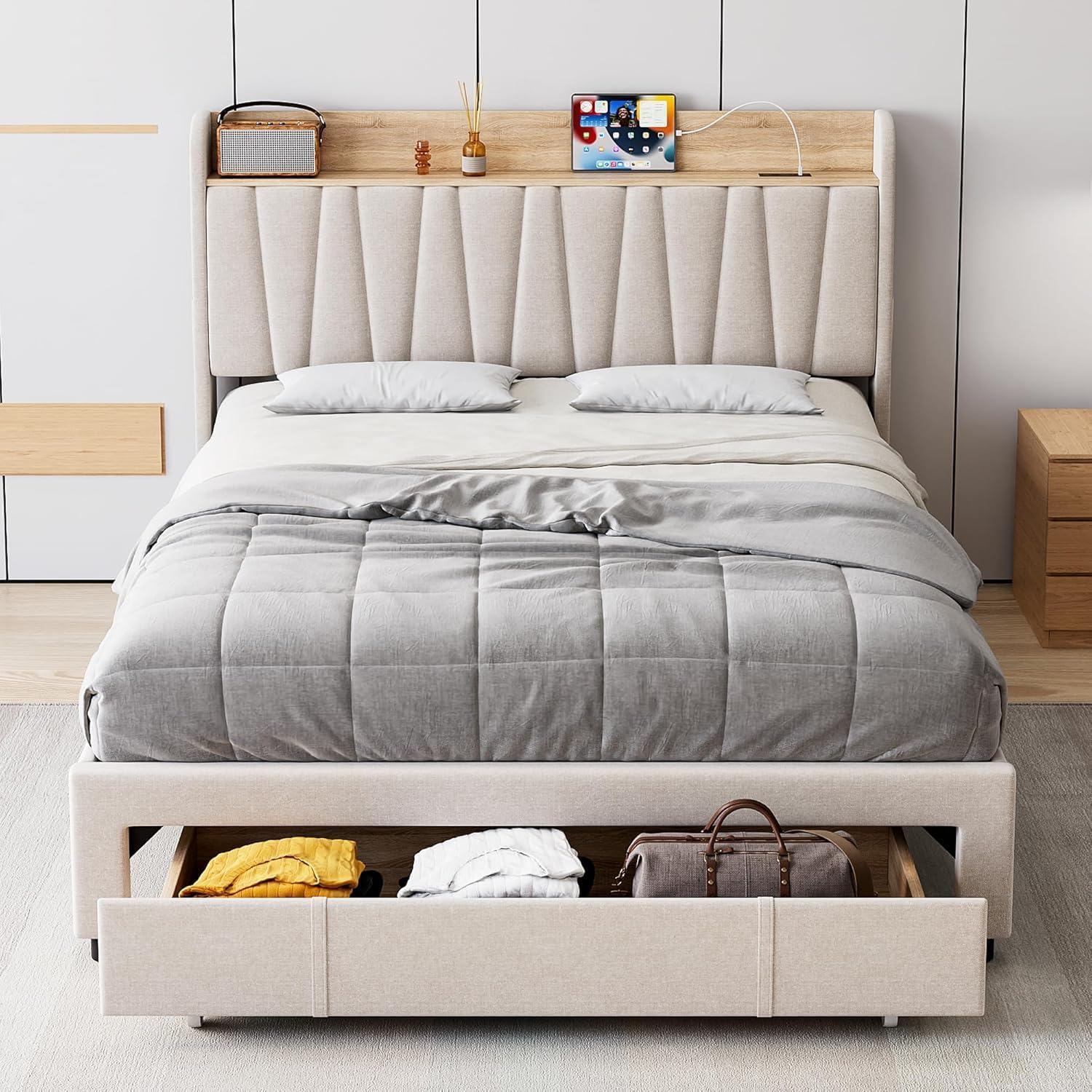
Image 5: The bed frame with a storage drawer open, demonstrating its capacity for storing various items.
6. Maintenance
- Cleaning Upholstery: For general cleaning, vacuum the upholstered fabric regularly with a soft brush attachment. For spills, blot immediately with a clean, dry cloth. For stubborn stains, use a mild fabric cleaner following the product instructions, testing on an inconspicuous area first.
- Cleaning Wood/Laminated Surfaces: Wipe wood or laminated surfaces with a soft, damp cloth. Avoid abrasive cleaners or harsh chemicals.
- Hardware Check: Periodically (every 3-6 months) check all bolts and screws to ensure they are tight. Loose hardware can lead to instability and noise.
- Drawer Maintenance: Keep drawer tracks clean and free of debris to ensure smooth operation.
- Air Circulation: The open slat design promotes air circulation for your mattress. Ensure the area under the bed is not completely blocked to maintain airflow.
7. Troubleshooting
| Problem | Possible Cause | Solution |
|---|---|---|
| Bed frame is squeaking/noisy. | Loose hardware; uneven floor; slats not properly seated. | Tighten all bolts and screws. Ensure the bed is on a level surface. Check that all wooden slats are securely attached to the Velcro strips. |
| Charging station not working. | Power cord unplugged; wall outlet not functioning; device cable faulty. | Ensure the bed frame's power cord is securely plugged into a working wall outlet. Test the wall outlet with another device. Try a different USB cable or device. |
| Drawers are difficult to open/close. | Obstruction in drawer track; drawer overloaded; casters dirty. | Check for any items blocking the drawer path. Reduce the load in the drawer. Clean any debris from the drawer casters and tracks. |
| Bed frame feels unstable. | Loose connections; missing support legs. | Re-check and tighten all assembly hardware. Ensure all support legs are correctly installed and making contact with the floor. |
8. Specifications
- Model Number: LYJ-BF-PHO_158DPQ7B
- Size: King (U.S. Standard)
- Product Dimensions: 83.5"L x 78"W x 44.9"H
- Color: Light Grey
- Material: Engineered Wood, Upholstered Fabric (Linen)
- Special Features: Storage Headboard, Charging Station (2 USB ports, 1 AC outlet), Storage Drawers
- Weight Capacity: Up to 1,000 pounds
- Assembly Required: Yes (approx. 2 adults)
- Item Weight: 117.9 pounds
- Manufacturer: Fancihabor
9. Warranty & Support
For warranty information, please refer to the terms provided at the time of purchase or contact the seller directly. This product is typically covered by a 90-day easy return policy from the seller, Yikemandian.
If you encounter any issues or have questions regarding your Fancihabor bed frame, please contact customer support through your purchase platform or the manufacturer's official channels. Please have your model number (LYJ-BF-PHO_158DPQ7B) and purchase details ready when contacting support.