
1. Introduction
Thank you for choosing the Heelay Q22 Electric Dehumidifier. This manual provides essential information for the safe and efficient operation, maintenance, and troubleshooting of your device. Please read it thoroughly before use and retain it for future reference.
The Heelay Q22 dehumidifier utilizes advanced Peltier semiconductor technology to effectively remove excess moisture from the air, helping to prevent mold, mildew, and unpleasant odors. It is designed for use in small spaces such as bedrooms, bathrooms, basements, and storage rooms.
2. Safety Instructions
- Ensure the power supply matches the voltage specified on the rating label.
- Do not operate the dehumidifier with a damaged cord or plug.
- Keep the appliance away from heat sources, direct sunlight, and flammable materials.
- Do not block the air inlets or outlets. Maintain at least 10 cm clearance around the unit.
- Always place the dehumidifier on a stable, level surface.
- Do not immerse the unit, power cord, or plug in water or other liquids.
- Unplug the device before cleaning, maintenance, or when not in use for extended periods.
- This appliance is not intended for use by persons (including children) with reduced physical, sensory, or mental capabilities, or lack of experience and knowledge, unless they have been given supervision or instruction concerning use of the appliance by a person responsible for their safety.
- Do not attempt to repair or disassemble the unit yourself. Contact qualified service personnel.
3. Product Overview
The Heelay Q22 dehumidifier features a compact design with a 2000ml water tank and intuitive controls.
Key Features:
- Advanced Peltier Technology: Utilizes dual-core semiconductor technology for efficient and quiet dehumidification without a compressor.
- Triple Airflow Design: Enhances air circulation for rapid moisture removal.
- Automatic Defrost: Operates effectively even at temperatures below 15°C, with an intelligent defrost function.
- Large Water Tank: 2000ml capacity reduces the frequency of emptying.
- Auto Shut-off: Automatically turns off when the water tank is full to prevent overflow.
- Two Operating Modes: 'Extreme' for powerful dehumidification and 'Sleep' for ultra-quiet operation.
- Ambient Lighting: Features colorful ambient lighting that can also serve as a soft night light.
Components:
- Air Inlet
- Air Outlet
- Control Panel
- Water Tank (2000ml)
- Power Cord

Image: One-touch control panel showing power, fan speed, and ambient light buttons.
4. Setup
- Unpacking: Carefully remove the dehumidifier from its packaging. Retain the packaging for future storage or transport.
- Placement: Place the dehumidifier on a firm, level surface in the desired room. Ensure there is at least 10 cm of clear space around all sides of the unit for proper airflow. Avoid placing it directly against a wall or in a corner that might obstruct the air inlets/outlets.
- Power Connection: Plug the power cord into a suitable electrical outlet.
- Water Tank: Ensure the water tank is correctly inserted into the unit.

Image: Dehumidifier suitable for various small rooms, demonstrating placement in a bedroom, living room, kitchen, and storage area.
5. Operating Instructions
Power On/Off:
- Press the Power Button (
 ) to turn the unit on or off.
Operating Modes:
The dehumidifier offers two operating modes:
- Extreme Mode: Provides powerful dehumidification for faster moisture removal. This mode is suitable for daytime use or when humidity levels are very high.
- Sleep Mode: Operates at a lower fan speed for ultra-quiet performance, ideal for nighttime use in bedrooms.
To switch between modes, press the Fan Speed Button ( ).
).
Image: Comparison of the dehumidifier operating in Power Mode (daytime setting) and Sleep Mode (nighttime setting).
Ambient Lighting:
The dehumidifier features colorful ambient lighting. Press the Light Button () to cycle through the light colors or turn the light off.

Image: Dehumidifier with ambient lighting in a bedroom, illustrating quiet operation at 30 dB in sleep mode.
Automatic Defrost:
The unit is equipped with an NTC1 temperature sensor. If the ambient temperature drops below 13°C, the unit will run for two hours, then pause for 300 seconds. During this pause, ice is automatically removed from the semiconductors to ensure continuous function.
Image: Diagram illustrating the automatic defrost function of the dehumidifier.
6. Maintenance
Emptying the Water Tank:
When the water tank is full, the dehumidifier will automatically shut off, and an indicator light will blink red, accompanied by three beeps. To empty the tank:
- Gently pull out the water tank from the unit.
- Open the spout cover and pour out the collected water.
- Replace the spout cover and slide the water tank back into the dehumidifier until it clicks into place.
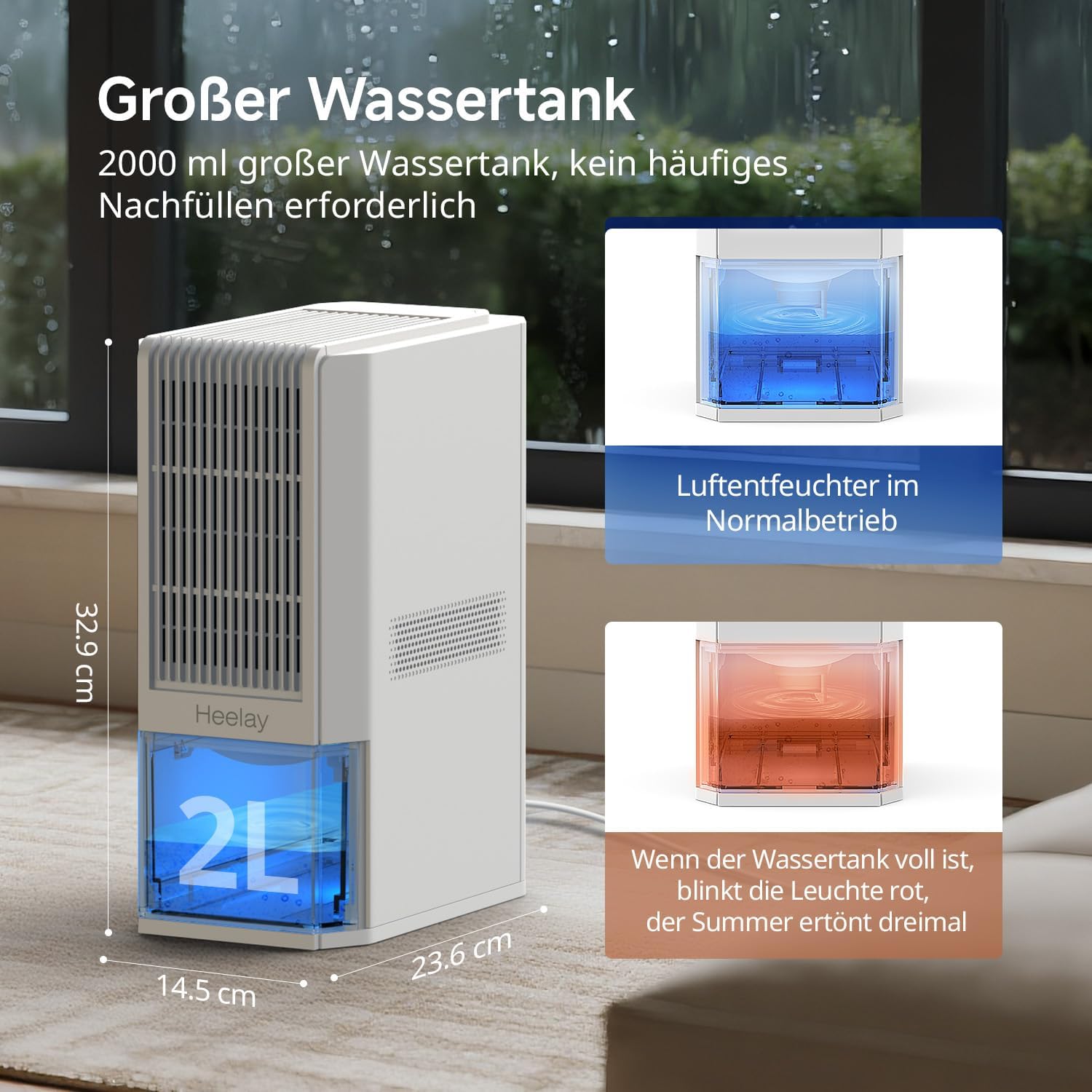
Image: The 2000ml water tank, showing how it looks when full and indicating the auto-shutoff feature.

Image: Step-by-step guide on how to remove and empty the water tank, highlighting the improved leak-proof design.
Cleaning:
- Exterior: Wipe the exterior of the dehumidifier with a soft, damp cloth. Do not use abrasive cleaners or solvents.
- Air Filter (if applicable): Refer to the product diagram for the location of the air filter. Clean it regularly to ensure optimal performance.
- Water Tank: Clean the water tank periodically with mild soap and water to prevent mold or bacteria growth. Rinse thoroughly before reinserting.
7. Troubleshooting
If you encounter issues with your Heelay Q22 dehumidifier, please refer to the following common problems and solutions:
| Problem | Possible Cause | Solution |
|---|---|---|
| Low water collection / Dehumidifier not collecting water. | Efficiency depends on ambient temperature and humidity. Lower temperatures and humidity result in less water collection. | Ensure the room temperature and humidity are within the effective operating range. The unit performs best in higher humidity environments. |
| Humidity level does not decrease. |
|
|
| Unit is making unusual noise. | Unit not on a level surface; fan obstruction. | Place the unit on a stable, level surface. Check for any obstructions in the fan or air vents. |
| Unit is not turning on. | No power; water tank full or incorrectly inserted. | Check power connection. Empty and correctly reinsert the water tank. |
If problems persist after attempting these solutions, please contact customer support.

Image: Visual representation of customer support addressing common dehumidifier questions.
8. Specifications
| Feature | Specification |
|---|---|
| Brand | Heelay |
| Model Name | Q22 |
| Color | White |
| Special Functions | Automatic Shut-off, Removable Tank, Automatic Defrost |
| Water Tank Capacity | 2000 Milliliters (2 Liters) |
| Moisture Removal Capacity | Up to 1.3 Liters per day (at 30°C / 80% RH) |
| Power | 85 Watts |
| Product Dimensions (D x W x H) | 32.9 cm x 14.5 cm x 23.9 cm |
| Product Weight | 2.8 Kilograms |
| Material | Acrylonitrile Butadiene Styrene (ABS) |
| Recommended Use Area | Residential, up to 20 square meters |
Performance Data:
| Operating Environment | Dehumidification Capacity (ml/day) |
|---|---|
| 20 °C / 60 % RH | 390 ml/day ± 10% |
| 27 °C / 60 % RH | 500 ml/day ± 10% |
| 30 °C / 80 % RH | 1000 ml/day ± 10% |
| 32 °C / 85 % RH | 1330 ml/day ± 10% |
Note: Actual dehumidification performance may vary depending on temperature and humidity conditions.

Image: Dehumidification capacity table illustrating performance under various environmental conditions.
9. Warranty and Support
Heelay is committed to providing high-quality products and excellent customer service. Your Heelay Q22 dehumidifier comes with the following:
- 24 Months After-Sales Service: We offer comprehensive support for 24 months from the date of purchase.
- 7-Day Return Policy: You may return the product within 7 days of receipt.
- Return for Defects: Products with manufacturing defects are eligible for return.
For any questions, assistance, or to report an issue, please contact our customer support team:
Email: services-heeley@outlook.com
We are dedicated to providing a quick and satisfactory solution.

Image: After-sales service details including warranty period, return policy, and contact email.