1. Introduction
This manual provides detailed instructions for the installation, operation, and maintenance of the MRSNU KWS-306 3-Phase 4-Wire Power Meter. The KWS-306 is designed to accurately measure and display various electrical parameters, including voltage, current, power, energy consumption (KWh), frequency, and temperature. It also incorporates multiple protection functions to safeguard your electrical system. Please read this manual thoroughly before use to ensure proper and safe operation.
2. Safety Information
WARNING: Electrical shock hazard. Installation and servicing should only be performed by qualified personnel.
- Always disconnect power before installing or servicing the device.
- Ensure all wiring connections are secure and comply with local electrical codes.
- Do not operate the device if it appears damaged.
- Keep the device away from moisture and extreme temperatures.
- The device is designed for indoor use in a controlled environment.
3. Product Overview
The MRSNU KWS-306 is a compact, DIN rail-mountable power meter featuring a color digital display for clear readings of electrical parameters. It is designed for 3-phase, 4-wire systems.
3.1 Components
- Digital Display: Shows real-time measurements and settings.
- Input Terminals (A, B, C, N): For connecting the 3-phase, 4-wire power supply.
- Output Terminals (A, B, C, N): For connecting the load.
- Control Buttons (+, -, M, NO/OFF): For navigation, setting parameters, and manual control.
- NTC Temperature Sensor Terminal: For external temperature measurement.

Figure 3.1: Front view of the MRSNU KWS-306 Power Meter, showing the color display and terminal labels.

Figure 3.2: The MRSNU KWS-306 functions as an electric energy meter for 3-phase, 4-wire rail systems.
3.2 Model Variations
The MRSNU KWS series includes several models. This manual specifically covers the KWS-306 (Normal version). Other models, such as the KWS-306WF (with Wi-Fi) and KWS-306L (with RS485), offer additional connectivity features not present in the KWS-306.

Figure 3.3: Comparison illustrating the KWS-306WF (Wi-Fi version), KWS-306L (RS485 version), and KWS-306 (Normal version).
4. Specifications
| Parameter | Value |
|---|---|
| Model | KWS-306 |
| Voltage Range | AC 85-290V |
| Current Range | 0-80A |
| Power Range | 0-23KW |
| Frequency Range | 50-60Hz |
| Operating Temperature | -20°C to 150°C |
| Phase | Three Phase |
| Wiring | 4-Wire |
| Display Type | Digital Color Screen |
| Mounting Type | DIN Rail Mount |
| Power Supply | AC |
5. Installation
5.1 Mounting
- Ensure power to the circuit is completely disconnected at the main breaker.
- Mount the KWS-306 onto a standard 35mm DIN rail within an electrical enclosure.
- Ensure adequate ventilation around the device.
5.2 Wiring
The KWS-306 is designed for 3-phase, 4-wire systems. Follow the wiring diagram carefully.
- Connect the three phase wires (L1, L2, L3, typically labeled A, B, C) from the power source to the corresponding input terminals (A, B, C) on the meter.
- Connect the neutral wire (N) from the power source to the input neutral terminal (N) on the meter.
- Connect the load's phase wires to the output terminals (A, B, C) and the load's neutral wire to the output neutral terminal (N).
- Ensure all connections are tight and secure to prevent loose contacts and overheating.
- If using an external NTC temperature sensor, connect it to the designated NTC terminals.
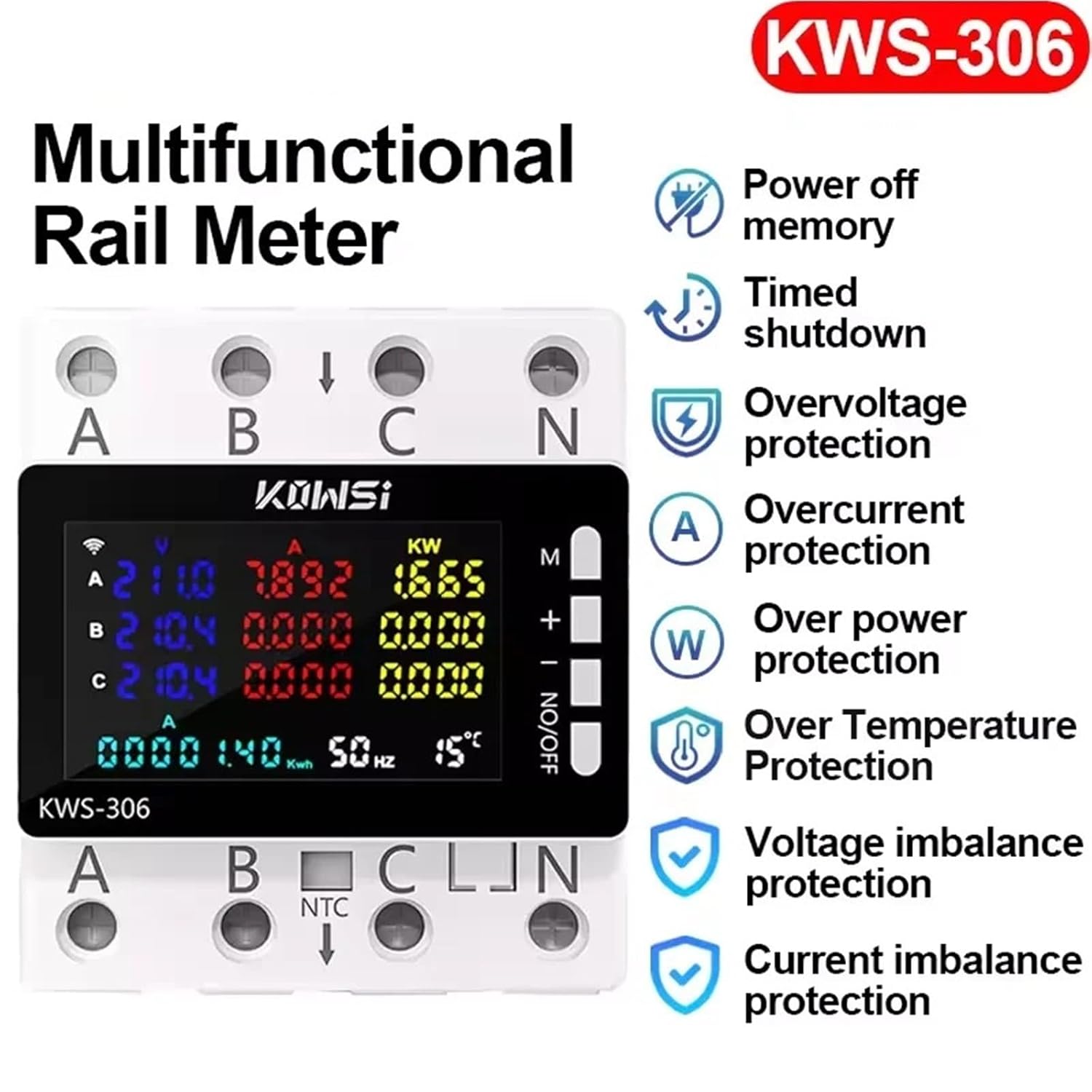
Figure 5.1: Illustrative diagram showing the terminal layout for wiring the 3-phase, 4-wire system to the KWS-306 meter.
6. Operation
6.1 Power On
After completing the wiring and ensuring all connections are secure, restore power to the circuit. The meter's display will illuminate, showing real-time electrical parameters.
6.2 Display Navigation
Use the control buttons to navigate through the display screens and access settings:
- M (Menu/Mode): Press to cycle through different display modes (e.g., Voltage, Current, Power, Energy, Frequency, Temperature). Long press to enter settings menu.
- + (Up/Increase): Used to increase values or move up in menus.
- - (Down/Decrease): Used to decrease values or move down in menus.
- NO/OFF (On/Off/Confirm): Short press to toggle the output relay (if enabled). Long press to confirm settings or exit a menu.
6.3 Reading Measurements
The color display provides clear readings for each phase (A, B, C) and total values where applicable:
- Voltage (V): Displays voltage for each phase.
- Current (A): Displays current for each phase.
- Power (KW): Displays instantaneous power for each phase and total.
- Energy (KWh): Accumulative energy consumption.
- Frequency (Hz): Displays system frequency.
- Temperature (°C): Displays ambient or external NTC sensor temperature.
6.4 Setting Parameters
To adjust protection thresholds or other settings:
- Long press the M button to enter the settings menu.
- Use the + and - buttons to navigate through the settings options (e.g., Overvoltage, Undervoltage, Overcurrent, etc.).
- Press M again to select a setting.
- Use + and - to adjust the value.
- Press NO/OFF to confirm the new value.
- Long press M to exit the settings menu.
7. Features and Protections
The KWS-306 offers a range of protective features to ensure the safety and stability of your electrical system:

Figure 7.1: Visual representation of the KWS-306's key features and protection functions.
- Overvoltage Protection: Automatically disconnects the load if voltage exceeds a set threshold.
- Undervoltage Protection: Automatically disconnects the load if voltage drops below a set threshold.
- Overcurrent Protection: Disconnects the load if current exceeds a safe limit.
- Over Power Protection: Disconnects the load if total power consumption exceeds a set limit.
- Over Temperature Protection: Disconnects the load if the internal or external temperature sensor detects an unsafe temperature.
- Voltage Imbalance Protection: Monitors and protects against significant voltage differences between phases.
- Current Imbalance Protection: Monitors and protects against significant current differences between phases.
- Timed Off: Allows setting a timer for automatic shutdown.
- Power Off Memory: Retains settings and accumulated energy data in case of power loss.
8. Maintenance
- Cleaning: Use a soft, dry cloth to clean the device. Do not use abrasive cleaners or solvents.
- Inspection: Periodically inspect wiring connections for tightness and signs of wear or damage.
- Environment: Ensure the operating environment remains within specified temperature and humidity ranges.
- No user-serviceable parts inside. Do not attempt to open or repair the device.
9. Troubleshooting
| Problem | Possible Cause | Solution |
|---|---|---|
| Device does not power on | No power supply; incorrect wiring; internal fault. | Check main power supply. Verify wiring connections. If problem persists, contact support. |
| Incorrect readings | Incorrect wiring; sensor malfunction. | Review wiring diagram and connections. Ensure NTC sensor is correctly installed if used. |
| Load disconnects unexpectedly | Protection function triggered (e.g., overvoltage, overcurrent); manual OFF. | Check display for protection alerts. Verify system parameters are within set limits. Press NO/OFF to manually re-enable if safe. |
| Buttons unresponsive | Temporary software glitch; hardware issue. | Cycle power to the device. If issue persists, contact support. |
10. Warranty and Support
MRSNU products are manufactured to high-quality standards. For warranty information, technical support, or service inquiries, please refer to the product packaging or contact your retailer. Please have your product model number (KWS-306) and purchase date available when contacting support.