
1. Introduction
Thank you for choosing the MINISO MS193 AI Instant Translator Earbuds. These earbuds are designed to provide real-time language translation, high-definition call clarity, and premium audio in a lightweight, ergonomic design. This manual provides essential information for setting up, operating, and maintaining your device.
2. Package Contents
Please verify that all items are present in your package:
- MS193 Ear Clip Earbuds
- Charging Case
- User Manual
- USB-C Charging Cable
- Lanyard

Image 2.1: Package contents of the MINISO MS193 AI Instant Translator Earbuds.
3. Features
- 3-in-1 AI Translation Earbuds: Combines real-time translation, HD call clarity, and premium audio.
- Rapid Translation: Near-instant translation (< 0.5 seconds) with 98% accuracy.
- Extensive Language Support: Supports 135 languages, including Spanish, Chinese, English, Japanese, Korean, German, and French.
- Intuitive LCD Touch Control: HD screen with over 15 functions including music playback, equalizer settings, voice commands, alarm, stopwatch, and remote camera control.
- Long Battery Life: Up to 50 hours of battery life with only 1.5 hours of charging.
- Multiple Translation Modes: Hands-free, Touch Control, Photo Translation, AI Chat Assistant, Meeting Mode, Hybrid Mode, and Voice Notes.
- Smart Location Management: Integrated tracker to locate lost earbuds via the companion app.
- Comfort and Audio Quality: Ergonomic, pressure-free design with advanced Active Noise Cancellation (ANC) for immersive sound.

Image 3.1: The MINISO MS193 AI Instant Translator Earbuds and their charging case.

Image 3.2: The extensive list of 135 languages supported for translation.
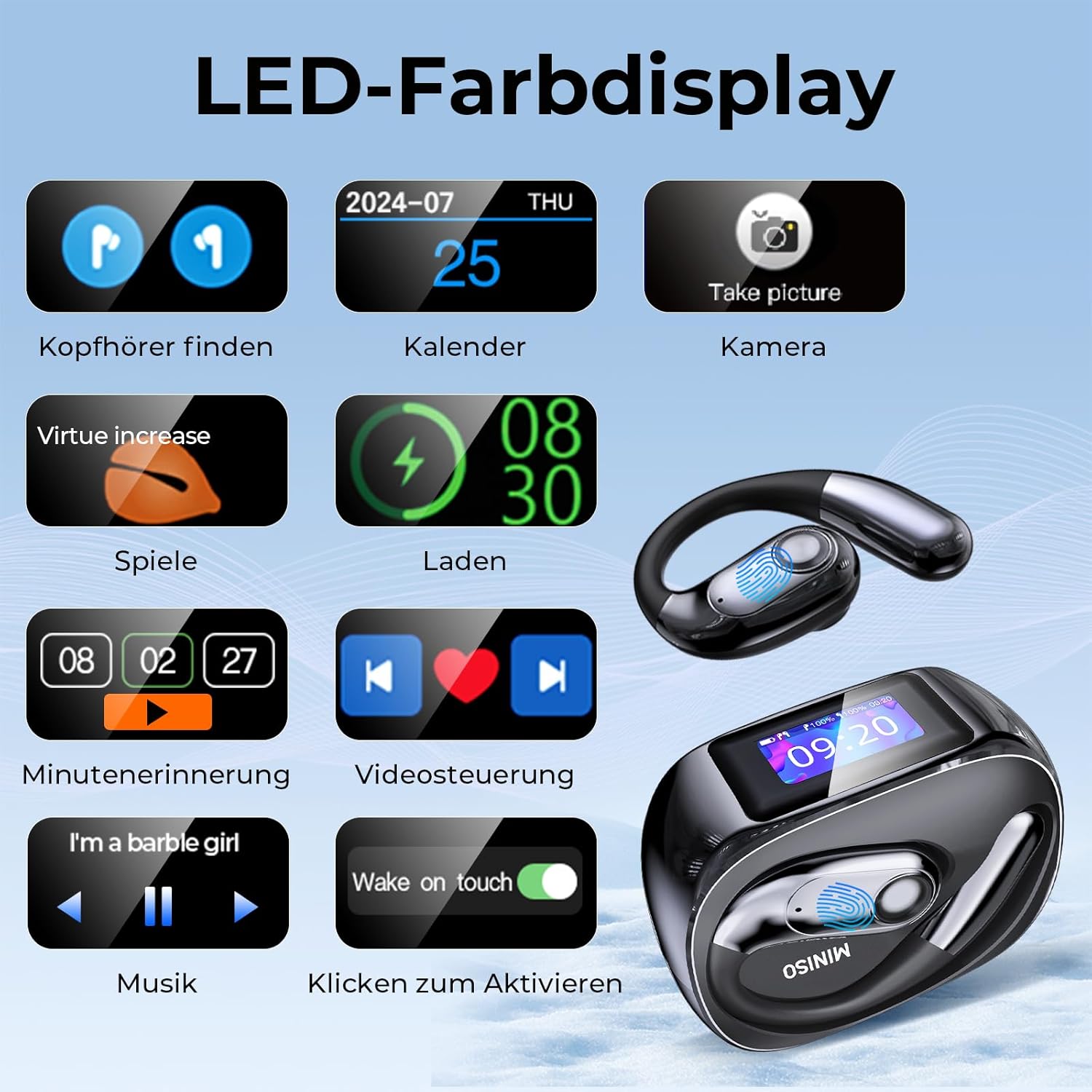
Image 3.3: Functions available on the LED color display of the charging case.
4. Setup
4.1 App Download and Installation
The MINISO MS193 earbuds require the companion application, EarJoy, for full functionality, especially for translation features. The app is available for free download without subscription.
- Scan the QR code provided in the product packaging or search for "AuralIntelli" (or "EarJoy" if AuralIntelli is not found) in your device's app store (App Store for iOS, Google Play Store for Android).
- Download and install the application.

Image 4.1: Visual guide for downloading and connecting the companion application.
4.2 Bluetooth Connection
To connect your earbuds to your smartphone:
- Ensure your earbuds are charged and removed from the charging case.
- Enable Bluetooth on your smartphone.
- Open the EarJoy (or AuralIntelli) app.
- In the app, navigate to the device connection section and select "Add New Device" or similar option.
- Locate "MINISO-MS193" or "NE40" in the list of available Bluetooth devices and tap to connect.
- Once connected, the app will display the device status.
Video 4.1: This video demonstrates the process of downloading the companion application and connecting the NE40 earbuds via Bluetooth to a smartphone. It shows scanning a QR code, searching the App Store for "AuralIntelli", installing the app, and then pairing the earbuds by selecting "NE40" from the Bluetooth device list within the app.
5. Operating Instructions
The MINISO MS193 offers various modes for translation and audio use:
5.1 Translation Modes
- Hands-Free Mode: For real-time conversation flow.
- Touch Control Mode: Operate translation with a single earbud.
- Photo Translation: Capture text with your phone camera for instant translation.
- AI Chat Assistant: Engage in natural dialogue with an AI assistant.
- Meeting Mode: Facilitates multilingual group discussions.
- Hybrid Mode: Enjoy music and simultaneous translation.
- Voice Notes: Automatically transcribes memos.

Image 5.1: Demonstrating the AI Dialogue Mode for interactive translation.

Image 5.2: Overview of the different translation modes available with the earbuds.
Video 5.1: This video showcases the real-time translation capabilities of the NE40 earbuds. It demonstrates a conversation being translated between English and Spanish, with the translated text appearing on both the smartphone app and the earbud's display.
Video 5.2: This short preview video illustrates various use cases for the Olycism instant translator earbuds, including business meetings, air travel, shopping abroad, and photo translation. It highlights the ability to break language barriers in different scenarios.
5.2 General Use
- Audio Playback: Use the earbuds for listening to music or other audio content. Control playback via the charging case's LCD touch screen or your connected device.
- HD Calls: The earbuds provide clear audio for phone calls.
- Voice Commands: Utilize voice commands for various functions as supported by the app.

Image 5.3: The earbuds are suitable for diverse environments such as business meetings, travel, and personal use.
6. Maintenance
To ensure the longevity and optimal performance of your MINISO MS193 earbuds:
- Cleaning: Regularly clean the earbuds and charging case with a soft, dry cloth. Avoid using harsh chemicals or abrasive materials.
- Storage: Store the earbuds in their charging case when not in use to protect them from dust and damage.
- Charging: Use the provided USB-C cable for charging. Avoid overcharging or using damaged cables.
- Water Resistance: The earbuds have an IPX5 rating, meaning they are resistant to splashes and sweat. Do not submerge them in water.

Image 6.1: The earbuds feature IPX5 water resistance, making them suitable for active use.
7. Troubleshooting
If you encounter issues with your MINISO MS193 earbuds, please refer to the following common solutions:
- Connection Issues: Ensure Bluetooth is enabled on your device and the earbuds are within range. Try unpairing and re-pairing the earbuds.
- App Not Responding: Close and restart the EarJoy (or AuralIntelli) app. Ensure the app is updated to the latest version.
- Translation Inaccuracy: Ensure a clear speaking environment and speak clearly. Check your internet connection if using online translation features.
- Audio Problems: Check the volume levels on both your earbuds and connected device. Ensure earbuds are properly seated in your ears.
- Earbuds Lost: Use the smart location management feature in the app to track their last known position.
For further assistance, please contact our support team via the companion application.
8. Specifications
| Feature | Detail |
|---|---|
| Brand | MINISO |
| Model Number | MS193 |
| Battery Type | Lithium-ion |
| Rechargeable Battery | Yes |
| Manufacturer Warranty | 1 Year |
| Water Resistance | IPX5 |
9. Warranty and Support
The MINISO MS193 AI Instant Translator Earbuds come with a 1-year manufacturer warranty. Please retain your proof of purchase for warranty claims.
For technical support, troubleshooting, or any inquiries regarding your product, please refer to the support section within the EarJoy (or AuralIntelli) companion application. You can also visit the official MINISO website for additional resources.