
1. Product Overview
The Fisura Digital Cuckoo Alarm Clock (Model CCD2520901) is a unique digital alarm clock designed to display time, date, and temperature. It features a distinctive cuckoo clock house shape with a static bird figure and gradient colors. The clock includes multiple alarm settings and adjustable display brightness.
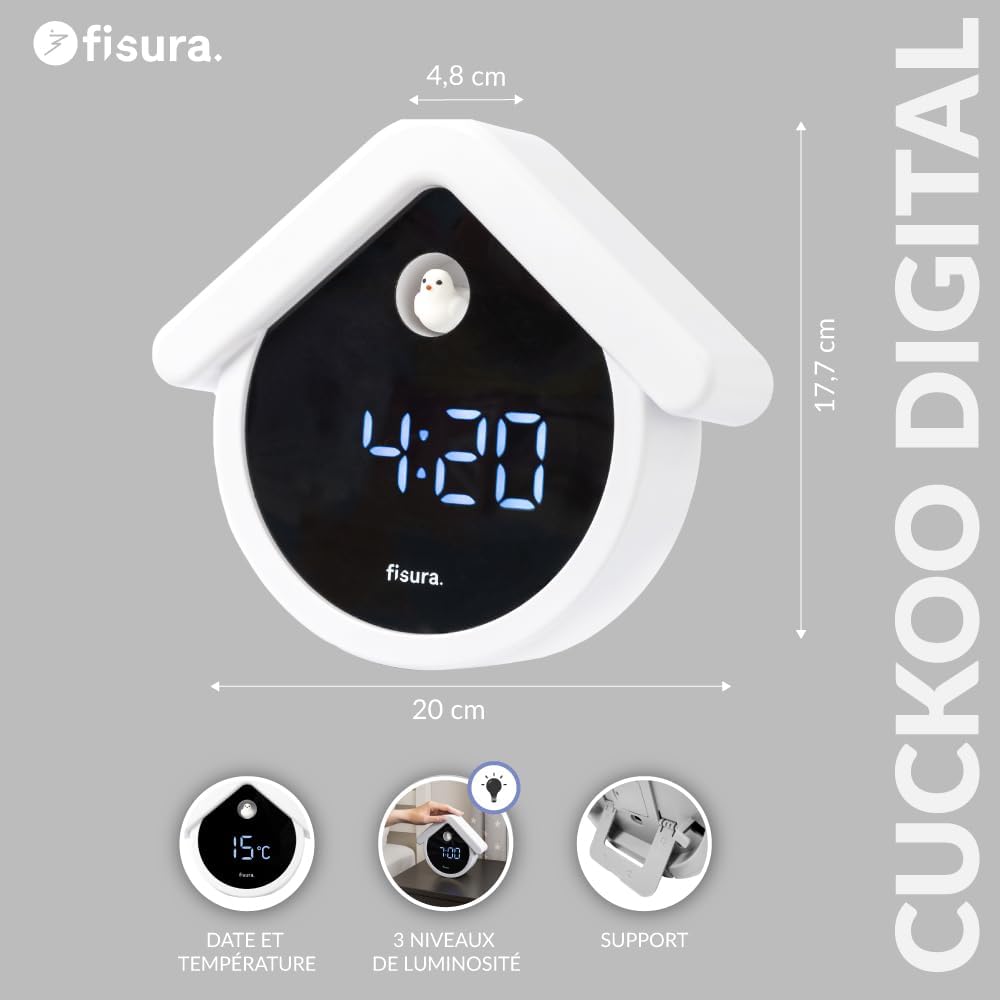
Image 1: Fisura Digital Cuckoo Alarm Clock showing its dimensions (20cm H x 17.7cm W x 4.8cm D) and highlighting features like date and temperature display, 3 brightness levels, and integrated support.
2. Package Contents
- 1 x Fisura Digital Cuckoo Alarm Clock (Model CCD2520901)
- 1 x USB-C Charging Cable
- 1 x CR2032 Battery (for memory backup)
3. Setup
3.1 Power Connection
To power the alarm clock, connect the provided USB-C cable to the clock's USB-C port and plug the other end into a compatible USB power adapter (not included) or a USB port. The clock requires continuous power via the USB-C cable for full functionality. The included CR2032 battery serves as a backup for time and settings memory during power outages.

Image 2: A hand plugging the USB-C cable into the back of the Fisura Digital Cuckoo Alarm Clock, illustrating the power connection.
3.2 Initial Power On
Once connected to power, the LED display will illuminate. The clock may display a default time or require initial time setting.
4. Operating Instructions
4.1 Setting Time and Date
Refer to the buttons on the back or bottom of the clock. Typically, there are buttons labeled 'SET', 'UP', 'DOWN', or similar. Press 'SET' to enter time setting mode. Use 'UP'/'DOWN' to adjust hours, minutes, year, month, and day. Press 'SET' again to confirm each setting and move to the next. The display supports 12-hour and 24-hour formats.
4.2 Setting Alarms
The clock supports up to 3 independent alarms. Locate the 'ALARM' or 'A1/A2/A3' button. Press it to select an alarm (e.g., A1). Use 'SET' to enter alarm time adjustment and 'UP'/'DOWN' to set the desired alarm time. Confirm with 'SET'. The alarm sound is a gentle cuckoo sound. To activate/deactivate an alarm, press the 'ALARM' button repeatedly until the desired alarm indicator (e.g., A1 ON/OFF) is shown.

Image 3: The Fisura Digital Cuckoo Alarm Clock displaying 7:00 AM, indicating an active alarm setting.
4.3 Adjusting Display Brightness
The clock offers 3 levels of brightness. Look for a 'BRIGHTNESS' or 'LIGHT' button. Press it to cycle through the brightness levels. The display also features automatic dimming between 6:00 PM and 6:00 AM to reduce light disturbance during nighttime hours.
4.4 Energy Saving Mode (Clap Activation)
To conserve energy, the display automatically turns off after 30 seconds of inactivity. To reactivate the display, simply clap your hands or make a similar sound near the clock. The display will light up, showing the current time, date, and temperature.

Image 4: The Fisura Digital Cuckoo Alarm Clock on a desk, with an icon of clapping hands, demonstrating the clap-activated display feature.
4.5 Temperature Display
The clock displays the ambient temperature. You can switch between Celsius (°C) and Fahrenheit (°F) by pressing a dedicated button, usually labeled 'TEMP' or by holding down a specific setting button.
5. Maintenance
5.1 Cleaning
Wipe the clock with a soft, dry cloth. Do not use abrasive cleaners or solvents, as they may damage the surface. Avoid getting moisture into the electronic components.
5.2 Battery Replacement (CR2032)
The CR2032 battery is for memory backup only. If the clock loses time or settings after a power disconnection, the CR2032 battery may need replacement. Open the battery compartment, typically located on the back, and replace the old battery with a new CR2032 battery, ensuring correct polarity.
6. Troubleshooting
- Display is blank: Ensure the USB-C power cable is securely connected to a working power source. If in energy-saving mode, clap your hands to activate the display. Check if the CR2032 backup battery is correctly installed.
- Alarm does not sound: Verify that the alarm is set and activated (e.g., A1 ON). Check the alarm volume settings if available.
- Incorrect time/date: Re-enter the time and date settings as described in Section 4.1. Ensure the clock is receiving continuous power.
- Clap activation not working: Ensure the sound is loud enough and close to the clock. Check if the energy-saving mode is enabled.
7. Specifications
| Model Number | CCD2520901 |
| Brand | Fisura |
| Dimensions (H x W x D) | 20 cm x 17.7 cm x 4.8 cm |
| Weight | 310 grams |
| Materials | ABS, Silicone Rubber, Electronic Components |
| Display Type | 4-Digit LED |
| Power Source | USB-C Cable (continuous connection required) |
| Backup Battery | 1 x CR2032 (for memory) |
| Features | 3 Alarms, 3 Brightness Levels, Automatic Dimming, Date Display, Temperature Display (°C/°F), Clap Activation |
8. Warranty and Support
For warranty information or technical support, please refer to the product packaging or contact Fisura customer service directly. Contact details can typically be found on the manufacturer's official website or on the product's purchase page.

