1. Introduction
This manual provides essential information for the setup, operation, and maintenance of your Aivuidbs RG477M Retro Handheld Game Console. Please read this guide thoroughly before using the device to ensure optimal performance and longevity.
2. What's in the Box
Verify that all items are present in the package:
- RG477M Retro Game Console
- Screen Protector (1)
- User Manual (1)
- Type-C Charging Cable (1)
- Gift Box (1)
- Silicone Protective Case (1)

Figure 2.1: Included accessories with the RG477M console.
3. Device Overview
The RG477M features a durable CNC aluminum alloy body and a 4.7-inch LTPS In-Cell touch display. It is designed for comfortable handheld gaming with precise controls.

Figure 3.1: Front view of the RG477M console.
4. Setup
4.1 Initial Charging
Before first use, fully charge the RG477M console. Connect the provided Type-C charging cable to the console's USB-C port and a compatible power adapter (not included). The battery indicator will show charging status.
4.2 Power On/Off
- To power on: Press and hold the power button until the screen illuminates.
- To power off: Press and hold the power button, then select "Power Off" from the options.
4.3 System Language
The device supports multiple languages. Navigate to System Settings to select your preferred language.
5. Operating Instructions
5.1 Android 14 System
The RG477M operates on the Android 14 system. It features a built-in game front-end for organizing and accessing games. No games are preloaded on the device.
5.2 Game Installation and Storage
Games can be added to the console by the user. The device supports up to 30 popular emulator games. The TF card slot allows for external storage expansion up to 2TB for additional games and media.
5.3 Controls
The console is equipped with two Hall joysticks for high precision and extended durability, a D-pad, and standard gaming buttons (A, B, X, Y, R1, R2, L1, L2).
Video 5.1: Overview of the RG477M's features, including its design, display, processor, cooling, and controls.
5.4 Display Features
The 4.7-inch LTPS In-Cell display offers a resolution of 1280x960 and a 120Hz high refresh rate for smooth visuals. It supports multi-touch and OCA full lamination technology for accurate touch sensitivity.

Figure 5.2: The 4.7-inch LTPS In-Cell display.
5.5 Connectivity
- Wi-Fi 6E: For high-speed wireless internet access and online multiplayer games.
- Bluetooth 5.3: For connecting wireless headphones, controllers, and other peripherals.
- USB Type-C: Supports 1080p DisplayPort output for dual-screen display, useful for NDS and 3DS games.
- HDMI Output: Connect the console to a TV for a larger display experience.
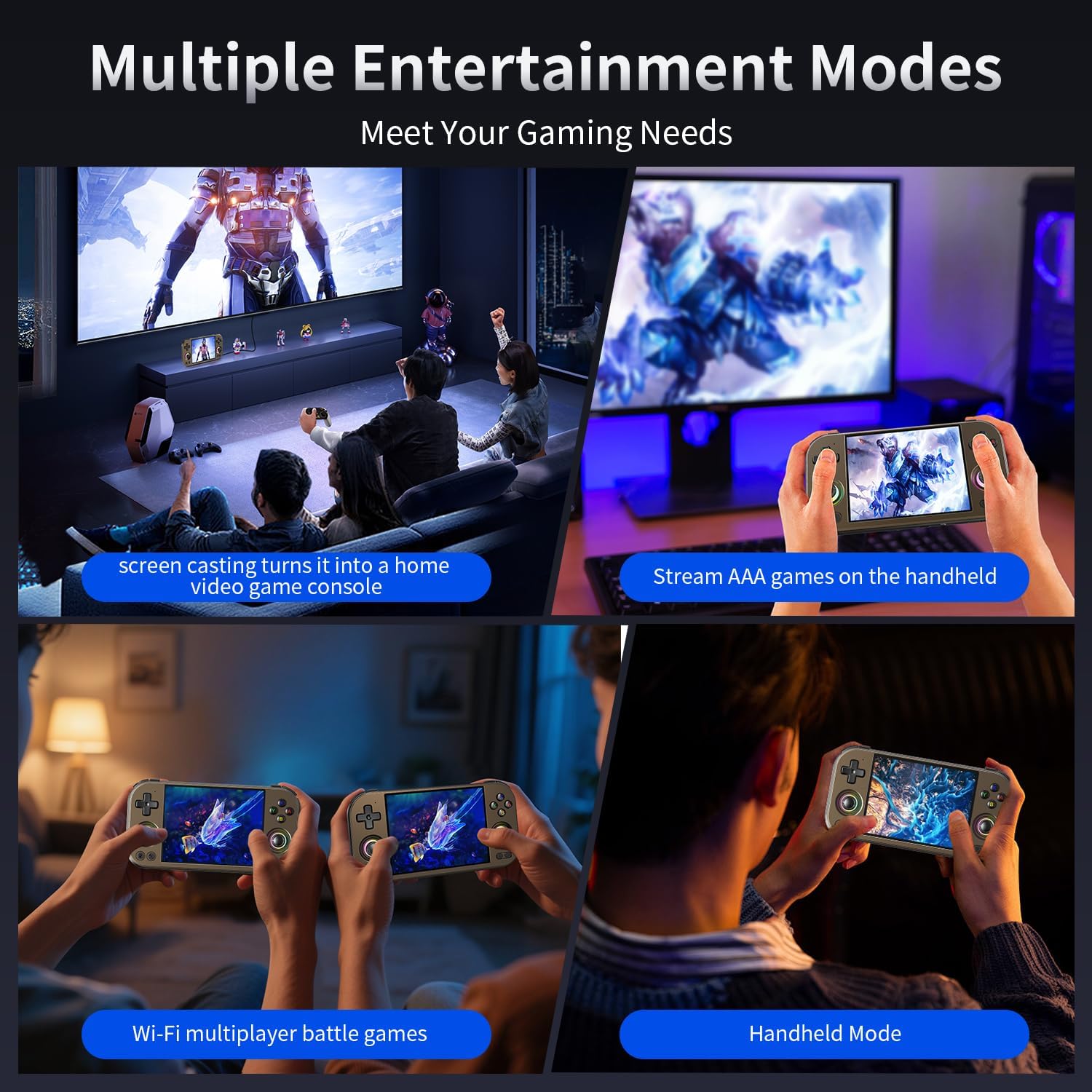
Figure 5.3: Various entertainment modes supported by the console.

Figure 5.4: Dual-screen display functionality.
5.6 RGB Joystick Lighting
The joysticks feature 16 million color RGB lighting with various effects such as constant on, breathing, rainbow, peripheral light, and chasing light. Colors and brightness can be customized in settings.
5.7 AI Assistant
The console includes a self-developed AI assistant with features like AI Square for additional functions, AI Translation for real-time in-game translation, and AI Assistant for discussing game strategies.
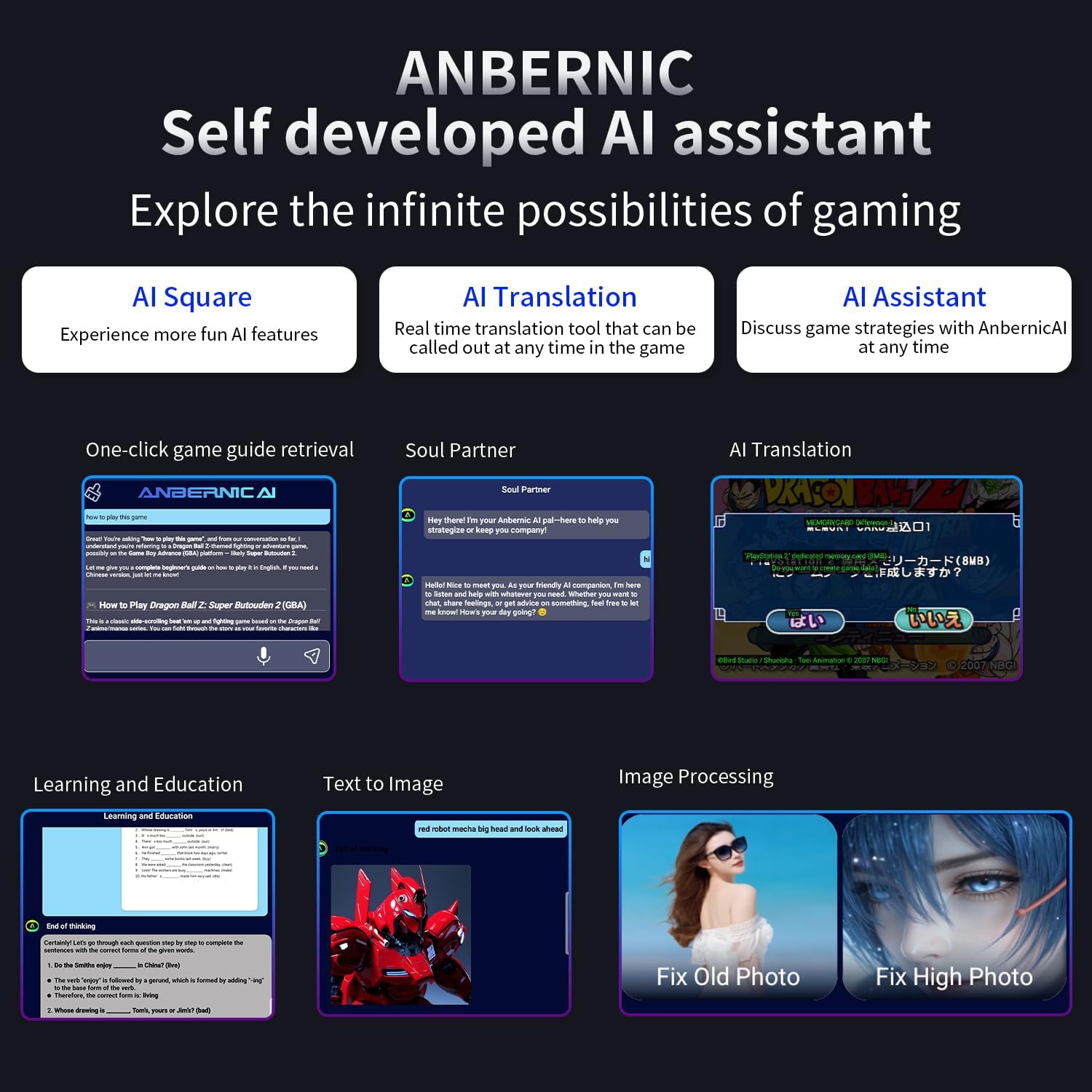
Figure 5.5: Features of the integrated AI assistant.
5.8 Moonlight Streaming
The RG477M supports Moonlight Streaming, enabling users to play PC games on the handheld device.
6. Specifications
| Feature | Detail |
|---|---|
| Model | RG477M |
| Color Options | Copper, Silver |
| Material | Aluminum Alloy (CNC Process) |
| Screen | 4.7-inch LTPS In-Cell Display, OCA full lamination, Multi-touch, 1280x960 resolution, 120Hz refresh rate |
| CPU | Dimensity 8300 Processor (5G SoC chip, 4nm process, Octa-core: 1x A715 (3.35GHz) + 3x A715 (3.20GHz) + 4x A510 (2.2GHz)) |
| GPU | Mali-G615 MC6 |
| RAM | 12GB LPDDR5X |
| Internal Storage | 256GB UFS4.0 |
| External Storage | TF card expansion up to 2TB |
| Operating System | Android 14 |
| Wi-Fi | Wi-Fi 6E |
| Bluetooth | Bluetooth 5.3 |
| Battery | 5300mAh Lithium Polymer, up to 7 hours usage, 5V/9V-27W charging |
| Joysticks | Large-angle 3D Hall joysticks |
| Audio | High fidelity dual stereo speakers, 3.5mm stereo headphone jack |
| Cooling | High-speed fan and heat pipe active cooling |
| Dimensions | 6.9 x 3.5 x 0.6 inches |
| Weight | 1.32 pounds (0.6 Kilograms) |
| Other Features | Built-in 6-axis gyroscope sensor, FOTA wireless upgrade, online multiplayer, streaming media, wireless screen projection, vibration motor, energy-saving settings, RGB joystick light control. |
7. Maintenance
7.1 Cleaning
Use a soft, dry cloth to clean the console's exterior. For the screen, use a microfiber cloth specifically designed for electronics. Avoid using harsh chemicals or abrasive materials.
7.2 Storage
Store the console in a cool, dry place away from direct sunlight and extreme temperatures. Use the provided silicone protective case to prevent scratches and minor impacts.
7.3 Battery Care
To prolong battery life, avoid fully discharging the battery frequently. Charge the device regularly, even if not in use for extended periods.
8. Troubleshooting
8.1 Device Not Powering On
- Ensure the battery is sufficiently charged. Connect the console to a power source and allow it to charge for at least 30 minutes before attempting to power it on again.
- Press and hold the power button for 10-15 seconds to perform a hard reset.
8.2 Screen Unresponsive
- If the screen is unresponsive, try restarting the device.
- Ensure the screen is clean and free of debris.
8.3 Games Not Loading
- Verify that the game files are correctly placed in the appropriate emulator folders on the internal storage or TF card.
- Ensure the game format is supported by the installed emulators.
- Check if the TF card is properly inserted and recognized by the system.
8.4 Connectivity Issues (Wi-Fi/Bluetooth)
- Restart the console and your Wi-Fi router or Bluetooth device.
- Ensure the console is within range of the Wi-Fi network or Bluetooth device.
- Check system settings to confirm Wi-Fi and Bluetooth are enabled.
8.5 Overheating
The RG477M has active cooling. If the device feels excessively hot, close any running applications or games and allow it to cool down. Ensure the cooling vents are not obstructed.
9. Warranty and Support
For warranty information and technical support, please refer to the documentation provided with your purchase or visit the official Aivuidbs website. Keep your proof of purchase for warranty claims.
For further assistance, you may contact Aivuidbs customer service through their official channels.
