
1. Introduction
Thank you for choosing the BritMo 72 Inch Extra Large Ceiling Fan with Lights. This commercial-grade ceiling fan is designed to transform large rooms, living rooms, great rooms, master bedrooms, and commercial spaces up to 22ft x 22ft with powerful, quiet airflow and versatile lighting. Featuring a sleek black finish, 8 aerodynamic blades, and complete remote control convenience, this fan offers 6 speeds, 5 brightness levels, and 3 color temperatures (3000K, 4500K, 6000K). Enjoy whisper-quiet operation, natural wind mode, reversible functionality, memory function, and a 2/4-hour timer for optimal comfort and energy efficiency.
2. Safety Information
Please read and understand all instructions before beginning installation. Failure to follow these instructions may result in electric shock, fire, or personal injury.
- Ensure the power is turned off at the circuit breaker before installation or maintenance.
- All wiring must be in accordance with national and local electrical codes.
- The mounting structure must be capable of supporting the weight of the fan (approximately 27.9 pounds).
- Do not operate the fan if any part is damaged. Contact customer support for replacement parts.
- Keep hands, clothing, and other objects clear of the fan blades during operation.
3. Package Contents
Carefully unpack your new ceiling fan and inspect the contents. Ensure all items listed below are present and undamaged. If any parts are missing or damaged, do not attempt to install the fan. Contact BritMo customer service for assistance.
- 1 x Canopy
- 1 x User Manual
- 1 x 3M Glue
- Fan Motor Assembly
- Fan Blades (8 pieces)
- Downrods (6", 10", 16" options)
- Remote Control with Wall Mount Bracket and Screws
- Remote Control Receiver
- LED Light Kit
- Mounting Bracket and Hardware (screws, electrical caps)
Video: Unboxing and initial component overview of the BritMo ceiling fan.
4. Specifications
| Feature | Specification |
|---|---|
| Brand | BritMo |
| Model Name | CFK7202 |
| Size | 72 inch |
| Color | Gray & Dark Brown |
| Electric Fan Design | Ceiling Fan |
| Power Source | DC |
| Style | Remote |
| Product Dimensions | 72"D x 72"W x 18.9"H |
| Room Type | Office Space, Large Living Rooms, Great Rooms, Master Bedrooms, Commercial Spaces |
| Special Feature | 6-Speed Remote Control - LED Display, Memory Function & Smart Timer (2/4/8hrs) |
| Recommended Uses | Indoor |
| Wattage | 64 watts |
| Finish Type | Black |
| Air Flow Capacity | 6321 Cubic Meters Per Minute |
| Voltage | 120 Volts |
| Included Components | 1 Canopy, User Manual, 3M Glue |
| Indoor/Outdoor Usage | Indoor |
| Specification Met | FCC, DOE |
| Control Method | Remote |
| Efficiency | High Efficiency |
| Item Weight | 27.9 pounds |
| Mounting Type | Downrod Mount |
5. Setup and Installation
The BritMo 72 Inch Ceiling Fan features a Quick-Fit blade system designed for simple installation. It includes hardware for different ceiling heights, allowing you to choose from 6", 10", or 16" downrods for optimal placement. For detailed visual guidance, please refer to the included user manual and the installation videos below.
Installation Steps Overview:
- Prepare the Mounting Bracket: Secure the ceiling bracket to a sturdy support member in your ceiling. Ensure all wiring is safely connected.
- Assemble the Fan Body: Attach the downrod to the fan motor assembly. Carefully feed the electrical wires through the downrod.
- Hang the Fan: Lift the fan assembly and hang it onto the ceiling bracket. Make sure the downrod ball is properly seated in the bracket.
- Connect Electrical Wiring: Connect the fan's electrical wires to your household wiring according to the wiring diagram in the user manual. Ensure all connections are secure and insulated with electrical caps.
- Attach Fan Blades: The Quick-Fit system allows for easy blade attachment. Insert each blade into its designated slot on the motor housing and secure with the provided screws. The blades are reversible, offering a black or wood-grain finish.
- Install the LED Light Kit: Connect the LED light kit's wiring to the fan motor's light wires. Secure the light kit to the bottom of the fan motor assembly.
- Secure the Canopy: Slide the canopy up to cover the ceiling bracket and wiring connections. Secure it in place.
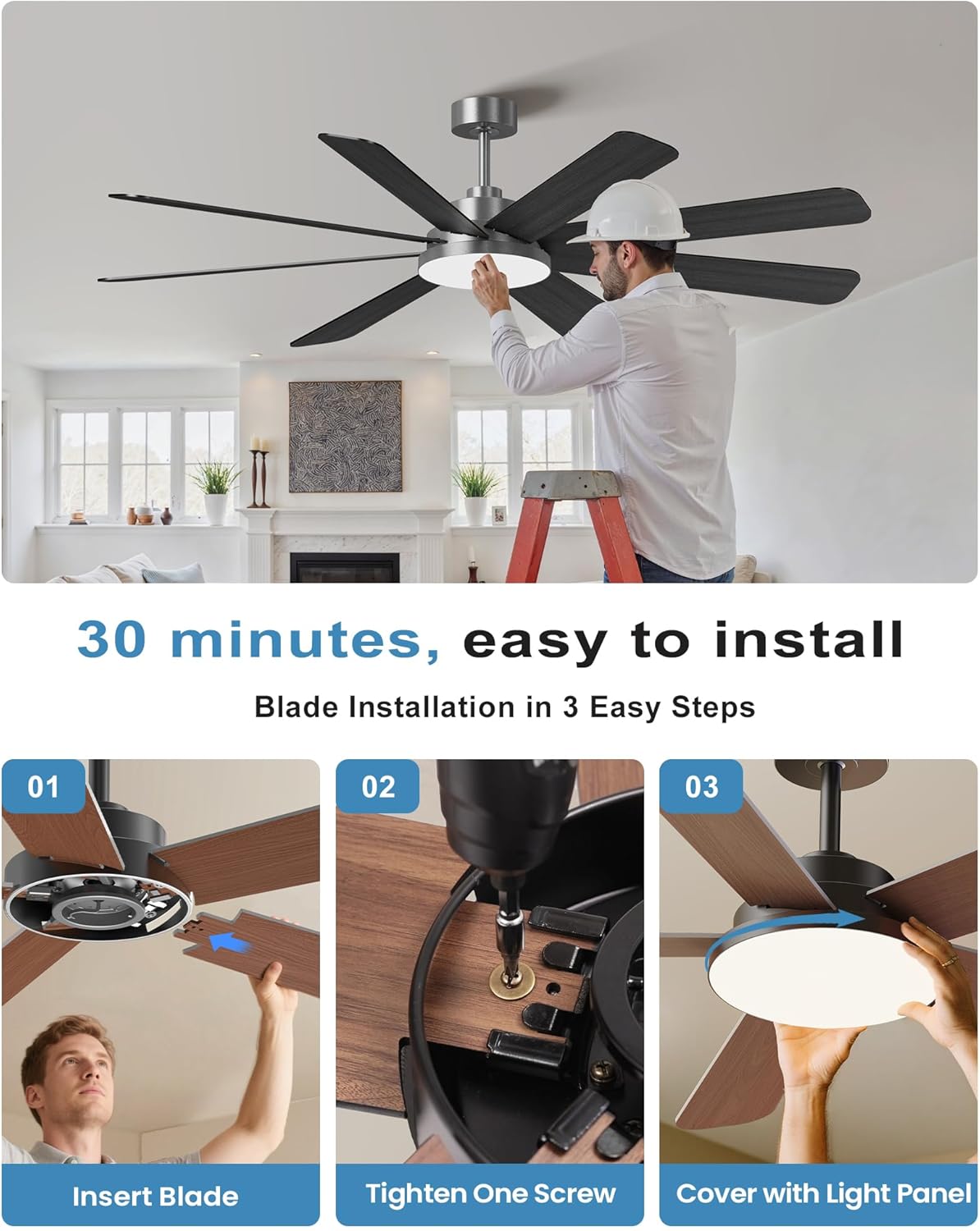
Image: A man installing the BritMo ceiling fan, demonstrating the ease of installation.

Image: Detailed specifications and installation options for the 72-inch BritMo ceiling fan.
Video: A detailed installation guide for the BritMo Ceiling Fan, covering various steps from mounting to wiring.
Video: Unboxing and assembly process of the BritMo ceiling fan, including blade attachment and light kit installation.
6. Operating Instructions
Your BritMo ceiling fan comes with a convenient remote control to manage all its functions. Ensure the remote has 2 AAA batteries installed (not included).
Remote Control Functions:
- Power On/Off: Press the power button to turn the fan and light on or off.
- Fan Speed Control: Select from 6 fan speeds (1-6) to adjust airflow intensity.
- Light On/Off: Independently control the light by pressing the light button.
- Light Brightness Adjustment: Use the dimmer buttons to adjust the light brightness from 0% to 100%.
- Color Temperature Change: Cycle through 3 color temperatures (3000K Warm White, 4500K Natural White, 6000K Cool White) to suit your preference.
- Natural Wind Mode: Activates a fluctuating fan speed to simulate natural breezes.
- Reversible Operation: Change the direction of the fan blades for summer (downward airflow) or winter (upward airflow to circulate warm air).
- Timer Function: Set the fan to automatically turn off after 2 or 4 hours.
- Memory Function: The fan remembers your last light and fan settings when turned off and on.

Image: Remote control functions and light temperature options for the BritMo ceiling fan.

Image: Explanation of Summer and Winter modes for fan operation.
Video: Demonstration of the BritMo ceiling fan's operation, including light and fan speed adjustments via remote control.
Video: Overview of remote control features and fan operation, including light dimming and color temperature changes.
7. Maintenance
Regular maintenance will ensure the longevity and optimal performance of your BritMo ceiling fan.
- Cleaning: Periodically clean the fan blades and light cover with a soft, damp cloth. Do not use abrasive cleaners or solvents.
- Tighten Screws: Check all screws on the fan blades and mounting hardware annually to ensure they are secure.
- No Lubrication Needed: The fan's motor is permanently lubricated and does not require oiling.
8. Troubleshooting
If you experience issues with your BritMo ceiling fan, refer to the following common troubleshooting steps:
- Fan Not Operating: Check if the circuit breaker is on. Ensure all electrical connections are secure. Verify remote control batteries are functional.
- Light Not Working: Check electrical connections to the light kit. Ensure the light function on the remote is activated.
- Excessive Wobbling: Ensure all blade screws are tightened. Verify the mounting bracket is securely fastened to the ceiling. Check that the downrod ball is properly seated.
- Noisy Operation: Ensure all screws are tight. Check for any loose parts or obstructions.
For further assistance, consult the detailed troubleshooting section in your user manual or contact BritMo customer support.
9. Warranty and Support
Your BritMo ceiling fan is backed by a manufacturer's warranty. Please refer to the included User Manual for specific warranty terms and conditions. For technical support, replacement parts, or any inquiries, please visit the BritMo store on Amazon or contact their customer service directly.
BritMo Store: Visit the BritMo Store