
Product Overview
The YMZ Smart Watch TGW01 is a versatile wearable device designed for both men and women, offering a range of features to enhance daily life and fitness routines. It includes Bluetooth calling, fitness tracking, sleep monitoring, and a customizable 1.85-inch DIY dial. The watch is IP68 waterproof and compatible with Android and iOS devices.

Package Contents
Ensure all items are present in the box:
- YMZ Smart Watch TGW01
- USB Magnetic Charging Cable
- User Manual

Initial Setup
Charging the Device
Before first use, fully charge your YMZ Smart Watch. Connect the magnetic charging cable to the charging points on the back of the watch and to a USB power source. The watch display will indicate charging status.
App Installation and Pairing
To unlock the full potential of your YMZ Smart Watch, download the "VeryFit" app from your device's app store. Follow the on-screen instructions in the app to pair your watch via Bluetooth. A QR code for the app can be found in the included user manual.
Operating Instructions
Basic Navigation
- Swipe up/down: Access notifications or quick settings.
- Swipe left/right: Navigate through different features and widgets.
- Press side button: Wake up screen, return to home screen, or access app list.
Bluetooth Calling
Once paired with your smartphone, the YMZ Smart Watch allows you to make and receive calls directly from your wrist. Use the dial pad, access call history, or select frequent contacts.

AI Voice Assistant
The built-in AI voice assistant provides convenient voice control for various functions, including setting alarms, checking weather, making calls, and more.

Message Notifications
Receive notifications from various apps directly on your watch. Supported apps include SMS, Email, WhatsApp, Facebook, Instagram, and more. Note: Replying to messages directly from the watch is not supported.

Health Monitoring
The YMZ Smart Watch continuously tracks key health metrics throughout the day.
- Heart Rate Monitoring: Real-time heart rate tracking.
- Blood Oxygen Monitoring: Measures blood oxygen levels.
- Sleep Monitoring: Analyzes sleep patterns (deep sleep, light sleep, awake time, REM).
- Stress Level Monitoring: Tracks stress levels.
- Menstrual Cycle Tracking: Helps women track their menstrual cycle.


Fitness Tracking
The YMZ Smart Watch supports over 100 sports modes and provides detailed exercise data. It is IP68 waterproof, making it suitable for various activities including swimming.
- 100+ Sports Modes: Track various activities like walking, running, cycling, swimming, and more.
- Detailed Exercise Data: Records steps, distance, calories burned, and heart rate during workouts.
- IP68 Waterproof: Suitable for showering, rain, and swimming.


Customization
Personalize your YMZ Smart Watch with a variety of watch faces and strap options.
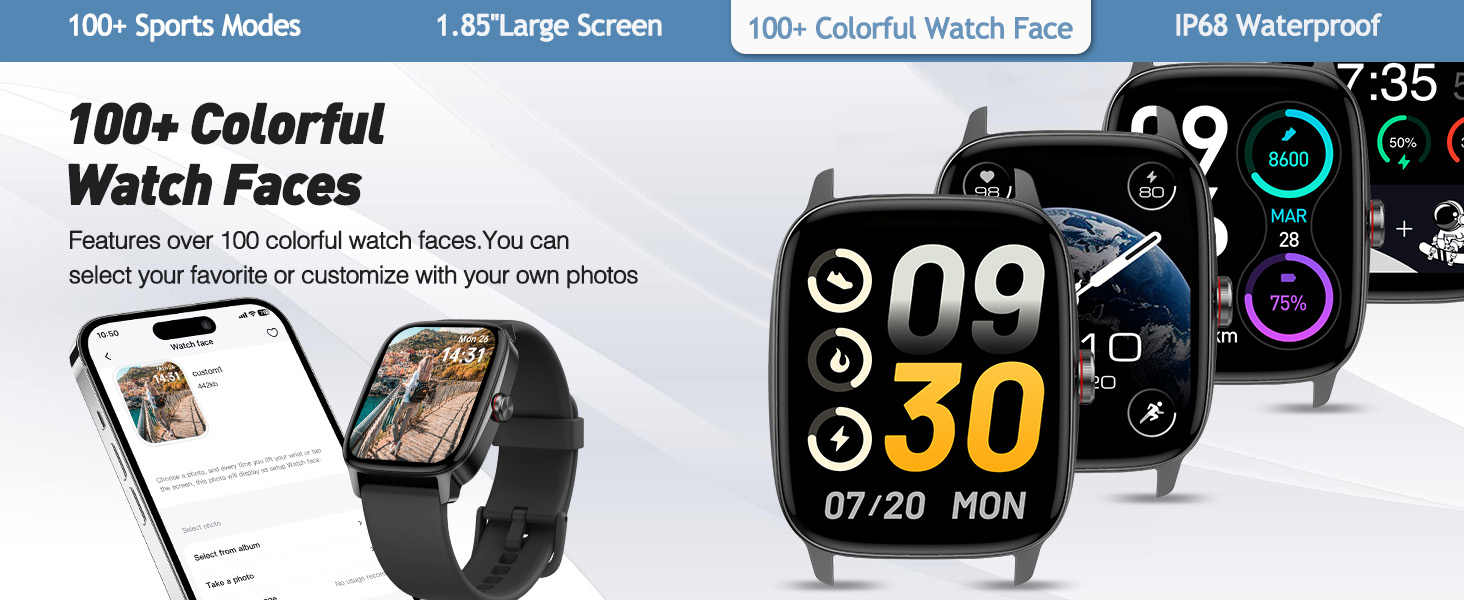
- DIY Dial: Choose from over 100 watch faces or customize with your own photos.
- 1.85" TFT-LCD Large Screen: High-definition display with 320*385 resolution for clear visuals.

Other Useful Functions
The YMZ Smart Watch offers a range of additional features for convenience and entertainment.
- Games: Enjoy built-in games for relaxation.
- Calculator: Perform quick calculations on your wrist.
- Music Control: Manage music playback from your phone.
- Find Phone: Locate your misplaced smartphone.
- Alarm Clock, Stopwatch & Timer: Essential time management tools.
- Weather Forecast: Get real-time weather updates.
- Camera Control: Remotely control your phone's camera.
- Breathing Training: Guided breathing exercises.
- Drink Reminder: Reminders to stay hydrated.
- Draining Water: Feature to eject water after exposure.


Maintenance
- Cleaning: Regularly wipe the watch screen and strap with a soft, dry cloth. For waterproof models, ensure the watch is dry after exposure to water.
- Charging: Use only the provided magnetic charging cable. Avoid exposing charging contacts to liquids or metal objects.
- Storage: Store the watch in a cool, dry place when not in use. Avoid extreme temperatures.
Troubleshooting
- Watch not turning on: Ensure the watch is fully charged. Connect it to the charger for at least 30 minutes.
- Cannot pair with phone:
- Ensure Bluetooth is enabled on your phone.
- Make sure the watch is within range of your phone.
- Restart both the watch and your phone.
- Check the "VeryFit" app for pairing instructions and ensure the app has necessary permissions.
- Inaccurate heart rate/blood oxygen readings: Ensure the watch is worn snugly on your wrist, not too tight or too loose. Clean the sensor on the back of the watch.
- Notifications not received: Check app notification settings on your phone and within the "VeryFit" app to ensure they are enabled for the desired applications.
- Short battery life: Reduce screen brightness, disable unnecessary features, and ensure background app refresh is managed.
For further assistance, refer to the full user manual or contact YMZ customer support.
Specifications
| Feature | Detail |
|---|---|
| Model Number | TGW01 |
| Screen Size | 1.85 Inches TFT-LCD |
| Resolution | 320*385 |
| Waterproof Rating | IP68 |
| Battery Capacity | 350 Milliamp Hours |
| Battery Life | Up to 7 days (typical usage) |
| Standby Time | Up to 30 days |
| Connectivity | Bluetooth |
| Compatibility | Android 6.0+ & iOS 9.0+ |
| Item Weight | 3.2 ounces |
| Memory Storage Capacity | 2 MB |
Warranty and Support
This product comes with a standard manufacturer's warranty. For specific warranty details, please refer to the documentation included in your package or visit the official YMZ website.
For technical support, troubleshooting, or any product-related inquiries, please contact YMZ customer service.
- Online Support: Visit the YMZ Store on Amazon.
- Email Support: Refer to your product packaging for contact information.
Protection plans are also available for extended coverage.